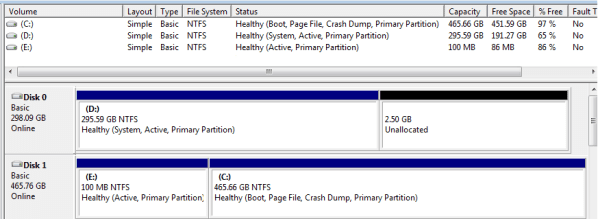
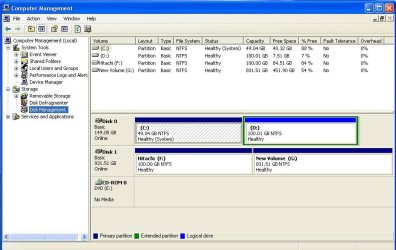
Well ... I just have to guess, based on what you have said and what I can see from your screen shot, When you installed 7 on your new, separate hard drive, the only "Active" (or System in the XP drive map) was the XP partition. The 7 installer put the boot code in the XP partition and when you deleted it, you deleted the boot code for 7. Then when you installed XP again, the only bootable partition was XP.
The boot manager for XP does not recognize Vista or 7 partitions. You need the Vista or 7 bootmgr to include XP with 7. The "Startup Repair" will not work if there is no "Active" partition with bootmgr bootcode to repair. Since the ONLY "Active" partition is XP, that did not work.
If I may suggest to you, I would 1) mark the F: (Windows 7) partition "Active" from the disk management utility in XP. Right click on the F: partition and select make active.
2) Boot to the 7 install DVD to the Command Prompt option and type:
bootrec /rebuildbcd
Saltgrass put me on to this tip, it is much easier than the "Startup Repair" as long as you are OK with the command line.
3) Open the BIOS and place the Windows 7 hard drive as the first in boot order.
When done, you will have your boot menu with 7 and XP, plus if you select the XP hard drive with your BIOS boot menu, you can boot to XP even if something happens to the other hard drive.
Please let us know if this works for you?
Cheers!
You guesses about my computer configuration is perfect. I tried out the steps listed above. It told windows installation found and asked me if I want to rebuild BCD. I said yes, got a message that it was successful. Then rebooted, changed the hard drive boot order, and now I get an error saying "BOOTMGR" is missing.
I'm now going to try startup repair. Will let you know how that turns out.
Thanks a lot for all you tips and suggestions.
EDIT: Even after the startup repair (it automatically detected that boot record is missing and asked me if i want to fix it), I'm still getting BOOTMGR is missing and the system halts.
EDIT2: After repeatedly running startup repair, the system now automatically boots into Windows 7. Great! But now how do I get the dual boot menu to access windows XP. Do I have to use EasyBCD??