Help: Too Many Music Folders

RayPaula

New member
Local time
9:17 PM
Messages
35
Hi,
I am having a folder problem for music. I'll try to explain without confusing you.
1) I have three hard drives in my workstation, C,D & E
2) I created a folder in E drive named Music.
3) I open Windows Media Player and insert a pre-recorded music disc into my CD drive.
4) I Rip the CD (without burning)
5) I close out of Windows Media Player.
6) I go to My Computer under the Start menu and open Drive E
7) I open the folder that I created (Music)
This is where I'm having an issue. Once I open the folder, another folder will appear showing the artist name. After opening up that folder, another folder appears showing the name of the album. Once I open that folder my music list is displayed.
My question is; How can I get rid of the "Artist name folder" and the "Album name folder"? In other words, when I rip my music cd's I want to be able to open my folder I created called Music without having to open two other folders to get to my music list.
Within Windows Media Player under the Organize tab my settings are;
a) Manage Libraries
b) Music
c) E/Music (Default save location)
I really believe that the folder problem is a setting in Windows 7 that needs to be changed. The reason I say that is because I get the same results when I use Nero 9. If you can help me resolve this, I would sincerely appreciate it. Thanks in advance, Ray
 

My Computer My Computer

Computer type
PC/Desktop
OS
Windows 7 Ultimate x64
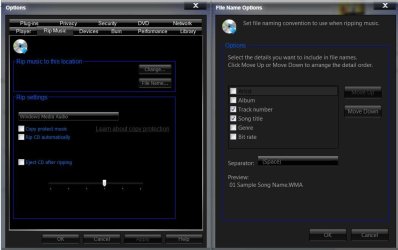
Did you try changing options for riping?
Capture.JPG
 

My Computer My Computer

Computer Manufacturer/Model Number
Micro-Star International/MS-7529
OS
Windows 7 Ultimate x32
CPU
DualCore Intel Pentium E2200, 2218 MHz (11 x 202)
Motherboard
MSI G31M3 V2 (MS-7529) (2 PCI, 1 PCI-E x16,2 DDR2 DIMM)
Memory
2 GB DDR2-800 DDR2 SDRAM
Graphics Card(s)
nVIDIA GeForce 9500GT 1GB
Sound Card
Realtek ALC888/1200 @ Intel 82801GB ICH7
Monitor(s) Displays
Samsung SyncMaster 2253BW (Digital) 22'' LCD
Screen Resolution
1680x1050
Hard Drives
SAMSUNG HD322IJ ATA Device (298 GB , IDE)
Could you tell me how to get to this window? Thanks, Ray
 

My Computer My Computer

Computer type
PC/Desktop
OS
Windows 7 Ultimate x64
In the Organize>Options>Rip Music tab, you will see those settings.
 

My Computer My Computer

Computer Manufacturer/Model Number
Custom
OS
Windows 7 Professional x64
CPU
Intel i7 2600K OC'd @ 4620 MHz
Motherboard
Asus P8Z68-V Pro
Memory
16GB GSkill Sniper 2133 Mhz (4x4GB)
Graphics Card(s)
EVGA GeForce GTX 480 SuperClocked+
Sound Card
Realtek High Definition Audio
Monitor(s) Displays
2x Acer S273HLbmii 27"
Screen Resolution
2 x 1920x1080
Hard Drives
64GB Crucial M4 SSD

Storage: Hitachi 1TB 5400RPM, Samsung 1.5TB 5400RPM
PSU
Corsair HW Series 750w (modular)
Case
Cooler Master HAF 932 Advanced Blue Edition
Cooling
CM Hyper 212+ CPU cooler, 3x 230mm + 1x 140mm case fans
Keyboard
Logitech MK320 (wireless)
Mouse
Logitech MK320 (wireless)
Internet Speed
30 Mb/s : 2 Mb/s
you might try what i just did. i have a folder called my mp3's on e and it is organized just like yours is. what i did to see if it would work is create a new folder called music and took all the mp3's under various artist/album folders and created shortcuts in the new music folder. now i have all those mp3's loose in one folder as shortcuts. i then pointed my player to the new folder instead of the my mp3's folder. this way i can keep the organization that i like in my original mp3 folder and still have a setup like what you are talking about in the new music folder. i do not know if you want to go through that much, but it is an option.:):)
 

My Computer My Computer

OS
Windows 7
:confused: Hi, I checked my settings which all seem to be proper as Grimmjow suggested, but still the same result. I believe what Staple Head did is basically what I tried as well. I opened up all the folders, one at a time and copied the tracks and pasted them directly into another folder I called Music Tracks. Now when I open that folder, it's all tracks with no additional folders to go through. As to the original problem, one would think that there's a better way to get around this issue. It's hard to believe that there isn't some type of setting to elminate the automatic folders. For now, I'll continue this practice. If I hear of a better way, I will post it here. Thanks to both of you for all the help. Ray
 

My Computer My Computer

Computer type
PC/Desktop
OS
Windows 7 Ultimate x64
I always make sure what folder I want to rip, record or download music to is set before I do anything. So far that has eliminated fragmenting my music, it all goes to my C:\Music folder.
 

My Computer My Computer

Computer type
PC/Desktop
Computer Manufacturer/Model Number
My Own Build
OS
Windows 10 64 bit
CPU
Intel i7 6700K
Motherboard
ASUS ROG Maximus VIII Hero
Memory
16GB Corsair Dominator
Graphics Card(s)
Intel CPU Graphics
Sound Card
RealTek
Monitor(s) Displays
27" Dell S2719dgf
Screen Resolution
2560X1440
Hard Drives
1 TB Samsung 850 EVO SSD for Win 10 Pro
500GB Samsung 850 EVO SSD for Win 10 Insider
2 TB drive for backup
PSU
EVGA Supernova 750G2
Case
BeQuiet Silent Base 600
Cooling
Deepcool Captain 120EX
Keyboard
Microsoft Wireless 2000
Mouse
Microsoft wireless
Internet Speed
100 MB/sec (Cable)
Antivirus
Microsoft Defender and Malwarebytes
Browser
Edge/Firefox
Other Info
Cakewalk (Sonar) by BandLab and Studio One 4.1 Pro recording studio software. MOTU 896Mk3 Hybrid recording interface, Frontier Tranzport wireless control unit, Behringer X-Touch Control Surface.
Five USB connected optical drives for CD Audio production using Nero BurningROM
to OP, you can try ripping with third party software, I'm using for burning and (sometimes)ripping ashampoo burning studio, it rips great, no additional folders and all that, if I point it to rip the songs on the desktop for example, I'll have just the songs there, no folders:) (output formats are wma and wav)
 

My Computer My Computer

Computer Manufacturer/Model Number
Micro-Star International/MS-7529
OS
Windows 7 Ultimate x32
CPU
DualCore Intel Pentium E2200, 2218 MHz (11 x 202)
Motherboard
MSI G31M3 V2 (MS-7529) (2 PCI, 1 PCI-E x16,2 DDR2 DIMM)
Memory
2 GB DDR2-800 DDR2 SDRAM
Graphics Card(s)
nVIDIA GeForce 9500GT 1GB
Sound Card
Realtek ALC888/1200 @ Intel 82801GB ICH7
Monitor(s) Displays
Samsung SyncMaster 2253BW (Digital) 22'' LCD
Screen Resolution
1680x1050
Hard Drives
SAMSUNG HD322IJ ATA Device (298 GB , IDE)
ratpuala,

i would take the other suggestions and find yourself another media player. wmp takes to many resources to begin with, and wants too much info.
 

My Computer My Computer

OS
Windows 7
Hi there
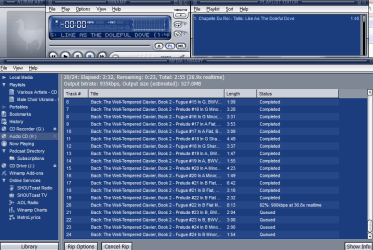
For ripping CD's I'd recommend WINAMP -- the FREE version will restrict the rip rate to 8X real time but that might be fast enough. It rips to FLAC as well if you are interested in LOSSLESS formats -- or if you want to recover the original CD again.

(The paid for version is cheap and rips at UNLIMITED speed).

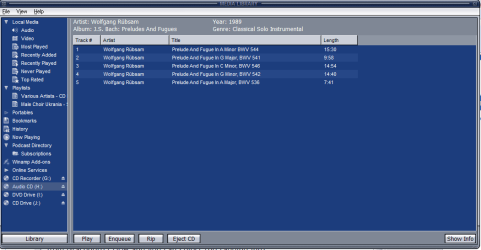
What I also like is that the rip with winamp will also tag your files automatically from Gracenote CDDB and you can select the tagging info.

In the rip options just specify the output folder.

There are other good rippers as well - but the "deal maker" for me with Winamp is that it uses Gracenote CDDB for getting music info -- for Classical Music this is far far better than FREEDB both in regard to accuracy and content.

I've got rips (in FLAC) up to 32X -- this is great if you've got a whole slew of CD's to rip.

Enc 2 pics from Winamp


Cheers
jimbo
 

Attachments

  • winamp.png
    winamp.png
    49.3 KB · Views: 34
  • winamp1.png
    winamp1.png
    19.4 KB · Views: 10

My Computer My Computer

Computer type
PC/Desktop
Computer Manufacturer/Model Number
Custom built, several laptops HP/ASUS
OS
Linux CENTOS 7 / various Windows OS'es and servers
CPU
Intel i7 Intel i5
Memory
8GB, 16GB
Graphics Card(s)
On Motherboard
Sound Card
Realtek HD audio
Monitor(s) Displays
Apple Cinema display, Samsung LCD
Screen Resolution
1920 X 1080
Hard Drives
4 X 1TB SATA
Mouse
Toshiba wireless laser
Internet Speed
> 20MB up
:D Fantastic! thanks for all your help, Ray
 

My Computer My Computer

Computer type
PC/Desktop
OS
Windows 7 Ultimate x64
Just pull all your music out of the last folder and put it on drive E: then organize it however you want.

Doesn`t WMP organize it for you ?
If I open WMP it opens right to the Library with all my albums right there, 1 click done.
 

My Computer My Computer

Computer Manufacturer/Model Number
Myself
OS
Windows 7 Ultimate 64Bit
CPU
C2D E8200
Motherboard
XFX 750i
Memory
8GB PNY PC2-6400
Graphics Card(s)
BFG 9600GT x 2
Sound Card
Stock XFX Optical
Monitor(s) Displays
Gateway 22" HD Display
Hard Drives
C: 1 TB G: 500 GB H: 500 GB
PSU
Ultra LSP 550 Pro Lifetime Series
Case
Xion2
Cooling
ThermalTake
:thumbsup:
Hi, Thanks goes out to all of you! I am going to take a look at the CD ripping software that you are recommending. I appreciate all your help and input. Thanks again, you folks are awesome! Ray
 

My Computer My Computer

Computer type
PC/Desktop
OS
Windows 7 Ultimate x64
Back
Top