
[Help] Two connections whenever I boot my computer

Anon456235

New member
Local time
7:49 AM
Messages
7
Title says it all and I'm unable to connect to the internet unless I disable my network. I see no way of deleting this other connection or both. Management won't let me for some reason. How do I resolve this? Oh, also, I'm unable to get this second connection to appear again unless I reboot, but then I'll have no internet access until I restart my network. Really annoying.

Pic related is what I see.
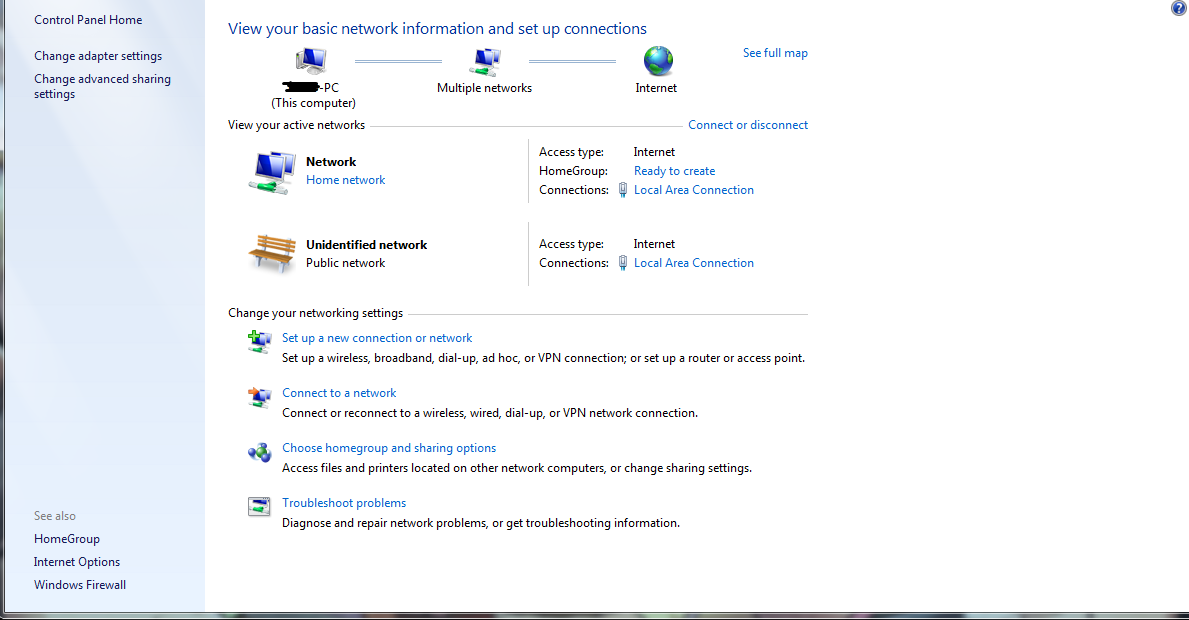
FHrl1iQ.png
 

My Computer

Computer type
PC/Desktop
OS
Windows 7 64bit
CPU
AMD FX-8350
Motherboard
AMD Corporation 990FXA-UD3
Memory
16.0GB Dual-Channel DDR3
Graphics Card(s)
2048MB ATI AMD Radeon HD 7800 Series
Hard Drives
489GB Crucial_ CT525MX300SSD1 SATA Disk Device (SSD)
931GB Western Digital WDC WD10 EZEX-00RKKA0 SATA Disk Device (SATA)
I wouldn't be concerned with the "active networks". Your "Network" is set to "Home Network", which is the least restrictive setting. In other words, the way you have "Network" currently set should allow you to connect with the least amount of restriction. So you shouldn't need to do anything there.

I would be concerned with my adapter settings. If you click on Change Adapter Settings, you will see a list of your network adapter profiles. You need one for Ethernet, and one for wifi (if you have a wifi adapter in your computer). If you have more than one Ethernet or wifi, that may be the cause of this issue. Click on each one, then choose Change Settings of this Connection. If you click Configure, you will see if the device is working correctly.

Whenever I set up a new computer, or work on one which is already set up, if it is not on the network, I make sure that my adapter settings are correct, and it then connects.
 

My Computer

Computer type
PC/Desktop
Computer Manufacturer/Model Number
Dell
OS
Linux Mint 18.2 xfce 64-bit (VMWare host) / Windows 8.1 Pro 32-bit (VMWare guest)
CPU
Haswell
Memory
4 GB
Monitor(s) Displays
Acer 23"
Screen Resolution
1920 x 1080
Hard Drives
Two hard drives, 1TB each: One for Linux, one for my data.
Keyboard
IBM Model M
Antivirus
Sophos (Linux), Trend Micro (Windows)
Browser
Firefox, Opera
Other Info
I use Samba to share my data drive with the other computers at my house and with my guest session in VMWare Workstation Player.
It always says my adapter settings is fine and there's only one adapter. Are you sure the other connection isn't overlapping or something?
 

My Computer

Computer type
PC/Desktop
OS
Windows 7 64bit
CPU
AMD FX-8350
Motherboard
AMD Corporation 990FXA-UD3
Memory
16.0GB Dual-Channel DDR3
Graphics Card(s)
2048MB ATI AMD Radeon HD 7800 Series
Hard Drives
489GB Crucial_ CT525MX300SSD1 SATA Disk Device (SSD)
931GB Western Digital WDC WD10 EZEX-00RKKA0 SATA Disk Device (SATA)
Please go to your profile and fill in the information for My System Specs. To do this, click UserCP (at the top of the screen). Then on the left, click Edit System Spec. By including this information, we can give better assistance.

What other connection are you speaking of? If there is only one adapter listed, you have only one connection.

If there are two network adapters in the computer (Ethernet and wifi), but only one is showing, then the one not showing may be defective; or maybe there is no driver installed for that adapter. In this case, you need to go to the manufacturer's web site and download and install that driver.

Go into Device Manager and see how many Network devices are listed. If only one is listed, yet there are actually two network adapters physically present in the computer, then it is likely that the one not showing is defective.
 

My Computer

Computer type
PC/Desktop
Computer Manufacturer/Model Number
Dell
OS
Linux Mint 18.2 xfce 64-bit (VMWare host) / Windows 8.1 Pro 32-bit (VMWare guest)
CPU
Haswell
Memory
4 GB
Monitor(s) Displays
Acer 23"
Screen Resolution
1920 x 1080
Hard Drives
Two hard drives, 1TB each: One for Linux, one for my data.
Keyboard
IBM Model M
Antivirus
Sophos (Linux), Trend Micro (Windows)
Browser
Firefox, Opera
Other Info
I use Samba to share my data drive with the other computers at my house and with my guest session in VMWare Workstation Player.
Added my specs.

I'm talking about the second connection in my original image. That unidentified network and yeah there's only one adapter listed.

Device manager is only showing one network too.

I'm just confused as to why I have to always reset my network connection whenever I boot my computer. Whenever I start my computer I'm greeted with this: Imgur: The most awesome images on the Internet telling me I have internet connection, yet nothing will load unless I reset my adapter. This problem has appeared since I did a fresh install of Windows 7 on my new SSD.
 

My Computer

Computer type
PC/Desktop
OS
Windows 7 64bit
CPU
AMD FX-8350
Motherboard
AMD Corporation 990FXA-UD3
Memory
16.0GB Dual-Channel DDR3
Graphics Card(s)
2048MB ATI AMD Radeon HD 7800 Series
Hard Drives
489GB Crucial_ CT525MX300SSD1 SATA Disk Device (SSD)
931GB Western Digital WDC WD10 EZEX-00RKKA0 SATA Disk Device (SATA)
I don't see any connections in your original image. All I see is two ways you can set up your network connection(s): either Home Network or Public Network.

A connection will have a specific name - you will see these names when you search for available wireless networks.. However, there's no specific name showing in your original image. And this isn't the correct screen for that anyway.
 

My Computer

Computer type
PC/Desktop
Computer Manufacturer/Model Number
Dell
OS
Linux Mint 18.2 xfce 64-bit (VMWare host) / Windows 8.1 Pro 32-bit (VMWare guest)
CPU
Haswell
Memory
4 GB
Monitor(s) Displays
Acer 23"
Screen Resolution
1920 x 1080
Hard Drives
Two hard drives, 1TB each: One for Linux, one for my data.
Keyboard
IBM Model M
Antivirus
Sophos (Linux), Trend Micro (Windows)
Browser
Firefox, Opera
Other Info
I use Samba to share my data drive with the other computers at my house and with my guest session in VMWare Workstation Player.
Here is what I would do, Yes I can see your problem

1: Get the drivers for your lan card and store them on your hard drive, You may need them because the following commands may delete them and your lan card may not be detected after following my directions

2: Open an administrators command prompt and type or paste the following commands and press enter after each one.

3:
Code:
netsh int reset all
4:
Code:
netsh int ipv4 reset
5:
Code:
netsh int ipv6 reset
6:
Code:
netsh winsock reset
And finally reboot your computer, If your lan card is not detected or working properly install the drivers that you downloaded in step 1.
 

My Computer

Computer type
PC/Desktop
Computer Manufacturer/Model Number
Compac
OS
Microsoft Windows 7 Ultimate 32-bit 7601
CPU
Intel(R) Pentium(R) Dual CPU E2160 @ 1.80GHz
Motherboard
MSI Boston
Memory
4.00 GB
Graphics Card(s)
(1) VNC Mirror Driver (2) Intel(R) G33/G31 Express Chipset
Sound Card
Disabled
Monitor(s) Displays
Headless
Screen Resolution
1280 x 960 x 32 bits (4294967296 colors) @ 60 Hz
Hard Drives
ST3320820AS ATA Device
Keyboard
Headless
Mouse
Headless
Antivirus
Malwarebytes pro
Other Info
Also
Windows 8.1 Laptop and Desktop both Acer
Here is what I would do, Yes I can see your problem

1: Get the drivers for your lan card and store them on your hard drive, You may need them because the following commands may delete them and your lan card may not be detected after following my directions

2: Open an administrators command prompt and type or paste the following commands and press enter after each one.

3:
Code:
netsh int reset all
4:
Code:
netsh int ipv4 reset
5:
Code:
netsh int ipv6 reset
6:
Code:
netsh winsock reset
And finally reboot your computer, If your lan card is not detected or working properly install the drivers that you downloaded in step 1.
Didn't solve my issue.

Here's what command prompt shows:
D3Yf1ga.png
 

My Computer

Computer type
PC/Desktop
OS
Windows 7 64bit
CPU
AMD FX-8350
Motherboard
AMD Corporation 990FXA-UD3
Memory
16.0GB Dual-Channel DDR3
Graphics Card(s)
2048MB ATI AMD Radeon HD 7800 Series
Hard Drives
489GB Crucial_ CT525MX300SSD1 SATA Disk Device (SSD)
931GB Western Digital WDC WD10 EZEX-00RKKA0 SATA Disk Device (SATA)
Title says it all and I'm unable to connect to the internet unless I disable my network. I see no way of deleting this other connection or both. Management won't let me for some reason.

When you say "management", are you saying that this is your work computer? If so, then your best bet, not only to fix this, but also to not violate a company policy, would be to go to your company's IT people.
 

My Computer

Computer type
PC/Desktop
Computer Manufacturer/Model Number
Dell
OS
Linux Mint 18.2 xfce 64-bit (VMWare host) / Windows 8.1 Pro 32-bit (VMWare guest)
CPU
Haswell
Memory
4 GB
Monitor(s) Displays
Acer 23"
Screen Resolution
1920 x 1080
Hard Drives
Two hard drives, 1TB each: One for Linux, one for my data.
Keyboard
IBM Model M
Antivirus
Sophos (Linux), Trend Micro (Windows)
Browser
Firefox, Opera
Other Info
I use Samba to share my data drive with the other computers at my house and with my guest session in VMWare Workstation Player.
This is my personal computer I use at home.

No, I meant management under network and sharing center. I thought I'd be able to merge both connections, but there's only one listed every time. I've never had this problem until very recently. That second connection goes away by the way whenever I restart my network.
 

My Computer

Computer type
PC/Desktop
OS
Windows 7 64bit
CPU
AMD FX-8350
Motherboard
AMD Corporation 990FXA-UD3
Memory
16.0GB Dual-Channel DDR3
Graphics Card(s)
2048MB ATI AMD Radeon HD 7800 Series
Hard Drives
489GB Crucial_ CT525MX300SSD1 SATA Disk Device (SSD)
931GB Western Digital WDC WD10 EZEX-00RKKA0 SATA Disk Device (SATA)
My issue is basically having no connection whenever I start my computer. It'll say I'm connected but nothing will load. I don't know if it's because of that second connection being there or what.
 

My Computer

Computer type
PC/Desktop
OS
Windows 7 64bit
CPU
AMD FX-8350
Motherboard
AMD Corporation 990FXA-UD3
Memory
16.0GB Dual-Channel DDR3
Graphics Card(s)
2048MB ATI AMD Radeon HD 7800 Series
Hard Drives
489GB Crucial_ CT525MX300SSD1 SATA Disk Device (SSD)
931GB Western Digital WDC WD10 EZEX-00RKKA0 SATA Disk Device (SATA)

My Computer

Computer type
PC/Desktop
OS
Windows 7 64bit
CPU
AMD FX-8350
Motherboard
AMD Corporation 990FXA-UD3
Memory
16.0GB Dual-Channel DDR3
Graphics Card(s)
2048MB ATI AMD Radeon HD 7800 Series
Hard Drives
489GB Crucial_ CT525MX300SSD1 SATA Disk Device (SSD)
931GB Western Digital WDC WD10 EZEX-00RKKA0 SATA Disk Device (SATA)
Back
Top