HELP.. USB Ports Still Powered on Even When PC Switched off

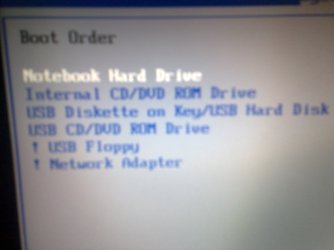
Ok just found the manual - not overly helpful -- however ensure there are no USB devices listed in the boot order sequence...

Apart from that im at a loss - looks like there are not many options in the bios compared to a pc (usually manufacturers lock down what you can change.., sometimes theres a secret way to enable them (there is on my NC10) but cant find that)
 

My Computer My Computer

At a glance

Windows 7Intel E6600 @ 2.9Ghz4GB Crucial DDR2 PC6400EVGA GTS 260 768mb
OS
Windows 7
CPU
Intel E6600 @ 2.9Ghz
Motherboard
Gigabyte EP45 UD3
Memory
4GB Crucial DDR2 PC6400
Graphics Card(s)
EVGA GTS 260 768mb
Monitor(s) Displays
24" DGM
Screen Resolution
1920x1200
Hard Drives
1.5TB
1TB
750GB
500GB x 2
PSU
750w Corsair
Ok just found the manual - not overly helpful -- however ensure there are no USB devices listed in the boot order sequence...

Apart from that im at a loss - looks like there are not many options in the bios compared to a pc (usually manufacturers lock down what you can change.., sometimes theres a secret way to enable them (there is on my NC10) but cant find that)

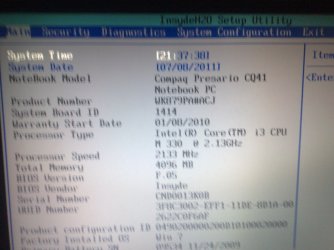
Just saw the boot order sequence and found that objects can only be moved up and down but cannot be removed. There're are some USB devices listed there though. I've posted the pics of the boot order menu (under system config) as well as BIOS main menu if you might wanna look at them. Seems like only system time and date can be changed from the main menu as all the other options are greyed out.
 

Attachments

  • 08072011355.jpg
    08072011355.jpg
    265.3 KB · Views: 9
  • 08072011356.jpg
    08072011356.jpg
    417.7 KB · Views: 13

My Computer My Computer

At a glance

win 7 32bit
OS
win 7 32bit
I know it's not a big deal but the problem is that i have many USB devices plugged in like mouse, webcam, phone, etc and have to disconnect all of them every time when i turn off the laptop which is getting annoying.

Do you leave your laptop in one place? (more like a desktop)
 

My Computer My Computer

At a glance

Windows 7 Ultimate x64Intel Core i7-2600K16 GB G Skill F3-10666 CL9D-4GBRLATI Radeon HD 6870
Computer Manufacturer/Model Number
Something I threw together
OS
Windows 7 Ultimate x64
CPU
Intel Core i7-2600K
Motherboard
Asus P8P67
Memory
16 GB G Skill F3-10666 CL9D-4GBRL
Graphics Card(s)
ATI Radeon HD 6870
Sound Card
ATI Radeon HDMI / Realtek ALC892
Monitor(s) Displays
2 x 22" standard monitors / LG32LC56v TV to watch films
Screen Resolution
1920 x1080
Hard Drives
2 x OCZ Vertex2 111.79GB
3 x Samsung103SJ
1 x Samsung103UJ
1 x WD3200BEVT
1 x Hitachi5K320-160
PSU
Thermaltake Toughpower Cable Management 750W
Case
Antec 300
Cooling
Noctua NH-U12P SE2 and 5 120mm Case fans
Keyboard
Microsoft Comfort Curve Keyboard 2000
Mouse
Hama M3110 / Logitech M305
Internet Speed
16000
Other Info
I have also used Fedora, Suse, Ubuntu Linux
And all other Windows from 95 to date except ME
Ok no help there unfortunately...

Only other thought is that some motherboard manufacturers design it so that you can charge up your usb devices (phones...) while it is off.. Gigabyte have quickcharge which works when the PC is off.. Whether you may have something similar installed I dont know, if you can find out your motherboard make/model and google it you should be able to find out
 

My Computer My Computer

At a glance

Windows 7Intel E6600 @ 2.9Ghz4GB Crucial DDR2 PC6400EVGA GTS 260 768mb
OS
Windows 7
CPU
Intel E6600 @ 2.9Ghz
Motherboard
Gigabyte EP45 UD3
Memory
4GB Crucial DDR2 PC6400
Graphics Card(s)
EVGA GTS 260 768mb
Monitor(s) Displays
24" DGM
Screen Resolution
1920x1200
Hard Drives
1.5TB
1TB
750GB
500GB x 2
PSU
750w Corsair
It will be getting power from the battery, the only way to stop it is take out the battery and unplug the charger or unplug the mouse,
I have the same type of problem on my desktop when I turn it off the USB Illuminated keyboard stays lit up like a Christmas tree.
 

My Computer My Computer

At a glance

Windows 10 Pro x64i7-4770K16Gig DDR3-2400Gigabyte GT740
Computer type
PC/Desktop
Computer Manufacturer/Model Number
Self Built Custom Computer.
OS
Windows 10 Pro x64
CPU
i7-4770K
Motherboard
Asus Z87 Sabertooth
Memory
16Gig DDR3-2400
Graphics Card(s)
Gigabyte GT740
Sound Card
Onboard
Monitor(s) Displays
Benq 27" - Dell 23' - Benq 22"
Screen Resolution
1680x1050
Hard Drives
Samsung 840 Pro 128g SSD
1xWestern Digital Caviar Green 1tb
2xWestern Digital Caviar Green 2 tb
PSU
Seasonic 760 watt Platinum
Case
Coolermaster Haf - X
Cooling
Noctua NH-C12P CPU Cooler
Keyboard
Logitech illuminated keyboard
Mouse
Logitech Perfomance MX
Internet Speed
Cable = speeds to 20Mbps downsteam and 512kbps upsteam
Antivirus
Avast Internet Security
Browser
Firefox
But this problem just started like 4 days ago. I'm pretty sure everything was fine until then.
 

My Computer My Computer

At a glance

win 7 32bit
OS
win 7 32bit
Just for a try, unplg all USB devices, go into bios and set optimized defaults, then set the boot order and see if the USB devices are still listed.
 

My Computers My Computers

  • At a glance

    Windows 11 ProRyzen 9 5900X32GB G Skill DDR4-3600EVGA RTX 3080 FTW 3 Ultra
    Computer type
    PC/Desktop
    Computer Manufacturer/Model Number
    ALWAYS UNDER CONSTRUCTION
    OS
    Windows 11 Pro
    CPU
    Ryzen 9 5900X
    Motherboard
    Asus X570 Crosshair Viii Hero
    Memory
    32GB G Skill DDR4-3600
    Graphics Card(s)
    EVGA RTX 3080 FTW 3 Ultra
    Sound Card
    On Board/Sennheiser PC37X Headset
    Monitor(s) Displays
    3 X Asus 27"
    Screen Resolution
    2560x1440
    Hard Drives
    2 X 1 TB NVME drives
    PSU
    EVGA 850
    Case
    Phanteks Eclipse P400A
    Cooling
    EVGA 280 AIO
    Keyboard
    Logitech G510s/ Logitech G13
    Mouse
    Logitech G502
    Internet Speed
    24/1
    Antivirus
    ESET/MBAM Pro/SAS Pro
    Browser
    Chrome/ Firefox/ Edge
  • At a glance

    Windows 11 ProIntel Ultra 9 288V32 GB LPDDR5X 8533
    Computer type
    Laptop
    System Manufacturer/Model Number
    Dell 16 Plus
    OS
    Windows 11 Pro
    CPU
    Intel Ultra 9 288V
    Memory
    32 GB LPDDR5X 8533
    Monitor(s) Displays
    16" Mini-LED HDR600 Touch 90 Hz
    Screen Resolution
    2560X1600
    Hard Drives
    1 TB NVME
Some New Laptops actually have a Built in feature in the Bios that allows one or two of the USB ports to BE supplied power when the Laptop is off.

USB Sleep and Charge | Research Center | Toshiba Laptops, Netbooks and Accessories

My friend Actually has a Notebook with this option, Just above the Usb slot should be an Icon that looks like a Lightning bolt or an on/off image. If it has that then there is your explanation.

You also want to check that your Computer is Actually shutting down and Not going into Sleep mode. You can do this in the Bios By ensuring that the Power button is set to turn off, not hibernate or Sleep and that the Windows settings are the same.

Hope This Helps
 

My Computer My Computer

At a glance

Windows 8.1Intel i5 3750k OC'd 4.0Ghz16GB Vengence CorsairGTX 770 OC 2GB Windforce
Computer type
PC/Desktop
Computer Manufacturer/Model Number
Custom Build
OS
Windows 8.1
CPU
Intel i5 3750k OC'd 4.0Ghz
Motherboard
P8Z77-V LX3
Memory
16GB Vengence Corsair
Graphics Card(s)
GTX 770 OC 2GB Windforce
Sound Card
C-Media 7.1 Surround Card
Monitor(s) Displays
Asus 3D 23" & BenQ 24" & LG 19"
Screen Resolution
1920*1080, 1920*1080, 1440*900
Hard Drives
Crucial 512GB SSD
WD 1.5 TB
WD 500Gb
PSU
850MW Silverstone
Case
inWin DragonRider
Cooling
4 * 140mm LED Akasa, One 140mm Fan Akasa
Keyboard
Corsair k95
Mouse
R.A.T 7 Contagion
Internet Speed
152 Mb Fiber Optic
Antivirus
ESET Nod32
Browser
Waterfox x64 / Chrome x64
Other Info
Freenas / Plex Media server
Q6600
6Gb DDR3
6TB ZFS Raid
500W PSu
2 x Intel NIC's
It will be getting power from the battery, the only way to stop it is take out the battery and unplug the charger or unplug the mouse,
I have the same type of problem on my desktop when I turn it off the USB Illuminated keyboard stays lit up like a Christmas tree.

My two ASUS motherboards have jumpers on the motherboard to set the USB ports to always powered or only powered when the PC is on. Check your motherboard manual and you may find a way to turn them off. Part of the reason for doing this is to let me power up the PC by just clicking my mouse or hitting a key on my keyboard.

To the OP, although yours is a laptop, have a good look in your BIOS for a similar power on with mouse or keyboard option. If you can find it and disable it, maybe your USB ports will go back to normal operation. Its a bit of a stab in the dark but you've tried everything else with no luck.
 

My Computer My Computer

At a glance

Windows 10 Education 64 bitAMD Phenom II X4 980 Black Edition Deneb 3.7GHz8GB 4GBx2 Kingston PC10600 DDR3 1333 MemoryZotac NVIDIA Geforce GT640 2 Gig DDR3 PCIe
Computer type
PC/Desktop
Computer Manufacturer/Model Number
Home Built
OS
Windows 10 Education 64 bit
CPU
AMD Phenom II X4 980 Black Edition Deneb 3.7GHz
Motherboard
Asus M4N68T-M V2 µATX Motherboard
Memory
8GB 4GBx2 Kingston PC10600 DDR3 1333 Memory
Graphics Card(s)
Zotac NVIDIA Geforce GT640 2 Gig DDR3 PCIe
Sound Card
VIA VT1708s High Definition Audio 8-channel Onboard
Monitor(s) Displays
22" LG E2242 1080p and 2 19" I-INC AG191D
Screen Resolution
1280x1024 - 1920x1080 - 1280x1024
Hard Drives
Crucial M100 256 GB SSD and 500 GB WD Blue SATA
PSU
Thermaltake TR 620
Case
Power Up Black ATX Mid-Tower Case
Cooling
Stock heatsink and fan
Keyboard
Logitech Wireless K350 Wave
Mouse
Logitech Wireless M570 Trackman Wheel
Internet Speed
80 Mbps Down 30 Mbps Up
Antivirus
Windows Defender
Browser
Internet Explorer 11
Other Info
HP DVD1040e Lightscribe - External USB2
Hey everyone, i've tried finding every possible thing that i could but couldn't find any other option than a BIOS upgrade. Ok so i want to upgrade my bios so as to get this problem solved. My laptop model is Compaq Presario CQ41 227 TX. It would be very very much appreciated if someone can find me a BIOS version that is compatible with my laptop and comes with "USB ALWAYS ON" option so that i can disable it and get rid of this problem once and for all. Also would like step by step guide for the BIOS upgrade. Thanks, any help would be much appreciated.
 

My Computer My Computer

At a glance

win 7 32bit
OS
win 7 32bit
Flashing with the incorrect BIOS file or flashing the BIOS incorrectly, could render your laptop useless. I would only flash with the latest version recommended by and supplied by the manufacturer. If you go to the support section of the manufacturers web site you should be able to find the latest version for your make and model laptop. You should also be able to find the utility for flashing your BIOS with instructions on how to do it. The options likely include flashing from windows or from bootable media like a flash drive. You may even be able to do it right from your BIOS menu just by pointing the BIOS to the BIOS file.
 

My Computer My Computer

At a glance

Windows 10 Education 64 bitAMD Phenom II X4 980 Black Edition Deneb 3.7GHz8GB 4GBx2 Kingston PC10600 DDR3 1333 MemoryZotac NVIDIA Geforce GT640 2 Gig DDR3 PCIe
Computer type
PC/Desktop
Computer Manufacturer/Model Number
Home Built
OS
Windows 10 Education 64 bit
CPU
AMD Phenom II X4 980 Black Edition Deneb 3.7GHz
Motherboard
Asus M4N68T-M V2 µATX Motherboard
Memory
8GB 4GBx2 Kingston PC10600 DDR3 1333 Memory
Graphics Card(s)
Zotac NVIDIA Geforce GT640 2 Gig DDR3 PCIe
Sound Card
VIA VT1708s High Definition Audio 8-channel Onboard
Monitor(s) Displays
22" LG E2242 1080p and 2 19" I-INC AG191D
Screen Resolution
1280x1024 - 1920x1080 - 1280x1024
Hard Drives
Crucial M100 256 GB SSD and 500 GB WD Blue SATA
PSU
Thermaltake TR 620
Case
Power Up Black ATX Mid-Tower Case
Cooling
Stock heatsink and fan
Keyboard
Logitech Wireless K350 Wave
Mouse
Logitech Wireless M570 Trackman Wheel
Internet Speed
80 Mbps Down 30 Mbps Up
Antivirus
Windows Defender
Browser
Internet Explorer 11
Other Info
HP DVD1040e Lightscribe - External USB2
I had the same issue at work with a HP probook. We spent almost $3000 on a work laptop to show clients the work we were doing and when I can in to work the next day the battery would be dead. After calling HP, and endlessly talking to people who have no idea what you are tell them, I go a usa based tech and they said that it was a known issue and a bios update would be coming out for the usb ports where staying on after the computer was turned off. The quick fix was to take the battery out of the laptop after it was turned off and then reinsert the battery. That turned off the usb ports.
 

My Computer My Computer

At a glance

Windows 7 Pro x64 SP1 and Mac OS X 10.8.3Intel Core i7-3820 Sandy Bridge-E at 4.75 GHz8 x Corsair 8GB DDR3 64 GB Kit @1866 Overcloc...GTX 580 and MSI R6870
Computer Manufacturer/Model Number
Asus
OS
Windows 7 Pro x64 SP1 and Mac OS X 10.8.3
CPU
Intel Core i7-3820 Sandy Bridge-E at 4.75 GHz
Motherboard
ASUS Rampage IV Extreme
Memory
8 x Corsair 8GB DDR3 64 GB Kit @1866 Overclocked @2000
Graphics Card(s)
GTX 580 and MSI R6870
Sound Card
HDMI on GPU and ACL898
Monitor(s) Displays
32" Sony EX-500 120Hz
Screen Resolution
1920x1080P
Hard Drives
1 x Corsair Force Series GT CSSD-F60GBGT-BK (OS)
2 x Western Digital Caviar Black Sata III 750GB (Raid 0)
1 x Western Digital Caviar Black Sata III 1TB (Media)
2 x Western Digital Caviar Black Sata II 640GB (Raid 0)
PSU
Corsair Professional Series Gold AX850
Case
Corsair 800D
Cooling
Corsair H80 High Performance Liquid CPU Cooler
Keyboard
HP Wireless Elite Keyboard
Mouse
HP Wireless Elite Mouse
Internet Speed
Cable, VisionTek Bigfoot Killer 2100 Gaming Network Card
Other Info
4 x GELID Solutions FN-TX12-15 120mm Case Fan with Superior Temperature Control
1 x Corsair 140mm Case Fan
1 x SilverStone FP55B Aluminum front panel 5.25" to a 3.5" bay converter
1 x Ultra Card Reader
1 x Sony Blu-ray Burner BD-5300S-0B
I had the same issue at work with a HP probook. We spent almost $3000 on a work laptop to show clients the work we were doing and when I can in to work the next day the battery would be dead. After calling HP, and endlessly talking to people who have no idea what you are tell them, I go a usa based tech and they said that it was a known issue and a bios update would be coming out for the usb ports where staying on after the computer was turned off. The quick fix was to take the battery out of the laptop after it was turned off and then reinsert the battery. That turned off the usb ports.
So, when does that update arrive? And does your problem still persist?
 

My Computer My Computer

At a glance

win 7 32bit
OS
win 7 32bit
Back
Top