
USB ports still dead after doing linked tutorial & driver updates

AdgeTimick

New member
Local time
5:29 PM
Messages
23
Hello there, SevenForums community. I'm looking for some assistance in fixing my laptop's USB ports, none of which are functioning anymore (I have three USB ports total: one is USB 2.0 and two are USB 3.0). I am running Windows 7 Home Premium 64-bit SP1 on a Dell Inspiron N5110 model laptop with an Intel Core i5-2410 CPU running at 2.30 GHz and I have 8 GB of RAM.

Initially, about two months ago, the two USB 3.0 ports stopped working, so I went through all of the steps described by Pooch in a tutorial post, but I had a fair amount of trouble getting the USB 3.0 Host Controller Driver(s) provided by Dell to install properly. One thing to note here is that what I had installed on my laptop before following Pooch's tutorial, i.e. when the ports stopped working, was a Renesas USB 3.0 Host Controller driver. This Renesas driver was grayed out, so I removed it while following Pooch's steps. Unfortunately, when I went to reinstall the USB 3.0 Host Controller driver, Dell only offered me a Wistron USB 3.0 Host Controller driver for download. (I do have the driver CD that came with my laptop, but I couldn't get it to reinstall the Renesas USB 3.0 drivers provided.) As such, I went ahead and installed this Wistron driver, but it never actually installed anything I don't think, because the ports didn't work and I couldn't find any evidence of a USB 3.0 Host Controller in Device Manager, let alone a Wistron program or even a mention on my computer..

So, I went through Pooch's steps again, found a Renesas USB 3.0 Host Controller driver on Dell's site, and installed that instead. Still though, neither of the USB 3.0 ports worked. I did some searching in my BIOS settings to see if anything was turned on or off (ex: TurboBoost, USB wake detect) that could be causing a problem with the power to my ports, but everything was in line with all the various troubleshooting tips I found on message boards around the net. Some people recommended updating the chipset drivers, so I tried doing that, but had no luck with the USB 3.0 ports working. And then suddenly, I noticed the USB 2.0 port wouldn't work anymore either. I'm not sure when this happened or what step caused it, but the USB 2.0 Host Controller driver is still installed and not grayed out in Device Manager. Go figure.

Long explanation, I know, but I wanted to give some background on what I've tried, nothing of which has brought back my USB ports to functionality. I finally got so desperate to fix this that I paid for an automatic driver updater program from Avast that recognized there were missing USB 3.0 drivers, but after installation of their chosen drivers, I was still unable to get the ports working again either. Is it possible that the power provided to these ports has gone bad in my laptop? It is a rather old model, but I don't have the money at the moment to buy a new one, not to mention I'm going to have to figure out how to backup my current laptop over the internet with a USB hard drive connected to my wireless router before I will even consider getting a new laptop (I doubt this is very difficult, but it's one more thing to learn). Another point worth noting is that, after following Pooch's tutorial, the Device Manager never detected the USB 3.0 Host Controller or any USB 3.0 ports on its own again. What does this likely indicate is the problem? I'm hesitant to blame a power problem because the USB 2.0 port is on the left side of the laptop and the USB 3.0 ports are on the right and back/right sides, so they probably have different connectors on the motherboard.

I don't know. I'm at a complete loss for what to do. Any help would be greatly appreciated.
 

My Computer

Computer type
Laptop
Computer Manufacturer/Model Number
Dell Inspiron 15R N5110
OS
Windows 7 Home Professional 64-bit SP1
CPU
Intel Core i5-2410M CPU @ 2.30GHz
Motherboard
Dell Inc. 034W60 (CPU 1)
Memory
8.0 GB DDR3 2DIMM @ 665MHz
Graphics Card(s)
Intel HD Graphics 3000
Sound Card
IDT High Definition Audio CODEC
Screen Resolution
1366x768 @ 60Hz
Hard Drives
750GB Western Digital WDC WD7500BPVT-75HXZ SCSI Disk Device (SATA)
Antivirus
Avast Free
Browser
Firefox Quantum 64.0 (64-bit) as of 12/18/2018
Hi AdgeTimick,
Welcome to the SevenForums!
Sir,
1. It is very important to determine whether its a hardware or software problem. I would look into it.
2. You said you backup your pc. Did you ever make a system image ?
If yes, do you have a system image that was made prior to the problem ? What software you used to make the system image ?

Let us know,

Thanks & Regards. ...
 

My Computer

Computer type
Laptop
Computer Manufacturer/Model Number
hp compaq presario c795VU notebook pc
OS
Windows 7 Ultimate x32 With Sp1 + Vista Ultimate x32 with Sp1 & Sp2 !!
CPU
Intel Mobile Core 2 Duo T5750 @ 2.00GHz Merom 65nm Technolog
Motherboard
Hewlett-Packard 30D9 (CPU)
Memory
2.00GB Dual-Channel DDR2 @ 332MHz (5-5-5-15)
Graphics Card(s)
Mobile Intel(R) 965 Express Chipset Family
Sound Card
High Definition Audio Device
Monitor(s) Displays
LP154WX4-TLCB on Mobile Intel 965 Express Chipset Family
Screen Resolution
1280x800 @ 60Hz
Hard Drives
149GB Western Digital WDC WD1600BEVS-60VAT0 ATA Device (SATA)
Keyboard
Standard 101/102-Key or Microsoft Natural PS/2 Key + HP QLB
Mouse
ALPS pointing device
Antivirus
Kaspersky AV 2017(Win 7) & AVG AntiVirus Free 2016 (VISTA)
Browser
google chrome
Answers

Sir,
1. It is very important to determine whether its a hardware or software problem. I would look into it.

I greatly appreciate your getting back to me. How do I go about determining whether it's hardware or software? I'm not sure where to start. I've tested my USB devices (a network adapter, a Logitech mouse receiver, etc.) on another computer and they all seem to work, but I doubt that's the extent of the testing I can do.

2. You said you backup your pc. Did you ever make a system image ?
If yes, do you have a system image that was made prior to the problem ? What software you used to make the system image ?

I backup my PC using Windows Backup and Restore, and I do have system images from before the problem started, but they are a few months old, so I will still need to backup my files I've created and accrued since then (mostly music and photos, but since I don't know a way to backup since a given date, I will have to backup everything). I've had some problems with the Windows Backup and Restore program crashing when I've tried to do non-system image backups in the past. Also, I've tried using System Recovery to roll the system back to a point where the USB ports still worked, but that crashed every single time, and the error codes given were vague when I looked them up.

Please advise as to what you think I should try next.
 

My Computer

Computer type
Laptop
Computer Manufacturer/Model Number
Dell Inspiron 15R N5110
OS
Windows 7 Home Professional 64-bit SP1
CPU
Intel Core i5-2410M CPU @ 2.30GHz
Motherboard
Dell Inc. 034W60 (CPU 1)
Memory
8.0 GB DDR3 2DIMM @ 665MHz
Graphics Card(s)
Intel HD Graphics 3000
Sound Card
IDT High Definition Audio CODEC
Screen Resolution
1366x768 @ 60Hz
Hard Drives
750GB Western Digital WDC WD7500BPVT-75HXZ SCSI Disk Device (SATA)
Antivirus
Avast Free
Browser
Firefox Quantum 64.0 (64-bit) as of 12/18/2018
How do I go about determining whether it's hardware or software? I'm not sure where to start. I've tested my USB devices (a network adapter, a Logitech mouse receiver, etc.) on another computer and they all seem to work, but I doubt that's the extent of the testing I can do.
Sir,
1.It's quite simple to determine that in your case. We would prepare a windows 10 usb installation media & will try to boot into it from USB 2.0 & USB 3.0 ports. The moment we boot into it, that's a software/OS problem!
As the USB ports are not working well under current installation, we would need other computer to prepare the media.
Actually, there is a good chance that USB ports are good enough & not working just because of the corrupted installation/OS. When we try to boot into installation media, actually we are trying to use the ports with different OS.
We would not install anything. We will just boot into the installation media & come out of it.
We will use latest Win 10 because win 7 sp1 does not support USB 3.0 port out of the box. With win 7 sp1 installation media, we can check only USB 2.0 port.
Shall we proceed ?

2. Do you have a working internal CD/DVD drive on the problematic pc ?

Let me know,

Thanks & Regards. ...
 

My Computer

Computer type
Laptop
Computer Manufacturer/Model Number
hp compaq presario c795VU notebook pc
OS
Windows 7 Ultimate x32 With Sp1 + Vista Ultimate x32 with Sp1 & Sp2 !!
CPU
Intel Mobile Core 2 Duo T5750 @ 2.00GHz Merom 65nm Technolog
Motherboard
Hewlett-Packard 30D9 (CPU)
Memory
2.00GB Dual-Channel DDR2 @ 332MHz (5-5-5-15)
Graphics Card(s)
Mobile Intel(R) 965 Express Chipset Family
Sound Card
High Definition Audio Device
Monitor(s) Displays
LP154WX4-TLCB on Mobile Intel 965 Express Chipset Family
Screen Resolution
1280x800 @ 60Hz
Hard Drives
149GB Western Digital WDC WD1600BEVS-60VAT0 ATA Device (SATA)
Keyboard
Standard 101/102-Key or Microsoft Natural PS/2 Key + HP QLB
Mouse
ALPS pointing device
Antivirus
Kaspersky AV 2017(Win 7) & AVG AntiVirus Free 2016 (VISTA)
Browser
google chrome
Hi Vineet,

1. I can create the Windows 10 USB installation media on a friend's laptop, so I'm ready for instructions on how to do that and then what to do to test my computer while booting.

2. Yes, I do have a working internal CD/DVD drive on my problematic laptop.

Thank you for your assistance,
A.J.
 
Last edited:

My Computer

Computer type
Laptop
Computer Manufacturer/Model Number
Dell Inspiron 15R N5110
OS
Windows 7 Home Professional 64-bit SP1
CPU
Intel Core i5-2410M CPU @ 2.30GHz
Motherboard
Dell Inc. 034W60 (CPU 1)
Memory
8.0 GB DDR3 2DIMM @ 665MHz
Graphics Card(s)
Intel HD Graphics 3000
Sound Card
IDT High Definition Audio CODEC
Screen Resolution
1366x768 @ 60Hz
Hard Drives
750GB Western Digital WDC WD7500BPVT-75HXZ SCSI Disk Device (SATA)
Antivirus
Avast Free
Browser
Firefox Quantum 64.0 (64-bit) as of 12/18/2018
Hi AdgeTimick,
Greets,
Sir,
1. We would need a good USB 2.0 or USB 3.0 pen drive of 8gb or more capacity.

2. I assume your friend's pc is running 64 bit version of win 7 or above. Be ready with these downloads.
( These are direct download links )
(a) Rufus Portable : https://github.com/pbatard/rufus/releases/download/v3.3/rufus-3.3p.exe
(b) HashMyFiles : https://www.nirsoft.net/utils/hashmyfiles-x64.zip
(c) One can create link(s) & make untouched Microsoft downloads from website here : TechBench by WZT (v4.1.1)
OR
Use this utility :
Windows ISO Downloader.exe - Google Drive

These links work for the next 24 hours. After that one has to create a new link. Links can be created any no. of times.
For easiness, I have added a direct download link for ''Windows 10 x64 April 2018 Home/Pro'' @ around 6:00 AM in your clock. ( This is April 2018 version which is enough! )

LINK : https://tb.rg-adguard.net/dl.php?go=11e91ad4
File Info :
File Name : Win10_1803_English_x64.iso
File size: 4474.99 MB (4692365312 bytes)
SHA1: 08fbb24627fa768f869c09f44c5d6c1e53a57a6f

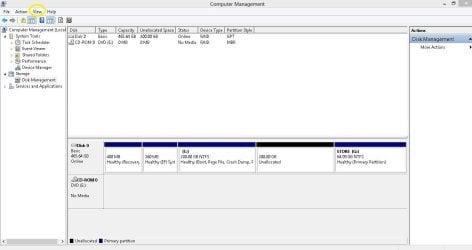
3. I need two snaps of the 'Disk Management' window of the problematic pc.
Disk Management - Post a Screen Capture Image
(a) Standard View
(b) From 'Standard View' window, navigate from 'Menu bar' to 'View > Top > Disk List' & take a snap.
( 'View' menu button is marked with yellow circle in the below image. Navigate 'View > Top > Disk List' & take the snap )

Disk Management Capture.JPG

Thanks & Regards. ...
 
Last edited:

My Computer

Computer type
Laptop
Computer Manufacturer/Model Number
hp compaq presario c795VU notebook pc
OS
Windows 7 Ultimate x32 With Sp1 + Vista Ultimate x32 with Sp1 & Sp2 !!
CPU
Intel Mobile Core 2 Duo T5750 @ 2.00GHz Merom 65nm Technolog
Motherboard
Hewlett-Packard 30D9 (CPU)
Memory
2.00GB Dual-Channel DDR2 @ 332MHz (5-5-5-15)
Graphics Card(s)
Mobile Intel(R) 965 Express Chipset Family
Sound Card
High Definition Audio Device
Monitor(s) Displays
LP154WX4-TLCB on Mobile Intel 965 Express Chipset Family
Screen Resolution
1280x800 @ 60Hz
Hard Drives
149GB Western Digital WDC WD1600BEVS-60VAT0 ATA Device (SATA)
Keyboard
Standard 101/102-Key or Microsoft Natural PS/2 Key + HP QLB
Mouse
ALPS pointing device
Antivirus
Kaspersky AV 2017(Win 7) & AVG AntiVirus Free 2016 (VISTA)
Browser
google chrome
files downloaded / screenshots uploaded

Hello Vineet,

First, apologies for the delay in getting back to you, but yesterday was a holiday and I didn't have a chance to follow your instructions. I have now downloaded the following files to an otherwise-empty 32GB USB thumb drive using your links:

a) Rufus Portable (rufus-3.3p.exe file)
b) HashMyFiles (hashmyfiles-x64.zip file)
c) Windows 10 image (Win10_1803_English_x64.iso)

Please provide detailed instructions of what I need to do with these files in order to test the USB ports in your next post as I am not familiar with this process.

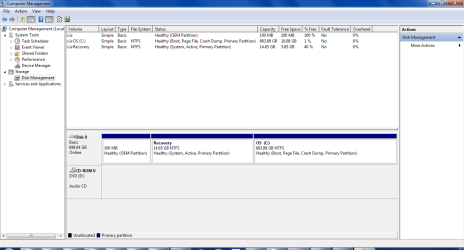
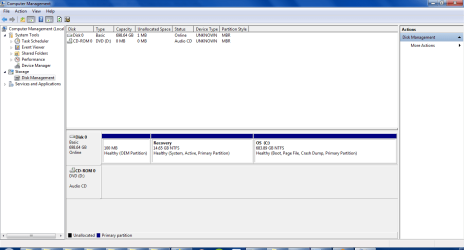
Second, the two screenshots of the Disk Management window on my laptop that you requested should appear below:

"Standard" view:
Disk Mgmt (Std view).PNG

"Disk List" view:
Disk Mgmt (Top-Disk List view).PNG

Thank you again for your help.
 

My Computer

Computer type
Laptop
Computer Manufacturer/Model Number
Dell Inspiron 15R N5110
OS
Windows 7 Home Professional 64-bit SP1
CPU
Intel Core i5-2410M CPU @ 2.30GHz
Motherboard
Dell Inc. 034W60 (CPU 1)
Memory
8.0 GB DDR3 2DIMM @ 665MHz
Graphics Card(s)
Intel HD Graphics 3000
Sound Card
IDT High Definition Audio CODEC
Screen Resolution
1366x768 @ 60Hz
Hard Drives
750GB Western Digital WDC WD7500BPVT-75HXZ SCSI Disk Device (SATA)
Antivirus
Avast Free
Browser
Firefox Quantum 64.0 (64-bit) as of 12/18/2018
Hi AdgeTimick,
Sir,
Don't worry I will mention everything. I only expect that you go forward only when the things are fully clear to you.

1) Your OS partition is heavily loaded!
OS partition should not be occupied more than 60% while yours is 99%. Its a tremendous load over the resources & itself an invitation to software and/or hardware problems.
Besides, It will increase your data backup and system image sizes unexpectedly & may be a troublesome even for back up programs.
You should consider to lighten it up.
I assume that its only because you could not back up the files for a long time & so, all the files are filling/occupying space on the c: itself.
Anyway, for checking USB ports, its not a problem as the HDD is not coming in the play.

2) Make two separate folders for 'rufus-3.3p.exe' & 'hashmyfiles-x64.zip' on your friend's pc's desktop screen.
Windows 10 ISO should be also there on your friends pc & you should be aware of the location.

3) To use 'hashmyfiles-x64.zip', extract it to the same folder.
You can extract files with archivers like 7-Zip, WinRAR, etc. The zip files can be extracted with the windows built in option as well. I think you know about it. Just right click the zip file & you would come to know about it.
OR
Download these 3 files & keep them in a folder on the desktop screen of your friend. The 3 files are here : https://drive.google.com/open?id=1nsSsAw8pfGQEs4MdT7H-WwZCit6M00RD

4) Now we will check the integrity of the downloaded Win 10 ISO on your friend's pc. We will use the ISO & HashMyFiles. We will calculate ISO's check sums & compare the calculated SHA-1 sum with the original SHA-1 sum.
The original SHA-1 is : 08fbb24627fa768f869c09f44c5d6c1e53a57a6f

To calculate the sums :
(a) Go to the extracted/downloaded folder of HashMyFiles & double click/launch HashMyFiles.exe
(b) Drag & Drop OR Copy & Paste the ISO to the HashMyFiles window.
It will take little time to load the ISO & calculate its sum.
(c) Once HashMyFiles has calculated the check sums. Compare SHA-1 with the original SHA-1

Once you have checked/compared the SHA-1 sums & both are identical, We would proceed for the USB Installation Media preparation in Step 5 ( below ) with Rufus, ISO & Pen Drive.

5)

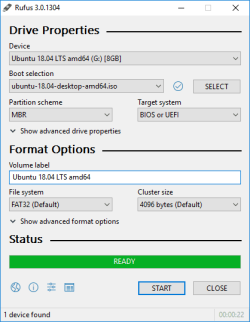
rufus_en.png

This image is just for reference. Need not follow it or get confused! Follow instructions as below only :

To avoid any confusions/problems :
Close all the Programs/Apps/Windows.
Eject & unplug/take out all the external devices & external media like CD/DVD, Pen Drives, external hard disks & other USB Devices except the one pen drive.

Rufus will format & delete everything on the pen drive

Now launch Rufus & follow strictly!

(a) When you launch Rufus for the first time, It will ask to check for updates, opt 'NO'.
(b) Select the pen drive in the Device menu
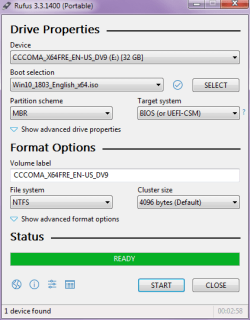
(c)click 'SELECT', browse to the win 10 iso and double click it (somethings changes & iso name will appear in the 'Boot selection' window)
(d) Choose partition scheme as MBR & Target system as BIOS ( These options may be chosen automatically but make sure you make it MBR & BIOS! )
(e) need not change any thing else
(f) press 'START' ( copying iso files, finally READY! )
(g) Take the last snap & close the rufus window, it's done.
(h) Share the snap.

Now come back to your pc with the prepared pen drive & wait for the instructions.

Let me know have you made this far ?

Thanks & Regards. ...
 
Last edited:

My Computer

Computer type
Laptop
Computer Manufacturer/Model Number
hp compaq presario c795VU notebook pc
OS
Windows 7 Ultimate x32 With Sp1 + Vista Ultimate x32 with Sp1 & Sp2 !!
CPU
Intel Mobile Core 2 Duo T5750 @ 2.00GHz Merom 65nm Technolog
Motherboard
Hewlett-Packard 30D9 (CPU)
Memory
2.00GB Dual-Channel DDR2 @ 332MHz (5-5-5-15)
Graphics Card(s)
Mobile Intel(R) 965 Express Chipset Family
Sound Card
High Definition Audio Device
Monitor(s) Displays
LP154WX4-TLCB on Mobile Intel 965 Express Chipset Family
Screen Resolution
1280x800 @ 60Hz
Hard Drives
149GB Western Digital WDC WD1600BEVS-60VAT0 ATA Device (SATA)
Keyboard
Standard 101/102-Key or Microsoft Natural PS/2 Key + HP QLB
Mouse
ALPS pointing device
Antivirus
Kaspersky AV 2017(Win 7) & AVG AntiVirus Free 2016 (VISTA)
Browser
google chrome
Hatch & Rufus done

Sorry, I was expecting an email from the forum when the post was updated, but I guess it doesn't email me when that happens. I must only get an email for new posts.

I'm ready now. Screenshot is below:

Rufus USB snip.PNG
 
Last edited:

My Computer

Computer type
Laptop
Computer Manufacturer/Model Number
Dell Inspiron 15R N5110
OS
Windows 7 Home Professional 64-bit SP1
CPU
Intel Core i5-2410M CPU @ 2.30GHz
Motherboard
Dell Inc. 034W60 (CPU 1)
Memory
8.0 GB DDR3 2DIMM @ 665MHz
Graphics Card(s)
Intel HD Graphics 3000
Sound Card
IDT High Definition Audio CODEC
Screen Resolution
1366x768 @ 60Hz
Hard Drives
750GB Western Digital WDC WD7500BPVT-75HXZ SCSI Disk Device (SATA)
Antivirus
Avast Free
Browser
Firefox Quantum 64.0 (64-bit) as of 12/18/2018
Hi AdgeTimick,
Greets,
Sir,
Sorry for the delay. It is all well with the rufus. Now we would check USB ports one by one on your pc with the prepared USB Win 10 Installation Media.

a) Close all the windows/apps on your pc.
b) Then Eject & take out/plug out all the external media & devices like CD/DVD, Pen drives, External HDD & other USB Devices AND make a shut down.
c) Now plug the pen drive in USB 2 port.
d) Restart the computer & keep on pressing F12
e) You will be presented with the boot menu. Press the UP/DOWN cursor key to highlight the pen drive, then press "Enter" to boot to the pen drive.
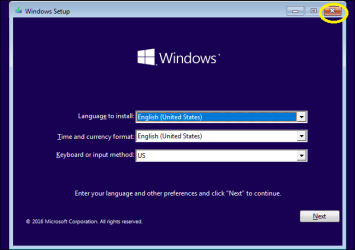
f) After some processing, this Windows 10 screen will be presented automatically:

win 10 first screen.png

g) Now click the X button at the top right ( marked with Yellow Circle on the image above ) to close the window & say Yes to exit the installation media & restart the computer.
h) Now the pc should boot again in the windows 7 depending on the settings.

If it boots again in the windows 10 installation media, Don't fear! Close the window again the same way as said in (g). With the pc restarting again, keep on pressing F12 and select 'Hard disk' to boot into win 7.

If you don't get the boot menu on pressing F12 & you have delayed the pressing. Again restart & press F12 repeatedly to get the boot menu.

The USB port is working as the pen drive has been detected in the boot menu & win 10 media on pen drive has been detected!

Once you boot into the windows 7 again, shut down the computer & give it some rest.

Now we will check the other USB ports the same way.
Plug the pen drive in another usb port to be checked , restart the pc, press F12 repeatedly & try to boot into the pen drive. Then close the window 10 installation window & say Yes to exit windows 10 installation media & let it to restart the computer normally again.

Let us know.

Thanks & Regards. ...
 
Last edited:

My Computer

Computer type
Laptop
Computer Manufacturer/Model Number
hp compaq presario c795VU notebook pc
OS
Windows 7 Ultimate x32 With Sp1 + Vista Ultimate x32 with Sp1 & Sp2 !!
CPU
Intel Mobile Core 2 Duo T5750 @ 2.00GHz Merom 65nm Technolog
Motherboard
Hewlett-Packard 30D9 (CPU)
Memory
2.00GB Dual-Channel DDR2 @ 332MHz (5-5-5-15)
Graphics Card(s)
Mobile Intel(R) 965 Express Chipset Family
Sound Card
High Definition Audio Device
Monitor(s) Displays
LP154WX4-TLCB on Mobile Intel 965 Express Chipset Family
Screen Resolution
1280x800 @ 60Hz
Hard Drives
149GB Western Digital WDC WD1600BEVS-60VAT0 ATA Device (SATA)
Keyboard
Standard 101/102-Key or Microsoft Natural PS/2 Key + HP QLB
Mouse
ALPS pointing device
Antivirus
Kaspersky AV 2017(Win 7) & AVG AntiVirus Free 2016 (VISTA)
Browser
google chrome
The USB 2.0 port worked. USB pen drive registered as being plugged after restart and thus was visible in the boot menu. When I selected USB as the boot device, the Windows 10 installation media loaded up fine. However, when I plugged the same pen drive into that same USB 2.0 port after booting up in Windows 7, the JumpDrive driver could not be installed properly...then, after about five minutes, all of the sudden my computer recognized the pen drive and let me look at the files on it.

Neither USB 3.0 port recognized that a USB pen drive was connected after restart, so I couldn't even try using USB as the boot device to see if the ports could read the Windows 10 media.
 

My Computer

Computer type
Laptop
Computer Manufacturer/Model Number
Dell Inspiron 15R N5110
OS
Windows 7 Home Professional 64-bit SP1
CPU
Intel Core i5-2410M CPU @ 2.30GHz
Motherboard
Dell Inc. 034W60 (CPU 1)
Memory
8.0 GB DDR3 2DIMM @ 665MHz
Graphics Card(s)
Intel HD Graphics 3000
Sound Card
IDT High Definition Audio CODEC
Screen Resolution
1366x768 @ 60Hz
Hard Drives
750GB Western Digital WDC WD7500BPVT-75HXZ SCSI Disk Device (SATA)
Antivirus
Avast Free
Browser
Firefox Quantum 64.0 (64-bit) as of 12/18/2018
Hi Sir,
1. I was always hopeful about USB 2.0 port. Now it is sure that during troubleshooting USB 3.0 ports, the win 7 installation got corrupted & USB 2.0 port also stopped working. There are fair chances that USB 2.0 ports are all good with no hardware problems.
( As for USB 3.0 ports, hope is still there but there are certainly some things to do before trying to troubleshoot them)
2. Now, I am planning to boot into a customised recovery media ( by our senior Sir SIW2 ) by CD in your problematic PC & use its USB 2.0 port to transfer files from PC to your external hard disk. Give me a day or two!
3. Till then make sure that your external hard disk has enough place to transfer those files. I suppose you are having some 600-700 GB data/files to copy. I am not planning to use any backup program as it is not possible in these circumstances & inviting troubles. I plan to copy & transfer files manually & one at a time.
4. We won't do that in one go. Initially, we would just copy & transfer some files. First we will confirm that the files are well transferred & are still useful. Then we would transfer files from internal hard disk to external hard disk & delete the files from internal hard disk to free up space.
I plan to free up at least 40% space on the internal hard disk but that will need space on external hard disk as well.

Are you easy with my plan & target ? Are you prepared ? Anything else ? Let me know.

Thanks & Regards. ...
 

My Computer

Computer type
Laptop
Computer Manufacturer/Model Number
hp compaq presario c795VU notebook pc
OS
Windows 7 Ultimate x32 With Sp1 + Vista Ultimate x32 with Sp1 & Sp2 !!
CPU
Intel Mobile Core 2 Duo T5750 @ 2.00GHz Merom 65nm Technolog
Motherboard
Hewlett-Packard 30D9 (CPU)
Memory
2.00GB Dual-Channel DDR2 @ 332MHz (5-5-5-15)
Graphics Card(s)
Mobile Intel(R) 965 Express Chipset Family
Sound Card
High Definition Audio Device
Monitor(s) Displays
LP154WX4-TLCB on Mobile Intel 965 Express Chipset Family
Screen Resolution
1280x800 @ 60Hz
Hard Drives
149GB Western Digital WDC WD1600BEVS-60VAT0 ATA Device (SATA)
Keyboard
Standard 101/102-Key or Microsoft Natural PS/2 Key + HP QLB
Mouse
ALPS pointing device
Antivirus
Kaspersky AV 2017(Win 7) & AVG AntiVirus Free 2016 (VISTA)
Browser
google chrome
ready for backup

I have deleted about 30 GB of extraneous files on my internal hard drive, freeing up some space. I also have an external USB hard drive with sufficient free space to backup my internal drive's files. Please let me know when you're ready to proceed with the backup.

Thanks!
 

My Computer

Computer type
Laptop
Computer Manufacturer/Model Number
Dell Inspiron 15R N5110
OS
Windows 7 Home Professional 64-bit SP1
CPU
Intel Core i5-2410M CPU @ 2.30GHz
Motherboard
Dell Inc. 034W60 (CPU 1)
Memory
8.0 GB DDR3 2DIMM @ 665MHz
Graphics Card(s)
Intel HD Graphics 3000
Sound Card
IDT High Definition Audio CODEC
Screen Resolution
1366x768 @ 60Hz
Hard Drives
750GB Western Digital WDC WD7500BPVT-75HXZ SCSI Disk Device (SATA)
Antivirus
Avast Free
Browser
Firefox Quantum 64.0 (64-bit) as of 12/18/2018
Hi,
Good job done. You have freed some good space. Now you have to continue on your problematic pc.

1) Keep that Win 10 installation pen drive intact.

2) Download this file 'SystemInfo.bat', Place it on the desktop & double click/launch it. It will open a command prompt window. When it completes loading your system information, scroll to the top & look for 'BIOS Version' Value. It will tell about your BIOS Driver Version. Please mention it.

View attachment SystemInfo.bat

3)
(a) Make this ISO download ( around 385 mb ) : https://1drv.ms/u/s!AkcyDjKJJ6KwiAbLJXCU3migYGV8
(b) It's SHA-1 is : a5007a29c11b9cd50c7f0d6e2cd5634c1dabd067
Calculate the SHA-1 of the downloaded ISO with 'HashMyFiles' & compare it with the one
mentioned above. It should be identical.

Let me know.

Thanks & Regards. ...
 
Last edited:

My Computer

Computer type
Laptop
Computer Manufacturer/Model Number
hp compaq presario c795VU notebook pc
OS
Windows 7 Ultimate x32 With Sp1 + Vista Ultimate x32 with Sp1 & Sp2 !!
CPU
Intel Mobile Core 2 Duo T5750 @ 2.00GHz Merom 65nm Technolog
Motherboard
Hewlett-Packard 30D9 (CPU)
Memory
2.00GB Dual-Channel DDR2 @ 332MHz (5-5-5-15)
Graphics Card(s)
Mobile Intel(R) 965 Express Chipset Family
Sound Card
High Definition Audio Device
Monitor(s) Displays
LP154WX4-TLCB on Mobile Intel 965 Express Chipset Family
Screen Resolution
1280x800 @ 60Hz
Hard Drives
149GB Western Digital WDC WD1600BEVS-60VAT0 ATA Device (SATA)
Keyboard
Standard 101/102-Key or Microsoft Natural PS/2 Key + HP QLB
Mouse
ALPS pointing device
Antivirus
Kaspersky AV 2017(Win 7) & AVG AntiVirus Free 2016 (VISTA)
Browser
google chrome
BIOS version

2) Download this file 'SystemInfo.bat', Place it on the desktop & double click/launch it. It will open a command prompt window. When it completes loading your system information, scroll to the top & look for 'BIOS Version' Value. It will tell about your BIOS Driver Version. Please mention it.

BIOS Version: Dell Inc. A11, 8/3/2012

3)
(a) Make this ISO download ( around 385 mb ) : https://1drv.ms/u/s!AkcyDjKJJ6KwiAbLJXCU3migYGV8
(b) It's SHA-1 is : a5007a29c11b9cd50c7f0d6e2cd5634c1dabd067
Calculate the SHA-1 of the downloaded ISO with 'HashMyFiles' & compare it with the one
mentioned above. It should be identical.

The ISO SHA-1 values match.
 
Last edited:

My Computer

Computer type
Laptop
Computer Manufacturer/Model Number
Dell Inspiron 15R N5110
OS
Windows 7 Home Professional 64-bit SP1
CPU
Intel Core i5-2410M CPU @ 2.30GHz
Motherboard
Dell Inc. 034W60 (CPU 1)
Memory
8.0 GB DDR3 2DIMM @ 665MHz
Graphics Card(s)
Intel HD Graphics 3000
Sound Card
IDT High Definition Audio CODEC
Screen Resolution
1366x768 @ 60Hz
Hard Drives
750GB Western Digital WDC WD7500BPVT-75HXZ SCSI Disk Device (SATA)
Antivirus
Avast Free
Browser
Firefox Quantum 64.0 (64-bit) as of 12/18/2018
Hi,

1) You would need a CD of around 600 mb capacity to burn the above ISO. For spare i would advise to buy 4-5 good CDs. Don't go for Re-writable CDs. They are often problematic & do not work as intended.

2) You would need a CD/DVD burning program that can burn the ISO image to a CD/DVD. Do you have one ? ( Be careful with the burning speed as 2x! )
If you don't have one :

(a) Download CDBurnerXP Portable zip below : https://download.cdburnerxp.se/porta...4.5.8.7041.zip
( It is compatible with Vista/7/8/10 x64 )
(b) To use CDBurnerXP Portable, You would need to extract the zip file to a folder. Are you able to do that ? Just right click the Zip file & you would know your option

3) Working with CDBurnerXP & preparing the CD boot media :

(a) Insert the blank CD disc in the CD/DVD drive.
(b) Go into the extracted folder & Launch cdbxpp.exe ( with blue disk icon ). Be careful
cdbxxpp.exe only!
(c) From the menu double click Burn Iso image
(d) First select ISO image to burn, to do so click 'Browse'. Browse to the ISO image & double click it to select & it will show in the box.
(e) Just next to 'Target device', you have to select the burning speed as 2x. Its crucial!
(f) Need not change anything else, just click Burn disc near the right bottom.
(g) It will take some time to burn.

Once the CD is successfully burnt. We would check whether we can boot to/with it.

Thanks & Regards. ...
 

My Computer

Computer type
Laptop
Computer Manufacturer/Model Number
hp compaq presario c795VU notebook pc
OS
Windows 7 Ultimate x32 With Sp1 + Vista Ultimate x32 with Sp1 & Sp2 !!
CPU
Intel Mobile Core 2 Duo T5750 @ 2.00GHz Merom 65nm Technolog
Motherboard
Hewlett-Packard 30D9 (CPU)
Memory
2.00GB Dual-Channel DDR2 @ 332MHz (5-5-5-15)
Graphics Card(s)
Mobile Intel(R) 965 Express Chipset Family
Sound Card
High Definition Audio Device
Monitor(s) Displays
LP154WX4-TLCB on Mobile Intel 965 Express Chipset Family
Screen Resolution
1280x800 @ 60Hz
Hard Drives
149GB Western Digital WDC WD1600BEVS-60VAT0 ATA Device (SATA)
Keyboard
Standard 101/102-Key or Microsoft Natural PS/2 Key + HP QLB
Mouse
ALPS pointing device
Antivirus
Kaspersky AV 2017(Win 7) & AVG AntiVirus Free 2016 (VISTA)
Browser
google chrome
Hi,
Having problem with extraction ?
1. Download & Install 7zip x64 ( The ultimate free archiver! ) :
https://www.7-zip.org/a/7z1805-x64.exe
2. After installing, Right click the zip file > 7-zip > Extract to

Thanks & Regards. ...
 

My Computer

Computer type
Laptop
Computer Manufacturer/Model Number
hp compaq presario c795VU notebook pc
OS
Windows 7 Ultimate x32 With Sp1 + Vista Ultimate x32 with Sp1 & Sp2 !!
CPU
Intel Mobile Core 2 Duo T5750 @ 2.00GHz Merom 65nm Technolog
Motherboard
Hewlett-Packard 30D9 (CPU)
Memory
2.00GB Dual-Channel DDR2 @ 332MHz (5-5-5-15)
Graphics Card(s)
Mobile Intel(R) 965 Express Chipset Family
Sound Card
High Definition Audio Device
Monitor(s) Displays
LP154WX4-TLCB on Mobile Intel 965 Express Chipset Family
Screen Resolution
1280x800 @ 60Hz
Hard Drives
149GB Western Digital WDC WD1600BEVS-60VAT0 ATA Device (SATA)
Keyboard
Standard 101/102-Key or Microsoft Natural PS/2 Key + HP QLB
Mouse
ALPS pointing device
Antivirus
Kaspersky AV 2017(Win 7) & AVG AntiVirus Free 2016 (VISTA)
Browser
google chrome
I have extracted the zip file and burned the ISO to a disc succesfully.
 

My Computer

Computer type
Laptop
Computer Manufacturer/Model Number
Dell Inspiron 15R N5110
OS
Windows 7 Home Professional 64-bit SP1
CPU
Intel Core i5-2410M CPU @ 2.30GHz
Motherboard
Dell Inc. 034W60 (CPU 1)
Memory
8.0 GB DDR3 2DIMM @ 665MHz
Graphics Card(s)
Intel HD Graphics 3000
Sound Card
IDT High Definition Audio CODEC
Screen Resolution
1366x768 @ 60Hz
Hard Drives
750GB Western Digital WDC WD7500BPVT-75HXZ SCSI Disk Device (SATA)
Antivirus
Avast Free
Browser
Firefox Quantum 64.0 (64-bit) as of 12/18/2018
Hi,
Now we will boot into the CD bootable media & try to transfer some files ( 10 GB ) to the external hard drive.

Note :

1. I am not intending to use any back up programs . I just want to copy & paste the files manually.
2. I only intend to transfer non system/personal interest files.
3. Not deleting the files as of now. Just making sure that the files are transferred well & are good enough. In fact always check transferred files before deleting them.
4. Always good to use separate folders for music, audio, video, document,etc. files.
5. Initially, don't try to copy paste files larger than 1 GB, as the free space is not that much! Once we are confirm that the transfers are successful, We would copy all the small files to external hard drive & then delete them from the internal hard drive. Then we have some good free space & deal with larger files.
6. Sir SIW2 media is like a mini win7 setup. It has multiple important apps & functions integrated into it. Go only as per instructions!

So, here we proceed :

1) Close all the apps/windows in win 7. Eject & unplug/detach all the external media & devices.
2) From within Win 7, insert the CD in the CD/DVD drive. As soon as you insert the CD, there may appear an 'autorun' dialog box/window. Simply close it.
3) Shut down win 7.
4) Insert external hard drive in the USB 2.0 port.
5) Restart the computer & keep on pressing F12 to get into the boot menu & select the CD to boot into.
6) It will boot into it & finally a win 7 desktop screen will appear.
7) Double click & enter 'Computer'
8) It would list the internal & external Hard disk. You can make out the difference easily referring to their sizes.
9) You would probably be using the default folders 'My Documents', 'Downloads', 'Desktop', etc. to store the files of personal interest/use. Don't you ?
To access them, You have to navigate ''C:/Users'' & select your 'User'. Then you have all the folders listed there as 'Downloads', 'Desktop', 'Documents', etc. for that user. Go into them & copy the files from there & paste it to the external hard disk. Copy & transfer some files ( around 10 GB )
10 ) Once done, Come out of the 'Computer' folder & Select 'Shut Down' as usual from the 'Start' menu tab. Just click 'Shut Down' & not go/navigate in the related menu.
11) After a complete shut down, detach External hard disk & verify it on some other pc to verify the transferred files.

If the transfer is successful, attach the external hard disk again ( USB 2.0 port ), restart & boot into CD, Transfer all the small files & delete them from the internal hard disk. Then transfer all the big files & delete them from the internal hard disk.

Let me know how was the overall experience ? Any problems with snaps ? Any doubts ? Anything else ?

Thanks & Regards. ...
 

My Computer

Computer type
Laptop
Computer Manufacturer/Model Number
hp compaq presario c795VU notebook pc
OS
Windows 7 Ultimate x32 With Sp1 + Vista Ultimate x32 with Sp1 & Sp2 !!
CPU
Intel Mobile Core 2 Duo T5750 @ 2.00GHz Merom 65nm Technolog
Motherboard
Hewlett-Packard 30D9 (CPU)
Memory
2.00GB Dual-Channel DDR2 @ 332MHz (5-5-5-15)
Graphics Card(s)
Mobile Intel(R) 965 Express Chipset Family
Sound Card
High Definition Audio Device
Monitor(s) Displays
LP154WX4-TLCB on Mobile Intel 965 Express Chipset Family
Screen Resolution
1280x800 @ 60Hz
Hard Drives
149GB Western Digital WDC WD1600BEVS-60VAT0 ATA Device (SATA)
Keyboard
Standard 101/102-Key or Microsoft Natural PS/2 Key + HP QLB
Mouse
ALPS pointing device
Antivirus
Kaspersky AV 2017(Win 7) & AVG AntiVirus Free 2016 (VISTA)
Browser
google chrome
Let me know how was the overall experience ? Any problems with snaps ? Any doubts ? Anything else ?

Hi Vineet,

I'm about to start doing file transfers to the external HDD, but I wanted to ask one thing first. What do you mean by "Any problems with snaps?"? Did I miss something in the instructions? I'm just not sure what you mean by the word "snaps" here. I initially thought you meant using the screenshot/snipping tool to take a "snapshot" of my screen, but now I'm not sure. Please let me know when you have a chance. Thank you.
 

My Computer

Computer type
Laptop
Computer Manufacturer/Model Number
Dell Inspiron 15R N5110
OS
Windows 7 Home Professional 64-bit SP1
CPU
Intel Core i5-2410M CPU @ 2.30GHz
Motherboard
Dell Inc. 034W60 (CPU 1)
Memory
8.0 GB DDR3 2DIMM @ 665MHz
Graphics Card(s)
Intel HD Graphics 3000
Sound Card
IDT High Definition Audio CODEC
Screen Resolution
1366x768 @ 60Hz
Hard Drives
750GB Western Digital WDC WD7500BPVT-75HXZ SCSI Disk Device (SATA)
Antivirus
Avast Free
Browser
Firefox Quantum 64.0 (64-bit) as of 12/18/2018
Back
Top