I found this program called mediainfo-rar which is supposed to be a "small front-end to the famous and most excellent MediaInfo program, which enables the feature to scan media in RAR archives. In addition to this, it now can handle ISO files, like that of DVDs and bluray in ISO form. Naturally, also ISO inside RAR archives."
But I have no idea how to utilize it. It says it's a frontend for mediainfo, but mediainfo doesn't need a frontend. Only problem is mediainfo won't read files in .rar archives, thus the need for this software. I'm guessing it's command line, but I'm not great with command lines anyways and I can't figure out how to get this going. I tried dropping a .rar file onto the mediainfo-rar.exe file, but it did nothing. Any help would be appreciated.
I tried installing rarfilesource but that did nothing.
My Computer
Computer type
PC/Desktop
Computer Manufacturer/Model Number
custom build
OS
Windows 7 32bit Home Premium
CPU
Intel Core I7 920 Bloomfield
Motherboard
Asus P6T Deluxe v1
Memory
3 GB Corsair DDR3 (3x1GB)
Graphics Card(s)
NVidia GTX 570 (1 GB RAM)
Sound Card
on board
Monitor(s) Displays
Dell P2314H
Screen Resolution
1920x1080
Hard Drives
Western Digital Black 1TB (main OS)
PSU
XION Supernova XON-800R14N 800W
Case
Antec 1200
Cooling
Arctic Freezer 7 Pro Rev. 2
Keyboard
AZIO Prism
Mouse
Logitech G700S
Internet Speed
Verizon FiOS 85/85
Antivirus
Avast
Browser
Firefox/Chrome
Other Info
SansDigital rr622 RocketRaid (with non-raid Driver)
Renesas USB 3.0 card
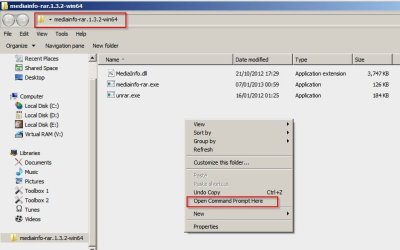
Open the folder then [Shift+Right Click] then choose "Open Command Prompt Here"
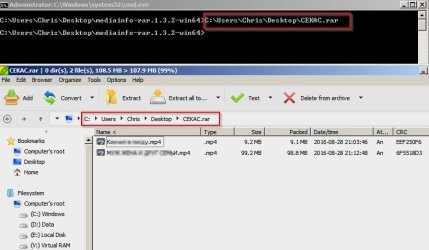
Then add the path to your .rar file and press Enter.
It will open the .rar file in your default archive viewer:
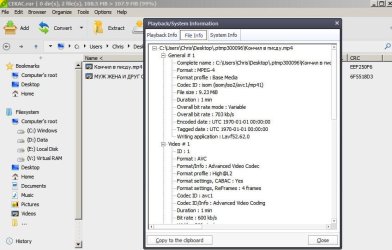
From there you can play the video in your media player which is capable of playing video files directly from inside archives and can display mediainfo.
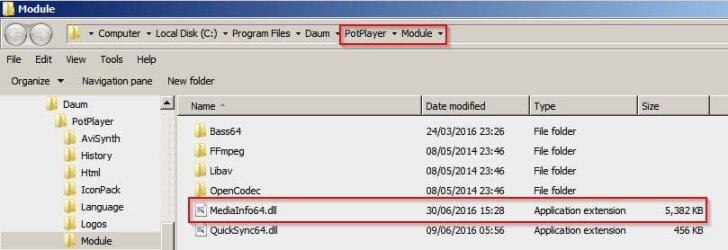
In my case I use PotPlayerx64 English Version. It has mediainfo built in but cannot read file information when playing media directly from a .rar file. However if the video is opened using the mediainfo-rar method above then the information is displayed by mediainfo.
Sorry that I can't help with "mediainfo" as a separate program but I've never needed it as it's included in the media players and a few video converters that I use.
My Computer
Computer type
Laptop
Computer Manufacturer/Model Number
ASUS
OS
Microsoft Windows 7 Home Premium 64-bit 7601 Multiprocessor Free Service Pack 1
CPU
AMD C-60 APU with Radeon(tm) HD Graphics
Motherboard
ASUSTeK COMPUTER INC. X501U
Memory
4.00 GB
Graphics Card(s)
AMD Radeon HD 6290 Graphics
Sound Card
(1) AMD High Definition Audio Device (2) Realtek High Defi
Thanks but that's not exactly what I'm looking for. What's frustrating is I used to be able to do this, but it's been so long that I forgot how to make it work. I used to be able to just drop the first .rar file (filename.part01.rar) onto a bat file and it pointed to mediainfo-rar and in seconds I had the full mediainfo popup. I tried your method but for some reason it's not working for me - maybe because mine is a multi-part archive?
My Computer
Computer type
PC/Desktop
Computer Manufacturer/Model Number
custom build
OS
Windows 7 32bit Home Premium
CPU
Intel Core I7 920 Bloomfield
Motherboard
Asus P6T Deluxe v1
Memory
3 GB Corsair DDR3 (3x1GB)
Graphics Card(s)
NVidia GTX 570 (1 GB RAM)
Sound Card
on board
Monitor(s) Displays
Dell P2314H
Screen Resolution
1920x1080
Hard Drives
Western Digital Black 1TB (main OS)
PSU
XION Supernova XON-800R14N 800W
Case
Antec 1200
Cooling
Arctic Freezer 7 Pro Rev. 2
Keyboard
AZIO Prism
Mouse
Logitech G700S
Internet Speed
Verizon FiOS 85/85
Antivirus
Avast
Browser
Firefox/Chrome
Other Info
SansDigital rr622 RocketRaid (with non-raid Driver)
Renesas USB 3.0 card
It works for me for any number of single files in an archive. I guess it wouldn't work for multi-part though. If you open the command prompt window it's possible to get a list of commands and syntax but I forgot what I typed to get the list.
I wouldn't now anything about dropping a rar file onto a batch file to get mediainfo to display file info.
My Computer
Computer type
Laptop
Computer Manufacturer/Model Number
ASUS
OS
Microsoft Windows 7 Home Premium 64-bit 7601 Multiprocessor Free Service Pack 1
CPU
AMD C-60 APU with Radeon(tm) HD Graphics
Motherboard
ASUSTeK COMPUTER INC. X501U
Memory
4.00 GB
Graphics Card(s)
AMD Radeon HD 6290 Graphics
Sound Card
(1) AMD High Definition Audio Device (2) Realtek High Defi