Help! When I log on it goes to default desktop

zooploi

New member
Local time
1:41 PM
Messages
29
Hi I scanned my laptop with microsoft security essential and it froze on the 25th scanning item, I decided to force shut down and then turned it on again after about 10 seconds, I then tried to log on but it was taking forever to load, so I thought I should force shutdown again. After that I then waited for me to log on and eventually it did, but instead of coming to my usual personalized wallpaper and everything back to default. There was this thing at the icons which said they did this because of something with the files, also it said to try again later so I logged off and then back on, and now here I am worried about my baby, please help me!
 

My Computer My Computer

At a glance

Windows 7
OS
Windows 7
Not working, here's the picture what it's saying.
 

Attachments

  • Capture.PNG
    Capture.PNG
    16.4 KB · Views: 10

My Computer My Computer

At a glance

Windows 7
OS
Windows 7

My Computer My Computer

At a glance

Windows 10 Pro X64Intel Quad Core i7-4770 @ 3.4Ghz16.0GB PC3-12800 DDR3 SDRAM 1600 MHzIntel Integrated HD Graphics
Computer type
PC/Desktop
Computer Manufacturer/Model Number
Lenovo IdeaCenter 450
OS
Windows 10 Pro X64
CPU
Intel Quad Core i7-4770 @ 3.4Ghz
Memory
16.0GB PC3-12800 DDR3 SDRAM 1600 MHz
Graphics Card(s)
Intel Integrated HD Graphics
Sound Card
Realtek HD Audio
Monitor(s) Displays
HP 22" LCD
Screen Resolution
1680 x 1050
Hard Drives
250GB Samsung EVO SATA-3 SSD
2TB Seagate ST2000DM001 SATA-2
1.5TB Seagate ST3150041AS SATA
Keyboard
Dell USB
Mouse
Lenovo USB
Internet Speed
Cable via Road Runner 3MB Upload, 30MB Download
Antivirus
Windows Defender, MBAM Pro, MBAE
Browser
Seamonkey
Other Info
UEFI/GPT
PLDS DVD-RW DH16AERSH
If checkdisk does not correct the problem, open an elevated command prompt (Start, type cmd, right click and select run as administrator) type sfc /scannow -enter. It will take awhile. see what that tells you. It is a system file checker to check the integrity of system files.
 

My Computers My Computers

  • At a glance

    Windows 11 ProRyzen 9 5900X32GB G Skill DDR4-3600EVGA RTX 3080 FTW 3 Ultra
    Computer type
    PC/Desktop
    Computer Manufacturer/Model Number
    ALWAYS UNDER CONSTRUCTION
    OS
    Windows 11 Pro
    CPU
    Ryzen 9 5900X
    Motherboard
    Asus X570 Crosshair Viii Hero
    Memory
    32GB G Skill DDR4-3600
    Graphics Card(s)
    EVGA RTX 3080 FTW 3 Ultra
    Sound Card
    On Board/Sennheiser PC37X Headset
    Monitor(s) Displays
    3 X Asus 27"
    Screen Resolution
    2560x1440
    Hard Drives
    2 X 1 TB NVME drives
    PSU
    EVGA 850
    Case
    Phanteks Eclipse P400A
    Cooling
    EVGA 280 AIO
    Keyboard
    Logitech G510s/ Logitech G13
    Mouse
    Logitech G502
    Internet Speed
    24/1
    Antivirus
    ESET/MBAM Pro/SAS Pro
    Browser
    Chrome/ Firefox/ Edge
  • At a glance

    Windows 11 ProIntel Ultra 9 288V32 GB LPDDR5X 8533
    Computer type
    Laptop
    System Manufacturer/Model Number
    Dell 16 Plus
    OS
    Windows 11 Pro
    CPU
    Intel Ultra 9 288V
    Memory
    32 GB LPDDR5X 8533
    Monitor(s) Displays
    16" Mini-LED HDR600 Touch 90 Hz
    Screen Resolution
    2560X1600
    Hard Drives
    1 TB NVME

My Computer My Computer

At a glance

Windows 10 Pro X64Intel Quad Core i7-4770 @ 3.4Ghz16.0GB PC3-12800 DDR3 SDRAM 1600 MHzIntel Integrated HD Graphics
Computer type
PC/Desktop
Computer Manufacturer/Model Number
Lenovo IdeaCenter 450
OS
Windows 10 Pro X64
CPU
Intel Quad Core i7-4770 @ 3.4Ghz
Memory
16.0GB PC3-12800 DDR3 SDRAM 1600 MHz
Graphics Card(s)
Intel Integrated HD Graphics
Sound Card
Realtek HD Audio
Monitor(s) Displays
HP 22" LCD
Screen Resolution
1680 x 1050
Hard Drives
250GB Samsung EVO SATA-3 SSD
2TB Seagate ST2000DM001 SATA-2
1.5TB Seagate ST3150041AS SATA
Keyboard
Dell USB
Mouse
Lenovo USB
Internet Speed
Cable via Road Runner 3MB Upload, 30MB Download
Antivirus
Windows Defender, MBAM Pro, MBAE
Browser
Seamonkey
Other Info
UEFI/GPT
PLDS DVD-RW DH16AERSH
It sounds like you need a deep clean for me.
microsoft security essentials= when I tried it it slow down my pc a lot, you need to have no antivirus or firewalls apart from this one. if you can get something else instead of this would be ok.

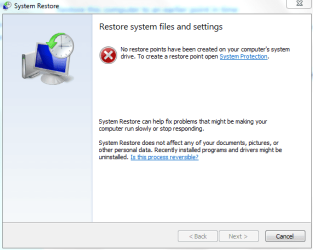
If system restore was disabled, then even activating it, it won't give you restore points because restore points were never created.

Try to login safe mode and delete all the cache

go start type %temp% and then hit intro. delete all the temporary files shown in that folder.

open your i'net browser and delete all history, cache cookies and stuff.

you could run a superantispyware scan, its a free app.always helps.
 

My Computer My Computer

At a glance

Windows 7 Ultimate x64Pentium D [email protected]2GB Mushkin@882 mhzEVGA 9600GT 512mb
Computer Manufacturer/Model Number
Old build still rockin'
OS
Windows 7 Ultimate x64
CPU
Pentium D [email protected]
Motherboard
P5WD2-E Premium
Memory
2GB Mushkin@882 mhz
Graphics Card(s)
EVGA 9600GT 512mb
Sound Card
Onboard
Monitor(s) Displays
1xAcer 19
Screen Resolution
1280x1024
Hard Drives
1x 640GB WD Black
1x WD Caviar 250GB
1x 120GB Seagate Barrracuda
PSU
Enermax 500W Semi modular
Case
Jeantech Aqua
Cooling
Zalman CNPS 9500
Keyboard
Logitech G15
Mouse
Logitech MX Revolution
I've done that chkdsk /r and it got up to 47% and turned it off, it's now working properly now, thanks!
 

My Computer My Computer

At a glance

Windows 7
OS
Windows 7
Back
Top