
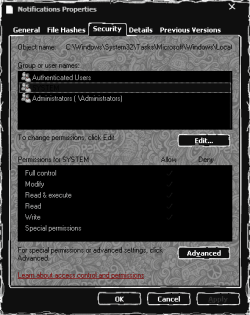
The hot/hover/hightlight selection inside black background. As I remember the highlight text itself can't be changed (hardcoded), it's always black text, but the highlight selection can. Just at the moment I can't manage to find out the location to edit this highlight color/image. I did look through entire Complete Guide Customize Theme (pdf which originally came from VirtualCustom) but didn't seem to see this part mentioned (it could be share the graphic image with other location but I've no idea right now).
So anyone? Thanks for reading.
My Computer
At a glance
Windows 7 Ultimate x64Intel(R) Core(TM) i5-6402P Skylake (14nm) 115...8.00 GB single DDR4 @ 1066MHzIntel(R) HD Graphics 510 (rev6)
- OS
- Windows 7 Ultimate x64
- CPU
- Intel(R) Core(TM) i5-6402P Skylake (14nm) 1151 LGA
- Motherboard
- MSI B150M MORTAR (MS-7972) 2.0
- Memory
- 8.00 GB single DDR4 @ 1066MHz
- Graphics Card(s)
- Intel(R) HD Graphics 510 (rev6)
- Sound Card
- High Definition Audio Device
- Monitor(s) Displays
- HP S2032 1600x900 (60Hz)
- Hard Drives
- Model ST1000DM 003-1SB10C SCSI Disk Device