Help? Win7 and XP on two HDD's...

thomashouseman

New member
Local time
10:29 PM
Messages
14
Hi, Long story on how I ended up like this, but I now have two HDD's. One with WinXP on it and the other with Win 7.
I can choose which to boot from in BIOS by changing the boot order priority. I'd like to be able to change this to just being asked at boot-up which OS I'd like to use. Is this possible please?

Both OS's were installed independently of each other neither knowing the other exists.

Thanks,

T.
 

My Computer

Computer Manufacturer/Model Number
Homebuilt
OS
Windows 7
CPU
Intel Core 2 - 6420
Motherboard
Asus P5PL2-E
Memory
2gb
Graphics Card(s)
ATI 5770
Sound Card
Some old PCI one (Stumped with onboard sound and win7)
Monitor(s) Displays
LG Flatron W2252TQ
Screen Resolution
1680x1050
Hard Drives
lots
PSU
550w
Case
Cheapy
Cooling
Fans galore
Keyboard
G15
Mouse
MX-510
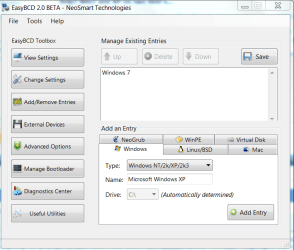
Install EasyBCD 2.0 to Win7. Add XP using the Add/Remove tab, choosing XP from drop-down menu, then accepting its prompt to add boot files which will autocomplete the Add. Highlight the new XP listing above and Save.

Capture.PNG

If this fails, post back a screenshot of Easy listings using Snipping tool in Start Menu attaching file using paper clip in Reply Box.

Or you can always run a http://www.sevenforums.com/tutorials/3413-repair-install.html?ltr=R which reconfigures the dual boot correctly when both drives are plugged.
 
I see you are keen on Easybcd now Greg.
 

My Computers

System One System Two

  • Computer type
    PC/Desktop
    OS
    7 X64
    CPU
    i5 8400
    Motherboard
    gigabyte b365m ds3h
    Memory
    2x8gb 3200mhz
    Hard Drives
    various
    PSU
    pure power 11 400w cm
    Case
    Coolermaster
    Cooling
    cryorig m9i
  • Computer type
    PC/Desktop
    OS
    7x64
    CPU
    g5400
    Motherboard
    ga b365m ds3h
    Memory
    8gb ddr4 2400
    PSU
    xfx pro 450w
Is there an easier way here that you see, Si?

Really impressed with Easy automation on adding XP dual boot. Takes a lot less time than Repair Install too. If only it ran from boot.

Tho Repair Install has its place. Yesterday I added User Acct to my computer for my roomie while I'm travelin. Went back to my desktop and Sticky Note plus all taskbar icons gone. Sticky won't start. So I repair install and 45 minutes later my To Do list is right back on desktop with taskbar icons back.
 
That is what Easybcd is for - to make it easier.

I seem to recall you weren't keen on it a while back. Good to see you have investigated it and changed your opinion.

Would be great if it was bootable - uses .net framework - so not so easy to do. It has been tried.
 

My Computers

System One System Two

  • Computer type
    PC/Desktop
    OS
    7 X64
    CPU
    i5 8400
    Motherboard
    gigabyte b365m ds3h
    Memory
    2x8gb 3200mhz
    Hard Drives
    various
    PSU
    pure power 11 400w cm
    Case
    Coolermaster
    Cooling
    cryorig m9i
  • Computer type
    PC/Desktop
    OS
    7x64
    CPU
    g5400
    Motherboard
    ga b365m ds3h
    Memory
    8gb ddr4 2400
    PSU
    xfx pro 450w
The only problem right now is EasyBCD (2.0.0.76) won't currently work if the OP has the reserved system partition..

This does assume the Win 7 drive is primary.
 
Last edited:

My Computer

Computer Manufacturer/Model Number
Homebuilt
OS
Windows 7 x64
CPU
i7-2600K
Motherboard
Asus P8Z77-v Pro
Memory
8 G
Graphics Card(s)
GTX 480
Sound Card
Onboard
Monitor(s) Displays
LG W2753V
Screen Resolution
1920x1080
Hard Drives
Crucial M4 128 G SSD
Is there an easier way here that you see, Si?

Really impressed with Easy automation on adding XP dual boot. Takes a lot less time than Repair Install too. If only it ran from boot.

Tho Repair Install has its place. Yesterday I added User Acct to my computer for my roomie while I'm travelin. Went back to my desktop and Sticky Note plus all taskbar icons gone. Sticky won't start. So I repair install and 45 minutes later my To Do list is right back on desktop with taskbar icons back.


And I thought you were an avid defender of independent installs on 2 disks. Now I will probably the only one left of this tribe - LOL.
 

My Computer

Computer Manufacturer/Model Number
HP, Dell, Gateway, Toshiba - 4 laptops and 2 desktops
OS
Vista, Windows7, Mint Mate, Zorin, Windows 8
CPU
from 1.6GHz Duo to i7
Monitor(s) Displays
2x HP w2207
Hard Drives
5x HDD, 7x SSD, 12x Externals
Keyboard
with trackball - no mices
Mouse
Trackball mice
Internet Speed
DSL 6000
And I thought you were an avid defender of independent installs on 2 disks. Now I will probably the only one left of this tribe - LOL.


Yes, as avid as ever. However this OP specifically asked to undo BIOS booting.

Just tryin to keep the customers satisfied......

Thomas: you're actually better off keeping the BIOS-based Dual Boot because your drives remain independent. With Windows Dual Boot they become interlinked and harder to extricate.
 
And I thought you were an avid defender of independent installs on 2 disks. Now I will probably the only one left of this tribe - LOL.


Yes, as avid as ever. However this OP specifically asked to undo BIOS booting.

Just tryin to keep the customers satisfied.....


Fair enough, I was just kidding.
 

My Computer

Computer Manufacturer/Model Number
HP, Dell, Gateway, Toshiba - 4 laptops and 2 desktops
OS
Vista, Windows7, Mint Mate, Zorin, Windows 8
CPU
from 1.6GHz Duo to i7
Monitor(s) Displays
2x HP w2207
Hard Drives
5x HDD, 7x SSD, 12x Externals
Keyboard
with trackball - no mices
Mouse
Trackball mice
Internet Speed
DSL 6000
Thomas: you're actually better off keeping the BIOS-based Dual Boot because your drives remain independent. With Windows Dual Boot they become interlinked and harder to extricate.

Well is there another way to do it easier than going into the BIOS? Trying to make it easy for computer illiterate family members to switch...

i.e. something like, insert this floppy to boot winxp else eject if for win7. Something like that instead? Or USB key in to boot from 1 drive, out for the other etc...
 

My Computer

Computer Manufacturer/Model Number
Homebuilt
OS
Windows 7
CPU
Intel Core 2 - 6420
Motherboard
Asus P5PL2-E
Memory
2gb
Graphics Card(s)
ATI 5770
Sound Card
Some old PCI one (Stumped with onboard sound and win7)
Monitor(s) Displays
LG Flatron W2252TQ
Screen Resolution
1680x1050
Hard Drives
lots
PSU
550w
Case
Cheapy
Cooling
Fans galore
Keyboard
G15
Mouse
MX-510
You don't normally have to go into BIOS except to set the default HD you want to boot first. Then if you want to boot the other HD, use the key given on first bootup screen for Boot Menu. This shortcut key can get you to the other HD much faster.

I thought you were doing this now, but wanted to configure a WIndows-managed dual boot which is more complicated to later remove. The way you have it now, either HD can come and go.

See if you can find the Boot Menu shortcut key (usually F12 or F10) and see if this makes it easier to boot the HD which isn't set to boot first.

If not, and you want a Dual Boot menu at each bootup, use Easy BCD linked earlier to add XP from 7.
 
Last edited:
That sounds a bit complicated.

The easiest thing is to add an entry for XP the 7 boot menu.

That way - if you boot that HD - you will get a choice of either on the menu.

Either HD can still be removed and the other will boot - they are still independent installs.

If you ever want to remove the boot menu entry - it's very easy.

I believe Easybcd 2.0 was already suggested as a simple way to do that.


saltgrass...The only problem right now is EasyBCD (2.0.0.76) won't currently work if the OP has the reserved system partition..

What makes you say that?
 

My Computers

System One System Two

  • Computer type
    PC/Desktop
    OS
    7 X64
    CPU
    i5 8400
    Motherboard
    gigabyte b365m ds3h
    Memory
    2x8gb 3200mhz
    Hard Drives
    various
    PSU
    pure power 11 400w cm
    Case
    Coolermaster
    Cooling
    cryorig m9i
  • Computer type
    PC/Desktop
    OS
    7x64
    CPU
    g5400
    Motherboard
    ga b365m ds3h
    Memory
    8gb ddr4 2400
    PSU
    xfx pro 450w
You can boot from a USB , but then you have to go into the BIOS also to establish the boot sequence. Plus, when you boot from a USB, it is a single session deal. When you log off, everything is gone because nothing from the session is stored on the USB. I do that at times with Linux Fedora that I have on a stick. It's nice to just play around with it, but for any serious work it is unsuitable.
I think the setup you have right now is the absolutely easiest and least troublesome. I am running Vista and Windows7 like that and it never gives me any problems.
 

My Computer

Computer Manufacturer/Model Number
HP, Dell, Gateway, Toshiba - 4 laptops and 2 desktops
OS
Vista, Windows7, Mint Mate, Zorin, Windows 8
CPU
from 1.6GHz Duo to i7
Monitor(s) Displays
2x HP w2207
Hard Drives
5x HDD, 7x SSD, 12x Externals
Keyboard
with trackball - no mices
Mouse
Trackball mice
Internet Speed
DSL 6000
saltgrass...The only problem right now is EasyBCD (2.0.0.76) won't currently work if the OP has the reserved system partition..

What makes you say that?
It currently will not point the boot to the Reserved System Partition, unless it has been assigned a Drive letter. If you do assign a letter it works fine, as you have stated and is mentioned in the tutorial.

Possibly another beta will fix this, or at least give instructions to assign a drive letter to the system partition. Just a little bump, but needs to be mentioned.
 

My Computer

Computer Manufacturer/Model Number
Homebuilt
OS
Windows 7 x64
CPU
i7-2600K
Motherboard
Asus P8Z77-v Pro
Memory
8 G
Graphics Card(s)
GTX 480
Sound Card
Onboard
Monitor(s) Displays
LG W2753V
Screen Resolution
1920x1080
Hard Drives
Crucial M4 128 G SSD
Ah , see what you mean.

In fact v2.0 points to the volume and not the drive letter - so it should work on an unlettered partition. I don't have XP myself , so I wasn't involved in testing that aspect and am not sure how successful it is - tho. I did some testing on the other windows functions.

v1.72 needs the letter, which is why it is now in the tutorial.
 

My Computers

System One System Two

  • Computer type
    PC/Desktop
    OS
    7 X64
    CPU
    i5 8400
    Motherboard
    gigabyte b365m ds3h
    Memory
    2x8gb 3200mhz
    Hard Drives
    various
    PSU
    pure power 11 400w cm
    Case
    Coolermaster
    Cooling
    cryorig m9i
  • Computer type
    PC/Desktop
    OS
    7x64
    CPU
    g5400
    Motherboard
    ga b365m ds3h
    Memory
    8gb ddr4 2400
    PSU
    xfx pro 450w
Then if you want to boot the other HD, use the key given on first bootup screen for Boot Menu. This shortcut key can get you to the other HD much faster.

See if you can find the Boot Menu shortcut key (usually F12 or F10) and see if this makes it easier to boot the HD which isn't set to boot first.

If not, and you want a Dual Boot menu at each bootup, use Easy BCD linked earlier to add XP from 7.

Hmm, don't think this bios has that option :confused: That would make it easier!

I'll look next time I visit my brother. (His pc)

T.
 

My Computer

Computer Manufacturer/Model Number
Homebuilt
OS
Windows 7
CPU
Intel Core 2 - 6420
Motherboard
Asus P5PL2-E
Memory
2gb
Graphics Card(s)
ATI 5770
Sound Card
Some old PCI one (Stumped with onboard sound and win7)
Monitor(s) Displays
LG Flatron W2252TQ
Screen Resolution
1680x1050
Hard Drives
lots
PSU
550w
Case
Cheapy
Cooling
Fans galore
Keyboard
G15
Mouse
MX-510
You can boot from a USB , but then you have to go into the BIOS also to establish the boot sequence. Plus, when you boot from a USB, it is a single session deal. When you log off, everything is gone because nothing from the session is stored on the USB. I do that at times with Linux Fedora that I have on a stick. It's nice to just play around with it, but for any serious work it is unsuitable.
I think the setup you have right now is the absolutely easiest and least troublesome. I am running Vista and Windows7 like that and it never gives me any problems.


I actually meant like back in the DOS days when you used a 3 1/2 or 5 1/4 floppy to boot up differently or use a different HDD instead etc. i.e. have grub loader on a FDD to then load winxp if inserted or if ejected just load win7 normally etc.
 
Last edited:

My Computer

Computer Manufacturer/Model Number
Homebuilt
OS
Windows 7
CPU
Intel Core 2 - 6420
Motherboard
Asus P5PL2-E
Memory
2gb
Graphics Card(s)
ATI 5770
Sound Card
Some old PCI one (Stumped with onboard sound and win7)
Monitor(s) Displays
LG Flatron W2252TQ
Screen Resolution
1680x1050
Hard Drives
lots
PSU
550w
Case
Cheapy
Cooling
Fans galore
Keyboard
G15
Mouse
MX-510
Back
Top