HELP. Windows 7 theme problems

Preston007

New member
Local time
11:23 PM
Messages
1
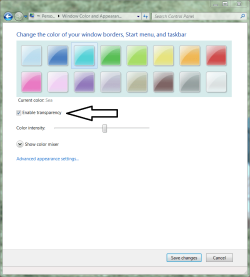
I have Aero and everything working. I can change themes, colors and transparency with ease. However, when i change the color the taskbar is the only thing that changes, the color of everything remains the same (Just normal see- through), like the borders of open windows. Please help!
 

My Computer

OS
Windows 7
I have Aero and everything working. I can change themes, colors and transparency with ease. However, when i change the color the taskbar is the only thing that changes, the color of everything remains the same (Just normal see- through), like the borders of open windows. Please help!
Disable transparency.
 

Attachments

  • Capture.PNG
    Capture.PNG
    61.9 KB · Views: 90
Hi! I tried Windows 7 manager to optimalize my MSI Wind U100. I made a mistake, set my theme to windows classic. And i couln't switch back to my good one... :(
Could u help me? :)
 

My Computer

Computer Manufacturer/Model Number
Intel
OS
Windows 7 Ultimate
CPU
Intel Atom
Hi! I tried Windows 7 manager to optimalize my MSI Wind U100. I made a mistake, set my theme to windows classic. And i couln't switch back to my good one...
Please describe what action(s) you are taking to switch back. Describe the result.
 
I just tried to change it on the desktop. But the other themes are gray and i can't click onto them. And i tried to change it from the //windows/resources/themes folder. If i clicked on it says: "You can't use this theme. Choose another."
What can i do dear Antman?
 

My Computer

Computer Manufacturer/Model Number
Intel
OS
Windows 7 Ultimate
CPU
Intel Atom
Hi! I tried Windows 7 manager...
I am not familiar enough with all of these tweakers. Unless someone provides a more lucid idea, System Restore.

Someone else might be able to guide you with the information that you have now provided.

edit - Is that system response verbatim?
 
Back
Top