Help! Windows 7 won't detect my GPU

jibbybonk

New member
Local time
8:32 AM
Messages
5
I have read a lot of threads about this already but none of them helped me.

So I have an Nvidia geforce GTX 260m that will not be detected by my computer after installing windows 7. As you can see from my dxdiag file it only detects a standard vga graphics adapter.
I have tried installing the files from nvidia website. Nothing doing... I get the same errors over again. "The Nvidia setup program could not locate any drivers that are compatible with your current hardware" etc.

I have also attached the .inf file from the setup i am trying to download from. I should note that there is a lot of .inf files to choose from. I chose this one because other people seem to think it is important.

I have also tried to update the drivers via windows update and going into device manager and forcing it to update (by browsing and selecting the .inf file). I always seem to get the error "The driver selected by this device does not support this version of windows".

Please help!
 

Attachments

My Computer

OS
windows 7
I have read a lot of threads about this already but none of them helped me.

So I have an Nvidia geforce GTX 260m that will not be detected by my computer after installing windows 7. As you can see from my dxdiag file it only detects a standard vga graphics adapter.
I have tried installing the files from nvidia website. Nothing doing... I get the same errors over again. "The Nvidia setup program could not locate any drivers that are compatible with your current hardware" etc.

I have also attached the .inf file from the setup i am trying to download from. I should note that there is a lot of .inf files to choose from. I chose this one because other people seem to think it is important.

I have also tried to update the drivers via windows update and going into device manager and forcing it to update (by browsing and selecting the .inf file). I always seem to get the error "The driver selected by this device does not support this version of windows".

Please help!

what driver did you try to install in device manager. was it an XP, vista, or win 7 driver? 32bit or 64?

Ken J
 

My Computer

Computer Manufacturer/Model Number
HP Pavillion dv-7 1005 Tx
OS
Win 8 Release candidate 8400
CPU
[email protected]
Memory
4 gigs
Graphics Card(s)
Nvidia 9600M
Sound Card
HD built-in
Monitor(s) Displays
17" Wxga
Screen Resolution
1440x900
Cooling
none
Internet Speed
45Mb down 5Mb up
I have tried to install two 64bit drivers from the website. I tried the windows 7 64 bit first, then I tried the windows vista 64bit. I have not tried the 32bit drivers and I haven't tried anything earlier than windows vista (such as xp)
 

My Computer

OS
windows 7
Can you uninstall any current driver from control panel, reboot into safe mode, run driver sweeper, reboot into windows, download the newest driver - choose the right 7 x64 or x32 - then reboot into safe mode and install, selecting run as administrator.
 

My Computer

Computer Manufacturer/Model Number
Sony Vaio Z46GDU
OS
Windows 7 Ultimate x86-64
CPU
[email protected] 1066MHz FSB
Motherboard
Sony branded
Memory
6GB DDR3 1066MHz
Graphics Card(s)
9300M GS 256MB Dedicated (Speed) + Intel4500MHD (Stamina)
Sound Card
Realtek HD Audio
Monitor(s) Displays
13.1' WXGA
Screen Resolution
1600x900
Hard Drives
320GB 7200RPM w/ 16MB cache
Internet Speed
1MB/s
"The Nvidia setup program could not locate any drivers that are compatible with your current hardware"

That sound to me like you download the wrong architecture driver. x86 when need x64 or x64 when need x86.

Are you sure you are trying to install the correct version for your operating system? Definitely should be for Windows 7, not Vista.

To find which version you installed, type system information in the start menu search box. Hit enter. Look at the line that says, "system type."
 

My Computer

Computer Manufacturer/Model Number
self built
OS
7600.20510 x86
CPU
P4 550 3.4 GHz HT running at 3.5 GHz
Motherboard
MSI PM8M3-V (MS-7211 v1.x) Micro-ATX mainboard
Memory
OCZ 2 GB(2x1GB) DDR400mHz running @ 414 mHz
Graphics Card(s)
HIS Radeon HD 3850 IceQ 3 Turbo HDMI Dual DL-DVI AGP
Sound Card
MOTU Traveler firewire studio interface 192 kHz 24 bit
Monitor(s) Displays
22" widescreen Acer X223W LCD, 17" Compaq P75 CRT
Screen Resolution
1680x1050 and 1280x1024
Hard Drives
SATA I x2 WD, 400 GB and 120 GB, SATA 2 WD Caviar Black 1 TB
PSU
350W generic
Case
Cybertronpc, it glows blue
Cooling
stock cpu fan, Ice-Q 3 gpu and system, many case fans
Keyboard
Logitch Classical Keyboard 200
Mouse
Logitech Mediaplay cordless
Internet Speed
1792/448 kbits/sec
Other Info
SATA II PCI fake RAID adapter, 1 GB Readyboost, original ATI Remote Wonder (even works with WMC perfectly), Logitech Rumblepad 2 game controller x2
So I tried cleaning drivers and booting into safe mode and running as admin. Didn't work, I got the same error message about not finding compatible hardware etc.

That sound to me like you download the wrong architecture driver. x86 when need x64 or x64 when need x86
I did the system information check. It says its an x64 based pc. Soo... I think that means I downloaded the right drivers? (64bit drivers)
 
Last edited:

My Computer

OS
windows 7
Can you delete the vga driver and install?
 

My Computer

Computer Manufacturer/Model Number
Sony Vaio Z46GDU
OS
Windows 7 Ultimate x86-64
CPU
[email protected] 1066MHz FSB
Motherboard
Sony branded
Memory
6GB DDR3 1066MHz
Graphics Card(s)
9300M GS 256MB Dedicated (Speed) + Intel4500MHD (Stamina)
Sound Card
Realtek HD Audio
Monitor(s) Displays
13.1' WXGA
Screen Resolution
1600x900
Hard Drives
320GB 7200RPM w/ 16MB cache
Internet Speed
1MB/s
Can you delete the vga driver and install? Are you sure you have a 260m? Run HWInfo or Belarc Advisor or GPU-Z.
 

My Computer

Computer Manufacturer/Model Number
Sony Vaio Z46GDU
OS
Windows 7 Ultimate x86-64
CPU
[email protected] 1066MHz FSB
Motherboard
Sony branded
Memory
6GB DDR3 1066MHz
Graphics Card(s)
9300M GS 256MB Dedicated (Speed) + Intel4500MHD (Stamina)
Sound Card
Realtek HD Audio
Monitor(s) Displays
13.1' WXGA
Screen Resolution
1600x900
Hard Drives
320GB 7200RPM w/ 16MB cache
Internet Speed
1MB/s
I did not see who made your nVidia 260, sometimes the manufacturer has a fix...if it is made by nVidia, you have tried that, if made by EVGA or any other manufacturer, BFG or Visiontek, sometimes there is a fix or faq at their website, always look at the source first...:(
 

My Computer

Computer Manufacturer/Model Number
CustomBuiltByMe
OS
Windows 7 Home Premium x64 OEM
CPU
Q6600
Motherboard
GigaByte EP45-UD3R
Memory
6GB 800Mz DDR2
Graphics Card(s)
nVidia GTX260 898MB GPU
Sound Card
Audigy 2 Platinum
Monitor(s) Displays
NEC AccuSync LCD22WMGX, NEC MultiSync LCD1770NX
Screen Resolution
1680x1050, 1280x1024
Hard Drives
RAID 0=Fast Boot
PSU
Silverstone OP750 watt
Case
Ultra M998=Great Case
Cooling
Corsair Hydro Series H50, 120mm reversed flow thru Rad/Front
Keyboard
Logitech G15
Mouse
Logitech (um, a wireless one)
Internet Speed
Bell DSL for 10 yrs
Other Info
lots of, may OC soon, liking Win7 more and more....I plugged it into my 46XBR3, worked right away, on HDMI, a slider for resolution was easy to tweak, plugged it back to my NEC 22, it is like it saved the ini file somewhere, I did nothing to change the resolution on the different TV/Monitors...this is major cool, truly plug and play (well, maybe)...lol
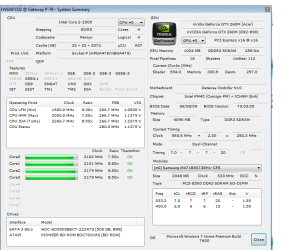
I put a screenshot of the HWinfo here, just to make sure im not making any mistakes Pic.png
 

My Computer

OS
windows 7
I feel like a bit of a jackass... I found a thread on these forums that helped me :(

Thank you for all the advice, especially about going to the makers of my computer for help (that put me on the right track)

I found that this problem was already solved http://www.sevenforums.com/graphic-cards/34353-hardware-not-detected.html

So thanks again everybody, specially torrentg who made a file i could use to fix gateways crappy fix. ^.^
 

My Computer

OS
windows 7
Back
Top