[Help] Windows Biometric Devices

jeutie

New member
Local time
2:11 AM
Messages
32
Location
België
Hello, So I got an HP Pavilion dv9450eb with windows 7 build 7057 on it,
It has an fingerprint reader, And the notebook recognises it,
So I'd like to use this to log on into Windows,

I looked around a little and found out that I should go in the control panel to the biometric devices option...

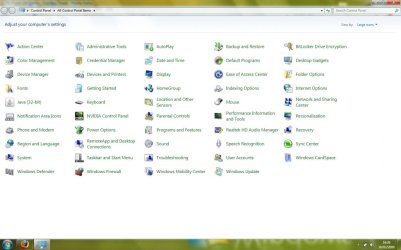
When I go to the control panel... There is no such thing as 'biometric devices'
Pretty weird I guess, or is this option pulled out again in build 7057?

I added an screen shot of the control panel...
Many thanks to whoever can help me on this ^^

Greets, Jeutie:cool:
 

Attachments

  • Control Panel.jpg
    Control Panel.jpg
    73.4 KB · Views: 665

My Computer

Computer Manufacturer/Model Number
MSI
OS
Vista
CPU
Q9450 @ 3.0 Ghz
Memory
8GB Ram DDR-3
Graphics Card(s)
9800 GTX 512mb Tri SLI
Sound Card
Soundblaster
Monitor(s) Displays
30" monitor
Hard Drives
250GB & 1TB together in raid 0
Case
Antec 900
Keyboard
Logitech G11
Mouse
Logitech G9
Internet Speed
21Mbps

My Computer

Computer Manufacturer/Model Number
Lenovo T61
OS
Windows 7 x64
CPU
Intel Core 2 Duo T7300
Memory
4 GB DDR2
AuthenTec Inc. AES2501
I can install the software and or drivers given by HP,
But the sensor is recognised by Windows 7 automaticly
But Windows 7 should give an 'Biometric Devices' option in the control panel
no mater what ? or am I confusing?

Ty already!
 
Last edited:

My Computer

Computer Manufacturer/Model Number
MSI
OS
Vista
CPU
Q9450 @ 3.0 Ghz
Memory
8GB Ram DDR-3
Graphics Card(s)
9800 GTX 512mb Tri SLI
Sound Card
Soundblaster
Monitor(s) Displays
30" monitor
Hard Drives
250GB & 1TB together in raid 0
Case
Antec 900
Keyboard
Logitech G11
Mouse
Logitech G9
Internet Speed
21Mbps
Biometric Device in Control Panel

If the device driver installed correctly you should see the biometric devices in the control panel and in the device manager.

Are you sure that the drivers are correctly installed?
 

My Computer

Computer Manufacturer/Model Number
Lenovo T61
OS
Windows 7 x64
CPU
Intel Core 2 Duo T7300
Memory
4 GB DDR2
Well it's all reconised by windows, But i'm dl'ding the vista drivers atm...
I wonder if that works any better,

I will keep this updated ^^

*also*
Could it be the finger print sensor that slows down the boot?
my pc starts quite fast, and then it hangs (black screen) for a second or 3,
Then it gives the login screen...

If these 2 problems could be fixed, I think I would have found the perfect OS x)


*edit* I installed the vista drivers given by HP, And well it shows up 'working' in the device manager, But the 'Biometric Devices' doesn't show up in the control panel... hav
Could I accidentaly have disabled something?
 
Last edited:

My Computer

Computer Manufacturer/Model Number
MSI
OS
Vista
CPU
Q9450 @ 3.0 Ghz
Memory
8GB Ram DDR-3
Graphics Card(s)
9800 GTX 512mb Tri SLI
Sound Card
Soundblaster
Monitor(s) Displays
30" monitor
Hard Drives
250GB & 1TB together in raid 0
Case
Antec 900
Keyboard
Logitech G11
Mouse
Logitech G9
Internet Speed
21Mbps
Hello, I did already search & find that thread mate...
But unfortunately, the site gives me a 'page not found' notification and redirects to their sitemap...

I googled a bit to them drivers, and I found(!) But only the 32bit drivers,
And I got the 64bit... So when I installed the 32 bit ones, the included application auto-fails
 

My Computer

Computer Manufacturer/Model Number
MSI
OS
Vista
CPU
Q9450 @ 3.0 Ghz
Memory
8GB Ram DDR-3
Graphics Card(s)
9800 GTX 512mb Tri SLI
Sound Card
Soundblaster
Monitor(s) Displays
30" monitor
Hard Drives
250GB & 1TB together in raid 0
Case
Antec 900
Keyboard
Logitech G11
Mouse
Logitech G9
Internet Speed
21Mbps
Hello, I'll install this software then, Thank you very much.
On vista I had to use software from bioscript... but anyways
Kinda weird the 'Biometric devices' do not show up in the control panel :(
Cause I read on another forum that there should be support for fingerprint readers without using extra software?

Anyways, It'll do with this program for now ^^
But if anyone knows why the fingerprint reader doesn't show up under control panel, Please say!

(It does show up under 'devices & printers')
 

My Computer

Computer Manufacturer/Model Number
MSI
OS
Vista
CPU
Q9450 @ 3.0 Ghz
Memory
8GB Ram DDR-3
Graphics Card(s)
9800 GTX 512mb Tri SLI
Sound Card
Soundblaster
Monitor(s) Displays
30" monitor
Hard Drives
250GB & 1TB together in raid 0
Case
Antec 900
Keyboard
Logitech G11
Mouse
Logitech G9
Internet Speed
21Mbps
Back
Top