Help.. Windows update just keeps checking without downloading anything

truemate

New member
Local time
9:57 PM
Messages
32
Hiii Sevenforums Team,

Plz help in this out as me facing this prob from when...
even though i repair/reinstall windows7 thru installation disc...but still the prob is not been solved.

I try my best.. but still no positive results.so i give up and came here...By hoping that anyone here will sort out my prob :confused: ...my last hope

It will keep on checking...for hrs..but nothing happens :confused:
8401778.png


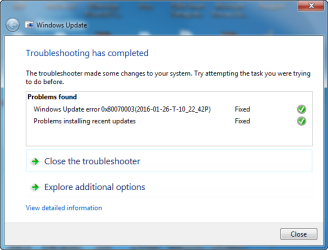
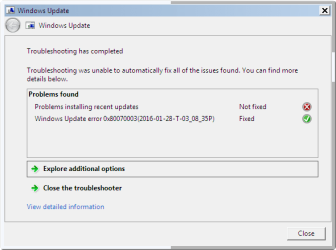
i even run this tool "WindowsUpdateDiagnostic" so many times... but it always says error repair but nothing happens..same errors it shows again on reboot.

2.png

says repair/Fixed... :sarc:
3.png
.

just an eyewash,,,nothing getting fixed.... :sarc:
 

My Computer My Computer

Computer type
PC/Desktop
OS
Windows 7 Ultimate x64 & Win10 x64bit LTSC
Memory
4gb/8GB
Hard Drives
WD SATA 500GB
Seagate Barracuda 1TB
Antivirus
EIS v13

My Computer My Computer

Computer type
PC/Desktop
Computer Manufacturer/Model Number
Self built custom
OS
64-bit Windows 11 Pro for Workstations
CPU
Intel i7-8700K OC'd to 5 GHz
Motherboard
ASUS ROG Maximus XI Formula Z390
Memory
64 GB (4x16GB) G.SKILL TridentZ RGB DDR4 3600 MHz
Graphics Card(s)
ASUS ROG-STRIX-GTX1080TI-O11G-GAMING
Sound Card
Integrated
Monitor(s) Displays
2 x Samsung Odyssey G7 27"
Screen Resolution
2560x1440
Hard Drives
1TB Samsung 990 PRO M.2,
4TB Samsung 990 PRO PRO M.2,
TerraMaster F8 SSD Plus NAS
PSU
Seasonic Prime Titanium 850W
Case
Thermaltake Core P3
Cooling
Corsair Hydro H115i
Keyboard
Logitech wireless K800
Mouse
Logitech MX Master 4
Internet Speed
2 Gb/s Download and 100 Mb/s Upload
Antivirus
Malwarebyte Anti-Malware Premium
Browser
Google Chrome
Other Info
Logitech Z625 speaker system,
Logitech BRIO 4K Pro webcam,
HP Color LaserJet Pro MFP M477fdn,
APC SMART-UPS RT 1000 XL - SURT1000XLI,
Galaxy S23 Plus phone
hi Brinkz,
i used that method once.. a week back..
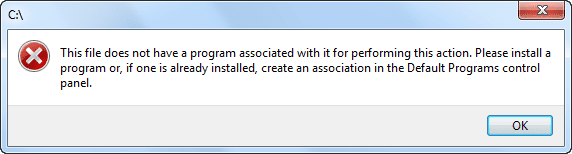
on nxt day my whole pc was pwned.. i was not able to open any drive on double click..
is it safe to try/use it again.

this error it was showing,last week
4.png
 

My Computer My Computer

Computer type
PC/Desktop
OS
Windows 7 Ultimate x64 & Win10 x64bit LTSC
Memory
4gb/8GB
Hard Drives
WD SATA 500GB
Seagate Barracuda 1TB
Antivirus
EIS v13

My Computer My Computer

Computer type
PC/Desktop
Computer Manufacturer/Model Number
Self built custom
OS
64-bit Windows 11 Pro for Workstations
CPU
Intel i7-8700K OC'd to 5 GHz
Motherboard
ASUS ROG Maximus XI Formula Z390
Memory
64 GB (4x16GB) G.SKILL TridentZ RGB DDR4 3600 MHz
Graphics Card(s)
ASUS ROG-STRIX-GTX1080TI-O11G-GAMING
Sound Card
Integrated
Monitor(s) Displays
2 x Samsung Odyssey G7 27"
Screen Resolution
2560x1440
Hard Drives
1TB Samsung 990 PRO M.2,
4TB Samsung 990 PRO PRO M.2,
TerraMaster F8 SSD Plus NAS
PSU
Seasonic Prime Titanium 850W
Case
Thermaltake Core P3
Cooling
Corsair Hydro H115i
Keyboard
Logitech wireless K800
Mouse
Logitech MX Master 4
Internet Speed
2 Gb/s Download and 100 Mb/s Upload
Antivirus
Malwarebyte Anti-Malware Premium
Browser
Google Chrome
Other Info
Logitech Z625 speaker system,
Logitech BRIO 4K Pro webcam,
HP Color LaserJet Pro MFP M477fdn,
APC SMART-UPS RT 1000 XL - SURT1000XLI,
Galaxy S23 Plus phone
When was the last successful update that you got? It will show up in your update history, or maybe under installed updates (both of which are on Windows Update dialog), so check both.
To make a long story short, my "Checking updates" never ended either. In my update history, the last successful update was back in August. I ended up installing the missing ones manually, from the ISO files on the Microsoft website..
It was a pain, but it got things back on track again. My updates are working now. All else fails, worth a try.
 

My Computer My Computer

Computer type
PC/Desktop
Computer Manufacturer/Model Number
Custom
OS
W7 64bit
CPU
6600 core duo
Motherboard
Gigabyte EP45 -UD3R
Memory
8G
Graphics Card(s)
NVIDIA 550 Ti
Hard Drives
WD 640 GB
Antivirus
ESET
Browser
Several
The .bat file to reset Windows Update would not affect that.

It sounds like something messed up your drive association. Downloading and merging the .reg file for the listed Drive option in the tutorial below should help restore the default drive association.

http://www.sevenforums.com/tutorials/19449-default-file-type-associations-restore.html

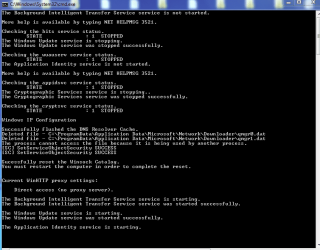
ok i run that .bat file in admin mode... (well it created new softdistribution folder and old one as SoftwareDistribution.bak)

Reset_Windows_Update_Full.png


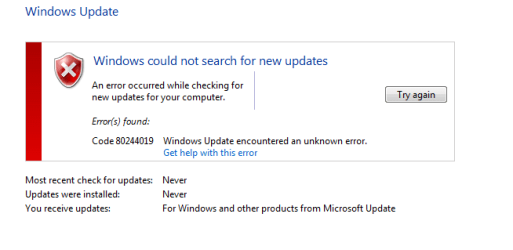
restarted the pc... now when i check for update it shows this error
WindowsUpdate Error code_80244019.png
 

My Computer My Computer

Computer type
PC/Desktop
OS
Windows 7 Ultimate x64 & Win10 x64bit LTSC
Memory
4gb/8GB
Hard Drives
WD SATA 500GB
Seagate Barracuda 1TB
Antivirus
EIS v13
When was the last successful update that you got? It will show up in your update history, or maybe under installed updates (both of which are on Windows Update dialog), so check both.
To make a long story short, my "Checking updates" never ended either. In my update history, the last successful update was back in August. I ended up installing the missing ones manually, from the ISO files on the Microsoft website..
It was a pain, but it got things back on track again. My updates are working now. All else fails, worth a try.

actually me using this desktop pc after a gap of 5/6 months.. that time it was working well with updates.. but now its not.
and as i told i repair the windows.. so cant see any installed updates detail only ie11 and its few update what i done manually a week back.
Me back using this desktop pc,with all new net connection & new modem

this manually download updates sucks.. take to much time...
 

My Computer My Computer

Computer type
PC/Desktop
OS
Windows 7 Ultimate x64 & Win10 x64bit LTSC
Memory
4gb/8GB
Hard Drives
WD SATA 500GB
Seagate Barracuda 1TB
Antivirus
EIS v13
Last edited:

My Computer My Computer

Computer type
PC/Desktop
Computer Manufacturer/Model Number
Self built custom
OS
64-bit Windows 11 Pro for Workstations
CPU
Intel i7-8700K OC'd to 5 GHz
Motherboard
ASUS ROG Maximus XI Formula Z390
Memory
64 GB (4x16GB) G.SKILL TridentZ RGB DDR4 3600 MHz
Graphics Card(s)
ASUS ROG-STRIX-GTX1080TI-O11G-GAMING
Sound Card
Integrated
Monitor(s) Displays
2 x Samsung Odyssey G7 27"
Screen Resolution
2560x1440
Hard Drives
1TB Samsung 990 PRO M.2,
4TB Samsung 990 PRO PRO M.2,
TerraMaster F8 SSD Plus NAS
PSU
Seasonic Prime Titanium 850W
Case
Thermaltake Core P3
Cooling
Corsair Hydro H115i
Keyboard
Logitech wireless K800
Mouse
Logitech MX Master 4
Internet Speed
2 Gb/s Download and 100 Mb/s Upload
Antivirus
Malwarebyte Anti-Malware Premium
Browser
Google Chrome
Other Info
Logitech Z625 speaker system,
Logitech BRIO 4K Pro webcam,
HP Color LaserJet Pro MFP M477fdn,
APC SMART-UPS RT 1000 XL - SURT1000XLI,
Galaxy S23 Plus phone
For the Windows Update error code 80244019, the link below says that turn on DEP for all Programs and Services except those I select helped with it.

Windows Update Error Code 80244019 - Microsoft Community

Did you use the .reg file to see if it may fix your drive issue?

That DEP thing,me little confuse what should i check ?
as by default it is checked to this option--> Turn DEP On for All Programs and Services Except those i Select

which .reg file... that drive issue is been solved last week only when i repaired my pc.. now there nothing drive issue prob.. only this update thing :(
 
Last edited by a moderator:

My Computer My Computer

Computer type
PC/Desktop
OS
Windows 7 Ultimate x64 & Win10 x64bit LTSC
Memory
4gb/8GB
Hard Drives
WD SATA 500GB
Seagate Barracuda 1TB
Antivirus
EIS v13
ok i clicked on Turn on DEP for Essential Windows Programs and Services only.
reboot...
still it showing "checking for update" (the pic wat i posted in 1st post...)
 

My Computer My Computer

Computer type
PC/Desktop
OS
Windows 7 Ultimate x64 & Win10 x64bit LTSC
Memory
4gb/8GB
Hard Drives
WD SATA 500GB
Seagate Barracuda 1TB
Antivirus
EIS v13
Try with the Turn on DEP for all Programs and Services except those I select option checked instead.
 

My Computer My Computer

Computer type
PC/Desktop
Computer Manufacturer/Model Number
Self built custom
OS
64-bit Windows 11 Pro for Workstations
CPU
Intel i7-8700K OC'd to 5 GHz
Motherboard
ASUS ROG Maximus XI Formula Z390
Memory
64 GB (4x16GB) G.SKILL TridentZ RGB DDR4 3600 MHz
Graphics Card(s)
ASUS ROG-STRIX-GTX1080TI-O11G-GAMING
Sound Card
Integrated
Monitor(s) Displays
2 x Samsung Odyssey G7 27"
Screen Resolution
2560x1440
Hard Drives
1TB Samsung 990 PRO M.2,
4TB Samsung 990 PRO PRO M.2,
TerraMaster F8 SSD Plus NAS
PSU
Seasonic Prime Titanium 850W
Case
Thermaltake Core P3
Cooling
Corsair Hydro H115i
Keyboard
Logitech wireless K800
Mouse
Logitech MX Master 4
Internet Speed
2 Gb/s Download and 100 Mb/s Upload
Antivirus
Malwarebyte Anti-Malware Premium
Browser
Google Chrome
Other Info
Logitech Z625 speaker system,
Logitech BRIO 4K Pro webcam,
HP Color LaserJet Pro MFP M477fdn,
APC SMART-UPS RT 1000 XL - SURT1000XLI,
Galaxy S23 Plus phone
:rolleyes: now i check this option "Turn on DEP for all Programs and Services except those I select"
this was already as default in past...

ok i done it..
rebooted but still same thing... keep checking for updates.

p.s-
Look

1.png
 

My Computer My Computer

Computer type
PC/Desktop
OS
Windows 7 Ultimate x64 & Win10 x64bit LTSC
Memory
4gb/8GB
Hard Drives
WD SATA 500GB
Seagate Barracuda 1TB
Antivirus
EIS v13
Do you have a 3rd party AV program installed that could be causing this issue with Windows Update?
 

My Computer My Computer

Computer type
PC/Desktop
Computer Manufacturer/Model Number
Self built custom
OS
64-bit Windows 11 Pro for Workstations
CPU
Intel i7-8700K OC'd to 5 GHz
Motherboard
ASUS ROG Maximus XI Formula Z390
Memory
64 GB (4x16GB) G.SKILL TridentZ RGB DDR4 3600 MHz
Graphics Card(s)
ASUS ROG-STRIX-GTX1080TI-O11G-GAMING
Sound Card
Integrated
Monitor(s) Displays
2 x Samsung Odyssey G7 27"
Screen Resolution
2560x1440
Hard Drives
1TB Samsung 990 PRO M.2,
4TB Samsung 990 PRO PRO M.2,
TerraMaster F8 SSD Plus NAS
PSU
Seasonic Prime Titanium 850W
Case
Thermaltake Core P3
Cooling
Corsair Hydro H115i
Keyboard
Logitech wireless K800
Mouse
Logitech MX Master 4
Internet Speed
2 Gb/s Download and 100 Mb/s Upload
Antivirus
Malwarebyte Anti-Malware Premium
Browser
Google Chrome
Other Info
Logitech Z625 speaker system,
Logitech BRIO 4K Pro webcam,
HP Color LaserJet Pro MFP M477fdn,
APC SMART-UPS RT 1000 XL - SURT1000XLI,
Galaxy S23 Plus phone
i have ESS v8.
But using this from 2 years, nothing happen like this update issue.
 

My Computer My Computer

Computer type
PC/Desktop
OS
Windows 7 Ultimate x64 & Win10 x64bit LTSC
Memory
4gb/8GB
Hard Drives
WD SATA 500GB
Seagate Barracuda 1TB
Antivirus
EIS v13
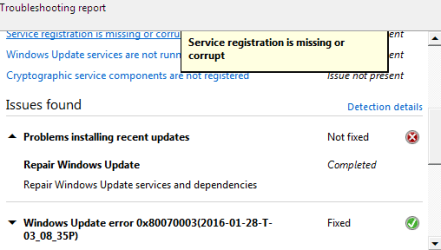
it mostly shows
Service registration is missing or corrupt
Reset service registration

in safe mode i run that WindowsUpdateDiagnostic tool
 

Attachments

  • 2016-01-28_151342.png
    2016-01-28_151342.png
    8.4 KB · Views: 29
  • 2016-01-28_151446.png
    2016-01-28_151446.png
    7.3 KB · Views: 29

My Computer My Computer

Computer type
PC/Desktop
OS
Windows 7 Ultimate x64 & Win10 x64bit LTSC
Memory
4gb/8GB
Hard Drives
WD SATA 500GB
Seagate Barracuda 1TB
Antivirus
EIS v13
truemate, you are in excellent hands. However, I was having trouble updating W7 [after a particular update that completed successfully last April (2015)]... but ever since, the update process would hang exactly like you described.

I just used Autopatcher instead to update Windows (which I learned about here in the 7 forums), and it updated the system for me without a problem. As a bonus, the native W7 updater worked again after that.

If interested, Autopatcher can be downloaded by clicking on "The Autopatcher Download" (which looks like the title of a forum but is actually the download link)... Good luck.
Autopatcher.net - Index page

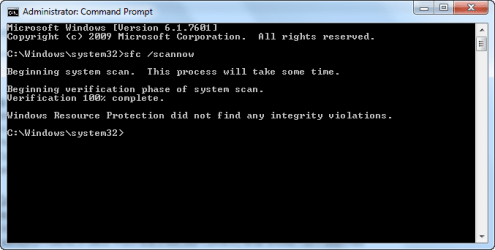
PS You might also start a DOS window (cmd.exe) running as admin, and try "sfc /scannow" without the quotes, so Windows can check the integrity of its files.
 

My Computer My Computer

OS
Win 7 Ultimate 64-bit
^^ remm, So u too facing this prob in p[ast... I have seen many people facing this update prob from mid of 2015.. is there something frm microsoft side (due to releasing of there win 10) ?

i done that sfc /scannow.. every thing is ok
2016-01-29_172429.png


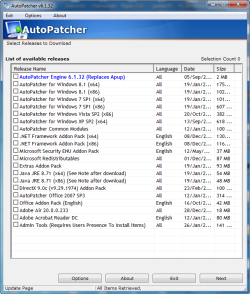
About that Autopatcher, i downloaded it.
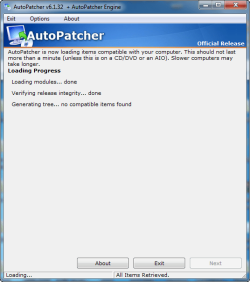
Showing me this...... watz that for winsp1 607mb file ? :confused:
1.png

I need to download that 607mb file !
what updates it have...any info !
and cant i manually select what update i need to download & install.
 

Attachments

  • 2.png
    2.png
    27.1 KB · Views: 22

My Computer My Computer

Computer type
PC/Desktop
OS
Windows 7 Ultimate x64 & Win10 x64bit LTSC
Memory
4gb/8GB
Hard Drives
WD SATA 500GB
Seagate Barracuda 1TB
Antivirus
EIS v13
Sorry I did not see this sooner. I did check back but there were no replies when I did.

I am sure you are past this now, but for future readers...

^^ remm, So u too facing this prob in p[ast... I have seen many people facing this update prob from mid of 2015.. is there something frm microsoft side (due to releasing of there win 10) ?

Yes, it is likely a poorly coded update that caused this.

About that Autopatcher, i downloaded it.
Showing me this...... watz that for winsp1 607mb file ? :confused:
View attachment 380691

You tick the box that matches your OS, like W7 64 bit, or whatever is the case. Then it shows a list of the available downloads for your machine.

I only used it once (a month ago) and IIRC I could select individual updates BUT Autopatcher showed no blurb about what each was for.

After I used Autopatcher, which updated the OS beautifully, I tried the native updater again, and it worked, finally. So Autopatcher must have installed a KB fix for whatever MS screwed up previously.

I also then manually uninstalled some KBs I did not want.

And FTR, I am not updating W7 anymore. That was my last update. Too many updates now are just exploits on MS's part, to send them telemetry or whatnot. The major bugs have long since been worked out of W7 and if I have a specific problem in the future, I will look for a patch to address that problem. But I am no longer updating as a matter of course... the list of KBs to avoid has gotten too long to bother.

I hope you got through your update.
 

My Computer My Computer

OS
Win 7 Ultimate 64-bit
Back
Top