help with a clean Windows 7 install on new SSD

beagrie07

New member
Member
VIP
Local time
9:21 PM
Messages
118
Location
UK
Hi, I've bought a new OCZ Vertex 3 SSD as I'm upgrading my computer in the coming weeks. I currently have 3 hard drives. What I want to do is do a CLEAN install of Windows 7 onto the SSD and then use the other hard drives as normal. How would I go about doing a clean install onto the SSD? Also what do I do about Windows 7 on my current C: drive after this clean install is complete?

Thanks
 

My Computer My Computer

At a glance

Windows 7 Ultimate 64 BitIntel Core i7 2600k 3.8GHzCorsair Vengeance 16GB DDR3 1600MhzAsus NVIDIA GeForce GTX 680 - 2GB GDDR5
Computer Manufacturer/Model Number
Custom
OS
Windows 7 Ultimate 64 Bit
CPU
Intel Core i7 2600k 3.8GHz
Motherboard
Asus P8Z68-V Pro
Memory
Corsair Vengeance 16GB DDR3 1600Mhz
Graphics Card(s)
Asus NVIDIA GeForce GTX 680 - 2GB GDDR5
Sound Card
On Board
Monitor(s) Displays
LG DM2780D
Screen Resolution
1920 x 1080
Hard Drives
OCZ Vertex 4 240GB SATA-III SSD
OCZ Agility 3 240GB SATA-III SSD
WD 500 GB SATA-II HDD
Hitachi 500 GB SATA-II HDD
Hitachi 1 TB SATA-II HDD
Seagate Barracuda 2 TB SATA-III HDD
250GB External HD
PSU
Corsair TX650M PSU
Case
NZXT Phantom Full Tower Case - Black
Cooling
1 x Sickleflow, 2 x AF120 Quiet, 1 x 200mm Top, Corsair H70
Keyboard
Logitech G110
Mouse
Logitech G500
Internet Speed
80 Down / 20 Up
I believe there is tutorials on this forums about installing and/or cloning HDD to SDD.
I just recently upgraded to SSD from HDD with clean reinstall of windows 7 there is steps I did:
1) disconnect all other drives exept the one you use to install windows (in my case DVD drive)
2) Do a clean install of windows (this is same as HDD)
3) do updates intall drivers (SSD management software)
4) connect all drives (you can format/repartition old system partition including old 100MB partition if there is no data that you need).
5) configure storage (change documents, music, etc location) to store files on HDD (if SSD storage is not enough)

Windows 7 should detect SSD and configure it self for optimal usage (disable defragmentation etc) you can check for more in you SSD manufacturer software or manual.
 

My Computer My Computer

At a glance

Windows 7 pro 64bit. (SP1)Intel core I5 24008GB DDR3 KingstonGigabyte GF GTX650OC
Computer type
PC/Desktop
Computer Manufacturer/Model Number
Self Built PC
OS
Windows 7 pro 64bit. (SP1)
CPU
Intel core I5 2400
Motherboard
Gigabyte H61
Memory
8GB DDR3 Kingston
Graphics Card(s)
Gigabyte GF GTX650OC
Sound Card
Realtek HD audio
Monitor(s) Displays
LCD 20"
Screen Resolution
1600x900
Hard Drives
INTEL SSD 320 80GB +Seagate 7200.12 1TBx3
PSU
Coolermaster RX450W
Case
Coolermaster atx case
Cooling
stock cooler
Keyboard
logitech
Mouse
logitech
Internet Speed
FTTD 100mbps
Hi, I've bought a new OCZ Vertex 3 SSD as I'm upgrading my computer in the coming weeks. I currently have 3 hard drives. What I want to do is do a CLEAN install of Windows 7 onto the SSD and then use the other hard drives as normal. How would I go about doing a clean install onto the SSD? Also what do I do about Windows 7 on my current C: drive after this clean install is complete?

Thanks

It's really no different than installing to a HDD.

Back up your data. Unplug all other drives. Install to the SSD. Update the new installation. Reconnect old drives and do with them as you wish---repartition, etc.

After you have installed Windows on the SSD, confirm alignment. Inspect settings for page file and System Restore. Consider eliminating the hibernation file if you don't use hibernation.
 

My Computer My Computer

At a glance

Windows 7 Home Premium SP1, 64-bitIntel Skylake i5-6600K, not overclocked8 GB HyperX DDR4-2666 (2 x 4 GB)none; graphics are integrated on CPU
Computer type
PC/Desktop
Computer Manufacturer/Model Number
Ignatz Special; 4 speed manual gearbox; factory air conditioning; one of one
OS
Windows 7 Home Premium SP1, 64-bit
CPU
Intel Skylake i5-6600K, not overclocked
Motherboard
AsRock Z170M Extreme 4, micro ATX
Memory
8 GB HyperX DDR4-2666 (2 x 4 GB)
Graphics Card(s)
none; graphics are integrated on CPU
Sound Card
onboard: Realtek ALC1150; external: USB Behringer UF0-202
Monitor(s) Displays
Dell S2340M 23 inch IPS
Screen Resolution
1600 x 900
Hard Drives
System: Crucial MX100 series SSD, 128 GB;
Data: Samsung Spinpoint 103SJ, 1 TB;
Backup: WD Caviar Green WD30EZRX-00D8PB0, 3 TB
PSU
Rosewill SilentNight 500 watt fanless, semi-modular
Case
Antec Solo II
Cooling
Noctua NH-U12S; Noctua F12 intake, Noctua S12A exhaust
Keyboard
Microsoft 200 6JH-00001 USB
Mouse
Dell or Microsoft optical wired; USB
Antivirus
Microsoft Security Essentials and Malwarebytes Premium
Browser
Pale Moon
Other Info
All fans PWM; speeds at idle: CPU circa 500 rpm; intake circa 600 rpm; exhaust circa 600 rpm; CPU temps 27 idle and 47 C load in a warm room (27 C/81 F) when running Intel Extreme Tuning Utility stress test.
Thanks for the replies, I'll keep this post on hand with that tutorial while I setup, its my first SSD so I want to do my research and make sure I have everything in place.

It's really no different than installing to a HDD.

Back up your data. Unplug all other drives. Install to the SSD. Update the new installation. Reconnect old drives and do with them as you wish---repartition, etc.

After you have installed Windows on the SSD, confirm alignment. Inspect settings for page file and System Restore. Consider eliminating the hibernation file if you don't use hibernation.

When you say confirm alignment etc. that can be done through the OCZ SSD management software?
 

My Computer My Computer

At a glance

Windows 7 Ultimate 64 BitIntel Core i7 2600k 3.8GHzCorsair Vengeance 16GB DDR3 1600MhzAsus NVIDIA GeForce GTX 680 - 2GB GDDR5
Computer Manufacturer/Model Number
Custom
OS
Windows 7 Ultimate 64 Bit
CPU
Intel Core i7 2600k 3.8GHz
Motherboard
Asus P8Z68-V Pro
Memory
Corsair Vengeance 16GB DDR3 1600Mhz
Graphics Card(s)
Asus NVIDIA GeForce GTX 680 - 2GB GDDR5
Sound Card
On Board
Monitor(s) Displays
LG DM2780D
Screen Resolution
1920 x 1080
Hard Drives
OCZ Vertex 4 240GB SATA-III SSD
OCZ Agility 3 240GB SATA-III SSD
WD 500 GB SATA-II HDD
Hitachi 500 GB SATA-II HDD
Hitachi 1 TB SATA-II HDD
Seagate Barracuda 2 TB SATA-III HDD
250GB External HD
PSU
Corsair TX650M PSU
Case
NZXT Phantom Full Tower Case - Black
Cooling
1 x Sickleflow, 2 x AF120 Quiet, 1 x 200mm Top, Corsair H70
Keyboard
Logitech G110
Mouse
Logitech G500
Internet Speed
80 Down / 20 Up
When you say confirm alignment etc. that can be done through the OCZ SSD management software?

I know nothing about OCZ software, but it can be done through Windows own Diskpart command.

It should be aligned properly automatically, but it's good to check it because if it is mis-aligned you will have a noticeable reduction in performance.
 

My Computer My Computer

At a glance

Windows 7 Home Premium SP1, 64-bitIntel Skylake i5-6600K, not overclocked8 GB HyperX DDR4-2666 (2 x 4 GB)none; graphics are integrated on CPU
Computer type
PC/Desktop
Computer Manufacturer/Model Number
Ignatz Special; 4 speed manual gearbox; factory air conditioning; one of one
OS
Windows 7 Home Premium SP1, 64-bit
CPU
Intel Skylake i5-6600K, not overclocked
Motherboard
AsRock Z170M Extreme 4, micro ATX
Memory
8 GB HyperX DDR4-2666 (2 x 4 GB)
Graphics Card(s)
none; graphics are integrated on CPU
Sound Card
onboard: Realtek ALC1150; external: USB Behringer UF0-202
Monitor(s) Displays
Dell S2340M 23 inch IPS
Screen Resolution
1600 x 900
Hard Drives
System: Crucial MX100 series SSD, 128 GB;
Data: Samsung Spinpoint 103SJ, 1 TB;
Backup: WD Caviar Green WD30EZRX-00D8PB0, 3 TB
PSU
Rosewill SilentNight 500 watt fanless, semi-modular
Case
Antec Solo II
Cooling
Noctua NH-U12S; Noctua F12 intake, Noctua S12A exhaust
Keyboard
Microsoft 200 6JH-00001 USB
Mouse
Dell or Microsoft optical wired; USB
Antivirus
Microsoft Security Essentials and Malwarebytes Premium
Browser
Pale Moon
Other Info
All fans PWM; speeds at idle: CPU circa 500 rpm; intake circa 600 rpm; exhaust circa 600 rpm; CPU temps 27 idle and 47 C load in a warm room (27 C/81 F) when running Intel Extreme Tuning Utility stress test.
Ok I'll keep that in mind, just gotta wait on the drive to arrive now!
 

My Computer My Computer

At a glance

Windows 7 Ultimate 64 BitIntel Core i7 2600k 3.8GHzCorsair Vengeance 16GB DDR3 1600MhzAsus NVIDIA GeForce GTX 680 - 2GB GDDR5
Computer Manufacturer/Model Number
Custom
OS
Windows 7 Ultimate 64 Bit
CPU
Intel Core i7 2600k 3.8GHz
Motherboard
Asus P8Z68-V Pro
Memory
Corsair Vengeance 16GB DDR3 1600Mhz
Graphics Card(s)
Asus NVIDIA GeForce GTX 680 - 2GB GDDR5
Sound Card
On Board
Monitor(s) Displays
LG DM2780D
Screen Resolution
1920 x 1080
Hard Drives
OCZ Vertex 4 240GB SATA-III SSD
OCZ Agility 3 240GB SATA-III SSD
WD 500 GB SATA-II HDD
Hitachi 500 GB SATA-II HDD
Hitachi 1 TB SATA-II HDD
Seagate Barracuda 2 TB SATA-III HDD
250GB External HD
PSU
Corsair TX650M PSU
Case
NZXT Phantom Full Tower Case - Black
Cooling
1 x Sickleflow, 2 x AF120 Quiet, 1 x 200mm Top, Corsair H70
Keyboard
Logitech G110
Mouse
Logitech G500
Internet Speed
80 Down / 20 Up
If you don't mind spending $20 (USD), you can use the Paragon Migrate HDD to SSD app to do it for you.

Macrium Reflect has an additional component that will do the same -- with the added feature that you can EXCLUDE filetypes in order to "shrink" your partition size to make it fit on the SSD, but I don't think you can buy it separately.
 

My Computer My Computer

At a glance

Win7 Pro 32-bit, Win8 Pro 32-bitAMD Phenom II X6 1090T4GB ddr3 1300AMD HD 4290 onboard
Computer type
PC/Desktop
Computer Manufacturer/Model Number
Custom
OS
Win7 Pro 32-bit, Win8 Pro 32-bit
CPU
AMD Phenom II X6 1090T
Motherboard
Gigabyte
Memory
4GB ddr3 1300
Graphics Card(s)
AMD HD 4290 onboard
Sound Card
Builtin Realtek HD Audio
Monitor(s) Displays
Samsung 24" widescreen, LG 23" widescreen
Screen Resolution
1920x1200/1920x1080
Hard Drives
Kingston 256GB SSD
Keyboard
Logitech Illuminated Keyboard
Mouse
Logitech M705 wireless mouse
Antivirus
Norton Av 2013
Browser
IE v10
Mark Phelps is right about Paragon Migrate. It is excellent. It will transfer the OS to the SSD. format it and align it correctly. It will also let you exclude files to shrink the size if necessary. I have used it quite a few times and it has worked perfectly every time. It is not only for SSDs, it works on mechanical hard drives too.
 

My Computers My Computers

  • At a glance

    Windows 11 ProRyzen 9 5900X32GB G Skill DDR4-3600EVGA RTX 3080 FTW 3 Ultra
    Computer type
    PC/Desktop
    Computer Manufacturer/Model Number
    ALWAYS UNDER CONSTRUCTION
    OS
    Windows 11 Pro
    CPU
    Ryzen 9 5900X
    Motherboard
    Asus X570 Crosshair Viii Hero
    Memory
    32GB G Skill DDR4-3600
    Graphics Card(s)
    EVGA RTX 3080 FTW 3 Ultra
    Sound Card
    On Board/Sennheiser PC37X Headset
    Monitor(s) Displays
    3 X Asus 27"
    Screen Resolution
    2560x1440
    Hard Drives
    2 X 1 TB NVME drives
    PSU
    EVGA 850
    Case
    Phanteks Eclipse P400A
    Cooling
    EVGA 280 AIO
    Keyboard
    Logitech G510s/ Logitech G13
    Mouse
    Logitech G502
    Internet Speed
    24/1
    Antivirus
    ESET/MBAM Pro/SAS Pro
    Browser
    Chrome/ Firefox/ Edge
  • At a glance

    Windows 11 ProIntel Ultra 9 288V32 GB LPDDR5X 8533
    Computer type
    Laptop
    System Manufacturer/Model Number
    Dell 16 Plus
    OS
    Windows 11 Pro
    CPU
    Intel Ultra 9 288V
    Memory
    32 GB LPDDR5X 8533
    Monitor(s) Displays
    16" Mini-LED HDR600 Touch 90 Hz
    Screen Resolution
    2560X1600
    Hard Drives
    1 TB NVME
So that program is basically a clone of the hard drive or a clone of the OS on its own?
 

My Computer My Computer

At a glance

Windows 7 Ultimate 64 BitIntel Core i7 2600k 3.8GHzCorsair Vengeance 16GB DDR3 1600MhzAsus NVIDIA GeForce GTX 680 - 2GB GDDR5
Computer Manufacturer/Model Number
Custom
OS
Windows 7 Ultimate 64 Bit
CPU
Intel Core i7 2600k 3.8GHz
Motherboard
Asus P8Z68-V Pro
Memory
Corsair Vengeance 16GB DDR3 1600Mhz
Graphics Card(s)
Asus NVIDIA GeForce GTX 680 - 2GB GDDR5
Sound Card
On Board
Monitor(s) Displays
LG DM2780D
Screen Resolution
1920 x 1080
Hard Drives
OCZ Vertex 4 240GB SATA-III SSD
OCZ Agility 3 240GB SATA-III SSD
WD 500 GB SATA-II HDD
Hitachi 500 GB SATA-II HDD
Hitachi 1 TB SATA-II HDD
Seagate Barracuda 2 TB SATA-III HDD
250GB External HD
PSU
Corsair TX650M PSU
Case
NZXT Phantom Full Tower Case - Black
Cooling
1 x Sickleflow, 2 x AF120 Quiet, 1 x 200mm Top, Corsair H70
Keyboard
Logitech G110
Mouse
Logitech G500
Internet Speed
80 Down / 20 Up
Yes. But it will align the SSD and can shrink the size as well to. The problem with most clone programs is the alignment and the size of the hard drive being bigger than the SSD. Paragon Migrate will do both of those.
 

My Computers My Computers

  • At a glance

    Windows 11 ProRyzen 9 5900X32GB G Skill DDR4-3600EVGA RTX 3080 FTW 3 Ultra
    Computer type
    PC/Desktop
    Computer Manufacturer/Model Number
    ALWAYS UNDER CONSTRUCTION
    OS
    Windows 11 Pro
    CPU
    Ryzen 9 5900X
    Motherboard
    Asus X570 Crosshair Viii Hero
    Memory
    32GB G Skill DDR4-3600
    Graphics Card(s)
    EVGA RTX 3080 FTW 3 Ultra
    Sound Card
    On Board/Sennheiser PC37X Headset
    Monitor(s) Displays
    3 X Asus 27"
    Screen Resolution
    2560x1440
    Hard Drives
    2 X 1 TB NVME drives
    PSU
    EVGA 850
    Case
    Phanteks Eclipse P400A
    Cooling
    EVGA 280 AIO
    Keyboard
    Logitech G510s/ Logitech G13
    Mouse
    Logitech G502
    Internet Speed
    24/1
    Antivirus
    ESET/MBAM Pro/SAS Pro
    Browser
    Chrome/ Firefox/ Edge
  • At a glance

    Windows 11 ProIntel Ultra 9 288V32 GB LPDDR5X 8533
    Computer type
    Laptop
    System Manufacturer/Model Number
    Dell 16 Plus
    OS
    Windows 11 Pro
    CPU
    Intel Ultra 9 288V
    Memory
    32 GB LPDDR5X 8533
    Monitor(s) Displays
    16" Mini-LED HDR600 Touch 90 Hz
    Screen Resolution
    2560X1600
    Hard Drives
    1 TB NVME
It does look like a great program, I'll have a look into it, it'll definetly save me lots of time and even better it looks easy to use and understand!
 

My Computer My Computer

At a glance

Windows 7 Ultimate 64 BitIntel Core i7 2600k 3.8GHzCorsair Vengeance 16GB DDR3 1600MhzAsus NVIDIA GeForce GTX 680 - 2GB GDDR5
Computer Manufacturer/Model Number
Custom
OS
Windows 7 Ultimate 64 Bit
CPU
Intel Core i7 2600k 3.8GHz
Motherboard
Asus P8Z68-V Pro
Memory
Corsair Vengeance 16GB DDR3 1600Mhz
Graphics Card(s)
Asus NVIDIA GeForce GTX 680 - 2GB GDDR5
Sound Card
On Board
Monitor(s) Displays
LG DM2780D
Screen Resolution
1920 x 1080
Hard Drives
OCZ Vertex 4 240GB SATA-III SSD
OCZ Agility 3 240GB SATA-III SSD
WD 500 GB SATA-II HDD
Hitachi 500 GB SATA-II HDD
Hitachi 1 TB SATA-II HDD
Seagate Barracuda 2 TB SATA-III HDD
250GB External HD
PSU
Corsair TX650M PSU
Case
NZXT Phantom Full Tower Case - Black
Cooling
1 x Sickleflow, 2 x AF120 Quiet, 1 x 200mm Top, Corsair H70
Keyboard
Logitech G110
Mouse
Logitech G500
Internet Speed
80 Down / 20 Up
It is simple. It is easier if you move all user folders to another hard drive or partition before the transfer. It drastically reduces the size of the C drive and also you won't have to do it after the transfer. It will create an exact duplicate of your current installation. If you want to move the user folders, here is a tutorial:

Relocate user folders
 

My Computers My Computers

  • At a glance

    Windows 11 ProRyzen 9 5900X32GB G Skill DDR4-3600EVGA RTX 3080 FTW 3 Ultra
    Computer type
    PC/Desktop
    Computer Manufacturer/Model Number
    ALWAYS UNDER CONSTRUCTION
    OS
    Windows 11 Pro
    CPU
    Ryzen 9 5900X
    Motherboard
    Asus X570 Crosshair Viii Hero
    Memory
    32GB G Skill DDR4-3600
    Graphics Card(s)
    EVGA RTX 3080 FTW 3 Ultra
    Sound Card
    On Board/Sennheiser PC37X Headset
    Monitor(s) Displays
    3 X Asus 27"
    Screen Resolution
    2560x1440
    Hard Drives
    2 X 1 TB NVME drives
    PSU
    EVGA 850
    Case
    Phanteks Eclipse P400A
    Cooling
    EVGA 280 AIO
    Keyboard
    Logitech G510s/ Logitech G13
    Mouse
    Logitech G502
    Internet Speed
    24/1
    Antivirus
    ESET/MBAM Pro/SAS Pro
    Browser
    Chrome/ Firefox/ Edge
  • At a glance

    Windows 11 ProIntel Ultra 9 288V32 GB LPDDR5X 8533
    Computer type
    Laptop
    System Manufacturer/Model Number
    Dell 16 Plus
    OS
    Windows 11 Pro
    CPU
    Intel Ultra 9 288V
    Memory
    32 GB LPDDR5X 8533
    Monitor(s) Displays
    16" Mini-LED HDR600 Touch 90 Hz
    Screen Resolution
    2560X1600
    Hard Drives
    1 TB NVME
I also support the Paragon Migration tool. Have used it half a dozen times and it works flawlessly - only 2 clicks and you are done.

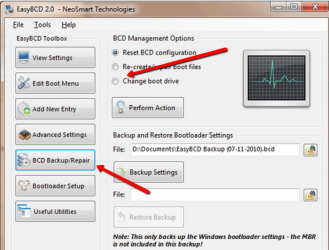
One thing I always do is first move the bootmgr from the 100MB system partition to C (before you migrate to the SSD). And if you have a Dell, that is even more important because they put the bootmgr into the recovery partition. That move can be easily done with EasyBCD (also only 2 clicks).
 

Attachments

  • 2012-01-16_1334.png
    2012-01-16_1334.png
    165.4 KB · Views: 7

My Computer My Computer

At a glance

Vista, Windows7, Mint Mate, Zorin, Windows 8from 1.6GHz Duo to i7
Computer Manufacturer/Model Number
HP, Dell, Gateway, Toshiba - 4 laptops and 2 desktops
OS
Vista, Windows7, Mint Mate, Zorin, Windows 8
CPU
from 1.6GHz Duo to i7
Monitor(s) Displays
2x HP w2207
Hard Drives
5x HDD, 7x SSD, 12x Externals
Keyboard
with trackball - no mices
Mouse
Trackball mice
Internet Speed
DSL 6000
I'm going to plan on installing the new motherboard, cpu, cooler, RAM and then the SSD all at the same time. Would the new bios on the mobo affect anything or am I being stupid? :P
 

My Computer My Computer

At a glance

Windows 7 Ultimate 64 BitIntel Core i7 2600k 3.8GHzCorsair Vengeance 16GB DDR3 1600MhzAsus NVIDIA GeForce GTX 680 - 2GB GDDR5
Computer Manufacturer/Model Number
Custom
OS
Windows 7 Ultimate 64 Bit
CPU
Intel Core i7 2600k 3.8GHz
Motherboard
Asus P8Z68-V Pro
Memory
Corsair Vengeance 16GB DDR3 1600Mhz
Graphics Card(s)
Asus NVIDIA GeForce GTX 680 - 2GB GDDR5
Sound Card
On Board
Monitor(s) Displays
LG DM2780D
Screen Resolution
1920 x 1080
Hard Drives
OCZ Vertex 4 240GB SATA-III SSD
OCZ Agility 3 240GB SATA-III SSD
WD 500 GB SATA-II HDD
Hitachi 500 GB SATA-II HDD
Hitachi 1 TB SATA-II HDD
Seagate Barracuda 2 TB SATA-III HDD
250GB External HD
PSU
Corsair TX650M PSU
Case
NZXT Phantom Full Tower Case - Black
Cooling
1 x Sickleflow, 2 x AF120 Quiet, 1 x 200mm Top, Corsair H70
Keyboard
Logitech G110
Mouse
Logitech G500
Internet Speed
80 Down / 20 Up
I'm going to plan on installing the new motherboard, cpu, cooler, RAM and then the SSD all at the same time. Would the new bios on the mobo affect anything or am I being stupid? :P

Not sure what you are driving at, but the fact that the new mobo has a different BIOS than your current mobo is immaterial.
 

My Computer My Computer

At a glance

Windows 7 Home Premium SP1, 64-bitIntel Skylake i5-6600K, not overclocked8 GB HyperX DDR4-2666 (2 x 4 GB)none; graphics are integrated on CPU
Computer type
PC/Desktop
Computer Manufacturer/Model Number
Ignatz Special; 4 speed manual gearbox; factory air conditioning; one of one
OS
Windows 7 Home Premium SP1, 64-bit
CPU
Intel Skylake i5-6600K, not overclocked
Motherboard
AsRock Z170M Extreme 4, micro ATX
Memory
8 GB HyperX DDR4-2666 (2 x 4 GB)
Graphics Card(s)
none; graphics are integrated on CPU
Sound Card
onboard: Realtek ALC1150; external: USB Behringer UF0-202
Monitor(s) Displays
Dell S2340M 23 inch IPS
Screen Resolution
1600 x 900
Hard Drives
System: Crucial MX100 series SSD, 128 GB;
Data: Samsung Spinpoint 103SJ, 1 TB;
Backup: WD Caviar Green WD30EZRX-00D8PB0, 3 TB
PSU
Rosewill SilentNight 500 watt fanless, semi-modular
Case
Antec Solo II
Cooling
Noctua NH-U12S; Noctua F12 intake, Noctua S12A exhaust
Keyboard
Microsoft 200 6JH-00001 USB
Mouse
Dell or Microsoft optical wired; USB
Antivirus
Microsoft Security Essentials and Malwarebytes Premium
Browser
Pale Moon
Other Info
All fans PWM; speeds at idle: CPU circa 500 rpm; intake circa 600 rpm; exhaust circa 600 rpm; CPU temps 27 idle and 47 C load in a warm room (27 C/81 F) when running Intel Extreme Tuning Utility stress test.
I thought I was being stupid :P Thanks
 

My Computer My Computer

At a glance

Windows 7 Ultimate 64 BitIntel Core i7 2600k 3.8GHzCorsair Vengeance 16GB DDR3 1600MhzAsus NVIDIA GeForce GTX 680 - 2GB GDDR5
Computer Manufacturer/Model Number
Custom
OS
Windows 7 Ultimate 64 Bit
CPU
Intel Core i7 2600k 3.8GHz
Motherboard
Asus P8Z68-V Pro
Memory
Corsair Vengeance 16GB DDR3 1600Mhz
Graphics Card(s)
Asus NVIDIA GeForce GTX 680 - 2GB GDDR5
Sound Card
On Board
Monitor(s) Displays
LG DM2780D
Screen Resolution
1920 x 1080
Hard Drives
OCZ Vertex 4 240GB SATA-III SSD
OCZ Agility 3 240GB SATA-III SSD
WD 500 GB SATA-II HDD
Hitachi 500 GB SATA-II HDD
Hitachi 1 TB SATA-II HDD
Seagate Barracuda 2 TB SATA-III HDD
250GB External HD
PSU
Corsair TX650M PSU
Case
NZXT Phantom Full Tower Case - Black
Cooling
1 x Sickleflow, 2 x AF120 Quiet, 1 x 200mm Top, Corsair H70
Keyboard
Logitech G110
Mouse
Logitech G500
Internet Speed
80 Down / 20 Up
If you install all this new hardware, a transfer of your old OS will most likely not work because of driver incompatibility. In that case you should make a fresh install.
 

My Computer My Computer

At a glance

Vista, Windows7, Mint Mate, Zorin, Windows 8from 1.6GHz Duo to i7
Computer Manufacturer/Model Number
HP, Dell, Gateway, Toshiba - 4 laptops and 2 desktops
OS
Vista, Windows7, Mint Mate, Zorin, Windows 8
CPU
from 1.6GHz Duo to i7
Monitor(s) Displays
2x HP w2207
Hard Drives
5x HDD, 7x SSD, 12x Externals
Keyboard
with trackball - no mices
Mouse
Trackball mice
Internet Speed
DSL 6000
Back
Top