Help with additional storage device, ie second harddrive

yp89CCp

New member
Member
Local time
11:42 PM
Messages
40
So I'm planning to get a second HD for my tower here so I can do the things that i love but also take up space ie 3d modeling and the game art stuff. I lost all of my backups on my laptop but i figured since my tower has a better proc, tons more memory, video power that it would be a more suitable place to do 3d modeling because it is sometimes RAM hungry

Anyways my 250 primary is running low. I just installed PS cs4 because I use it a ton [and for school graphic arts work] and i'm down to 60 gigs

I've never installed another hd before. I wanted to get a basic run down of it.

Correct me if I mess up:

1. get right kind, sata3 drive
2. put in case in rails and connect sata cables to HD and motherboard

then what? Do i install win7 on that too like a fresh install? I wouldn't want the new bigger HD to be boot, just a storage device for like steam, 3d stuff, etc

Thanks

EDIT: my motherboard
http://www.newegg.com/Product/Product.aspx?Item=N82E16813157241
 

My Computer

Computer Manufacturer/Model Number
asus aspire 5745g-7671
OS
win 7 x64
CPU
intel core i3-370m
Memory
4 gig ddr3
Graphics Card(s)
nvidia gt 420m
Hard Drives
500 gig
Do i install win7 on that too like a fresh install? I wouldn't want the new bigger HD to be boot, just a storage device for like steam, 3d stuff, etc

No. You wouldn't put Windows on it.

All you need to do is mount it, connect 2 cables to it, partition it, and format it. You'll need to give it a drive letter.

Partitioning, formatting, and drive letter can be done in Windows Disk Management.

Then just put your data on it.
 

My Computer

Computer type
PC/Desktop
Computer Manufacturer/Model Number
Ignatz Special; 4 speed manual gearbox; factory air conditioning; one of one
OS
Windows 7 Home Premium SP1, 64-bit
CPU
Intel Skylake i5-6600K, not overclocked
Motherboard
AsRock Z170M Extreme 4, micro ATX
Memory
8 GB HyperX DDR4-2666 (2 x 4 GB)
Graphics Card(s)
none; graphics are integrated on CPU
Sound Card
onboard: Realtek ALC1150; external: USB Behringer UF0-202
Monitor(s) Displays
Dell S2340M 23 inch IPS
Screen Resolution
1600 x 900
Hard Drives
System: Crucial MX100 series SSD, 128 GB;
Data: Samsung Spinpoint 103SJ, 1 TB;
Backup: WD Caviar Green WD30EZRX-00D8PB0, 3 TB
PSU
Rosewill SilentNight 500 watt fanless, semi-modular
Case
Antec Solo II
Cooling
Noctua NH-U12S; Noctua F12 intake, Noctua S12A exhaust
Keyboard
Microsoft 200 6JH-00001 USB
Mouse
Dell or Microsoft optical wired; USB
Antivirus
Microsoft Security Essentials and Malwarebytes Premium
Browser
Pale Moon
Other Info
All fans PWM; speeds at idle: CPU circa 500 rpm; intake circa 600 rpm; exhaust circa 600 rpm; CPU temps 27 idle and 47 C load in a warm room (27 C/81 F) when running Intel Extreme Tuning Utility stress test.
1. No need to look for a Sata3 drive. Sata2 is ample for a HDD. The Sata3 only makes sense for SSDs. And you most likely have no Sata3 ports on your Mobo anyhow.

2. Check first whether you have a rail from the PSU - and a HDD bay, else it is good old Velcro.

3. Look for a HDD with 7200 RPM and a big cache (16 or 32MB)

4. Unfortunately you are buying at the wrong time. Prices are a LOT higher than in the last couple of years - because Thailand is flooded. And that will not change for at least 6 months.

5. Consider an external disk. They are sometimes cheaper.

6. Here is a site where they sometimes have good deals - check daily: Storage Devices Deals - Deals2buy.com
 

My Computer

Computer Manufacturer/Model Number
HP, Dell, Gateway, Toshiba - 4 laptops and 2 desktops
OS
Vista, Windows7, Mint Mate, Zorin, Windows 8
CPU
from 1.6GHz Duo to i7
Monitor(s) Displays
2x HP w2207
Hard Drives
5x HDD, 7x SSD, 12x Externals
Keyboard
with trackball - no mices
Mouse
Trackball mice
Internet Speed
DSL 6000
No. You wouldn't put Windows on it.

All you need to do is mount it, connect 2 cables to it, partition it, and format it. You'll need to give it a drive letter.


Partitioning, formatting, and drive letter can be done in Windows Disk Management.


Then just put your data on it.


Win disk management? Do I do this IN win7 with the drive connected? Like I boot up as normal with new hd connected and there are options in normal windows?
 

My Computer

Computer Manufacturer/Model Number
asus aspire 5745g-7671
OS
win 7 x64
CPU
intel core i3-370m
Memory
4 gig ddr3
Graphics Card(s)
nvidia gt 420m
Hard Drives
500 gig
Jist type Disk Management into Start/Search and it will show up. Then right click on the right pane of the new disk and define a partition. The wizard will guide you.

Should the disk not be initialized yet, right click first on the left pane of this drive where it says Disk1 and initialize.
 

My Computer

Computer Manufacturer/Model Number
HP, Dell, Gateway, Toshiba - 4 laptops and 2 desktops
OS
Vista, Windows7, Mint Mate, Zorin, Windows 8
CPU
from 1.6GHz Duo to i7
Monitor(s) Displays
2x HP w2207
Hard Drives
5x HDD, 7x SSD, 12x Externals
Keyboard
with trackball - no mices
Mouse
Trackball mice
Internet Speed
DSL 6000
Do I do this IN win7 with the drive connected? Like I boot up as normal with new hd connected and there are options in normal windows?

Yes. Just like WHS says.

Your Windows drive (C) is still in charge of things. The new drive is totally inert and useless until you partition and format it.

Give the new drive an unused drive letter like D or F or S or whatever is available.
 

My Computer

Computer type
PC/Desktop
Computer Manufacturer/Model Number
Ignatz Special; 4 speed manual gearbox; factory air conditioning; one of one
OS
Windows 7 Home Premium SP1, 64-bit
CPU
Intel Skylake i5-6600K, not overclocked
Motherboard
AsRock Z170M Extreme 4, micro ATX
Memory
8 GB HyperX DDR4-2666 (2 x 4 GB)
Graphics Card(s)
none; graphics are integrated on CPU
Sound Card
onboard: Realtek ALC1150; external: USB Behringer UF0-202
Monitor(s) Displays
Dell S2340M 23 inch IPS
Screen Resolution
1600 x 900
Hard Drives
System: Crucial MX100 series SSD, 128 GB;
Data: Samsung Spinpoint 103SJ, 1 TB;
Backup: WD Caviar Green WD30EZRX-00D8PB0, 3 TB
PSU
Rosewill SilentNight 500 watt fanless, semi-modular
Case
Antec Solo II
Cooling
Noctua NH-U12S; Noctua F12 intake, Noctua S12A exhaust
Keyboard
Microsoft 200 6JH-00001 USB
Mouse
Dell or Microsoft optical wired; USB
Antivirus
Microsoft Security Essentials and Malwarebytes Premium
Browser
Pale Moon
Other Info
All fans PWM; speeds at idle: CPU circa 500 rpm; intake circa 600 rpm; exhaust circa 600 rpm; CPU temps 27 idle and 47 C load in a warm room (27 C/81 F) when running Intel Extreme Tuning Utility stress test.
wow sounds too easy to be true
Thinking a 1 tb 32cache. Anyone got good links for me?
 

My Computer

Computer Manufacturer/Model Number
asus aspire 5745g-7671
OS
win 7 x64
CPU
intel core i3-370m
Memory
4 gig ddr3
Graphics Card(s)
nvidia gt 420m
Hard Drives
500 gig

My Computer

Computer type
PC/Desktop
Computer Manufacturer/Model Number
Ignatz Special; 4 speed manual gearbox; factory air conditioning; one of one
OS
Windows 7 Home Premium SP1, 64-bit
CPU
Intel Skylake i5-6600K, not overclocked
Motherboard
AsRock Z170M Extreme 4, micro ATX
Memory
8 GB HyperX DDR4-2666 (2 x 4 GB)
Graphics Card(s)
none; graphics are integrated on CPU
Sound Card
onboard: Realtek ALC1150; external: USB Behringer UF0-202
Monitor(s) Displays
Dell S2340M 23 inch IPS
Screen Resolution
1600 x 900
Hard Drives
System: Crucial MX100 series SSD, 128 GB;
Data: Samsung Spinpoint 103SJ, 1 TB;
Backup: WD Caviar Green WD30EZRX-00D8PB0, 3 TB
PSU
Rosewill SilentNight 500 watt fanless, semi-modular
Case
Antec Solo II
Cooling
Noctua NH-U12S; Noctua F12 intake, Noctua S12A exhaust
Keyboard
Microsoft 200 6JH-00001 USB
Mouse
Dell or Microsoft optical wired; USB
Antivirus
Microsoft Security Essentials and Malwarebytes Premium
Browser
Pale Moon
Other Info
All fans PWM; speeds at idle: CPU circa 500 rpm; intake circa 600 rpm; exhaust circa 600 rpm; CPU temps 27 idle and 47 C load in a warm room (27 C/81 F) when running Intel Extreme Tuning Utility stress test.
If you have a spare PCIexpress slot you might consider USB 3.0 card:
Newegg.com - SIIG JU-P20412-S2 PCI Express to 2-Port USB 3.0 SuperSpeed Card

It was a better strategy when HD were cheaper. But I would keep an eye out for USB 3.0 docking station bargains as I expect expensive internal drives to stick in them may cramp sales.

You can put a bargain drive in the dock now, then if performance drives get cheap again, just slide one in the dock. I got a little plastic stack of drawers at Walmart to store the drives I'm not using in anti-static bags in the drawers.

On my machines the drives in the docks are actually faster than the system drives that came with the machines.

Another advantage, if you are doing very disk intensive tasks, such as muxing video, it puts no load on your system disk controller. The SIIG card handles everything. There are 2 ports. I have a USB 3.0 dock single plugged into each. Copying or muxing from one drive as source to the other as destination doesn't cause my system disk access LED to flicker at all. The i/o is self-contained and runs at the full speed of the drives(was buying WD Caviar Black until the big price gouge.)
 

My Computer

Computer Manufacturer/Model Number
HP Media Center
OS
Windows 7 32 bit
CPU
AMD 5200+ dual core
Memory
2 GB
Graphics Card(s)
NVidia GeForce 6150SE 128 MB
Monitor(s) Displays
CRT
Screen Resolution
1280x1024
Hard Drives
500 GB Sata internal :

SIIG USB 3.0 docking stations w/WD Caviar Black 6 Gb/s drives
Keyboard
PS/2
Mouse
PS/2 Wheel Mouse
Other Info
SIIG USB 3.0 PCIexpress card.
On my machines the drives in the docks are actually faster than the system drives that came with the machines
Yeah, but are the drive specs the same - RPM, cache size and total size.
 

My Computer

Computer Manufacturer/Model Number
HP, Dell, Gateway, Toshiba - 4 laptops and 2 desktops
OS
Vista, Windows7, Mint Mate, Zorin, Windows 8
CPU
from 1.6GHz Duo to i7
Monitor(s) Displays
2x HP w2207
Hard Drives
5x HDD, 7x SSD, 12x Externals
Keyboard
with trackball - no mices
Mouse
Trackball mice
Internet Speed
DSL 6000
On my machines the drives in the docks are actually faster than the system drives that came with the machines
Yeah, but are the drive specs the same - RPM, cache size and total size.

Of course not. Likewise the controller that came in the tower is only 3 Gb/s while the SIIG card is 5 Gb/s. I don't get the point? If the OP was a system builder he wouldn't be asking how to add a HD.
 

My Computer

Computer Manufacturer/Model Number
HP Media Center
OS
Windows 7 32 bit
CPU
AMD 5200+ dual core
Memory
2 GB
Graphics Card(s)
NVidia GeForce 6150SE 128 MB
Monitor(s) Displays
CRT
Screen Resolution
1280x1024
Hard Drives
500 GB Sata internal :

SIIG USB 3.0 docking stations w/WD Caviar Black 6 Gb/s drives
Keyboard
PS/2
Mouse
PS/2 Wheel Mouse
Other Info
SIIG USB 3.0 PCIexpress card.
3Gb/sec or 5Gb/sec is neither here or there. The HDD can read data at best as fast as 1Gb/sec. So the speed of the channel is really irrelevant.
 

My Computer

Computer Manufacturer/Model Number
HP, Dell, Gateway, Toshiba - 4 laptops and 2 desktops
OS
Vista, Windows7, Mint Mate, Zorin, Windows 8
CPU
from 1.6GHz Duo to i7
Monitor(s) Displays
2x HP w2207
Hard Drives
5x HDD, 7x SSD, 12x Externals
Keyboard
with trackball - no mices
Mouse
Trackball mice
Internet Speed
DSL 6000
3Gb/sec or 5Gb/sec is neither here or there. The HDD can read data at best as fast as 1Gb/sec. So the speed of the channel is really irrelevant.

To me this whole thread hijack is irrelevant. In a 3 drive 2 controller scenario, the OS physical disk is running the OS and supposedly the disk intensive program. The data is processed across the other 2 drives using the other controller(the SIIG card.) In your 2 drive one controller setup one drive is shouldering the OS with swap, the program, and the data source, the other drive is the data destination. All the disk i/o is over one controller.

Don't think it's as efficient.
 

My Computer

Computer Manufacturer/Model Number
HP Media Center
OS
Windows 7 32 bit
CPU
AMD 5200+ dual core
Memory
2 GB
Graphics Card(s)
NVidia GeForce 6150SE 128 MB
Monitor(s) Displays
CRT
Screen Resolution
1280x1024
Hard Drives
500 GB Sata internal :

SIIG USB 3.0 docking stations w/WD Caviar Black 6 Gb/s drives
Keyboard
PS/2
Mouse
PS/2 Wheel Mouse
Other Info
SIIG USB 3.0 PCIexpress card.

What???

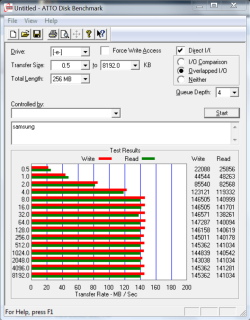
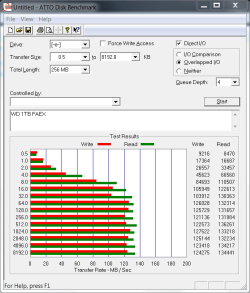
Your link is to a $250 Western Digital 1 TB drive.

My link was to a $150 Samsung 1 TB drive.

They are different drives with similar performance and identical capacity.

On the very day that I bought my Samsung for $50 (June 19, 2011), the Western Digital Caviar Black was priced at $85. They have both tripled since that date.

Samsungs have always been cheaper.

Here are the benchmarks of each drive. Samsung on the left; WD on the right.
 

Attachments

  • Samsung 1 tb 103 sj owned by essenbe.PNG
    Samsung 1 tb 103 sj owned by essenbe.PNG
    39.7 KB · Views: 2
  • WD  1 TB wd1002FAEX 6GBs drive owned by essenbe.PNG
    WD 1 TB wd1002FAEX 6GBs drive owned by essenbe.PNG
    16.1 KB · Views: 1

My Computer

Computer type
PC/Desktop
Computer Manufacturer/Model Number
Ignatz Special; 4 speed manual gearbox; factory air conditioning; one of one
OS
Windows 7 Home Premium SP1, 64-bit
CPU
Intel Skylake i5-6600K, not overclocked
Motherboard
AsRock Z170M Extreme 4, micro ATX
Memory
8 GB HyperX DDR4-2666 (2 x 4 GB)
Graphics Card(s)
none; graphics are integrated on CPU
Sound Card
onboard: Realtek ALC1150; external: USB Behringer UF0-202
Monitor(s) Displays
Dell S2340M 23 inch IPS
Screen Resolution
1600 x 900
Hard Drives
System: Crucial MX100 series SSD, 128 GB;
Data: Samsung Spinpoint 103SJ, 1 TB;
Backup: WD Caviar Green WD30EZRX-00D8PB0, 3 TB
PSU
Rosewill SilentNight 500 watt fanless, semi-modular
Case
Antec Solo II
Cooling
Noctua NH-U12S; Noctua F12 intake, Noctua S12A exhaust
Keyboard
Microsoft 200 6JH-00001 USB
Mouse
Dell or Microsoft optical wired; USB
Antivirus
Microsoft Security Essentials and Malwarebytes Premium
Browser
Pale Moon
Other Info
All fans PWM; speeds at idle: CPU circa 500 rpm; intake circa 600 rpm; exhaust circa 600 rpm; CPU temps 27 idle and 47 C load in a warm room (27 C/81 F) when running Intel Extreme Tuning Utility stress test.
I would think with holidays coming up they'd drop prices to encourage consumer spending
 

My Computer

Computer Manufacturer/Model Number
asus aspire 5745g-7671
OS
win 7 x64
CPU
intel core i3-370m
Memory
4 gig ddr3
Graphics Card(s)
nvidia gt 420m
Hard Drives
500 gig

My Computer

Computer Manufacturer/Model Number
HP, Dell, Gateway, Toshiba - 4 laptops and 2 desktops
OS
Vista, Windows7, Mint Mate, Zorin, Windows 8
CPU
from 1.6GHz Duo to i7
Monitor(s) Displays
2x HP w2207
Hard Drives
5x HDD, 7x SSD, 12x Externals
Keyboard
with trackball - no mices
Mouse
Trackball mice
Internet Speed
DSL 6000
@ignatzatsonic even with WD Caviar Black same capacity when the 64 MB cache 6 Gb/s drives came out I notice they didn't discount the 32 MB cache models. I guess they figure they can unload them. It was kind of comical because when the 64 MB cache models were introduced some of them were actually priced lower than the equivalent 32 MB cache models. Weird! What the market will bear as they say. :)
 

My Computer

Computer Manufacturer/Model Number
HP Media Center
OS
Windows 7 32 bit
CPU
AMD 5200+ dual core
Memory
2 GB
Graphics Card(s)
NVidia GeForce 6150SE 128 MB
Monitor(s) Displays
CRT
Screen Resolution
1280x1024
Hard Drives
500 GB Sata internal :

SIIG USB 3.0 docking stations w/WD Caviar Black 6 Gb/s drives
Keyboard
PS/2
Mouse
PS/2 Wheel Mouse
Other Info
SIIG USB 3.0 PCIexpress card.
Weird! What the market will bear as they say. :)

Yeah, all I can figure is WD has been able to command a bit of a premium price for the Black series generally due to the good publicity and good performance they have had for the last 3 years or so.

Likewise, I think Samsungs are priced cheaper because that brand is more known for things other than hard drives and the retailers have to discount them to drive sales.

I've never had a problem with either, but have lately drifted toward Samsung due to the price differential.
 

My Computer

Computer type
PC/Desktop
Computer Manufacturer/Model Number
Ignatz Special; 4 speed manual gearbox; factory air conditioning; one of one
OS
Windows 7 Home Premium SP1, 64-bit
CPU
Intel Skylake i5-6600K, not overclocked
Motherboard
AsRock Z170M Extreme 4, micro ATX
Memory
8 GB HyperX DDR4-2666 (2 x 4 GB)
Graphics Card(s)
none; graphics are integrated on CPU
Sound Card
onboard: Realtek ALC1150; external: USB Behringer UF0-202
Monitor(s) Displays
Dell S2340M 23 inch IPS
Screen Resolution
1600 x 900
Hard Drives
System: Crucial MX100 series SSD, 128 GB;
Data: Samsung Spinpoint 103SJ, 1 TB;
Backup: WD Caviar Green WD30EZRX-00D8PB0, 3 TB
PSU
Rosewill SilentNight 500 watt fanless, semi-modular
Case
Antec Solo II
Cooling
Noctua NH-U12S; Noctua F12 intake, Noctua S12A exhaust
Keyboard
Microsoft 200 6JH-00001 USB
Mouse
Dell or Microsoft optical wired; USB
Antivirus
Microsoft Security Essentials and Malwarebytes Premium
Browser
Pale Moon
Other Info
All fans PWM; speeds at idle: CPU circa 500 rpm; intake circa 600 rpm; exhaust circa 600 rpm; CPU temps 27 idle and 47 C load in a warm room (27 C/81 F) when running Intel Extreme Tuning Utility stress test.
I always wonder whether the different makes do get their drives from the same sweatshops in Thailand and they only put their label on to be different.

I have seen that even in large systems. E.g. Siemens purchased their drives from IBM. They even arrived in the customer's office as IBM and the installing engineer just peeled the IBM label off and pasted the Siemns label on - saw that with my own eyes.
 

My Computer

Computer Manufacturer/Model Number
HP, Dell, Gateway, Toshiba - 4 laptops and 2 desktops
OS
Vista, Windows7, Mint Mate, Zorin, Windows 8
CPU
from 1.6GHz Duo to i7
Monitor(s) Displays
2x HP w2207
Hard Drives
5x HDD, 7x SSD, 12x Externals
Keyboard
with trackball - no mices
Mouse
Trackball mice
Internet Speed
DSL 6000
Back
Top