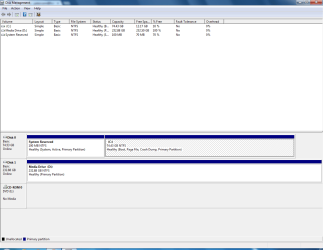
kingkenny1953 New member Local time 6:05 AM Messages 8 Location Eltham South East London. Dec 20, 2012 #1 Just installed a 2nd hard drive,It's showing up on disk management,But not sure how to allocate the bit in black Last edited: Dec 20, 2012 My Computer My Computer OS32 ultimate
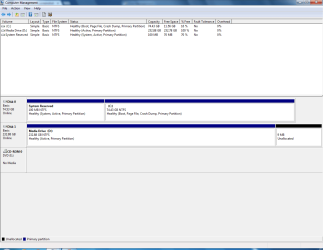
Just installed a 2nd hard drive,It's showing up on disk management,But not sure how to allocate the bit in black
LittleJay New member Guru Gold Member VIP Local time 6:05 AM Messages 1,626 Location The North Star state Dec 20, 2012 #2 Go into disk management and right click on the D partition on your second HDD. You should see an "extend" feature in the list. Click on that and follow the directions. http://www.sevenforums.com/tutorials/2670-partition-volume-extend.html Last edited by a moderator: Dec 20, 2012 My Computer My Computer Computer Manufacturer/Model NumberCustomized build from CyberPowerOSWindows 7 Home Premium 64bit SP 1CPUIntel i5 2500kMotherboardAsus P8P67 DeluxeMemory8 gigabytes Corsair PC3-12800 DDR3Graphics Card(s)EVGA GeForce GTX 460 superclockedSound CardIntegratedMonitor(s) DisplaysViewSonic 23" LCDScreen Resolution1980 x 1080Hard Drives120 Gb Samsung 840 Pro SSD 120 Gb Kingston Hyper X SSD 1 Tb WD Caviar Black HDDPSUCoolermaster 1000 watt modularCaseCoolermaster HAF X full towerCoolingCoolermaster Hyper 212 plusKeyboardLogitech USBMouseMicrosoft 3 buttonInternet Speeddownload 1.5 Mb/sec upload 300Kb/sec
Go into disk management and right click on the D partition on your second HDD. You should see an "extend" feature in the list. Click on that and follow the directions. http://www.sevenforums.com/tutorials/2670-partition-volume-extend.html
kingkenny1953 New member Thread Starter Local time 6:05 AM Messages 8 Location Eltham South East London. Dec 21, 2012 #3 Many thanks Little jay,Problem solved.Have a merry Christmas. My Computer My Computer OS32 ultimate
theog New member Guru Gold Member VIP Local time 12:05 PM Messages 11,404 Location uk Hampshire Dec 21, 2012 #4 Also mark your 2nd HD Drive inactive. http://www.sevenforums.com/tutorials/197157-partition-mark-inactive.html My Computer My Computer OSME/XP/Vista/Win7
Also mark your 2nd HD Drive inactive. http://www.sevenforums.com/tutorials/197157-partition-mark-inactive.html
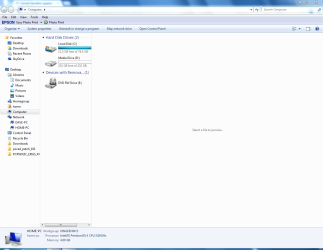
kingkenny1953 New member Thread Starter Local time 6:05 AM Messages 8 Location Eltham South East London. Dec 21, 2012 #5 is this correct now. My Computer My Computer OS32 ultimate
LittleJay New member Guru Gold Member VIP Local time 6:05 AM Messages 1,626 Location The North Star state Dec 21, 2012 #6 Yes, that looks fine. Hope you have a Merry Christmas! My Computer My Computer Computer Manufacturer/Model NumberCustomized build from CyberPowerOSWindows 7 Home Premium 64bit SP 1CPUIntel i5 2500kMotherboardAsus P8P67 DeluxeMemory8 gigabytes Corsair PC3-12800 DDR3Graphics Card(s)EVGA GeForce GTX 460 superclockedSound CardIntegratedMonitor(s) DisplaysViewSonic 23" LCDScreen Resolution1980 x 1080Hard Drives120 Gb Samsung 840 Pro SSD 120 Gb Kingston Hyper X SSD 1 Tb WD Caviar Black HDDPSUCoolermaster 1000 watt modularCaseCoolermaster HAF X full towerCoolingCoolermaster Hyper 212 plusKeyboardLogitech USBMouseMicrosoft 3 buttonInternet Speeddownload 1.5 Mb/sec upload 300Kb/sec
kingkenny1953 New member Thread Starter Local time 6:05 AM Messages 8 Location Eltham South East London. Dec 21, 2012 #7 Many thanks My Computer My Computer OS32 ultimate