Help with Bluetooth Phone Explore

CraXJaX

New member
Member
Local time
2:19 AM
Messages
29
Hi...

I have a Dell XPS M1330, the bluetooth drivers of which were detected automatically by Windows Update during installation of Win 7 (Dell Truemobile 355 Module + EDR along with Microsoft Bluetooth Enumerator).

In XP, there was an option of 'My Bluetooth Places' from where I could connect using 'Obex File Transfer' to my Sony Ericsson W890i, and could use it like any other drive for transfer of files to and from it.

Is this not possible under Windows 7? How do I explore my phone via bluetooth?

Thanks,
JaX
 

My Computer

Computer Manufacturer/Model Number
Dell XPS M1330
OS
Windows 7 Ultimate x86
CPU
Intel Core 2 Duo T7250 @2GHz
Memory
2 GB
Graphics Card(s)
nVidia 8400M GS
Screen Resolution
1280x800
Hard Drives
250GB SATA
In Network and sharing....click Change adapter settings (left hand pane). right-click Bluetooth Network connection, then View Bluetooth Network Devices...

If your devices are set to visible then W7 should detect it.
 

My Computer

Computer Manufacturer/Model Number
Lenovo ThinkPad T60
OS
Windows 7 Ultimate 64Bit
CPU
GenuineIntel Intel(R) Core(TM) DuoCore T2400 @ 1.83GHz
Motherboard
Intel(R) 82801G (ICH7 Family)
Memory
2.00 GB
Graphics Card(s)
Mobile Intel(R) 945 Express Chipset
Sound Card
SoundMAX Integrated Digital HD Audio
Monitor(s) Displays
ThinkPad Display
Screen Resolution
1400x1050
Hard Drives
100Gb SATA
Keyboard
Standard Keyboard
Mouse
HID-compliant Mouse
Internet Speed
Cable Broadband - 54Mbps
Other Info
Intel(R) PRO/1000 PL Network Connection
11a/b/g Wireless LAN Mini PCI Express Adapter
Yes, Windows 7 is detecting it as a bluetooth device, but I don't know how to explore into it.
??! :(
 

My Computer

Computer Manufacturer/Model Number
Dell XPS M1330
OS
Windows 7 Ultimate x86
CPU
Intel Core 2 Duo T7250 @2GHz
Memory
2 GB
Graphics Card(s)
nVidia 8400M GS
Screen Resolution
1280x800
Hard Drives
250GB SATA
What is the error message when you double click the icon?
 

My Computer

Computer Manufacturer/Model Number
Lenovo ThinkPad T60
OS
Windows 7 Ultimate 64Bit
CPU
GenuineIntel Intel(R) Core(TM) DuoCore T2400 @ 1.83GHz
Motherboard
Intel(R) 82801G (ICH7 Family)
Memory
2.00 GB
Graphics Card(s)
Mobile Intel(R) 945 Express Chipset
Sound Card
SoundMAX Integrated Digital HD Audio
Monitor(s) Displays
ThinkPad Display
Screen Resolution
1400x1050
Hard Drives
100Gb SATA
Keyboard
Standard Keyboard
Mouse
HID-compliant Mouse
Internet Speed
Cable Broadband - 54Mbps
Other Info
Intel(R) PRO/1000 PL Network Connection
11a/b/g Wireless LAN Mini PCI Express Adapter
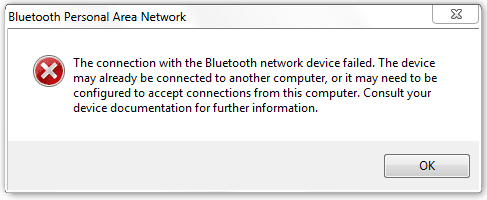
When I doubleclick on it the properties window opens up, but when I right click and connect using -> direct connection, this error pops up: "The connection with the Bluetooth network device failed...." (see attachment)

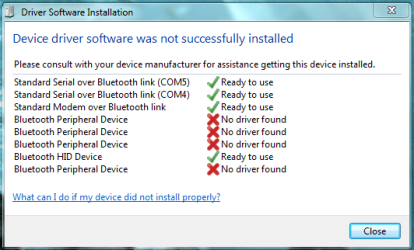
When I try to install the drivers again using Windows Update, I see that not all the drivers are installed properly..
 

Attachments

  • Capture1.PNG
    Capture1.PNG
    5.6 KB · Views: 8
  • Capture.PNG
    Capture.PNG
    15.1 KB · Views: 18

My Computer

Computer Manufacturer/Model Number
Dell XPS M1330
OS
Windows 7 Ultimate x86
CPU
Intel Core 2 Duo T7250 @2GHz
Memory
2 GB
Graphics Card(s)
nVidia 8400M GS
Screen Resolution
1280x800
Hard Drives
250GB SATA
Update: When I connect using right click -> connect using -> access point, it says the connection has been successful, but I cannot view any of my files in the phone or directories like I could in XP.

As you can see, the drivers for file transfer have probably not been installed.

What do you think?
 

My Computer

Computer Manufacturer/Model Number
Dell XPS M1330
OS
Windows 7 Ultimate x86
CPU
Intel Core 2 Duo T7250 @2GHz
Memory
2 GB
Graphics Card(s)
nVidia 8400M GS
Screen Resolution
1280x800
Hard Drives
250GB SATA
Cannot view files, meaning empty folder or unable to bring up a folder at all? It's worth a try getting those red Xs remediated.
 

My Computer

Computer Manufacturer/Model Number
Lenovo ThinkPad T60
OS
Windows 7 Ultimate 64Bit
CPU
GenuineIntel Intel(R) Core(TM) DuoCore T2400 @ 1.83GHz
Motherboard
Intel(R) 82801G (ICH7 Family)
Memory
2.00 GB
Graphics Card(s)
Mobile Intel(R) 945 Express Chipset
Sound Card
SoundMAX Integrated Digital HD Audio
Monitor(s) Displays
ThinkPad Display
Screen Resolution
1400x1050
Hard Drives
100Gb SATA
Keyboard
Standard Keyboard
Mouse
HID-compliant Mouse
Internet Speed
Cable Broadband - 54Mbps
Other Info
Intel(R) PRO/1000 PL Network Connection
11a/b/g Wireless LAN Mini PCI Express Adapter
I am unable to bring up a folder at all...

I don't know how I can remove those red X's, how do I do that?
 

My Computer

Computer Manufacturer/Model Number
Dell XPS M1330
OS
Windows 7 Ultimate x86
CPU
Intel Core 2 Duo T7250 @2GHz
Memory
2 GB
Graphics Card(s)
nVidia 8400M GS
Screen Resolution
1280x800
Hard Drives
250GB SATA
Have you try installing the driver off the CD?
 

My Computer

Computer Manufacturer/Model Number
Lenovo ThinkPad T60
OS
Windows 7 Ultimate 64Bit
CPU
GenuineIntel Intel(R) Core(TM) DuoCore T2400 @ 1.83GHz
Motherboard
Intel(R) 82801G (ICH7 Family)
Memory
2.00 GB
Graphics Card(s)
Mobile Intel(R) 945 Express Chipset
Sound Card
SoundMAX Integrated Digital HD Audio
Monitor(s) Displays
ThinkPad Display
Screen Resolution
1400x1050
Hard Drives
100Gb SATA
Keyboard
Standard Keyboard
Mouse
HID-compliant Mouse
Internet Speed
Cable Broadband - 54Mbps
Other Info
Intel(R) PRO/1000 PL Network Connection
11a/b/g Wireless LAN Mini PCI Express Adapter
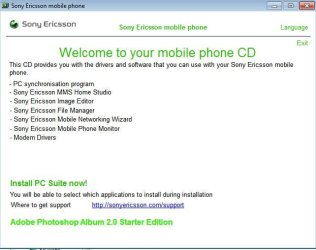
I just connected my K750i via Bluetooth and i had to install software and drivers off the CD. I know it's a old phone but hey it still works. If your driver doesnt look like it's compatible with W7, and get a message to say so, just keep with the install...i did and somehow it works.

The File Manager is what will allow u to browse your phone.
Noname.jpg
 

My Computer

Computer Manufacturer/Model Number
Lenovo ThinkPad T60
OS
Windows 7 Ultimate 64Bit
CPU
GenuineIntel Intel(R) Core(TM) DuoCore T2400 @ 1.83GHz
Motherboard
Intel(R) 82801G (ICH7 Family)
Memory
2.00 GB
Graphics Card(s)
Mobile Intel(R) 945 Express Chipset
Sound Card
SoundMAX Integrated Digital HD Audio
Monitor(s) Displays
ThinkPad Display
Screen Resolution
1400x1050
Hard Drives
100Gb SATA
Keyboard
Standard Keyboard
Mouse
HID-compliant Mouse
Internet Speed
Cable Broadband - 54Mbps
Other Info
Intel(R) PRO/1000 PL Network Connection
11a/b/g Wireless LAN Mini PCI Express Adapter
I can browse my phone without SE PC Suite, but they need need to update their drivers as shown in the image.

What phone are you using?
 

My Computer

Computer Manufacturer/Model Number
Sony Vaio FZ21Z
OS
Windows 7 Ultimate x64 ®™
CPU
Intel Core 2 Duo (2.2 GHz)
Motherboard
Sony (Intel Chipset)
Memory
2x 2GB Corsair (667 MHz)
Graphics Card(s)
NVIDIA 8600M GS (256MB)
Sound Card
Sigmatel
Monitor(s) Displays
15.4" TFT X-Black
Screen Resolution
1280x800
Hard Drives
Western Digital 300GB Scorpio Black (7200rpm)
Mouse
Logitech Anywhere MX
Internet Speed
Sky 5MB
Ok, I bought the phone almost 2 years ago so I don't have the CD but I'll see if I can get something off their website..
Thanks for your quick replies aem, I'll let you know if it worked.

@FZ21Z.. I've a Sony Ericsson W890i..
 

My Computer

Computer Manufacturer/Model Number
Dell XPS M1330
OS
Windows 7 Ultimate x86
CPU
Intel Core 2 Duo T7250 @2GHz
Memory
2 GB
Graphics Card(s)
nVidia 8400M GS
Screen Resolution
1280x800
Hard Drives
250GB SATA
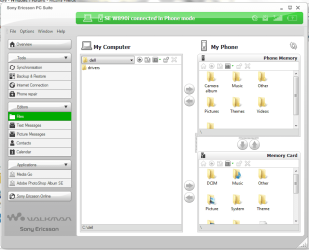
Ok, I downloaded and installed PC Suite from SE website. It's allowing me to access the phone files from within it (img attached).

But I am strictly against bloatware, and don't want to have this bulky s/w lying around my PC. I want to be able to explore into the phone from Win7 itself.. :( :( Are you able to do this, (open your phone like a folder)?
 

Attachments

  • Capture2.PNG
    Capture2.PNG
    39 KB · Views: 18

My Computer

Computer Manufacturer/Model Number
Dell XPS M1330
OS
Windows 7 Ultimate x86
CPU
Intel Core 2 Duo T7250 @2GHz
Memory
2 GB
Graphics Card(s)
nVidia 8400M GS
Screen Resolution
1280x800
Hard Drives
250GB SATA
You are yes, but you need to get all the drivers installed to do it through BT.
 

My Computer

Computer Manufacturer/Model Number
Sony Vaio FZ21Z
OS
Windows 7 Ultimate x64 ®™
CPU
Intel Core 2 Duo (2.2 GHz)
Motherboard
Sony (Intel Chipset)
Memory
2x 2GB Corsair (667 MHz)
Graphics Card(s)
NVIDIA 8600M GS (256MB)
Sound Card
Sigmatel
Monitor(s) Displays
15.4" TFT X-Black
Screen Resolution
1280x800
Hard Drives
Western Digital 300GB Scorpio Black (7200rpm)
Mouse
Logitech Anywhere MX
Internet Speed
Sky 5MB
Ok, I downloaded and installed PC Suite from SE website. It's allowing me to access the phone files from within it (img attached).

But I am strictly against bloatware, and don't want to have this bulky s/w lying around my PC. I want to be able to explore into the phone from Win7 itself.. :( :( Are you able to do this, (open your phone like a folder)?

Some device will only work with thier utilities. If that utility is actually for your phone, i don't think you have any other choices.

Keep in mind that Windows Explorer (or other utils) weren't made to be able to integrate with every devices out there. It's just not feasible.
 

My Computer

Computer Manufacturer/Model Number
Lenovo ThinkPad T60
OS
Windows 7 Ultimate 64Bit
CPU
GenuineIntel Intel(R) Core(TM) DuoCore T2400 @ 1.83GHz
Motherboard
Intel(R) 82801G (ICH7 Family)
Memory
2.00 GB
Graphics Card(s)
Mobile Intel(R) 945 Express Chipset
Sound Card
SoundMAX Integrated Digital HD Audio
Monitor(s) Displays
ThinkPad Display
Screen Resolution
1400x1050
Hard Drives
100Gb SATA
Keyboard
Standard Keyboard
Mouse
HID-compliant Mouse
Internet Speed
Cable Broadband - 54Mbps
Other Info
Intel(R) PRO/1000 PL Network Connection
11a/b/g Wireless LAN Mini PCI Express Adapter
Back
Top