JavaScript is disabled. For a better experience, please enable JavaScript in your browser before proceeding.
You are using an out of date browser. It may not display this or other websites correctly.
You should upgrade or use an
alternative browser .
Help with change on .php files
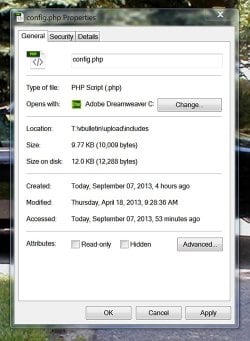
I did something stupid. I was having to edit a .php file and when i did I went into properties and changed what opened it. It was opened by a Windows Shell Common and I changed it to Dreamweaver. I fogot to uncheck the always use selected program box when I did this. I now cant change it back. Any ideas?
Untitled.jpg
67.9 KB
· Views: 2
Computer type PC/Desktop Computer Manufacturer/Model Number Custom Built OS 7 Pro 64 bit CPU AMD FX 8 Core 8350 4600 mhz over clock Motherboard Asus Memory 32 GB Graphics Card(s) AMD Radeon Sapphire HD7770 Hard Drives Too Many Browser Firefox
Type associations in the search box. Choose Make a file type always open in a specific program from the list of results.
Computer Manufacturer/Model Number Put together OS Win7 Pro-64 Bit CPU i7-2600-3.4GHz Motherboard ASRock Z68M Memory 8 GIG DDR3 Graphics Card(s) onboard Sound Card onboard Hard Drives Seagate 1TB 7200RPM PSU 680 W Case black Cooling stock fans Keyboard Microsoft Mouse Microsoft optical
New member
Thread Starter
I want to change it back to what it was. I am not sure what I am looking for.
Computer type PC/Desktop Computer Manufacturer/Model Number Custom Built OS 7 Pro 64 bit CPU AMD FX 8 Core 8350 4600 mhz over clock Motherboard Asus Memory 32 GB Graphics Card(s) AMD Radeon Sapphire HD7770 Hard Drives Too Many Browser Firefox
Administrator
Staff member
Hello Caminokid, and welcome to Seven Forums.
You could use "Open with" again to set
Windows Shell Common as the default program by selecting the
C:\Windows\System32\shell32.dll file.
Hope this helps,
Shawn
Computer type PC/Desktop Computer Manufacturer/Model Number Self built custom OS 64-bit Windows 11 Pro for Workstations CPU Intel i7-8700K OC'd to 5 GHz Motherboard ASUS ROG Maximus XI Formula Z390 Memory 64 GB (4x16GB) G.SKILL TridentZ RGB DDR4 3600 MHz Graphics Card(s) ASUS ROG-STRIX-GTX1080TI-O11G-GAMING Sound Card Integrated Monitor(s) Displays 2 x Samsung Odyssey G7 27" Screen Resolution 2560x1440 Hard Drives 1TB Samsung 990 PRO M.2, PSU Seasonic Prime Titanium 850W Case Thermaltake Core P3 Cooling Corsair Hydro H115i Keyboard Logitech wireless K800 Mouse Logitech MX Master 4 Internet Speed 2 Gb/s Download and 100 Mb/s Upload Antivirus Malwarebyte Anti-Malware Premium Browser Google Chrome Other Info Logitech Z625 speaker system,
New member
Thread Starter
I tired that. Now when you click on the file it says not a valid windows 32 file.
Computer type PC/Desktop Computer Manufacturer/Model Number Custom Built OS 7 Pro 64 bit CPU AMD FX 8 Core 8350 4600 mhz over clock Motherboard Asus Memory 32 GB Graphics Card(s) AMD Radeon Sapphire HD7770 Hard Drives Too Many Browser Firefox
Administrator
Staff member
If you have a restore point dated before this happened, then you could also do a
system restore with that restore point to undo and fix this.
Computer type PC/Desktop Computer Manufacturer/Model Number Self built custom OS 64-bit Windows 11 Pro for Workstations CPU Intel i7-8700K OC'd to 5 GHz Motherboard ASUS ROG Maximus XI Formula Z390 Memory 64 GB (4x16GB) G.SKILL TridentZ RGB DDR4 3600 MHz Graphics Card(s) ASUS ROG-STRIX-GTX1080TI-O11G-GAMING Sound Card Integrated Monitor(s) Displays 2 x Samsung Odyssey G7 27" Screen Resolution 2560x1440 Hard Drives 1TB Samsung 990 PRO M.2, PSU Seasonic Prime Titanium 850W Case Thermaltake Core P3 Cooling Corsair Hydro H115i Keyboard Logitech wireless K800 Mouse Logitech MX Master 4 Internet Speed 2 Gb/s Download and 100 Mb/s Upload Antivirus Malwarebyte Anti-Malware Premium Browser Google Chrome Other Info Logitech Z625 speaker system,
What used to happen when you double clicked on the php files before you set them to open in dreamweaver? PHP files usually run on a web server of some type. Are you running a local web server to test a website you are creating?
Computer type PC/Desktop Computer Manufacturer/Model Number Dell
New member
Thread Starter
If you have a restore point dated before this happened, then you could also do a
system restore with that restore point to undo and fix this.
Unfortunately I didnt have any restore points. So thats out.
Computer type PC/Desktop Computer Manufacturer/Model Number Custom Built OS 7 Pro 64 bit CPU AMD FX 8 Core 8350 4600 mhz over clock Motherboard Asus Memory 32 GB Graphics Card(s) AMD Radeon Sapphire HD7770 Hard Drives Too Many Browser Firefox
New member
Thread Starter
What used to happen when you double clicked on the php files before you set them to open in dreamweaver? PHP files usually run on a web server of some type. Are you running a local web server to test a website you are creating?
Got a web server. It asked for a program to open it. But now all the php and .new files are now on dreamweaver. I thought I had messed it all up and this is why I couldnt get my forum going. I reformatted the server and still cant get my forum going. I have given up.
Computer type PC/Desktop Computer Manufacturer/Model Number Custom Built OS 7 Pro 64 bit CPU AMD FX 8 Core 8350 4600 mhz over clock Motherboard Asus Memory 32 GB Graphics Card(s) AMD Radeon Sapphire HD7770 Hard Drives Too Many Browser Firefox
You might have to go into the web server settings to get the php files working again. Are you running Apache, IIS, or something else?
Computer type PC/Desktop Computer Manufacturer/Model Number Dell
New member
Thread Starter
You might have to go into the web server settings to get the php files working again. Are you running Apache, IIS, or something else?
IIS
Computer type PC/Desktop Computer Manufacturer/Model Number Custom Built OS 7 Pro 64 bit CPU AMD FX 8 Core 8350 4600 mhz over clock Motherboard Asus Memory 32 GB Graphics Card(s) AMD Radeon Sapphire HD7770 Hard Drives Too Many Browser Firefox