
Help with custom theme: changing start menu items offset and font

Sebenko

New member
Local time
3:38 AM
Messages
3
I've been creating a custom theme for windows 7, but my black text doesn't show up very well on the background. Is there a way to change it?

And can I change the location of the items? they overlap with the border of the start menu, and I want to move them a bit so they fit neatly.
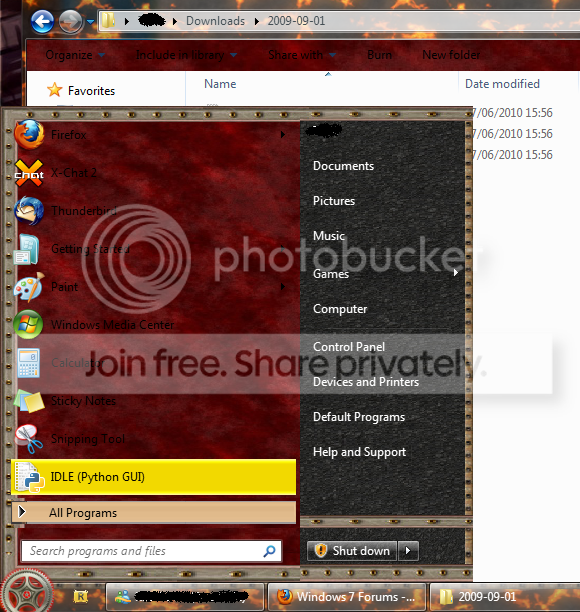
mystyle.png
 

My Computer

OS
Windows 7 & XP dual boot
How are you creating the theme? With the ubiquitous Style Builder?

The font colour can certainly be changed. The positioning is a bit more tricky as it is determined by internal stylesheets. I can't help noticing however that you have the narrow border on the right and the wider on the left which would be much better reversed.
 

My Computer

OS
Windows 7
If you are using Windows Style Builder then to change the ProgramsList text color, go here:

StartMenu > Panels > Basic > ProgramsList > TEXTCOLOR:COLOR

StartMenu > Panels > Basic > PragramsListExtended > TEXTCOLOR:COLOR

If these properties don't exist then just create them.

To adjust the margins, you will have to play around with your ContentMargins in these same places.
 

My Computer

Computer type
PC/Desktop
Computer Manufacturer/Model Number
Self built.
OS
Windows 7 RTM 64bit, Windows 8 Pro 64bit
CPU
Intel i5-2500K @ 3.3Ghz
Motherboard
Asus Maximus IV GENE-Z/GEN3
Memory
16GB G.Skill RaptorX 1600MHz DDR3
Graphics Card(s)
N570GTX Twin Frozr III Power Edition
Sound Card
SupremeFX X-Fi 2
Monitor(s) Displays
BenQ XL2420T 120Hz 24 inch gaming monitor, Acer V233H 23 inc
Screen Resolution
1920x1080
Hard Drives
320GB Seagate Barracuda
WD 1TB Black Caviar
2TB WD Green Caviar
Samsung SSD 840 PRO Series
PSU
CoolerMaster Silent Pro Gold 1200WATT 80 Plus Gold
Case
CoolerMaster HAF X RC-942
Cooling
CoolerMaster V6GT Multi-Platform CPU Cooler
Keyboard
Logitech G510 Gaming Keyboard
Mouse
Logitech G700 Gaming Mouse
Antivirus
Norton Internet Security
Browser
Firefox 21
Other Info
Logitech Extreme 3D Pro Gaming Joystick, Logitech G930 Wireless Gaming Headset
No, I've been using the Anolis resourcer.
 

My Computer

OS
Windows 7 & XP dual boot
No, I've been using the Anolis resourcer.

Ah. Then you're very much doing it the hard way so congrats on getting as far as you have but now it gets very tricky. Fonts and particularly font colours are virtually impossible to change using a resource hacker alone I'm afraid because they are set in xml using variables from stylesheets that hours of searching have failed to reveal the whereabouts of and are probably encrypted or hidden in some way anyway. Offsets are also set in this way so unless you are an xml wiz with the patience of a saint .....

Windows Style Builder costs but if you want to make any headway I'm afraid it's pretty much indispensable.
 

My Computer

OS
Windows 7
Windows Style Builder costs but if you want to make any headway I'm afraid it's pretty much indispensable.

Well, curses, damn and blast, etc.

I just don't think it's worth the cost for one font.
 

My Computer

OS
Windows 7 & XP dual boot
Without Windows Style Builder, you can not change the font colors. It simply isn't possible. I was looking for it once too, for hours even, and i didnt find anything. You will have to purchase WSB from Ave's Vista Style Builder, to be able to do.
You won't regret buying WSB, it is really really much better than doing it via a resource tool. It'll save you time as well, and make you able to change more images and properties than you are able to in a resource tool.
 
Back
Top