help with directx

navinator

New member
Local time
7:12 PM
Messages
4
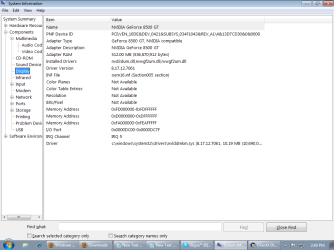
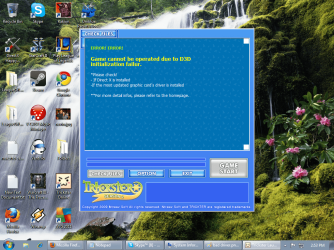
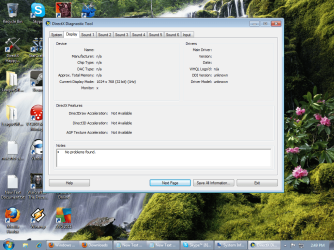
A few days ago my computer froze and after i restarted it i have not been able to play any online games there after. I've tried multiple games and they all say there is a problem with my direct x or my graphics card driver. I've tried installing new drivers, but unless im doing it wrong, it didnt work. Also, when i run dxdiag, the display is all saying n/a instead of showing my graphics card, but when i run msinfo32 it shows my graphics cards. someone please help to get this running again. I have attached some screen shots of things that might be necessary
 

Attachments
  • dxdiag.png
    dxdiag.png
    283.2 KB · Views: 17
  • msinfo32.png
    msinfo32.png
    26.2 KB · Views: 18
  • trickster.png
    trickster.png
    360.8 KB · Views: 17

My Computer

Computer Manufacturer/Model Number
HP-Pavilion
OS
Windows 7 ultimate
CPU
Intel(R) Core (TM)2 Quad CPU Q6600 @ 2.40 GHz, 2400
Memory
4096 MB RAM
Graphics Card(s)
NVIDIA Geforce 8500 GT
Open Control Panel then Device Manager then Display Adapters.
Should be a listing of Nvidia GeForce 8800 GT. If there is a yellow triangle next to the listing you may need to reinstall/repair the Nvidia driver. I realize you attempted to do so but a yellow triangle means there is still a problem with the driver.
It could be the video card but the driver is easiest to check first.

Mike
 

My Computer

Computer Manufacturer/Model Number
Hopalong/ Godzilla
OS
Windows7 Pro 64bit SP-1; Windows XP Pro 32bit
CPU
Intel Core i7-870 Lynnfield 2.93GHz LGA 1156 95W Quad-Core
Motherboard
ASUS P7P55D-E PRO
Memory
8GB@1400MHz Crucial Ballistix DDR3-1600 4x2GB
Graphics Card(s)
ASUS ENGTX460 DirectCU/2DI/1GD5 1GB 256-bit GDDR5
Sound Card
VIA Onboard
Monitor(s) Displays
Asus VS248H-P 24"; Samsung SyncMaster 941BW 19"ws
Screen Resolution
1920x1080; 1440x900
Hard Drives
Samsung 830 120GB SSD
Intel 320 120GB SSD
Western Digital Caviar Black WD7501AALS 750GB 7200 RPM SATA 3.0Gb/s
Western Digital Caviar Black WD6401AALS 640GB 7200 RPM SATA 3.0Gb/s
PSU
COOLER MASTER Silent Pro RS850-AMBAJ3-US 850W Modular
Case
COOLER MASTER HAF 932 RC-932-KKN5-GP Black
Cooling
Scythe "Mugen-2 Rev.B" (2 ScytheKaze-Jyuni PWM fans)
Keyboard
Logitech K-320
Mouse
Kensington
Antivirus
Avast Inernet Suite
Browser
IE 9 ; Chrome
Wow! yeah u got it right on the bulls eye. Okay, so i went here Drivers - Download NVIDIA Drivers and searched my driver and downloaded and restarted my computer and everything, but there is still a yellow triangle and my driver doesnt work. any help to what im doing wrong, or a different way to update my driver?
 

My Computer

Computer Manufacturer/Model Number
HP-Pavilion
OS
Windows 7 ultimate
CPU
Intel(R) Core (TM)2 Quad CPU Q6600 @ 2.40 GHz, 2400
Memory
4096 MB RAM
Graphics Card(s)
NVIDIA Geforce 8500 GT
Sometimes you have to totally remove the old driver- it did apparently have a problem- then install the new one. Any left over old registry parts can make the new driver have the old errors.

I can't find the info on the steps the guys use.
I will post and see if I can get you some additional help.

Don't want to make things worse.
Mike

I posted for more help. I don't know when- soon I hope.
 

My Computer

Computer Manufacturer/Model Number
Hopalong/ Godzilla
OS
Windows7 Pro 64bit SP-1; Windows XP Pro 32bit
CPU
Intel Core i7-870 Lynnfield 2.93GHz LGA 1156 95W Quad-Core
Motherboard
ASUS P7P55D-E PRO
Memory
8GB@1400MHz Crucial Ballistix DDR3-1600 4x2GB
Graphics Card(s)
ASUS ENGTX460 DirectCU/2DI/1GD5 1GB 256-bit GDDR5
Sound Card
VIA Onboard
Monitor(s) Displays
Asus VS248H-P 24"; Samsung SyncMaster 941BW 19"ws
Screen Resolution
1920x1080; 1440x900
Hard Drives
Samsung 830 120GB SSD
Intel 320 120GB SSD
Western Digital Caviar Black WD7501AALS 750GB 7200 RPM SATA 3.0Gb/s
Western Digital Caviar Black WD6401AALS 640GB 7200 RPM SATA 3.0Gb/s
PSU
COOLER MASTER Silent Pro RS850-AMBAJ3-US 850W Modular
Case
COOLER MASTER HAF 932 RC-932-KKN5-GP Black
Cooling
Scythe "Mugen-2 Rev.B" (2 ScytheKaze-Jyuni PWM fans)
Keyboard
Logitech K-320
Mouse
Kensington
Antivirus
Avast Inernet Suite
Browser
IE 9 ; Chrome
You guys are amazing. thanks. currently im not at home and ill have access back to my computer in two days. ill remove the driver and reinstall it then let u guys know if its fixed.
 

My Computer

Computer Manufacturer/Model Number
HP-Pavilion
OS
Windows 7 ultimate
CPU
Intel(R) Core (TM)2 Quad CPU Q6600 @ 2.40 GHz, 2400
Memory
4096 MB RAM
Graphics Card(s)
NVIDIA Geforce 8500 GT
okay. so i finally got back to trying to fix my graphics driver. First i downloaded driver sweeper but everytime i opened it, it said "driver sweeper has stopped working" "windows is checking for a solution to the problem. so then i right clicked the yellow triangle next to my nvidia graphics card and pressed uninstall. it uninstalled, then i reinstalled it and went to the nvidia site and tried to update it too, but nothing is working. i even system restored my computer to 1 year ago and still my graphics card has a yellow triangle saying "Windows has stopped this device because it has reported problems. (Code 43)" do i have a virus or something blocking my graphics card?
 

My Computer

Computer Manufacturer/Model Number
HP-Pavilion
OS
Windows 7 ultimate
CPU
Intel(R) Core (TM)2 Quad CPU Q6600 @ 2.40 GHz, 2400
Memory
4096 MB RAM
Graphics Card(s)
NVIDIA Geforce 8500 GT
You have to run Driver Sweeper in Safe Mode.

Right now, you should start from scratch. First uninstall the nVidia driver via the Control Panel's Add/Remove. When prompted to reboot, don't. Go to C:\NVIDIA and delete the folder "DisplayDriver".

Now you can reboot, tapping the F8 key. You will be then given a few options... just the first "Safe Mode" is fine. Let Windows boot, then you can run Driver Sweeper.
 

My Computer

OS
7 Ultimate x64
CPU
i5-2500k
Motherboard
Asus P8P67 Pro
Memory
8GB G.Skill Ripjaws X F3-12800CL7D-8GBXH 1866MHz 8-9-8-24
Graphics Card(s)
EVGA GTX 570 SC
Sound Card
X-Fi Titanium Fatality
Monitor(s) Displays
Samsung S27A550H 27" LED
Screen Resolution
1920x1080
Hard Drives
OCZ Vertex 3 120GB.
1TB Samsung F3.
2TB Samsung F4.
PSU
PC Power & Cooling Silencer 760
Case
Lian Li Lancool K62
Cooling
Thermalright Venomous X Black/Scythe S-Flex/Shin-Etsu X23
Keyboard
MS Natural Elite 4000 Ergonomic
Mouse
Logitech G500
Internet Speed
6MB/768
Other Info
Logitech Z-5500 505 watts.
D-Link DGL-4500.
Tripp-Lite Smart Pro 1500.
Back
Top