Solved Help With Driver State Power Failure BSOD

GirlFriday

New member
Local time
5:20 AM
Messages
11
I got a BSOD earlier and the error was "DRIVER_STATE_POWER FAILURE. Requested files attached and I also found this info in my system logs:

The computer has rebooted from a bugcheck. The bugcheck was: 0x0000009f (0x0000000000000003, 0xfffffa8007694060, 0xfffff800045e7748, 0xfffffa8008f9c680).

My system specs are available in my profile.

I hope I did everything correctly, and thanks in advance for the help!
 

My Computer My Computer

Computer type
PC/Desktop
Computer Manufacturer/Model Number
Acer 5349-2418
OS
Windows 7 Home Premium 64Bit
CPU
Intel B815 1.6 GHz ( Dual-Core )
Memory
4GB DDR3
Graphics Card(s)
Intel HD Dynamic Video Memory Technology 5.0
Monitor(s) Displays
15.6 inch
Screen Resolution
1366 x 768 ( WXGA )
Hard Drives
320 GB HDD Serial ATA-300 - 5400.0 rpm
Internet Speed
Broadband 20 Mbps
Antivirus
AVG
Browser
Chrome
Hi GirlFriday and welcome to the forum.

Security App
Code:
avgrkx64.sys                Fri Feb  8 09:14:05 2013 (51146D7D)
avgldx64.sys                Fri Feb  8 09:14:24 2013 (51146D90)
avgloga.sys                 Fri Feb  8 09:14:29 2013 (51146D95)
avgidsha.sys                Fri Feb  8 09:14:48 2013 (51146DA8)
avgmfx64.sys                Fri Feb  8 09:14:48 2013 (51146DA8)
avgtdia.sys                 Thu Mar 21 07:50:47 2013 (514A6777)
avgidsdrivera.sys           Fri Mar 29 07:40:56 2013 (5154F128)
avgtpx64.sys                Tue May  7 18:38:19 2013 (5188F5BB)
Crashes indicate AVG being a possible cause. Remove AVG and replace with Microsoft Security Essentials to see if it provides more stability. Uninstallers (removal tools) for common antivirus software. Microsoft Security Essentials and Malwarebytes are recommended from a strict BSOD perspective. They do not cause blue screens on the system as other AV products do.

Microsoft Security Essentials, Free antivirus for windows and Malwarebytes Anti-Malware Free

   Information
  • :warn: Do not start the free trial of MalwareBytes, unselect that option when prompted.

    201305202124.png

  • :tip: Update and make full scans with both separately.
Start up

Keep less stuff at the start-up. Only anti-virus, this helps avoid driver conflicts and improves time to log in to windows.
Troubleshoot a Problem by Performing a Clean Startup in Windows 7 or Vista
How to Change, Add, or Remove Startup Programs in Windows 7

Atheros Driver
If its wireless, match your device from here:
ATHEROS Wireless drivers for Windows
Code:
athrx.sys                   Sat Mar 12 08:56:36 2011 (4D7AE0E4)
If its not a wireless, match your device from here:
ATHEROS Network drivers for Windows

Also update your ALCOR Micro SD Card Controller Driver to its latest as it seems to be a problem. Driver Reference Table - AmUStor.SYS

Code:
0: kd> !irp fffffa8008f9c680
Irp is active with 10 stacks 9 is current (= 0xfffffa8008f9c990)
 No Mdl: No System Buffer: Thread 00000000:  Irp stack trace.  
     cmd  flg cl Device   File     Completion-Context
 [  0, 0]   0  0 00000000 00000000 00000000-00000000    

			Args: 00000000 00000000 00000000 00000000
 [  0, 0]   0  0 00000000 00000000 00000000-00000000    

			Args: 00000000 00000000 00000000 00000000
 [  0, 0]   0  0 00000000 00000000 00000000-00000000    

			Args: 00000000 00000000 00000000 00000000
 [  0, 0]   0  0 00000000 00000000 00000000-00000000    

			Args: 00000000 00000000 00000000 00000000
 [  0, 0]   0  0 00000000 00000000 00000000-00000000    

			Args: 00000000 00000000 00000000 00000000
 [  0, 0]   0  0 00000000 00000000 00000000-00000000    

			Args: 00000000 00000000 00000000 00000000
 [  0, 0]   0  0 00000000 00000000 00000000-00000000    

			Args: 00000000 00000000 00000000 00000000
 [  0, 0]   0  0 00000000 00000000 00000000-00000000    

			Args: 00000000 00000000 00000000 00000000
>[ 16, 2]   0 e1 fffffa80077ac060 00000000 00000000-00000000    pending
	      *** WARNING: Unable to verify timestamp for AmUStor.SYS
*** ERROR: Module load completed but symbols could not be loaded for AmUStor.SYS
 \Driver\AmUStor
			Args: 00000000 00000001 00000003 00000000
 [  0, 0]   0  0 00000000 00000000 00000000-fffffa8009db8e80    

			Args: 00000000 00000000 00000000 00000000
0: kd> lmvm AmUStor
start             end                 module name
fffff880`0604b000 fffff880`06060000   AmUStor  T (no symbols)           
    Loaded symbol image file: AmUStor.SYS
    Image path: \SystemRoot\system32\drivers\AmUStor.SYS
    Image name: AmUStor.SYS
    Timestamp:        Thu Jan 13 18:06:26 2011 (4D2EEAC2)
    CheckSum:         00012815
    ImageSize:        00015000
    Translations:     0000.04b0 0000.04e4 0409.04b0 0409.04e4
   Tip
How to clean left over drivers
Sometimes drivers remain, not completely uninstalled. Follow this tutorial for complete removal of drivers of the particular program: How to Clean Left Over Driver Files with Driver Sweeper
  • Click on the Start :orb:
  • Control Panel
  • Programs
  • Uninstall a program
  • Uninstall everything related to the software
Delete remnants of its drivers/older drivers using Driver Sweeper
Hard Drive/Storage

Post disk summary using CrystalDiskInfo software: CrystalDiskInfo Standard Edition

  • :info: For how to upload a screenshot or file, read here
Make a hard drive test from the hard drive manufacturers website: Hard Drive Diagnostic Procedure

For errors on your Hard drive(s): How to Run Disk Check in Windows 7

SFC /scannow to check windows for corruption:

How to Repair Windows 7 System Files with System File Checker
1. Click Start
orb.png

2. In the search box, type Command Prompt
3. In the list that appears, right-click on cmd.exe and choose Run as administrator
4. In the command window that opens, type
sfc /scannow
and hit enter.

This tutorial http://www.sevenforums.com/tutorials/147369-usb-selective-suspend-turn-off.html may help you:

To Disable Selective Suspend:
Code:
1. open the control panel
2. go to power options (you may have to set view to small icons)
3. click change plan settings
4. in the window that opens:
5. click change plan settings
6. click change advanced power settings, expand usb and ensure usb selective suspend is disabled.
Heat:
-Only use the laptop on a hard surface with nothing blocking any of the vents.
-Use a laptop cooling pad if possible
-Blow out all vents with canned air (DO NOT use a vacuum cleaner or an air compressor, they can damage the components).
-Ensure that the fan comes on and is blowing air out of the vent (may not happen at startup, but should happen after using it for a while).

System Temperature

Ensure that there are no heat issues, For monitoring heat of the system use Speccy or HWMonitor

Good luck.

BSOD BUGCHECK SUMMARY
Code:
[FONT="Lucida Console"]Debug session time: Wed Jun 19 07:51:26.811 2013 (UTC + 6:00)
Built by: 7601.18113.amd64fre.win7sp1_gdr.130318-1533
System Uptime: 1 days 0:33:20.935
*** ERROR: Module load completed but symbols could not be loaded for usbhub.sys
Probably caused by : usbhub.sys
BugCheck 9F, {3, fffffa8007694060, fffff800045e7748, fffffa8008f9c680}
BugCheck Info: [url=http://www.carrona.org/bsodindx.html#0x0000009F]DRIVER_POWER_STATE_FAILURE (9f)[/url]
Bugcheck code 0000009F
Arguments: 
Arg1: 0000000000000003, A device object has been blocking an Irp for too long a time
Arg2: fffffa8007694060, Physical Device Object of the stack
Arg3: fffff800045e7748, nt!TRIAGE_9F_POWER on Win7, otherwise the Functional Device Object of the stack
Arg4: fffffa8008f9c680, The blocked IRP
BUGCHECK_STR:  0x9F
DEFAULT_BUCKET_ID:  WIN7_DRIVER_FAULT
PROCESS_NAME:  chrome.exe
FAILURE_BUCKET_ID:  X64_0x9F_3_AmUStor_IMAGE_usbhub.sys
¨¨¨¨¨¨¨¨¨¨¨¨¨¨¨¨¨¨¨¨¨¨¨¨¨¨¨¨¨¨¨¨¨¨¨¨¨¨¨¨¨¨¨¨¨¨¨¨¨¨¨¨¨¨¨¨¨¨¨¨¨¨¨¨¨¨¨¨¨¨¨¨¨¨¨¨¨¨¨¨``[/FONT]

 

My Computer My Computer

Computer type
PC/Desktop
Computer Manufacturer/Model Number
Self assembled
OS
Windows 10 Home 64Bit
CPU
Intel Core i5 10400 @ 2.90GHz
Motherboard
Intel Corporation DG41WV (PROCESSOR)
Memory
8.00GB Single-Channel Unknown @ 1329MHz (16-20-20-38)
Sound Card
Realtek High Definition Audio
Monitor(s) Displays
DELL E170S
Screen Resolution
1280x1024 pixels
Hard Drives
931GB TOSHIBA DT01ACA100 (SATA)
238GB TEAM TM8PS7256G (SATA SSD)
Case
Nothing Fancy
Cooling
Fans
Keyboard
A4 Tech Co LTD
Mouse
A4 Tech Co Ltd/Logitech
Internet Speed
25 Mbps
Thank you so much! Here is the screenshot from CrystalDisk. That is the only yellow mark..everything else is blue.
 

My Computer My Computer

Computer type
PC/Desktop
Computer Manufacturer/Model Number
Acer 5349-2418
OS
Windows 7 Home Premium 64Bit
CPU
Intel B815 1.6 GHz ( Dual-Core )
Memory
4GB DDR3
Graphics Card(s)
Intel HD Dynamic Video Memory Technology 5.0
Monitor(s) Displays
15.6 inch
Screen Resolution
1366 x 768 ( WXGA )
Hard Drives
320 GB HDD Serial ATA-300 - 5400.0 rpm
Internet Speed
Broadband 20 Mbps
Antivirus
AVG
Browser
Chrome
I am unable to run the diagnostic. It refuses to let me chose my drive even though it shows up. The info on the site says it's for XP and Vista..guess they couldn't be bothered with Win 7.:(
 

My Computer My Computer

Computer type
PC/Desktop
Computer Manufacturer/Model Number
Acer 5349-2418
OS
Windows 7 Home Premium 64Bit
CPU
Intel B815 1.6 GHz ( Dual-Core )
Memory
4GB DDR3
Graphics Card(s)
Intel HD Dynamic Video Memory Technology 5.0
Monitor(s) Displays
15.6 inch
Screen Resolution
1366 x 768 ( WXGA )
Hard Drives
320 GB HDD Serial ATA-300 - 5400.0 rpm
Internet Speed
Broadband 20 Mbps
Antivirus
AVG
Browser
Chrome
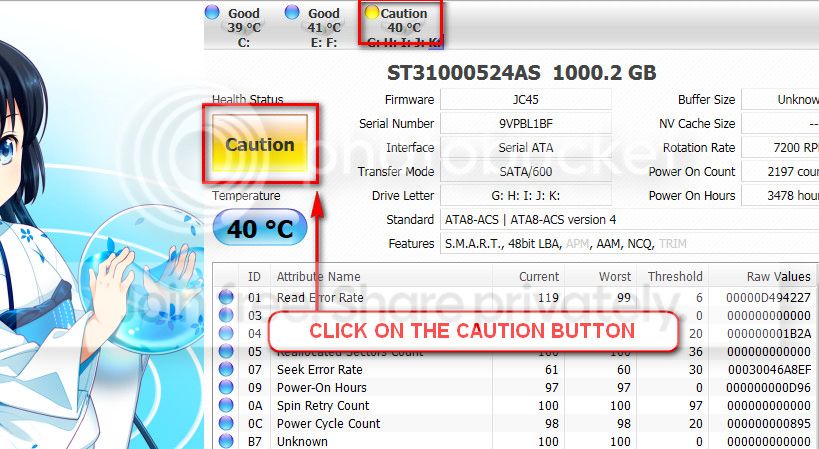
The caution indication can be converted to good using CrystalDiscInfo. Click on the caution Button, you will get another window ....
1_zps1eeadfca.jpg


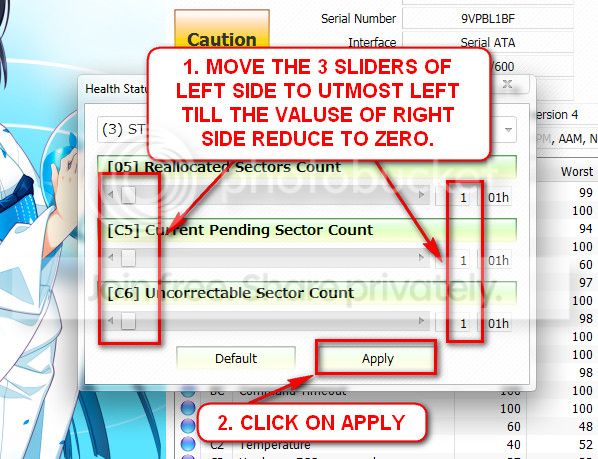
In the resulting window, there are three sliders in the left. Drag them to the ultimate left, and notice the values at the right side are converting to zeros.
2_zps50ae6eec.jpg


Now click the apply button, and notice that the caution is gone.

Try Seatool for dos: SeaTools | Seagate download. Burn it in a blank cd. boot from the CD or USB, click on "Accept", wait for it to finish detecting the drives, then in the upper left corner select "Basic Tests", then select "Long Test" and let it run.

BTW, how old the HDD is? Is is under warranty?
I think you should plan to back up your data externally.
 

My Computer My Computer

Computer type
PC/Desktop
Computer Manufacturer/Model Number
Self Assembled
OS
Microsoft Windows 10 Pro Insider Preview 64-bit
CPU
Intel(R) Core(TM) i3-4130 CPU @ 3.40GHz
Motherboard
Gigabyte Technology Co., Ltd. B85M-D3H
Memory
Corsair Vengence 4GB x2 (8.00GB Dual-Channel DDR3 @ 798MHz)
Graphics Card(s)
2047MB GeForce GTS 450 (ZOTAC International)
Sound Card
Onboard (Realtek High Definition Audio)
Monitor(s) Displays
LG Flatron E2040T
Screen Resolution
1600x900
Hard Drives
Western Digital 1 TB
Seagate 500 GB
PSU
Corsair VS550
Case
Cooler Master K380
Cooling
Cooler Master Seidon 120V Plus
Keyboard
Logitech MK260r
Mouse
Logitech MK260r
Internet Speed
PMPL Broadband
Antivirus
Windows Defender + MBAM
Browser
Firefox
Other Info
Dell Studio 15" Laptop
I ran SeaTools from Seagate and my HDD passed all tests. Running an SFC scan now.
 

My Computer My Computer

Computer type
PC/Desktop
Computer Manufacturer/Model Number
Acer 5349-2418
OS
Windows 7 Home Premium 64Bit
CPU
Intel B815 1.6 GHz ( Dual-Core )
Memory
4GB DDR3
Graphics Card(s)
Intel HD Dynamic Video Memory Technology 5.0
Monitor(s) Displays
15.6 inch
Screen Resolution
1366 x 768 ( WXGA )
Hard Drives
320 GB HDD Serial ATA-300 - 5400.0 rpm
Internet Speed
Broadband 20 Mbps
Antivirus
AVG
Browser
Chrome
Thank you ARC!!

My computer is 9 months old so yes it is under warranty. All of my data is regularly backed up to the cloud.
 

My Computer My Computer

Computer type
PC/Desktop
Computer Manufacturer/Model Number
Acer 5349-2418
OS
Windows 7 Home Premium 64Bit
CPU
Intel B815 1.6 GHz ( Dual-Core )
Memory
4GB DDR3
Graphics Card(s)
Intel HD Dynamic Video Memory Technology 5.0
Monitor(s) Displays
15.6 inch
Screen Resolution
1366 x 768 ( WXGA )
Hard Drives
320 GB HDD Serial ATA-300 - 5400.0 rpm
Internet Speed
Broadband 20 Mbps
Antivirus
AVG
Browser
Chrome
Good that seatools passed.

Have you updated AmUStor.SYS ? Is the card reader inbuilt or external?
 

My Computer My Computer

Computer type
PC/Desktop
Computer Manufacturer/Model Number
Self Assembled
OS
Microsoft Windows 10 Pro Insider Preview 64-bit
CPU
Intel(R) Core(TM) i3-4130 CPU @ 3.40GHz
Motherboard
Gigabyte Technology Co., Ltd. B85M-D3H
Memory
Corsair Vengence 4GB x2 (8.00GB Dual-Channel DDR3 @ 798MHz)
Graphics Card(s)
2047MB GeForce GTS 450 (ZOTAC International)
Sound Card
Onboard (Realtek High Definition Audio)
Monitor(s) Displays
LG Flatron E2040T
Screen Resolution
1600x900
Hard Drives
Western Digital 1 TB
Seagate 500 GB
PSU
Corsair VS550
Case
Cooler Master K380
Cooling
Cooler Master Seidon 120V Plus
Keyboard
Logitech MK260r
Mouse
Logitech MK260r
Internet Speed
PMPL Broadband
Antivirus
Windows Defender + MBAM
Browser
Firefox
Other Info
Dell Studio 15" Laptop
SFC scan found corrupt files and fixed them.. I uninstalled AVG and installed Microsoft Security Essentials. I already have Malwarebytes so all good there. Going to update those drivers now. Thanks again!
 

My Computer My Computer

Computer type
PC/Desktop
Computer Manufacturer/Model Number
Acer 5349-2418
OS
Windows 7 Home Premium 64Bit
CPU
Intel B815 1.6 GHz ( Dual-Core )
Memory
4GB DDR3
Graphics Card(s)
Intel HD Dynamic Video Memory Technology 5.0
Monitor(s) Displays
15.6 inch
Screen Resolution
1366 x 768 ( WXGA )
Hard Drives
320 GB HDD Serial ATA-300 - 5400.0 rpm
Internet Speed
Broadband 20 Mbps
Antivirus
AVG
Browser
Chrome
Good that seatools passed.

Have you updated AmUStor.SYS ? Is the card reader inbuilt or external?

It's built in. I am trying but there are none available on that page. Just product descriptions and purchase instructions.
 

My Computer My Computer

Computer type
PC/Desktop
Computer Manufacturer/Model Number
Acer 5349-2418
OS
Windows 7 Home Premium 64Bit
CPU
Intel B815 1.6 GHz ( Dual-Core )
Memory
4GB DDR3
Graphics Card(s)
Intel HD Dynamic Video Memory Technology 5.0
Monitor(s) Displays
15.6 inch
Screen Resolution
1366 x 768 ( WXGA )
Hard Drives
320 GB HDD Serial ATA-300 - 5400.0 rpm
Internet Speed
Broadband 20 Mbps
Antivirus
AVG
Browser
Chrome
OK, if it crashes again, upload a new SF diag tool output zip.

BTW, in Acer | Download, there is a version that is slightly updated .....

View attachment 273286

In the page Acer | Download, first select "notebook" in group. Then "Aspire" in series and in prdoucts, scroll down to Aspire 5349 and click on it. The download list will be prepared.
 

My Computer My Computer

Computer type
PC/Desktop
Computer Manufacturer/Model Number
Self Assembled
OS
Microsoft Windows 10 Pro Insider Preview 64-bit
CPU
Intel(R) Core(TM) i3-4130 CPU @ 3.40GHz
Motherboard
Gigabyte Technology Co., Ltd. B85M-D3H
Memory
Corsair Vengence 4GB x2 (8.00GB Dual-Channel DDR3 @ 798MHz)
Graphics Card(s)
2047MB GeForce GTS 450 (ZOTAC International)
Sound Card
Onboard (Realtek High Definition Audio)
Monitor(s) Displays
LG Flatron E2040T
Screen Resolution
1600x900
Hard Drives
Western Digital 1 TB
Seagate 500 GB
PSU
Corsair VS550
Case
Cooler Master K380
Cooling
Cooler Master Seidon 120V Plus
Keyboard
Logitech MK260r
Mouse
Logitech MK260r
Internet Speed
PMPL Broadband
Antivirus
Windows Defender + MBAM
Browser
Firefox
Other Info
Dell Studio 15" Laptop
Ran a Chkdsk, no problems found. Updated drivers, uninstalled AVG. Computer is booting up and running faster and I haven't had a BSOD since the one that brought me here. Thank you so much for your help, you guys are fantastic! :D
 

My Computer My Computer

Computer type
PC/Desktop
Computer Manufacturer/Model Number
Acer 5349-2418
OS
Windows 7 Home Premium 64Bit
CPU
Intel B815 1.6 GHz ( Dual-Core )
Memory
4GB DDR3
Graphics Card(s)
Intel HD Dynamic Video Memory Technology 5.0
Monitor(s) Displays
15.6 inch
Screen Resolution
1366 x 768 ( WXGA )
Hard Drives
320 GB HDD Serial ATA-300 - 5400.0 rpm
Internet Speed
Broadband 20 Mbps
Antivirus
AVG
Browser
Chrome
Now give it a time. Observe how it is running. If there are no more BSODs in between, report us after a week or so.
 

My Computer My Computer

Computer type
PC/Desktop
Computer Manufacturer/Model Number
Self Assembled
OS
Microsoft Windows 10 Pro Insider Preview 64-bit
CPU
Intel(R) Core(TM) i3-4130 CPU @ 3.40GHz
Motherboard
Gigabyte Technology Co., Ltd. B85M-D3H
Memory
Corsair Vengence 4GB x2 (8.00GB Dual-Channel DDR3 @ 798MHz)
Graphics Card(s)
2047MB GeForce GTS 450 (ZOTAC International)
Sound Card
Onboard (Realtek High Definition Audio)
Monitor(s) Displays
LG Flatron E2040T
Screen Resolution
1600x900
Hard Drives
Western Digital 1 TB
Seagate 500 GB
PSU
Corsair VS550
Case
Cooler Master K380
Cooling
Cooler Master Seidon 120V Plus
Keyboard
Logitech MK260r
Mouse
Logitech MK260r
Internet Speed
PMPL Broadband
Antivirus
Windows Defender + MBAM
Browser
Firefox
Other Info
Dell Studio 15" Laptop
I just wanted to come back and let you know my laptop has been running perfectly ever since! Thank you so much!!
 

My Computer My Computer

Computer type
PC/Desktop
Computer Manufacturer/Model Number
Acer 5349-2418
OS
Windows 7 Home Premium 64Bit
CPU
Intel B815 1.6 GHz ( Dual-Core )
Memory
4GB DDR3
Graphics Card(s)
Intel HD Dynamic Video Memory Technology 5.0
Monitor(s) Displays
15.6 inch
Screen Resolution
1366 x 768 ( WXGA )
Hard Drives
320 GB HDD Serial ATA-300 - 5400.0 rpm
Internet Speed
Broadband 20 Mbps
Antivirus
AVG
Browser
Chrome
Good to hear :D thanks Arc!
 

My Computer My Computer

Computer type
PC/Desktop
Computer Manufacturer/Model Number
Self assembled
OS
Windows 10 Home 64Bit
CPU
Intel Core i5 10400 @ 2.90GHz
Motherboard
Intel Corporation DG41WV (PROCESSOR)
Memory
8.00GB Single-Channel Unknown @ 1329MHz (16-20-20-38)
Sound Card
Realtek High Definition Audio
Monitor(s) Displays
DELL E170S
Screen Resolution
1280x1024 pixels
Hard Drives
931GB TOSHIBA DT01ACA100 (SATA)
238GB TEAM TM8PS7256G (SATA SSD)
Case
Nothing Fancy
Cooling
Fans
Keyboard
A4 Tech Co LTD
Mouse
A4 Tech Co Ltd/Logitech
Internet Speed
25 Mbps
Combined effort works better :)

@ GirlFriday, if you face any more issue, let us know :)
 

My Computer My Computer

Computer type
PC/Desktop
Computer Manufacturer/Model Number
Self Assembled
OS
Microsoft Windows 10 Pro Insider Preview 64-bit
CPU
Intel(R) Core(TM) i3-4130 CPU @ 3.40GHz
Motherboard
Gigabyte Technology Co., Ltd. B85M-D3H
Memory
Corsair Vengence 4GB x2 (8.00GB Dual-Channel DDR3 @ 798MHz)
Graphics Card(s)
2047MB GeForce GTS 450 (ZOTAC International)
Sound Card
Onboard (Realtek High Definition Audio)
Monitor(s) Displays
LG Flatron E2040T
Screen Resolution
1600x900
Hard Drives
Western Digital 1 TB
Seagate 500 GB
PSU
Corsair VS550
Case
Cooler Master K380
Cooling
Cooler Master Seidon 120V Plus
Keyboard
Logitech MK260r
Mouse
Logitech MK260r
Internet Speed
PMPL Broadband
Antivirus
Windows Defender + MBAM
Browser
Firefox
Other Info
Dell Studio 15" Laptop
Back
Top