Solved Help with dual boot system.

HDProman

New member
Local time
2:47 PM
Messages
19
I have partitioned my C:/ drive with a Vista OS and created a new partition on this drive and installed Windows 7.

Now all is well with my new Windows 7 OS and I want to remove the Vista OS and end up with one partition.

I am not sure what to do and want to make sure I don't damage the Windows 7 OS, it was quite a learning experience and involved many hours.

A few screen shots that might help.

Windows 7 Disk Management
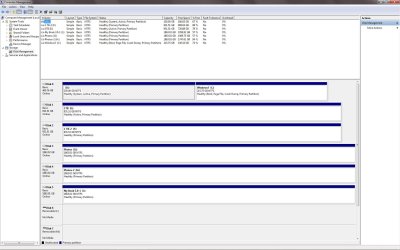
DiskMngScreenShot.jpg

EasUS Partition Master

EaseUS screenshot.jpg

Thanks in advance, Floyd
 

My Computer

Computer Manufacturer/Model Number
Custom Build
OS
Window 7x64 Professional
CPU
Intel (R) Core (TM) 2 Quad CPU Q9550 @ 2.83GHz
Motherboard
Gigabyte EP45-UD3R
Memory
8 GB
Graphics Card(s)
Nvidia GeForce GTS 250
Monitor(s) Displays
NEC MultiSync PA 241W
Screen Resolution
1920x1200
Hard Drives
C:/ Windows 7 Professional x64 OS
D:/ Partition on C:/ with Vista Ultimate x64 OS
E:/ 1TB-1
F:/ 1TB-2
G:/ Photos (2TB)
H:/ Photos2 (2TB)
J:/ WD My Book External (2TB)
K:/ WD My Book External (2TB)
PSU
850 W.
Keyboard
Logitech LX 700
Mouse
Wireless (Came as package with LX 700)
Internet Speed
Verizon FiOS 30mbs up 25mbs down
Other Info
USB3 expansion Cards (2) connected to WD external drives (2) and Lexor USB 3 CF/SD card reader.
This is just a personal view, but I would be inclined to carry out another clean install of Windows 7.

This will enable you to wipe Drive 0 clean and create a fresh partition for Windows 7 at the start of the drive.

The installer will create a 100MB System Reserved partition for the master boot record leaving you to decide how to partition the rest of the drive, if indeed you want more than one partition on it.

Doing it this way gets rid of Vista and its boot record and is in my view the simplest way of achieving what you want.

If you go down this route you might want to disconnect the active Drive 1 first, and then reconnect it when you've re-installed Windows 7.

On the other hand, as you are conversant with Partition Wizard you can boot into it (if you have burned the ISO to a blank disk) and delete your Vista partition then extend the Seven partition to the left.

Having done that you need to boot back into Windows and run a Startup Repair three times with a reboot after each one.

http://www.sevenforums.com/tutorials/681-startup-repair.html

This keeps Windows Seven intact so you wouldn't have to reinstall it.
 

My Computer

Computer Manufacturer/Model Number
HP Pavilion Elite 495UK
OS
Windows 7 Ultimate SP1 64-Bit
CPU
Intel Core i7 870 @ 2.93GHz
Motherboard
MSI 2A9C (CPU1)
Memory
8Gb Dual-Channel DDR3 @ 664MHz
Graphics Card(s)
nVidia GeForce GTX 460 1024MB dedicated RAM
Sound Card
Realtek HD Audio
Monitor(s) Displays
HP2310i
Screen Resolution
1920 x 1080
Hard Drives
1x1954GB Hitachi HDS22020ALA 330 (RAID), 1x1954GB Hitachi External for backup and storage
PSU
460W
Case
HP Elite
Cooling
Air cooled
Keyboard
Logitech K750 solar-powered keyboard
Mouse
Logitech Wireless M180 mouse
Internet Speed
2Mb
Other Info
Pure Avanti Flow Internet Radio with iPod Dock, 64Gb iPod, HP USB Speakers, Sony MDR-V500 Headphones, Sony Vaio F-Series Laptop
I agree, since you now know how to install Windows 7 I would delete the partitions and install again.

Then again, maybe you should wait a bit since you put a lot of work into it. Once you feel your ready, reinstall.

But don`t bother doing any updates if your gonna reinstall.
 

My Computer

Computer Manufacturer/Model Number
Myself
OS
Windows 7 Ultimate 64Bit
CPU
C2D E8200
Motherboard
XFX 750i
Memory
8GB PNY PC2-6400
Graphics Card(s)
BFG 9600GT x 2
Sound Card
Stock XFX Optical
Monitor(s) Displays
Gateway 22" HD Display
Hard Drives
C: 1 TB G: 500 GB H: 500 GB
PSU
Ultra LSP 550 Pro Lifetime Series
Case
Xion2
Cooling
ThermalTake
First boot free Partition Wizard bootable CD, rightclick on Win7 partition to Modify>Set to Active, click OK.

Next rightclick on Vista partition, select Modify>Set to Inactive, OK. Do the same for E if it is a data partition as only OS partition should be marked Active.

Next click on Win7 HD again to highlight it, from Disk tab select Rebuild MBR, OK, Apply all steps, reboot.

If Win7 starts on its own then you don't need to run Startup Repair 3 Separate Times
from the Win7 DVD or Repair CD, which writes the System boot files to Active partition. Rebuild MBR will sometimes suffice by itself - if not run Repairs until it starts at reboot.

Once Win7 starts on its own, save a backup image externally. We have never had a failure with PW CD in hundreds of these operations we've helped with here but back up still needs to be done now that Vista won't tag along. Backup Complete Computer - Create an Image Backup

Next boot PW CD, rightclick on Vista partition to Delete, OK. Then rightclick Win7 partition to select Resize, drag left grey border all the way to the left over the deleted Unallocated Space, OK, Apply all steps.

If resizing causes Win7 to fail to boot, run Startup Repair until it starts again.
 
Last edited:
Reinstall everything, I think not.

You make reinstalling sound so easy, it is not.

Just consider Photoshop CS5 and all that is involved. After the reinstall is finished I need to find and move the custom settings for, brushes, actions, custom desktops, etc,. Then I have to reinstall any plug-ins and find and move any customs setting for the plug-ins. Now include Lightroom, its plug-ins and their custom settings. On and on it goes and I want to avoid the days of work and the possibility of missing something important.

Can I just format the partition that contains the Vista OS and change the boot file to not include Vista? I have never done this and need some confirmation that I am not about to screw up in a big way.
 

My Computer

Computer Manufacturer/Model Number
Custom Build
OS
Window 7x64 Professional
CPU
Intel (R) Core (TM) 2 Quad CPU Q9550 @ 2.83GHz
Motherboard
Gigabyte EP45-UD3R
Memory
8 GB
Graphics Card(s)
Nvidia GeForce GTS 250
Monitor(s) Displays
NEC MultiSync PA 241W
Screen Resolution
1920x1200
Hard Drives
C:/ Windows 7 Professional x64 OS
D:/ Partition on C:/ with Vista Ultimate x64 OS
E:/ 1TB-1
F:/ 1TB-2
G:/ Photos (2TB)
H:/ Photos2 (2TB)
J:/ WD My Book External (2TB)
K:/ WD My Book External (2TB)
PSU
850 W.
Keyboard
Logitech LX 700
Mouse
Wireless (Came as package with LX 700)
Internet Speed
Verizon FiOS 30mbs up 25mbs down
Other Info
USB3 expansion Cards (2) connected to WD external drives (2) and Lexor USB 3 CF/SD card reader.
I can see where you are coming from and I'm sorry if it sounded too simplistic.

Please follow the excellent advice in gregrocker's reply and you won't have to reinstall Windows 7.

Partition Wizard's bootable CD is a great tool for problems such as this and we can help you at every step.
 

My Computer

Computer Manufacturer/Model Number
HP Pavilion Elite 495UK
OS
Windows 7 Ultimate SP1 64-Bit
CPU
Intel Core i7 870 @ 2.93GHz
Motherboard
MSI 2A9C (CPU1)
Memory
8Gb Dual-Channel DDR3 @ 664MHz
Graphics Card(s)
nVidia GeForce GTX 460 1024MB dedicated RAM
Sound Card
Realtek HD Audio
Monitor(s) Displays
HP2310i
Screen Resolution
1920 x 1080
Hard Drives
1x1954GB Hitachi HDS22020ALA 330 (RAID), 1x1954GB Hitachi External for backup and storage
PSU
460W
Case
HP Elite
Cooling
Air cooled
Keyboard
Logitech K750 solar-powered keyboard
Mouse
Logitech Wireless M180 mouse
Internet Speed
2Mb
Other Info
Pure Avanti Flow Internet Radio with iPod Dock, 64Gb iPod, HP USB Speakers, Sony MDR-V500 Headphones, Sony Vaio F-Series Laptop
Install from ISO file!!

Did I mention I installed Windows 7 Professional from a ISO file, does it matter. My son is taking a computer class at the local collage and the tuition included 4 license keys. I downloaded the ISO file and burned it to a DVD for the install.
 

My Computer

Computer Manufacturer/Model Number
Custom Build
OS
Window 7x64 Professional
CPU
Intel (R) Core (TM) 2 Quad CPU Q9550 @ 2.83GHz
Motherboard
Gigabyte EP45-UD3R
Memory
8 GB
Graphics Card(s)
Nvidia GeForce GTS 250
Monitor(s) Displays
NEC MultiSync PA 241W
Screen Resolution
1920x1200
Hard Drives
C:/ Windows 7 Professional x64 OS
D:/ Partition on C:/ with Vista Ultimate x64 OS
E:/ 1TB-1
F:/ 1TB-2
G:/ Photos (2TB)
H:/ Photos2 (2TB)
J:/ WD My Book External (2TB)
K:/ WD My Book External (2TB)
PSU
850 W.
Keyboard
Logitech LX 700
Mouse
Wireless (Came as package with LX 700)
Internet Speed
Verizon FiOS 30mbs up 25mbs down
Other Info
USB3 expansion Cards (2) connected to WD external drives (2) and Lexor USB 3 CF/SD card reader.
Boot the DVD, on the second screen should be a Repair My Computer console to access for doing any needed Repairs.

It scans the OS to discover installed OS and see if repairs are needed, then offers you these options: System Recovery Options
 
Almost Done

Thanks Gregrocker, I followed your instruction with only a few questions.

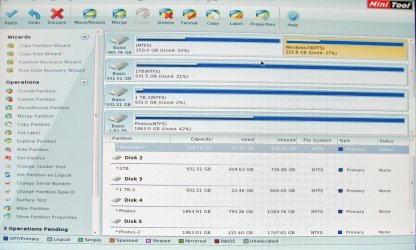
These images are digital photos and that is why they are blurry.

Partition Wizard did not work exactly as you said, probably my bad.

Windows 7_PW-1.jpg

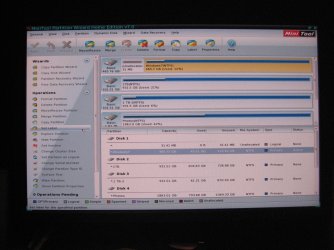
I set the Windows 7 to active but the Vista partition must have been already set to inactive because this option was grayed out. Also I was not able to select to rebuild the MBR, grayed out, on the Windows 7 disk.

Windows 7_PW-2.jpg

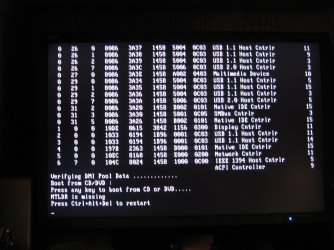
When rebooting I was informed I am missing NTLDR, whatever that was. After running three, just like you said, Startup Repairs, I was able to boot.

Windows 7-NTLDR.jpg

Now my only issue is how to eliminate this screen.

Windows 7_BootScreen.jpg

As soon as I am able to remove the OS selection screen I am done.

Thanks again, Floyd

edit: I also created the system backup, thanks for good insurance advice.
 

My Computer

Computer Manufacturer/Model Number
Custom Build
OS
Window 7x64 Professional
CPU
Intel (R) Core (TM) 2 Quad CPU Q9550 @ 2.83GHz
Motherboard
Gigabyte EP45-UD3R
Memory
8 GB
Graphics Card(s)
Nvidia GeForce GTS 250
Monitor(s) Displays
NEC MultiSync PA 241W
Screen Resolution
1920x1200
Hard Drives
C:/ Windows 7 Professional x64 OS
D:/ Partition on C:/ with Vista Ultimate x64 OS
E:/ 1TB-1
F:/ 1TB-2
G:/ Photos (2TB)
H:/ Photos2 (2TB)
J:/ WD My Book External (2TB)
K:/ WD My Book External (2TB)
PSU
850 W.
Keyboard
Logitech LX 700
Mouse
Wireless (Came as package with LX 700)
Internet Speed
Verizon FiOS 30mbs up 25mbs down
Other Info
USB3 expansion Cards (2) connected to WD external drives (2) and Lexor USB 3 CF/SD card reader.
Thanks Gregrocker, I followed your instruction with only a few questions.

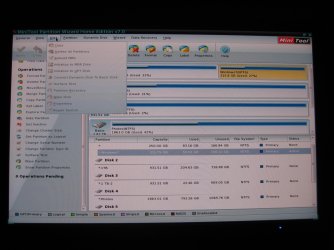
These images are digital photos and that is why they are blurry.

Partition Wizard did not work exactly as you said, probably my bad.

View attachment 180902

I set the Windows 7 to active but the Vista partition must have been already set to inactive because this option was grayed out. Also I was not able to select to rebuild the MBR, grayed out, on the Windows 7 disk.

View attachment 180903

When rebooting I was informed I am missing NTLDR, whatever that was. After running three, just like you said, Startup Repairs, I was able to boot.

View attachment 180904

Now my only issue is how to eliminate this screen.

View attachment 180905

As soon as I am able to remove the OS selection screen I am done.

Thanks again, Floyd

edit: I also created the system backup, thanks for good insurance advice.

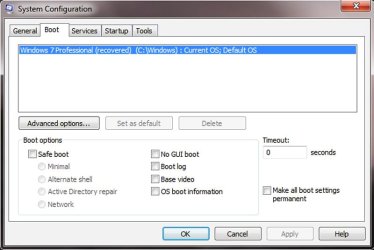
Click Start and type msconfig in the Search field then click msconfig under the Programs list.

Click the Boot tab and delete the redundant boot entry. Apply, OK and restart your computer and you should be good to go.
 

My Computer

Computer Manufacturer/Model Number
HP Pavilion Elite 495UK
OS
Windows 7 Ultimate SP1 64-Bit
CPU
Intel Core i7 870 @ 2.93GHz
Motherboard
MSI 2A9C (CPU1)
Memory
8Gb Dual-Channel DDR3 @ 664MHz
Graphics Card(s)
nVidia GeForce GTX 460 1024MB dedicated RAM
Sound Card
Realtek HD Audio
Monitor(s) Displays
HP2310i
Screen Resolution
1920 x 1080
Hard Drives
1x1954GB Hitachi HDS22020ALA 330 (RAID), 1x1954GB Hitachi External for backup and storage
PSU
460W
Case
HP Elite
Cooling
Air cooled
Keyboard
Logitech K750 solar-powered keyboard
Mouse
Logitech Wireless M180 mouse
Internet Speed
2Mb
Other Info
Pure Avanti Flow Internet Radio with iPod Dock, 64Gb iPod, HP USB Speakers, Sony MDR-V500 Headphones, Sony Vaio F-Series Laptop
That's OK, Vista went Inactuve when Win7 was marked Active on the same HD.

The only reason Rebuild MBR would not be available on an OS HD is because you didn't follow the step to click on the HD to highlight it first.

To remove Vista, follow the final steps to delete it and Resize Win7 into that space - to also take advantage of faster reads of OS in the lower (left hand) HD address. It should delete the Boot Menu along with Vista. If not delete it in msconfig>Boot tab.
 
Two More Things

Thanks to everyone, I am about to mark this thread as solved.

Only two small issues to solve. Probably not worth mentioning but, hey I am that kind of guy. Must know everything, drives my wife crazy.

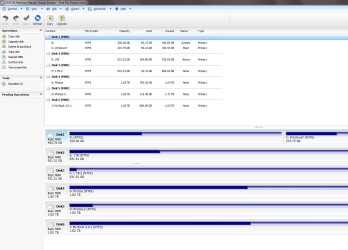
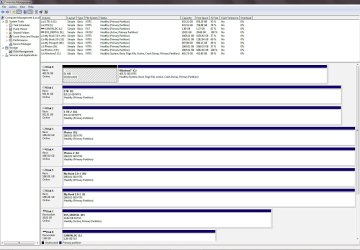
Unallocated space still exist, I think I can fix this because of what I have learned over the last few day.

Unallocated.jpg

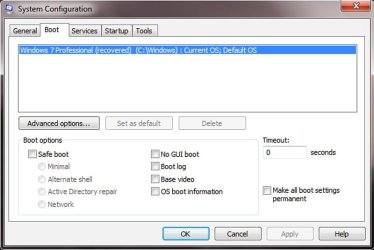
Why is my OS now know as (recovered) and do I care and could I change it back the way it used to be?


recovered.jpg

Floyd...
 

My Computer

Computer Manufacturer/Model Number
Custom Build
OS
Window 7x64 Professional
CPU
Intel (R) Core (TM) 2 Quad CPU Q9550 @ 2.83GHz
Motherboard
Gigabyte EP45-UD3R
Memory
8 GB
Graphics Card(s)
Nvidia GeForce GTS 250
Monitor(s) Displays
NEC MultiSync PA 241W
Screen Resolution
1920x1200
Hard Drives
C:/ Windows 7 Professional x64 OS
D:/ Partition on C:/ with Vista Ultimate x64 OS
E:/ 1TB-1
F:/ 1TB-2
G:/ Photos (2TB)
H:/ Photos2 (2TB)
J:/ WD My Book External (2TB)
K:/ WD My Book External (2TB)
PSU
850 W.
Keyboard
Logitech LX 700
Mouse
Wireless (Came as package with LX 700)
Internet Speed
Verizon FiOS 30mbs up 25mbs down
Other Info
USB3 expansion Cards (2) connected to WD external drives (2) and Lexor USB 3 CF/SD card reader.
Unallocated Space Not Gone

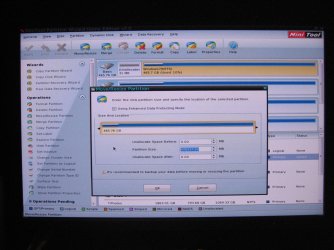
O.K., I seem to be able to follow instruction, however the unallocated space is not gone.

PW-ThisOK.jpg

PW-ZeroZero.jpg

The amount of unallocated space changed, I was expecting not to have any.

Floyd...
 

My Computer

Computer Manufacturer/Model Number
Custom Build
OS
Window 7x64 Professional
CPU
Intel (R) Core (TM) 2 Quad CPU Q9550 @ 2.83GHz
Motherboard
Gigabyte EP45-UD3R
Memory
8 GB
Graphics Card(s)
Nvidia GeForce GTS 250
Monitor(s) Displays
NEC MultiSync PA 241W
Screen Resolution
1920x1200
Hard Drives
C:/ Windows 7 Professional x64 OS
D:/ Partition on C:/ with Vista Ultimate x64 OS
E:/ 1TB-1
F:/ 1TB-2
G:/ Photos (2TB)
H:/ Photos2 (2TB)
J:/ WD My Book External (2TB)
K:/ WD My Book External (2TB)
PSU
850 W.
Keyboard
Logitech LX 700
Mouse
Wireless (Came as package with LX 700)
Internet Speed
Verizon FiOS 30mbs up 25mbs down
Other Info
USB3 expansion Cards (2) connected to WD external drives (2) and Lexor USB 3 CF/SD card reader.
Strange that it will not Resize into the 31mb since it is already Unallocated and therefore can't be deleted any further.

Perhaps after trying again with the PW boot Cd you'll have to wait til time to reinstall or reimage and then wipe the HD with Diskpart Clean All to vanquish it.
 
Ran Partition Wizard.exe from Windows 7 and with one try no more unallocated space.

recovered.jpg

What about (recovered) added to Windows 7, can I change it back?
 

My Computer

Computer Manufacturer/Model Number
Custom Build
OS
Window 7x64 Professional
CPU
Intel (R) Core (TM) 2 Quad CPU Q9550 @ 2.83GHz
Motherboard
Gigabyte EP45-UD3R
Memory
8 GB
Graphics Card(s)
Nvidia GeForce GTS 250
Monitor(s) Displays
NEC MultiSync PA 241W
Screen Resolution
1920x1200
Hard Drives
C:/ Windows 7 Professional x64 OS
D:/ Partition on C:/ with Vista Ultimate x64 OS
E:/ 1TB-1
F:/ 1TB-2
G:/ Photos (2TB)
H:/ Photos2 (2TB)
J:/ WD My Book External (2TB)
K:/ WD My Book External (2TB)
PSU
850 W.
Keyboard
Logitech LX 700
Mouse
Wireless (Came as package with LX 700)
Internet Speed
Verizon FiOS 30mbs up 25mbs down
Other Info
USB3 expansion Cards (2) connected to WD external drives (2) and Lexor USB 3 CF/SD card reader.
I'm assuming all you want to do now is edit the Windows 7 boot entry, which can be done from a command prompt, thus:

Boot into Windows then click Start and type cmd in the Search field.

Right-click cmd under the Programs list and choose Run as Administrator to open the command shell.

Type bcdedit then press Enter.

Look in the Windows Boot Loader section where you'll see the name Windows 7 Professional (recovered).

To edit this name go to the C: prompt at the bottom of the Boot Loader Section and type this command:

bcdedit /set description "Windows 7 Professional" then press Enter again. (Don't forget to include the inverted commas).

You should see a message that reads The operation completed successfully.

Type Exit and press Enter to close the command shell and reboot your computer.
 

My Computer

Computer Manufacturer/Model Number
HP Pavilion Elite 495UK
OS
Windows 7 Ultimate SP1 64-Bit
CPU
Intel Core i7 870 @ 2.93GHz
Motherboard
MSI 2A9C (CPU1)
Memory
8Gb Dual-Channel DDR3 @ 664MHz
Graphics Card(s)
nVidia GeForce GTX 460 1024MB dedicated RAM
Sound Card
Realtek HD Audio
Monitor(s) Displays
HP2310i
Screen Resolution
1920 x 1080
Hard Drives
1x1954GB Hitachi HDS22020ALA 330 (RAID), 1x1954GB Hitachi External for backup and storage
PSU
460W
Case
HP Elite
Cooling
Air cooled
Keyboard
Logitech K750 solar-powered keyboard
Mouse
Logitech Wireless M180 mouse
Internet Speed
2Mb
Other Info
Pure Avanti Flow Internet Radio with iPod Dock, 64Gb iPod, HP USB Speakers, Sony MDR-V500 Headphones, Sony Vaio F-Series Laptop
I've only used EasyBCD to change the name back in the past. But I avoid CMD's if there's alternatives.

First I'd check if it will let you set a new label at Computer>rightclick C>Properties in the box at top, or on PW by rightclicking the HD.
 
Thanks to everyone I have no more issues as noted in this thread.
Problems solved.
 

My Computer

Computer Manufacturer/Model Number
Custom Build
OS
Window 7x64 Professional
CPU
Intel (R) Core (TM) 2 Quad CPU Q9550 @ 2.83GHz
Motherboard
Gigabyte EP45-UD3R
Memory
8 GB
Graphics Card(s)
Nvidia GeForce GTS 250
Monitor(s) Displays
NEC MultiSync PA 241W
Screen Resolution
1920x1200
Hard Drives
C:/ Windows 7 Professional x64 OS
D:/ Partition on C:/ with Vista Ultimate x64 OS
E:/ 1TB-1
F:/ 1TB-2
G:/ Photos (2TB)
H:/ Photos2 (2TB)
J:/ WD My Book External (2TB)
K:/ WD My Book External (2TB)
PSU
850 W.
Keyboard
Logitech LX 700
Mouse
Wireless (Came as package with LX 700)
Internet Speed
Verizon FiOS 30mbs up 25mbs down
Other Info
USB3 expansion Cards (2) connected to WD external drives (2) and Lexor USB 3 CF/SD card reader.
Back
Top