help with duplicate programs on c: drive

nikonfruit

New member
Local time
5:17 AM
Messages
38
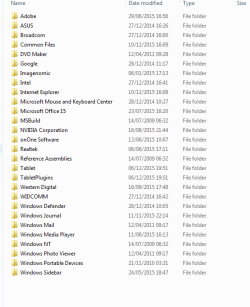
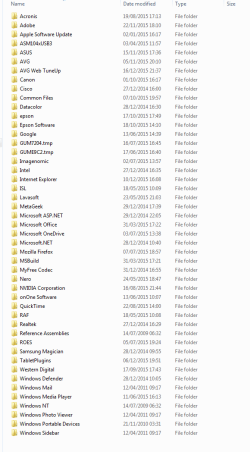
hi, I am using win 7 64bit I have noticed on my c drive there are 2 sets of programs one under program files and another more in-depth? on x86? do I need both sets? its a stupid question but I don't want to delete one if they are needed?
mark:confused:
 

Attachments

  • Capture.PNG
    Capture.PNG
    14 KB · Views: 22
  • Capture 2.PNG
    Capture 2.PNG
    21.7 KB · Views: 1
Last edited:

My Computer

Computer type
PC/Desktop
Computer Manufacturer/Model Number
corsair 350d
OS
windows ultimate 64bit
CPU
intel i7 6 core
Motherboard
asus x99 pro
Memory
corsair 16gb
Graphics Card(s)
Asus GTX 780
Monitor(s) Displays
asus 4k series
Screen Resolution
1440
Hard Drives
Samsung evo 840
2 x 2 gb wd caviar black
2x 2tb caviar green in a lian li hard drive enclosure
PSU
corsair 650w
Case
corsair
Cooling
corsair h100
Keyboard
microsoft 3000
Mouse
microsoft 3000
Internet Speed
68meg
Antivirus
AVG
Browser
explorer 11
You cannot delete either of these they are both required.
One set if for 32 bit apps the other for 64 bit apps, deleting anything from either of these folders will render programs unusable
 

My Computer

Computer type
PC/Desktop
Computer Manufacturer/Model Number
Pauly Special
OS
Win7 Ultimate X64
CPU
Intel i5 3570K
Motherboard
Gigabyte Z77X-DS3H
Memory
8GB DDR3 1600
Graphics Card(s)
Onboard
Sound Card
Onboard
Screen Resolution
1280x1024
Hard Drives
Samsung 840 Evo SSD (OS)
1TB Spinner (Data)
PSU
800W Arctic
Case
Cooler Master
Cooling
3x120mm Fans
Keyboard
MS Wireless
Mouse
MS Wireless
Internet Speed
20M
hi Pauly thank you
 

My Computer

Computer type
PC/Desktop
Computer Manufacturer/Model Number
corsair 350d
OS
windows ultimate 64bit
CPU
intel i7 6 core
Motherboard
asus x99 pro
Memory
corsair 16gb
Graphics Card(s)
Asus GTX 780
Monitor(s) Displays
asus 4k series
Screen Resolution
1440
Hard Drives
Samsung evo 840
2 x 2 gb wd caviar black
2x 2tb caviar green in a lian li hard drive enclosure
PSU
corsair 650w
Case
corsair
Cooling
corsair h100
Keyboard
microsoft 3000
Mouse
microsoft 3000
Internet Speed
68meg
Antivirus
AVG
Browser
explorer 11
A 64 bit OS is capable of running both 32 and 64 bit applications. Typically 64 bit applications will go to "Program Files" and 32 bit applications to "Program Files (x86). There will be many cases of apparent duplication of folders and files but this is more apparent than real. They may look the same in Windows explorer but internally 32 bit and 64 bit programs are VERY different. This is all a lot more complicated than it appears and most guesses will be wrong.

Normally programs are uninstalled and not manually deleted from the program files folders. There are times this may be necessary but you really need to understand what you are doing. Your policy should be look but don't touch. That goes double for anything in the Windows folder or it's subfolders.
 

My Computer

Computer type
PC/Desktop
Computer Manufacturer/Model Number
HP
OS
Windows 7 Pro 64 bit
CPU
Xeon W3520
Memory
8 GB
Graphics Card(s)
Nvidia Geforce 210
nikon

I like the method you used. Ask before removing.
Continue using that method and you and your computer will get along with each other.

Now from me, someone who is not schooled in computers but has been around awhile.

I also snoop through my computers and find many things that I have no idea what they are or used for. I Google them and sometimes I find nothing. At that time my Rule of the Thumb is look but don't touch.

I see that LMiller7 has the same rule.

Now if for whatever reason you don't want to follow the Rule of Thumb please print out this tutorial and hang it on the wall. You will be using it a lot.

http://www.sevenforums.com/tutorials/1649-clean-install-windows-7-a.html
 

My Computer

Computer type
PC/Desktop
Computer Manufacturer/Model Number
Home made Desktop
OS
Windows 10 Pro. 64/ version 1709 Windows 7 Pro/64
CPU
Intel i7-6800K @ 4.3
Motherboard
ASUS X-99 Deluxe II
Memory
Corsair Platinum 16 gig @2400
Graphics Card(s)
EVGA GTX 1070 OC
Monitor(s) Displays
Asus 27" LED LCD/VE278Q
Screen Resolution
1920-1080 or 1280-720 HDMI
Hard Drives
INTEL SSD 730-240 Gb Sata 3.0/
PSU
EVGA Platium 1200W
Case
Phanteks Luxe Tempered Glass 8 fans/ one radiator
Cooling
XSPC/ Water Cooled CPU
Keyboard
Das 4 Professional
Mouse
Logitech M705/MX Anywhere 2-S
Internet Speed
100 mbits
Antivirus
Microsoft Security Essentials/ Malwarebytes Premium 3.0/ SAS
Browser
I.E. 11 default/Firefox/ ISP Time Warner Cable/Spectrum
Other Info
LG BluRay Burner/
Sound system-KLipsch-THX/
Icy Dock ssd Hot Swap bays.
Leave the folders alone.
 

My Computer

Computer type
PC/Desktop
Computer Manufacturer/Model Number
Skylake Special #666
OS
Windows 10 Pro x64
CPU
Intel Core i7 6700K
Motherboard
Asus Sabertooth Z170 Mark 1
Memory
GSkill TridentZ RGB 16GB 3600 16-16-16-36
Graphics Card(s)
EVGA GTX 980 Ti SC x2
Sound Card
Realtek High Definition
Monitor(s) Displays
AOC G2460PG
Screen Resolution
1920 x 1080 144Hz
Hard Drives
Samsung 860 Pro 256GB, Seagate Barracuda 4TB x2
PSU
EVGA 1000 P2, EVGA White Custom Braided Cables
Case
Corsair Vengeance C70 Gunmetal Black
Cooling
Corsair H100i v2, Corsair ML120 x2, Thermal Grizzly Kryonaut
Keyboard
Logitech G910 Orion Spectrum
Mouse
Logitech G700s
Internet Speed
Verizon Fios Quantum Gateway 75/75
Antivirus
Windows Defender, Malwarebytes Free 3.8.3
Browser
Chrome
Other Info
Corsair SP120 x4, LG Blu-ray Drive, Durabrand HT-395 100 Watt Dolby Digital Amp, Corsair H2100 Wireless 7.1 Headset
thanks for all your reply`s most helpful :D
 

My Computer

Computer type
PC/Desktop
Computer Manufacturer/Model Number
corsair 350d
OS
windows ultimate 64bit
CPU
intel i7 6 core
Motherboard
asus x99 pro
Memory
corsair 16gb
Graphics Card(s)
Asus GTX 780
Monitor(s) Displays
asus 4k series
Screen Resolution
1440
Hard Drives
Samsung evo 840
2 x 2 gb wd caviar black
2x 2tb caviar green in a lian li hard drive enclosure
PSU
corsair 650w
Case
corsair
Cooling
corsair h100
Keyboard
microsoft 3000
Mouse
microsoft 3000
Internet Speed
68meg
Antivirus
AVG
Browser
explorer 11
Back
Top