
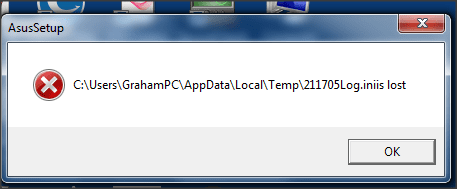
Help with error message on boot-up

runedog

New member
Power User
VIP
Local time
11:33 PM
Messages
190
Can anyone tell me how to alleviate this, it happens on boot-up and repeats twice?

Many thanks

Please see attachment
 

Attachments

  • Snap 2015-05-03 at 17.04.13.png
    Snap 2015-05-03 at 17.04.13.png
    30.8 KB · Views: 28

My Computer

Computer type
PC/Desktop
Computer Manufacturer/Model Number
Arbico
OS
Windows 7 Professional x64
CPU
Intel Core i7 950 CPU (3.06Ghz Quad Core)
Motherboard
Asus P6X58D-E motherboard with SATA III support
Memory
12 gig
Graphics Card(s)
ATI HD 5970 2GB PCI Express Graphics card
Sound Card
Creative XFi Xtreme Audio 7.1 channel sound card
Monitor(s) Displays
Samsung 24" inch
Hard Drives
250gig SSD
2TB
PSU
Quiet Coolermaster 1000W Quad PCI-E PSU
Case
Quiet Coolermaster Cosmos Case
Cooling
Water cooled with multiple fans
Antivirus
Kaspersky Internet Security 2012
Browser
Firefox

My Computer

Computer type
PC/Desktop
Computer Manufacturer/Model Number
home built
OS
Multi-Boot W7_Pro_x64 W8.1_Pro_x64 W10_Pro_x64 +Linux_VMs +Chromium_VM
CPU
AMD Athlon II x4 620
Motherboard
Gigabyte GA-MA785G-UD3H
Memory
6GB GSkill DDR2 800
Graphics Card(s)
AMD 4670 GPU + AMD 4200 IGP
Sound Card
on board Realtek ALC889A
Monitor(s) Displays
RCA 40" LCD TV, Insignia 32" LCD TV, HP 15" LCD monitor
Screen Resolution
1680 x 1050
Hard Drives
OCZ Vertex 3 120GB,
Samsung F3 1TB (3),
Several others - WD, Seagate, Hitachi, ...
PSU
Corsair 500 W
Case
Rosewill mid tower
Cooling
CM 90mm rifle
Keyboard
Gyration wireless, Logitech wireless, Dell USB wired
Mouse
Gyration wireless, Logitech wireless, V7 USB wired
Internet Speed
Spectrum - 100Mbps D / 10Mbps U
Antivirus
Avast, MBAM3, EMET, WinPatrol
Browser
Pale Moon, Firefox, IE
Other Info
2 multi-boot PC's
Mainly HTPC/Office/Gen purpose (no gaming).
Trendnet USB KVM.
LG DVD burner/Blue Ray Player.
Tray system for removable SATA backup drives.

Not currently OCd, under-volted.
I use Hybrid sleep, rarely re-boot or shutdown.

Hauppauge HD-PVR, Avermedia PCIe TV Tuner, Hauppauge PCI TV Tuner.
Download and run ProcessExplorer. It does not need to be installed.
Drag-and-drop target to find an image. If you're not sure which application corresponds to which image in Process Explorer, click and drag the little gun sight icon on the Process Explorer toolbar, and drop it on any visible window to find out what process/image it is.
Once the error message is on the screen, start ProcessExplorer and drag the target icon and drop it on the error message window. It will show the process that generated that window highlighted in blue in the PE window.
 

My Computer

Computer type
PC/Desktop
Computer Manufacturer/Model Number
Lenovo IdeaCenter 450
OS
Windows 10 Pro X64
CPU
Intel Quad Core i7-4770 @ 3.4Ghz
Memory
16.0GB PC3-12800 DDR3 SDRAM 1600 MHz
Graphics Card(s)
Intel Integrated HD Graphics
Sound Card
Realtek HD Audio
Monitor(s) Displays
HP 22" LCD
Screen Resolution
1680 x 1050
Hard Drives
250GB Samsung EVO SATA-3 SSD
2TB Seagate ST2000DM001 SATA-2
1.5TB Seagate ST3150041AS SATA
Keyboard
Dell USB
Mouse
Lenovo USB
Internet Speed
Cable via Road Runner 3MB Upload, 30MB Download
Antivirus
Windows Defender, MBAM Pro, MBAE
Browser
Seamonkey
Other Info
UEFI/GPT
PLDS DVD-RW DH16AERSH
Many thanks foryour replies chaps, I will give them a go.
Graham
 

My Computer

Computer type
PC/Desktop
Computer Manufacturer/Model Number
Arbico
OS
Windows 7 Professional x64
CPU
Intel Core i7 950 CPU (3.06Ghz Quad Core)
Motherboard
Asus P6X58D-E motherboard with SATA III support
Memory
12 gig
Graphics Card(s)
ATI HD 5970 2GB PCI Express Graphics card
Sound Card
Creative XFi Xtreme Audio 7.1 channel sound card
Monitor(s) Displays
Samsung 24" inch
Hard Drives
250gig SSD
2TB
PSU
Quiet Coolermaster 1000W Quad PCI-E PSU
Case
Quiet Coolermaster Cosmos Case
Cooling
Water cooled with multiple fans
Antivirus
Kaspersky Internet Security 2012
Browser
Firefox
I have now found the process that causes the error, how to I stop that process starting at boot-up please?

Many thanks
 

My Computer

Computer type
PC/Desktop
Computer Manufacturer/Model Number
Arbico
OS
Windows 7 Professional x64
CPU
Intel Core i7 950 CPU (3.06Ghz Quad Core)
Motherboard
Asus P6X58D-E motherboard with SATA III support
Memory
12 gig
Graphics Card(s)
ATI HD 5970 2GB PCI Express Graphics card
Sound Card
Creative XFi Xtreme Audio 7.1 channel sound card
Monitor(s) Displays
Samsung 24" inch
Hard Drives
250gig SSD
2TB
PSU
Quiet Coolermaster 1000W Quad PCI-E PSU
Case
Quiet Coolermaster Cosmos Case
Cooling
Water cooled with multiple fans
Antivirus
Kaspersky Internet Security 2012
Browser
Firefox
Brink has these instructions in the Clean Startup tutorial link in post #2 that should help.

9. After you determine the startup item or the service that causes the problem, contact the program manufacturer to determine whether the problem can be resolved. Or, run the System Configuration Utility (msconfig), and then uncheck the check box for the problem item until it can be.
If you need more help with a specific program, what program is it, and how did you find it ?
 

My Computer

Computer type
PC/Desktop
Computer Manufacturer/Model Number
home built
OS
Multi-Boot W7_Pro_x64 W8.1_Pro_x64 W10_Pro_x64 +Linux_VMs +Chromium_VM
CPU
AMD Athlon II x4 620
Motherboard
Gigabyte GA-MA785G-UD3H
Memory
6GB GSkill DDR2 800
Graphics Card(s)
AMD 4670 GPU + AMD 4200 IGP
Sound Card
on board Realtek ALC889A
Monitor(s) Displays
RCA 40" LCD TV, Insignia 32" LCD TV, HP 15" LCD monitor
Screen Resolution
1680 x 1050
Hard Drives
OCZ Vertex 3 120GB,
Samsung F3 1TB (3),
Several others - WD, Seagate, Hitachi, ...
PSU
Corsair 500 W
Case
Rosewill mid tower
Cooling
CM 90mm rifle
Keyboard
Gyration wireless, Logitech wireless, Dell USB wired
Mouse
Gyration wireless, Logitech wireless, V7 USB wired
Internet Speed
Spectrum - 100Mbps D / 10Mbps U
Antivirus
Avast, MBAM3, EMET, WinPatrol
Browser
Pale Moon, Firefox, IE
Other Info
2 multi-boot PC's
Mainly HTPC/Office/Gen purpose (no gaming).
Trendnet USB KVM.
LG DVD burner/Blue Ray Player.
Tray system for removable SATA backup drives.

Not currently OCd, under-volted.
I use Hybrid sleep, rarely re-boot or shutdown.

Hauppauge HD-PVR, Avermedia PCIe TV Tuner, Hauppauge PCI TV Tuner.
Tried that via MsConfig but it still appears on boot-up.

I found the culprit through Process Manager but cannot stop it appearing?

Many thanks
 

My Computer

Computer type
PC/Desktop
Computer Manufacturer/Model Number
Arbico
OS
Windows 7 Professional x64
CPU
Intel Core i7 950 CPU (3.06Ghz Quad Core)
Motherboard
Asus P6X58D-E motherboard with SATA III support
Memory
12 gig
Graphics Card(s)
ATI HD 5970 2GB PCI Express Graphics card
Sound Card
Creative XFi Xtreme Audio 7.1 channel sound card
Monitor(s) Displays
Samsung 24" inch
Hard Drives
250gig SSD
2TB
PSU
Quiet Coolermaster 1000W Quad PCI-E PSU
Case
Quiet Coolermaster Cosmos Case
Cooling
Water cooled with multiple fans
Antivirus
Kaspersky Internet Security 2012
Browser
Firefox
What is the process. Maybe it's a service? If so look at the Services tab in msconfig. Stop and disable it there.
 

My Computer

Computer type
PC/Desktop
Computer Manufacturer/Model Number
Lenovo IdeaCenter 450
OS
Windows 10 Pro X64
CPU
Intel Quad Core i7-4770 @ 3.4Ghz
Memory
16.0GB PC3-12800 DDR3 SDRAM 1600 MHz
Graphics Card(s)
Intel Integrated HD Graphics
Sound Card
Realtek HD Audio
Monitor(s) Displays
HP 22" LCD
Screen Resolution
1680 x 1050
Hard Drives
250GB Samsung EVO SATA-3 SSD
2TB Seagate ST2000DM001 SATA-2
1.5TB Seagate ST3150041AS SATA
Keyboard
Dell USB
Mouse
Lenovo USB
Internet Speed
Cable via Road Runner 3MB Upload, 30MB Download
Antivirus
Windows Defender, MBAM Pro, MBAE
Browser
Seamonkey
Other Info
UEFI/GPT
PLDS DVD-RW DH16AERSH
Hi, I have checked Services and the only non-MS one I have running is my anti-virus?

Many thanks
 

My Computer

Computer type
PC/Desktop
Computer Manufacturer/Model Number
Arbico
OS
Windows 7 Professional x64
CPU
Intel Core i7 950 CPU (3.06Ghz Quad Core)
Motherboard
Asus P6X58D-E motherboard with SATA III support
Memory
12 gig
Graphics Card(s)
ATI HD 5970 2GB PCI Express Graphics card
Sound Card
Creative XFi Xtreme Audio 7.1 channel sound card
Monitor(s) Displays
Samsung 24" inch
Hard Drives
250gig SSD
2TB
PSU
Quiet Coolermaster 1000W Quad PCI-E PSU
Case
Quiet Coolermaster Cosmos Case
Cooling
Water cooled with multiple fans
Antivirus
Kaspersky Internet Security 2012
Browser
Firefox

My Computer

Computer type
PC/Desktop
Computer Manufacturer/Model Number
home built
OS
Multi-Boot W7_Pro_x64 W8.1_Pro_x64 W10_Pro_x64 +Linux_VMs +Chromium_VM
CPU
AMD Athlon II x4 620
Motherboard
Gigabyte GA-MA785G-UD3H
Memory
6GB GSkill DDR2 800
Graphics Card(s)
AMD 4670 GPU + AMD 4200 IGP
Sound Card
on board Realtek ALC889A
Monitor(s) Displays
RCA 40" LCD TV, Insignia 32" LCD TV, HP 15" LCD monitor
Screen Resolution
1680 x 1050
Hard Drives
OCZ Vertex 3 120GB,
Samsung F3 1TB (3),
Several others - WD, Seagate, Hitachi, ...
PSU
Corsair 500 W
Case
Rosewill mid tower
Cooling
CM 90mm rifle
Keyboard
Gyration wireless, Logitech wireless, Dell USB wired
Mouse
Gyration wireless, Logitech wireless, V7 USB wired
Internet Speed
Spectrum - 100Mbps D / 10Mbps U
Antivirus
Avast, MBAM3, EMET, WinPatrol
Browser
Pale Moon, Firefox, IE
Other Info
2 multi-boot PC's
Mainly HTPC/Office/Gen purpose (no gaming).
Trendnet USB KVM.
LG DVD burner/Blue Ray Player.
Tray system for removable SATA backup drives.

Not currently OCd, under-volted.
I use Hybrid sleep, rarely re-boot or shutdown.

Hauppauge HD-PVR, Avermedia PCIe TV Tuner, Hauppauge PCI TV Tuner.
You started installing some Asus software, the machine had to reboot and you probably pulled the cd out of the tray and setup could not finish.

Go into task manager and delete the task or put the disk back in reboot the machine and let Asus finish the install of whatever it was you were installing.
 

My Computer

Computer type
PC/Desktop
Computer Manufacturer/Model Number
Skylake Special #666
OS
Windows 10 Pro x64
CPU
Intel Core i7 6700K
Motherboard
Asus Sabertooth Z170 Mark 1
Memory
GSkill TridentZ RGB 16GB 3600 16-16-16-36
Graphics Card(s)
EVGA GTX 980 Ti SC x2
Sound Card
Realtek High Definition
Monitor(s) Displays
AOC G2460PG
Screen Resolution
1920 x 1080 144Hz
Hard Drives
Samsung 860 Pro 256GB, Seagate Barracuda 4TB x2
PSU
EVGA 1000 P2, EVGA White Custom Braided Cables
Case
Corsair Vengeance C70 Gunmetal Black
Cooling
Corsair H100i v2, Corsair ML120 x2, Thermal Grizzly Kryonaut
Keyboard
Logitech G910 Orion Spectrum
Mouse
Logitech G700s
Internet Speed
Verizon Fios Quantum Gateway 75/75
Antivirus
Windows Defender, Malwarebytes Free 3.8.3
Browser
Chrome
Other Info
Corsair SP120 x4, LG Blu-ray Drive, Durabrand HT-395 100 Watt Dolby Digital Amp, Corsair H2100 Wireless 7.1 Headset
Ah Sorry David: Process Manager said it was AsusSetup.

Thanks
 

My Computer

Computer type
PC/Desktop
Computer Manufacturer/Model Number
Arbico
OS
Windows 7 Professional x64
CPU
Intel Core i7 950 CPU (3.06Ghz Quad Core)
Motherboard
Asus P6X58D-E motherboard with SATA III support
Memory
12 gig
Graphics Card(s)
ATI HD 5970 2GB PCI Express Graphics card
Sound Card
Creative XFi Xtreme Audio 7.1 channel sound card
Monitor(s) Displays
Samsung 24" inch
Hard Drives
250gig SSD
2TB
PSU
Quiet Coolermaster 1000W Quad PCI-E PSU
Case
Quiet Coolermaster Cosmos Case
Cooling
Water cooled with multiple fans
Antivirus
Kaspersky Internet Security 2012
Browser
Firefox
AddRam:

>>You started installing some Asus software, the machine had to reboot and you probably pulled the cd out of the tray and setup could not finish.

Go into task manager and delete the task or put the disk back in reboot the machine and let Asus finish the install of whatever it was you were installing.<<

I haven't recently installed any Asus software. My motherboard is a Asus X99 series and I do have the DVD support disk, should I try running this?

Thanks
 

My Computer

Computer type
PC/Desktop
Computer Manufacturer/Model Number
Arbico
OS
Windows 7 Professional x64
CPU
Intel Core i7 950 CPU (3.06Ghz Quad Core)
Motherboard
Asus P6X58D-E motherboard with SATA III support
Memory
12 gig
Graphics Card(s)
ATI HD 5970 2GB PCI Express Graphics card
Sound Card
Creative XFi Xtreme Audio 7.1 channel sound card
Monitor(s) Displays
Samsung 24" inch
Hard Drives
250gig SSD
2TB
PSU
Quiet Coolermaster 1000W Quad PCI-E PSU
Case
Quiet Coolermaster Cosmos Case
Cooling
Water cooled with multiple fans
Antivirus
Kaspersky Internet Security 2012
Browser
Firefox
Sorted the problem :)

Went to Task Scheduler
Expanded the Schedule library
Opened ASUS then deleted the i-setup entry.

All worked - one happy bunny :)

Thanks for your help guys
 

My Computer

Computer type
PC/Desktop
Computer Manufacturer/Model Number
Arbico
OS
Windows 7 Professional x64
CPU
Intel Core i7 950 CPU (3.06Ghz Quad Core)
Motherboard
Asus P6X58D-E motherboard with SATA III support
Memory
12 gig
Graphics Card(s)
ATI HD 5970 2GB PCI Express Graphics card
Sound Card
Creative XFi Xtreme Audio 7.1 channel sound card
Monitor(s) Displays
Samsung 24" inch
Hard Drives
250gig SSD
2TB
PSU
Quiet Coolermaster 1000W Quad PCI-E PSU
Case
Quiet Coolermaster Cosmos Case
Cooling
Water cooled with multiple fans
Antivirus
Kaspersky Internet Security 2012
Browser
Firefox
Exactly as I said, as I did the same thing, in my case it was the chipset drivers, you have to leave the cd in the tray so windows can reboot and finish.

Even though you said you haven`t tried to install any Asus software lately, it was definitely something that you initiated :)
 

My Computer

Computer type
PC/Desktop
Computer Manufacturer/Model Number
Skylake Special #666
OS
Windows 10 Pro x64
CPU
Intel Core i7 6700K
Motherboard
Asus Sabertooth Z170 Mark 1
Memory
GSkill TridentZ RGB 16GB 3600 16-16-16-36
Graphics Card(s)
EVGA GTX 980 Ti SC x2
Sound Card
Realtek High Definition
Monitor(s) Displays
AOC G2460PG
Screen Resolution
1920 x 1080 144Hz
Hard Drives
Samsung 860 Pro 256GB, Seagate Barracuda 4TB x2
PSU
EVGA 1000 P2, EVGA White Custom Braided Cables
Case
Corsair Vengeance C70 Gunmetal Black
Cooling
Corsair H100i v2, Corsair ML120 x2, Thermal Grizzly Kryonaut
Keyboard
Logitech G910 Orion Spectrum
Mouse
Logitech G700s
Internet Speed
Verizon Fios Quantum Gateway 75/75
Antivirus
Windows Defender, Malwarebytes Free 3.8.3
Browser
Chrome
Other Info
Corsair SP120 x4, LG Blu-ray Drive, Durabrand HT-395 100 Watt Dolby Digital Amp, Corsair H2100 Wireless 7.1 Headset
I cannot recollect initiating a install re, Asus unless it was a update sometime!
 

My Computer

Computer type
PC/Desktop
Computer Manufacturer/Model Number
Arbico
OS
Windows 7 Professional x64
CPU
Intel Core i7 950 CPU (3.06Ghz Quad Core)
Motherboard
Asus P6X58D-E motherboard with SATA III support
Memory
12 gig
Graphics Card(s)
ATI HD 5970 2GB PCI Express Graphics card
Sound Card
Creative XFi Xtreme Audio 7.1 channel sound card
Monitor(s) Displays
Samsung 24" inch
Hard Drives
250gig SSD
2TB
PSU
Quiet Coolermaster 1000W Quad PCI-E PSU
Case
Quiet Coolermaster Cosmos Case
Cooling
Water cooled with multiple fans
Antivirus
Kaspersky Internet Security 2012
Browser
Firefox
Back
Top