Help with Extending Volume in Windows 7

yellowjacket03

New member
Local time
10:06 AM
Messages
3
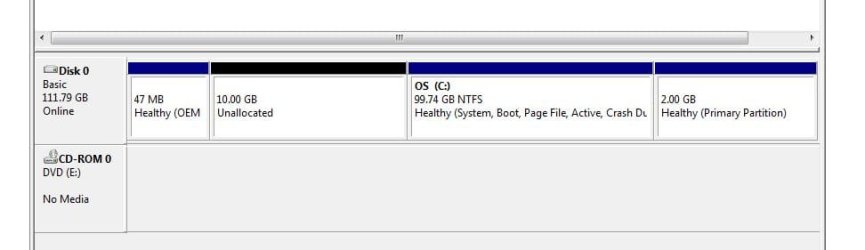
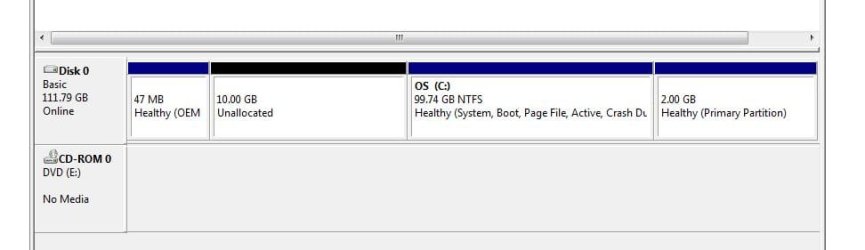
Please see the attached screenshot that shows the partitions of my disk. I have just installed Windows 7 on the partition labeled C:. I would like to extend this volume by merging the 99.74GB C: partition with the 10.0GB "unallocated" partition that is the left. I have just learned that the Disk Management doesn't allow me to do this :banghead:. How would be the best way to do this without having to reinstall the OS and applications?

OS: Windows 7 Home Premium 32-bit
 

Attachments
  • PartitionScreenShot.JPG
    PartitionScreenShot.JPG
    27.2 KB · Views: 83

My Computer My Computer

At a glance

Windows 7 Home Premium 32-bitCore 2 Duo2GB
Computer Manufacturer/Model Number
Dell Inspiron E1505
OS
Windows 7 Home Premium 32-bit
CPU
Core 2 Duo
Memory
2GB
Disk management will not extend a partition to the left, only to the right. To do what you want, you will need to use free Partition Wizard. The Partition Wizard tutorial will explain.
 

My Computers My Computers

  • At a glance

    Windows 11 ProRyzen 9 5900X32GB G Skill DDR4-3600EVGA RTX 3080 FTW 3 Ultra
    Computer type
    PC/Desktop
    Computer Manufacturer/Model Number
    ALWAYS UNDER CONSTRUCTION
    OS
    Windows 11 Pro
    CPU
    Ryzen 9 5900X
    Motherboard
    Asus X570 Crosshair Viii Hero
    Memory
    32GB G Skill DDR4-3600
    Graphics Card(s)
    EVGA RTX 3080 FTW 3 Ultra
    Sound Card
    On Board/Sennheiser PC37X Headset
    Monitor(s) Displays
    3 X Asus 27"
    Screen Resolution
    2560x1440
    Hard Drives
    2 X 1 TB NVME drives
    PSU
    EVGA 850
    Case
    Phanteks Eclipse P400A
    Cooling
    EVGA 280 AIO
    Keyboard
    Logitech G510s/ Logitech G13
    Mouse
    Logitech G502
    Internet Speed
    24/1
    Antivirus
    ESET/MBAM Pro/SAS Pro
    Browser
    Chrome/ Firefox/ Edge
  • At a glance

    Windows 11 ProIntel Ultra 9 288V32 GB LPDDR5X 8533
    Computer type
    Laptop
    System Manufacturer/Model Number
    Dell 16 Plus
    OS
    Windows 11 Pro
    CPU
    Intel Ultra 9 288V
    Memory
    32 GB LPDDR5X 8533
    Monitor(s) Displays
    16" Mini-LED HDR600 Touch 90 Hz
    Screen Resolution
    2560X1600
    Hard Drives
    1 TB NVME
Good practice would suggest that you image the partitions before you manipulate them with Partition Wizard. I got bit once and lost all my partitions using PW which I am familiar with (just a small little mistake did it) - but I had images. So it was no big deal.
 

My Computer My Computer

At a glance

Vista, Windows7, Mint Mate, Zorin, Windows 8from 1.6GHz Duo to i7
Computer Manufacturer/Model Number
HP, Dell, Gateway, Toshiba - 4 laptops and 2 desktops
OS
Vista, Windows7, Mint Mate, Zorin, Windows 8
CPU
from 1.6GHz Duo to i7
Monitor(s) Displays
2x HP w2207
Hard Drives
5x HDD, 7x SSD, 12x Externals
Keyboard
with trackball - no mices
Mouse
Trackball mice
Internet Speed
DSL 6000
Agreed

Good practice would suggest that you image the partitions before you manipulate them with Partition Wizard. I got bit once and lost all my partitions using PW which I am familiar with (just a small little mistake did it) - but I had images. So it was no big deal.

You should probably image the whole HDD.

When I tried to resize and move my W7 partition (in 2010) I managed to screw it up and I ended up having to reinstall it (XP and Ubuntu too). :o
 

My Computer My Computer

At a glance

W7 Ultimate SP1, LM19.2 MATE, W10 Home 1703, ...AMD Phenom II x6 1100T, 3.3 GHz12GB DDR3 1333 G-Skill (4GB x 2), G-Skill (2G...NVIDIA GeForce GTX 660
Computer type
PC/Desktop
Computer Manufacturer/Model Number
n/a
OS
W7 Ultimate SP1, LM19.2 MATE, W10 Home 1703, W10 Pro 1703 VM, #All 64 bit
CPU
AMD Phenom II x6 1100T, 3.3 GHz
Motherboard
ASUS M4A88T-M/USB3 (AM3)
Memory
12GB DDR3 1333 G-Skill (4GB x 2), G-Skill (2GB x 2)
Graphics Card(s)
NVIDIA GeForce GTX 660
Sound Card
Realtek?
Monitor(s) Displays
Samsung S23B350
Screen Resolution
1920x1080
Hard Drives
WD Green 2TB (SATA), WD Green 3TB (SATA), WD Blue 4TB (SATA), WD Blue 6TB (SATA)
PSU
Cooler Master
Case
Antec GX300 Tower
Cooling
3x Antec TRICOOL 120mm Fans
Mouse
Wired Optical
Internet Speed
DSL
Antivirus
Avast
Browser
Pale Moon (64 bit)
Other Info
2018-12-27 Upgraded HDDs
2015-12-10 Upgraded case, graphics card, storage
2015-08-15 Upgraded motherboard & RAM
2015-07-15 Upgraded LM17.1 to LM17.2
Are you all POSITIVE the FREE partition wizard will do this ? I thought only diskpart would merge space from the left of C:
If you just installed 7, in my opinion it would be much easier and faster just to reinstall and make your partition the size you want this time.

I know you need Pro to merge partitions, correct ?
 

My Computer My Computer

At a glance

Windows 10 Pro x64Intel Core i7 6700KGSkill TridentZ RGB 16GB 3600 16-16-16-36EVGA GTX 980 Ti SC x2
Computer type
PC/Desktop
Computer Manufacturer/Model Number
Skylake Special #666
OS
Windows 10 Pro x64
CPU
Intel Core i7 6700K
Motherboard
Asus Sabertooth Z170 Mark 1
Memory
GSkill TridentZ RGB 16GB 3600 16-16-16-36
Graphics Card(s)
EVGA GTX 980 Ti SC x2
Sound Card
Realtek High Definition
Monitor(s) Displays
AOC G2460PG
Screen Resolution
1920 x 1080 144Hz
Hard Drives
Samsung 860 Pro 256GB, Seagate Barracuda 4TB x2
PSU
EVGA 1000 P2, EVGA White Custom Braided Cables
Case
Corsair Vengeance C70 Gunmetal Black
Cooling
Corsair H100i v2, Corsair ML120 x2, Thermal Grizzly Kryonaut
Keyboard
Logitech G910 Orion Spectrum
Mouse
Logitech G700s
Internet Speed
Verizon Fios Quantum Gateway 75/75
Antivirus
Windows Defender, Malwarebytes Free 3.8.3
Browser
Chrome
Other Info
Corsair SP120 x4, LG Blu-ray Drive, Durabrand HT-395 100 Watt Dolby Digital Amp, Corsair H2100 Wireless 7.1 Headset
Are you all POSITIVE the FREE partition wizard will do this ? I thought only diskpart would merge space from the left of C:
If you just installed 7, in my opinion it would be much easier and faster just to reinstall and make your partition the size you want this time.
Yes, Partition Wizard does the job quite nicely - if you make no mistake. I have just used it a couple of days ago for the same purpose.

But a reinstall is the worst option. The better alternative would be to image C, delete the C partition and redefine a bigger partition in the merged unallocated space. Then dump the image back in.
 

My Computer My Computer

At a glance

Vista, Windows7, Mint Mate, Zorin, Windows 8from 1.6GHz Duo to i7
Computer Manufacturer/Model Number
HP, Dell, Gateway, Toshiba - 4 laptops and 2 desktops
OS
Vista, Windows7, Mint Mate, Zorin, Windows 8
CPU
from 1.6GHz Duo to i7
Monitor(s) Displays
2x HP w2207
Hard Drives
5x HDD, 7x SSD, 12x Externals
Keyboard
with trackball - no mices
Mouse
Trackball mice
Internet Speed
DSL 6000
Could be quite easily done without losing any data with a good partitioning software using it's boot disk. You could use Acronis Disk Director Suite Boot Disk which is my favourite or Free Partition Wizard Boot Disk that almost all in this Forum prefer.
 

My Computer My Computer

At a glance

Windows 7 Pro with SP1 32bit2 gigs of RAMIntel(R) 82845G/GL/GE/PE/GV Graphics Controller
Computer Manufacturer/Model Number
Custom Built
OS
Windows 7 Pro with SP1 32bit
Motherboard
Intel D845GVS1 X86-based PC
Memory
2 gigs of RAM
Graphics Card(s)
Intel(R) 82845G/GL/GE/PE/GV Graphics Controller
Sound Card
Realtek AC'97 Audio
Monitor(s) Displays
Samsung SyncMaster 931BF Black 19" LCD Monitor
Screen Resolution
1280X960
Hard Drives
1. SAMSUNG SP0822N ATA Device ~ 80 GigaBytes

2. Seagate FreeAgent Go USB Device ~ 500 GigaBytes
Keyboard
COMPAQ Standard PS/2 Keyboard
Mouse
iBall Laser Precise Speedster
Internet Speed
4 mb/sec
Please see the attached screenshot that shows the partitions of my disk. I have just installed Windows 7 on the partition labeled C:. I would like to extend this volume by merging the 99.74GB C: partition with the 10.0GB "unallocated" partition that is the left. I have just learned that the Disk Management doesn't allow me to do this :banghead:. How would be the best way to do this without having to reinstall the OS and applications?

OS: Windows 7 Home Premium 32-bit

1st question, where are you going to store your disc image ?
 

My Computer My Computer

At a glance

Windows 10 Pro x64Intel Core i7 6700KGSkill TridentZ RGB 16GB 3600 16-16-16-36EVGA GTX 980 Ti SC x2
Computer type
PC/Desktop
Computer Manufacturer/Model Number
Skylake Special #666
OS
Windows 10 Pro x64
CPU
Intel Core i7 6700K
Motherboard
Asus Sabertooth Z170 Mark 1
Memory
GSkill TridentZ RGB 16GB 3600 16-16-16-36
Graphics Card(s)
EVGA GTX 980 Ti SC x2
Sound Card
Realtek High Definition
Monitor(s) Displays
AOC G2460PG
Screen Resolution
1920 x 1080 144Hz
Hard Drives
Samsung 860 Pro 256GB, Seagate Barracuda 4TB x2
PSU
EVGA 1000 P2, EVGA White Custom Braided Cables
Case
Corsair Vengeance C70 Gunmetal Black
Cooling
Corsair H100i v2, Corsair ML120 x2, Thermal Grizzly Kryonaut
Keyboard
Logitech G910 Orion Spectrum
Mouse
Logitech G700s
Internet Speed
Verizon Fios Quantum Gateway 75/75
Antivirus
Windows Defender, Malwarebytes Free 3.8.3
Browser
Chrome
Other Info
Corsair SP120 x4, LG Blu-ray Drive, Durabrand HT-395 100 Watt Dolby Digital Amp, Corsair H2100 Wireless 7.1 Headset
That may depend on the imaging software used. Acronis TrueImage permits you to store the disk image on another partition/drive if one exists as a .tib file, or if you like it would create an Acronis Safe Zone special partition for you in which to store the image.

I have not used any other partitioning software.


Please see the attached screenshot that shows the partitions of my disk. I have just installed Windows 7 on the partition labeled C:. I would like to extend this volume by merging the 99.74GB C: partition with the 10.0GB "unallocated" partition that is the left. I have just learned that the Disk Management doesn't allow me to do this :banghead:. How would be the best way to do this without having to reinstall the OS and applications?

OS: Windows 7 Home Premium 32-bit

1st question, where are you going to store your disc image ?
 

My Computer My Computer

At a glance

Windows 7 Pro with SP1 32bit2 gigs of RAMIntel(R) 82845G/GL/GE/PE/GV Graphics Controller
Computer Manufacturer/Model Number
Custom Built
OS
Windows 7 Pro with SP1 32bit
Motherboard
Intel D845GVS1 X86-based PC
Memory
2 gigs of RAM
Graphics Card(s)
Intel(R) 82845G/GL/GE/PE/GV Graphics Controller
Sound Card
Realtek AC'97 Audio
Monitor(s) Displays
Samsung SyncMaster 931BF Black 19" LCD Monitor
Screen Resolution
1280X960
Hard Drives
1. SAMSUNG SP0822N ATA Device ~ 80 GigaBytes

2. Seagate FreeAgent Go USB Device ~ 500 GigaBytes
Keyboard
COMPAQ Standard PS/2 Keyboard
Mouse
iBall Laser Precise Speedster
Internet Speed
4 mb/sec
I was asking Yellowjacket specificly, where he was going to put an image.
 

My Computer My Computer

At a glance

Windows 10 Pro x64Intel Core i7 6700KGSkill TridentZ RGB 16GB 3600 16-16-16-36EVGA GTX 980 Ti SC x2
Computer type
PC/Desktop
Computer Manufacturer/Model Number
Skylake Special #666
OS
Windows 10 Pro x64
CPU
Intel Core i7 6700K
Motherboard
Asus Sabertooth Z170 Mark 1
Memory
GSkill TridentZ RGB 16GB 3600 16-16-16-36
Graphics Card(s)
EVGA GTX 980 Ti SC x2
Sound Card
Realtek High Definition
Monitor(s) Displays
AOC G2460PG
Screen Resolution
1920 x 1080 144Hz
Hard Drives
Samsung 860 Pro 256GB, Seagate Barracuda 4TB x2
PSU
EVGA 1000 P2, EVGA White Custom Braided Cables
Case
Corsair Vengeance C70 Gunmetal Black
Cooling
Corsair H100i v2, Corsair ML120 x2, Thermal Grizzly Kryonaut
Keyboard
Logitech G910 Orion Spectrum
Mouse
Logitech G700s
Internet Speed
Verizon Fios Quantum Gateway 75/75
Antivirus
Windows Defender, Malwarebytes Free 3.8.3
Browser
Chrome
Other Info
Corsair SP120 x4, LG Blu-ray Drive, Durabrand HT-395 100 Watt Dolby Digital Amp, Corsair H2100 Wireless 7.1 Headset
Disk management will not extend a partition to the left, only to the right. To do what you want, you will need to use free Partition Wizard. The Partition Wizard tutorial will explain.

I have created a system image, and backed up my files (using Windows 7 Backup and Restore tools) to an external hard drive. I have also created the free Partition Wizard boot disk. I've looked at the Partition Wizard tutorial, but not sure which of the options (1,2 or 3) in the tutorial apply to what I am trying to do.

I want to make the partition C: larger, by merging the C: partition with the 10.0 GB of unallocated space shown to the left of C:. Do I need to "Merge" these two partitions or do I want to "Move/Resize" one of these partitions? If I need to "Move/Resize", which one should I resize? Can I simply make C: larger or do I need to shrink the 10 GB of unallocated space first?

Option 3 in the tutorial looked like they were shrinking a partition that was to the right of the Primary partition labeled W_7_Ultimate to make room to the right so that they could extend the W_7_Ultimate towards the right. I'm trying to expand towards the left.
 

Attachments

  • PartitionScreenShot.JPG
    PartitionScreenShot.JPG
    27.2 KB · Views: 14

My Computer My Computer

At a glance

Windows 7 Home Premium 32-bitCore 2 Duo2GB
Computer Manufacturer/Model Number
Dell Inspiron E1505
OS
Windows 7 Home Premium 32-bit
CPU
Core 2 Duo
Memory
2GB
Boot PW CD, rightclick C to Resize, drag left border to the left to take up the Unallocated space, click OK, then Apply.

The 2gb partition is too small to be a Recovery partition. Rightclick on it in Disk Mgmt to post back a screenshot of its contents if you want. Same with the OEM partition which is likely the Dell Diagnostics.
 
Thank you all for your help. The partition wizard worked great. That 2GB partition to the right is a partition for Dell's Media Direct OS. I haven't used it so I'll probably get rid of it.
 

My Computer My Computer

At a glance

Windows 7 Home Premium 32-bitCore 2 Duo2GB
Computer Manufacturer/Model Number
Dell Inspiron E1505
OS
Windows 7 Home Premium 32-bit
CPU
Core 2 Duo
Memory
2GB
I use Easeus partition manager. There is a free version called home edition.
I used that before buying the pro version but the free will merge andshould move the partions as well without losing data.
 

My Computer My Computer

At a glance

Microsoft Windows 7 Professional & Ultimate 6...Intel(R) Core(TM) i7-3930K-C2 CPU @ 3.20GHz O...32.00 GB - GSkill 32Gig Kit(1) NVIDIA GeForce GTX 680 (2) NVIDIA GeForce...
Computer type
PC/Desktop
Computer Manufacturer/Model Number
My New Build
OS
Microsoft Windows 7 Professional & Ultimate 64-bit 7601 Multiprocessor Free Service Pack 1
CPU
Intel(R) Core(TM) i7-3930K-C2 CPU @ 3.20GHz O.C. 4.50GHz
Motherboard
ASUSTeK COMPUTER INC. SABERTOOTH X79
Memory
32.00 GB - GSkill 32Gig Kit
Graphics Card(s)
(1) NVIDIA GeForce GTX 680 (2) NVIDIA GeForce GTX 680
Sound Card
(1) Realtek High Definition Audio (2) NVIDIA High Definiti
Monitor(s) Displays
Viewsonic 28", Samsung 40", Viewsonic 28"
Screen Resolution
(1) 1600 x 1024 x 32 bits (4294967296 colors) @ 60 Hz (2)
Hard Drives
(1) 2-Vertex 4 256G in Raid0 (2) Crusial C300-CTFDDAC256M SCSI Disk Device (3) WDC WD1002FAEX-007BA0 ATA Device (4) WDC WD1002FAEX-007BA0 ATA Device (5) 2 Vertex 3 240G
PSU
Seasonic 80+ Platinum 860W
Case
Thermaltake Level 10 GT Snow Edition
Cooling
Phantek PH-TC14PE_RD
Internet Speed
25M
QED (Quite Easily Done). Congratulations. Now please mark the thread as solved.

Thank you all for your help. The partition wizard worked great. That 2GB partition to the right is a partition for Dell's Media Direct OS. I haven't used it so I'll probably get rid of it.
 

My Computer My Computer

At a glance

Windows 7 Pro with SP1 32bit2 gigs of RAMIntel(R) 82845G/GL/GE/PE/GV Graphics Controller
Computer Manufacturer/Model Number
Custom Built
OS
Windows 7 Pro with SP1 32bit
Motherboard
Intel D845GVS1 X86-based PC
Memory
2 gigs of RAM
Graphics Card(s)
Intel(R) 82845G/GL/GE/PE/GV Graphics Controller
Sound Card
Realtek AC'97 Audio
Monitor(s) Displays
Samsung SyncMaster 931BF Black 19" LCD Monitor
Screen Resolution
1280X960
Hard Drives
1. SAMSUNG SP0822N ATA Device ~ 80 GigaBytes

2. Seagate FreeAgent Go USB Device ~ 500 GigaBytes
Keyboard
COMPAQ Standard PS/2 Keyboard
Mouse
iBall Laser Precise Speedster
Internet Speed
4 mb/sec
Back
Top