
Help with installing office 2010

premier69

New member
Member
VIP
Local time
4:53 AM
Messages
139
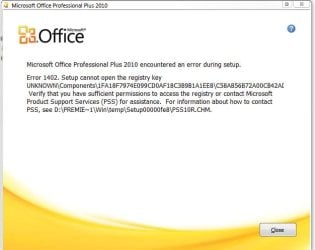
Weather the latest version i got yesterday or a release candidate i got back in december 2009 i cannot install office 2010 because i get some error message about 75% through the install.

I have tried ccleaner, windows installer clean up utility, an ms guide for removing reg edit keys concerning office, i don't know what else to do, whats missing?

Whats this about insufficient permissions to access the registry? i am logged in as admin on my windows 7 x64 installation.
 

Attachments
  • Capture.JPG
    Capture.JPG
    35.3 KB · Views: 464

My Computer

Computer Manufacturer/Model Number
White Box
OS
Windows 7 RTM x64
CPU
Core 2 Quad 2.6GHz
Motherboard
Gigabyte Ga-x48-ds5
Memory
4GB Ram
Graphics Card(s)
Asus nvidia 260
Sound Card
Built in, Using Optical Out with Logitech Z-5500 5.1
Monitor(s) Displays
Acer T230H & Samsung LCD TV FULL HD "LE46B530"
Screen Resolution
1920x1080 + 1920x1080
Hard Drives
8 of them, about 6.5TB
PSU
750 watt
Case
Antec P180
Cooling
Default Intel stock
Keyboard
Logitech Dinovo edge
Mouse
wireless laser mouse
Internet Speed
15mbit Cable
Other Info
Primary monitor is multitouch (yay)
Permission issue. Are you logged in as newly created Admin or inbuilt admin account?

Right click C drive, check the permission, whether your user profile has full access. I faced the same issue, but not the direct error mesage, and changed the C drive owner has my user account and install went fine.
 

My Computer

Computer Manufacturer/Model Number
MacBook Pro
OS
Lion
CPU
i5
Memory
4GB
Graphics Card(s)
Intel
Screen Resolution
1200x800
Hard Drives
Seagate FreeAgent GO 250GB Ext. HDD
no i'm logged in under the account i created during the installation i did of windows, also i have turned off UAC and have no anti-virus or anti-malware running.

full control is set on my Administrators (premier69-PC\Administrators) entry in the security tab of C: drive properties.

Office 14.0.4514.1009_SingleImage_retail_ship_combo_en-us_dvd I did just manage to install this, but it is Beta.

The one i am having trouble with is this one: Microsoft.Office.2010.PRE.RTM.Build.4730.x64-UP2DATE
 

My Computer

Computer Manufacturer/Model Number
White Box
OS
Windows 7 RTM x64
CPU
Core 2 Quad 2.6GHz
Motherboard
Gigabyte Ga-x48-ds5
Memory
4GB Ram
Graphics Card(s)
Asus nvidia 260
Sound Card
Built in, Using Optical Out with Logitech Z-5500 5.1
Monitor(s) Displays
Acer T230H & Samsung LCD TV FULL HD "LE46B530"
Screen Resolution
1920x1080 + 1920x1080
Hard Drives
8 of them, about 6.5TB
PSU
750 watt
Case
Antec P180
Cooling
Default Intel stock
Keyboard
Logitech Dinovo edge
Mouse
wireless laser mouse
Internet Speed
15mbit Cable
Other Info
Primary monitor is multitouch (yay)
Try login as default admin account and check. To enable it, Open command prompt as admin and fire the command,
net user administrator /active:yes
Logoff and login as default admin, start the install. Once done, logoff and login as ur accnt, fire the below command to deactivate admin,
net user administrator /active:no
BTW, are u performing a clean install or upgrade? Have u removed prev version of office if any?

Is the new image you doenloaded from M$? Did you extract the exe or just running it?
 

My Computer

Computer Manufacturer/Model Number
MacBook Pro
OS
Lion
CPU
i5
Memory
4GB
Graphics Card(s)
Intel
Screen Resolution
1200x800
Hard Drives
Seagate FreeAgent GO 250GB Ext. HDD
I had office 2007 installed, i tried uninstalling it but it reported an error and rolled back and aborted the uninstall.

So i looked up every guide i could find decribing how to manually uninstall office 2007 and completed them all.

But why could i now install the Beta office 2010 but not the most recent pre-rtm, that makes me puzzled.

Sure, i will do what you suggest, just need to take a little break first and go munch on breakfast =)

you think this will solve the problem?
 

My Computer

Computer Manufacturer/Model Number
White Box
OS
Windows 7 RTM x64
CPU
Core 2 Quad 2.6GHz
Motherboard
Gigabyte Ga-x48-ds5
Memory
4GB Ram
Graphics Card(s)
Asus nvidia 260
Sound Card
Built in, Using Optical Out with Logitech Z-5500 5.1
Monitor(s) Displays
Acer T230H & Samsung LCD TV FULL HD "LE46B530"
Screen Resolution
1920x1080 + 1920x1080
Hard Drives
8 of them, about 6.5TB
PSU
750 watt
Case
Antec P180
Cooling
Default Intel stock
Keyboard
Logitech Dinovo edge
Mouse
wireless laser mouse
Internet Speed
15mbit Cable
Other Info
Primary monitor is multitouch (yay)
I am juz tellin u cos, I have fallen a victim of the same and struggled alone for 5 days and finally got it fixed.
 

My Computer

Computer Manufacturer/Model Number
MacBook Pro
OS
Lion
CPU
i5
Memory
4GB
Graphics Card(s)
Intel
Screen Resolution
1200x800
Hard Drives
Seagate FreeAgent GO 250GB Ext. HDD
HI, i just tried installing both the x86 and x64 inside the admin account and got the same error as before, on both versions... any other suggestions?
 

My Computer

Computer Manufacturer/Model Number
White Box
OS
Windows 7 RTM x64
CPU
Core 2 Quad 2.6GHz
Motherboard
Gigabyte Ga-x48-ds5
Memory
4GB Ram
Graphics Card(s)
Asus nvidia 260
Sound Card
Built in, Using Optical Out with Logitech Z-5500 5.1
Monitor(s) Displays
Acer T230H & Samsung LCD TV FULL HD "LE46B530"
Screen Resolution
1920x1080 + 1920x1080
Hard Drives
8 of them, about 6.5TB
PSU
750 watt
Case
Antec P180
Cooling
Default Intel stock
Keyboard
Logitech Dinovo edge
Mouse
wireless laser mouse
Internet Speed
15mbit Cable
Other Info
Primary monitor is multitouch (yay)

My Computer

Computer Manufacturer/Model Number
White Box
OS
Windows 7 RTM x64
CPU
Core 2 Quad 2.6GHz
Motherboard
Gigabyte Ga-x48-ds5
Memory
4GB Ram
Graphics Card(s)
Asus nvidia 260
Sound Card
Built in, Using Optical Out with Logitech Z-5500 5.1
Monitor(s) Displays
Acer T230H & Samsung LCD TV FULL HD "LE46B530"
Screen Resolution
1920x1080 + 1920x1080
Hard Drives
8 of them, about 6.5TB
PSU
750 watt
Case
Antec P180
Cooling
Default Intel stock
Keyboard
Logitech Dinovo edge
Mouse
wireless laser mouse
Internet Speed
15mbit Cable
Other Info
Primary monitor is multitouch (yay)
Oh sweet... it did help....

ok so i got outlook running now and went in to options to change the search option to include subfolders but when i try clicking on ok to accept and close it simply pops up "The file does not exist" HUh?
I cant do any editing of anything without getting this...
 

My Computer

Computer Manufacturer/Model Number
White Box
OS
Windows 7 RTM x64
CPU
Core 2 Quad 2.6GHz
Motherboard
Gigabyte Ga-x48-ds5
Memory
4GB Ram
Graphics Card(s)
Asus nvidia 260
Sound Card
Built in, Using Optical Out with Logitech Z-5500 5.1
Monitor(s) Displays
Acer T230H & Samsung LCD TV FULL HD "LE46B530"
Screen Resolution
1920x1080 + 1920x1080
Hard Drives
8 of them, about 6.5TB
PSU
750 watt
Case
Antec P180
Cooling
Default Intel stock
Keyboard
Logitech Dinovo edge
Mouse
wireless laser mouse
Internet Speed
15mbit Cable
Other Info
Primary monitor is multitouch (yay)
Congrtz!!! Mind sharing which step helped u fix the problem?
What exactly u r searching for from outlook?
 

My Computer

Computer Manufacturer/Model Number
MacBook Pro
OS
Lion
CPU
i5
Memory
4GB
Graphics Card(s)
Intel
Screen Resolution
1200x800
Hard Drives
Seagate FreeAgent GO 250GB Ext. HDD
Well, if i press the orange file button on the top left corner, then press options...

I can't do ANYTHING anywhere there because when i try pressing "ok" to confirm and close it simply gives me that wierd message in a dialog box and all i can do i press ok to close it and cancel to close the options window.

In the previous leaked beta version however this differed by outlook instead crashing as soon as i pressed the ok button.

the link i posted to the guide is what i followed, but below the guide hi wrote a short summary of applying his fx globally to all sub folders and keys, that is the one i used.

I am very very suprised Microsoft or anyone else didn't already mention this in any of the search results when i Googles this 1402 error.
 

My Computer

Computer Manufacturer/Model Number
White Box
OS
Windows 7 RTM x64
CPU
Core 2 Quad 2.6GHz
Motherboard
Gigabyte Ga-x48-ds5
Memory
4GB Ram
Graphics Card(s)
Asus nvidia 260
Sound Card
Built in, Using Optical Out with Logitech Z-5500 5.1
Monitor(s) Displays
Acer T230H & Samsung LCD TV FULL HD "LE46B530"
Screen Resolution
1920x1080 + 1920x1080
Hard Drives
8 of them, about 6.5TB
PSU
750 watt
Case
Antec P180
Cooling
Default Intel stock
Keyboard
Logitech Dinovo edge
Mouse
wireless laser mouse
Internet Speed
15mbit Cable
Other Info
Primary monitor is multitouch (yay)
Wats the dialog box u get?
 

My Computer

Computer Manufacturer/Model Number
MacBook Pro
OS
Lion
CPU
i5
Memory
4GB
Graphics Card(s)
Intel
Screen Resolution
1200x800
Hard Drives
Seagate FreeAgent GO 250GB Ext. HDD
As you see, i changed the default search settings to what is shown in the picture and then pressed the OK button.

But this wierd error is not limited to the options, any customization of Outlook i try to make gives the same result.
 

Attachments

  • Capture.JPG
    Capture.JPG
    52.4 KB · Views: 13

My Computer

Computer Manufacturer/Model Number
White Box
OS
Windows 7 RTM x64
CPU
Core 2 Quad 2.6GHz
Motherboard
Gigabyte Ga-x48-ds5
Memory
4GB Ram
Graphics Card(s)
Asus nvidia 260
Sound Card
Built in, Using Optical Out with Logitech Z-5500 5.1
Monitor(s) Displays
Acer T230H & Samsung LCD TV FULL HD "LE46B530"
Screen Resolution
1920x1080 + 1920x1080
Hard Drives
8 of them, about 6.5TB
PSU
750 watt
Case
Antec P180
Cooling
Default Intel stock
Keyboard
Logitech Dinovo edge
Mouse
wireless laser mouse
Internet Speed
15mbit Cable
Other Info
Primary monitor is multitouch (yay)
ok this is strange...
i installed the x86 version of the same office suite on a virtual windows vista computer and there i don't get this error.
 

My Computer

Computer Manufacturer/Model Number
White Box
OS
Windows 7 RTM x64
CPU
Core 2 Quad 2.6GHz
Motherboard
Gigabyte Ga-x48-ds5
Memory
4GB Ram
Graphics Card(s)
Asus nvidia 260
Sound Card
Built in, Using Optical Out with Logitech Z-5500 5.1
Monitor(s) Displays
Acer T230H & Samsung LCD TV FULL HD "LE46B530"
Screen Resolution
1920x1080 + 1920x1080
Hard Drives
8 of them, about 6.5TB
PSU
750 watt
Case
Antec P180
Cooling
Default Intel stock
Keyboard
Logitech Dinovo edge
Mouse
wireless laser mouse
Internet Speed
15mbit Cable
Other Info
Primary monitor is multitouch (yay)
yeah that guide works, they show a step by step instruction of the process but i chose to follow the one bellow it that instructs how to do it for the hole group rather than individual key entries.

i just managed to install office 2007 on a computer that previously i could not because halfway through that installation it got interrupted.
 

My Computer

Computer Manufacturer/Model Number
White Box
OS
Windows 7 RTM x64
CPU
Core 2 Quad 2.6GHz
Motherboard
Gigabyte Ga-x48-ds5
Memory
4GB Ram
Graphics Card(s)
Asus nvidia 260
Sound Card
Built in, Using Optical Out with Logitech Z-5500 5.1
Monitor(s) Displays
Acer T230H & Samsung LCD TV FULL HD "LE46B530"
Screen Resolution
1920x1080 + 1920x1080
Hard Drives
8 of them, about 6.5TB
PSU
750 watt
Case
Antec P180
Cooling
Default Intel stock
Keyboard
Logitech Dinovo edge
Mouse
wireless laser mouse
Internet Speed
15mbit Cable
Other Info
Primary monitor is multitouch (yay)
Back
Top