Help with installing Ubuntu

Vertex

New member
Guru
Local time
5:29 AM
Messages
477
Location
Philippines
Hi, whenever I try to install Ubuntu, I always get this error, "No Root File system is defined" that is when I try to install it to a specified partition though I can't choose the option to install it alongside Windows cause it will cut my main partition into two but there is little space left in my main partition and when I did try that option, some time ago, I get this warning of an unrecoverable drive error. Please help. I have this screenshot...

I can only run it on a USB though which is not very convenient.
 

Attachments

  • Screenshot.png
    Screenshot.png
    101.1 KB · Views: 103

My Computer

Computer Manufacturer/Model Number
Custom Built
OS
Windows 7 Ultimate 32 Bit, Windows Developer Preview, Linux Mint 9 Gnome 32 Bit
CPU
Intel Pentium Dual CPU E2180@2GHz
Motherboard
Elitegroup 671T-M3
Graphics Card(s)
NVIDIA GeForce 7200 GS
Monitor(s) Displays
AOC TFT1560 15" LCD Monitor
Screen Resolution
1024x768
Keyboard
Logitech USB Keyboard
In looking at your screenshot, it doesn't appear that you have any free space on the drive in which to install Linux onto. Instead, you might want to opt for the wubi install...which you actually start from within windows and it installs to a file (somewhat like a virtual machine). and gives you what looks like a dual boot without actually having to have space for partitions and such.
 

My Computer

Computer Manufacturer/Model Number
Self-Built in July 2009
OS
Windows 7 Ultimate x64
CPU
Intel Q9550 2.83Ghz OC'd to 3.40Ghz
Motherboard
Gigabyte GA-EP45-UD3R rev. 1.1, F12 BIOS
Memory
8GB G.Skill PI DDR2-800, 4-4-4-12 timings
Graphics Card(s)
EVGA 1280MB Nvidia GeForce GTX570
Sound Card
Realtek ALC899A 8 channel onboard audio
Monitor(s) Displays
23" Acer x233H
Screen Resolution
1920x1080
Hard Drives
Intel X25-M 80GB Gen 2 SSD
Western Digital 1TB Caviar Black, 32MB cache. WD1001FALS
PSU
Corsair 620HX modular
Case
Antec P182
Cooling
stock
Keyboard
ABS M1 Mechanical
Mouse
Logitech G9 Laser Mouse
Internet Speed
15/2 cable modem
Other Info
Windows and Linux enthusiast. Logitech G35 Headset.
In looking at your screenshot, it doesn't appear that you have any free space on the drive in which to install Linux onto. Instead, you might want to opt for the wubi install...which you actually start from within windows and it installs to a file (somewhat like a virtual machine). and gives you what looks like a dual boot without actually having to have space for partitions and such.

I have 14.7 GB free space on the partition where I am about to install it and that is more than enough. I just click it and when I choose Forward, that warning appears...

I tried the Wubi install before but it always fails at around 49% of the installation because of "permission" errors and my connection is a bit slow and it would take hours for Wubi.
 

My Computer

Computer Manufacturer/Model Number
Custom Built
OS
Windows 7 Ultimate 32 Bit, Windows Developer Preview, Linux Mint 9 Gnome 32 Bit
CPU
Intel Pentium Dual CPU E2180@2GHz
Motherboard
Elitegroup 671T-M3
Graphics Card(s)
NVIDIA GeForce 7200 GS
Monitor(s) Displays
AOC TFT1560 15" LCD Monitor
Screen Resolution
1024x768
Keyboard
Logitech USB Keyboard
"no root file system" means you havent partitioned properly.

Easiest way to fix this: Delete the partiton (either Gparted or Windows disk Management) so it is "Unallocated Space" then when it asks you to select partiton click "use the largest continuous free space" it will sort it out by itself like that
 

My Computer

Computer type
PC/Desktop
Computer Manufacturer/Model Number
Medion Erazer (note to self: insert model number) - with custom additions
OS
Windows 10 Pro x64
CPU
Intel Core i5 7400 @ 3.00GHz
Motherboard
OEM supllied with PC
Memory
8GB 2133Mhz DDR4 (OEM supplied)
Graphics Card(s)
Gygabyte Windforce GTX 1050Ti (Factory Overclocked)
Sound Card
Realtek
Monitor(s) Displays
Acer Al1980 + HKC
Screen Resolution
1360*768(HKC) / 1280*1024(Acer)
Hard Drives
1TB Toshiba
1TB WD Caviar Green
120GB Samsung Evo 840
PSU
OEM supplied (no power rating on case)
Case
OEM Supplied
Cooling
Stock
Keyboard
Logitech Wireless
Mouse
Logitect Wireless
Internet Speed
40Mb/s Down 10Mb/s Up
Antivirus
Defender
Browser
Firefox
Your partition you try to install to is NTFS. Linux doesn't use NTFS. So, you pretty much have to delete that partition and during install, make Linux create his own himself.
 

My Computer

Computer type
PC/Desktop
Computer Manufacturer/Model Number
Custom build
OS
Windows 10 Professional 64-bit
CPU
Ryzen 9 5900X
Motherboard
Gigabyte X570 Aorus Master
Memory
G.Skill 3600Mhz CL16 16GB × 4
Graphics Card(s)
EVGA GeForce RTX 3070 Ti FTW3 Ultra Gaming
Sound Card
On-board
Monitor(s) Displays
Dell Alienware AW3418DW
Screen Resolution
3440x1440
Hard Drives
1×Sabrent Rocket 4 Plus 2TB nvme SSD (System, internal)
2x4TB Western Digital Blue (Internal)
1x4TB HDST 7200RPM (Internal)
PSU
Seasonic Focus Plus 850W Platinum
Case
Corsair 680X
Cooling
Stock fans + 3× Corsair QL120, Corsair H100i Platinum
Keyboard
Logitech K350
Mouse
Logitech M510
Internet Speed
120Mbits dl - 20Mbits up
Antivirus
ESET NOD32 Antivirus
Browser
Firefox (latest version)
Other Info
Headphones : Audio-Technica ATH-M50x
Scanner : Canon Canoscan LiDE 220 + Plustek OptiBook 4800
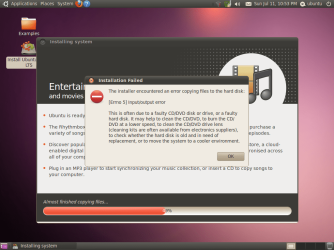
OK, I have deleted the partition where I plan to install Ubuntu so it becomes a free space, I try to install it to the "largest free space", I was able to continue but on 49% of the installation like what I feared, I get this warning again.

Just to make this, clear, I was installing it from a USB, not a CD when I took this screenshot, and the same warning would appear anyway if I try to install it from a burned CD. I even tried to plug the USB on a different USB port but still it comes to that.

What do I do now???
 

Attachments

  • Screenshot (2).png
    Screenshot (2).png
    97.4 KB · Views: 93

My Computer

Computer Manufacturer/Model Number
Custom Built
OS
Windows 7 Ultimate 32 Bit, Windows Developer Preview, Linux Mint 9 Gnome 32 Bit
CPU
Intel Pentium Dual CPU E2180@2GHz
Motherboard
Elitegroup 671T-M3
Graphics Card(s)
NVIDIA GeForce 7200 GS
Monitor(s) Displays
AOC TFT1560 15" LCD Monitor
Screen Resolution
1024x768
Keyboard
Logitech USB Keyboard
You say that it happens whetehr you burn it to disk or not?

sounds like a corrupted download, I'd download it again and burn it to CD
 

My Computer

Computer type
PC/Desktop
Computer Manufacturer/Model Number
Medion Erazer (note to self: insert model number) - with custom additions
OS
Windows 10 Pro x64
CPU
Intel Core i5 7400 @ 3.00GHz
Motherboard
OEM supllied with PC
Memory
8GB 2133Mhz DDR4 (OEM supplied)
Graphics Card(s)
Gygabyte Windforce GTX 1050Ti (Factory Overclocked)
Sound Card
Realtek
Monitor(s) Displays
Acer Al1980 + HKC
Screen Resolution
1360*768(HKC) / 1280*1024(Acer)
Hard Drives
1TB Toshiba
1TB WD Caviar Green
120GB Samsung Evo 840
PSU
OEM supplied (no power rating on case)
Case
OEM Supplied
Cooling
Stock
Keyboard
Logitech Wireless
Mouse
Logitect Wireless
Internet Speed
40Mb/s Down 10Mb/s Up
Antivirus
Defender
Browser
Firefox
You say that it happens whetehr you burn it to disk or not?

sounds like a corrupted download, I'd download it again and burn it to CD
If I burn the Ubuntu ISO on a CD and run this setup again, I would come up to this again. I know because I have attempted to install this many times and have failed everytime because of this.

My DVD ROM drive has no errors and I recently cleaned the inside of my CPU so I don't get this. One guy on another forum suggested, I rebuild my system but that is not an option for me at this point. He said he also experienced this error in his laptop whilst installing Ubuntu.

I also managed to get the Solaris ISO, burn it to a CD, that installed successfully but Ubuntu can't. Its either my drive is really rejecting Ubuntu of what...
 

My Computer

Computer Manufacturer/Model Number
Custom Built
OS
Windows 7 Ultimate 32 Bit, Windows Developer Preview, Linux Mint 9 Gnome 32 Bit
CPU
Intel Pentium Dual CPU E2180@2GHz
Motherboard
Elitegroup 671T-M3
Graphics Card(s)
NVIDIA GeForce 7200 GS
Monitor(s) Displays
AOC TFT1560 15" LCD Monitor
Screen Resolution
1024x768
Keyboard
Logitech USB Keyboard
Please reread my previous post :)

What I said was I think that the ISO is corrupted. IE it didnt download properly.

Try downloading it again and then burning.

Incidentally, have you looked at Linux Mint? its basically Ubuntu but a bit more user friendly:http://www.linuxmint.com/
 

My Computer

Computer type
PC/Desktop
Computer Manufacturer/Model Number
Medion Erazer (note to self: insert model number) - with custom additions
OS
Windows 10 Pro x64
CPU
Intel Core i5 7400 @ 3.00GHz
Motherboard
OEM supllied with PC
Memory
8GB 2133Mhz DDR4 (OEM supplied)
Graphics Card(s)
Gygabyte Windforce GTX 1050Ti (Factory Overclocked)
Sound Card
Realtek
Monitor(s) Displays
Acer Al1980 + HKC
Screen Resolution
1360*768(HKC) / 1280*1024(Acer)
Hard Drives
1TB Toshiba
1TB WD Caviar Green
120GB Samsung Evo 840
PSU
OEM supplied (no power rating on case)
Case
OEM Supplied
Cooling
Stock
Keyboard
Logitech Wireless
Mouse
Logitect Wireless
Internet Speed
40Mb/s Down 10Mb/s Up
Antivirus
Defender
Browser
Firefox
Please reread my previous post :)

What I said was I think that the ISO is corrupted. IE it didnt download properly.

Try downloading it again and then burning.

Incidentally, have you looked at Linux Mint? its basically Ubuntu but a bit more user friendly:Main Page - Linux Mint
Thanks, I would consider that, I downloaded it using Firefox with DownloadThemAll plugin. I rarely ever use IE.
 

My Computer

Computer Manufacturer/Model Number
Custom Built
OS
Windows 7 Ultimate 32 Bit, Windows Developer Preview, Linux Mint 9 Gnome 32 Bit
CPU
Intel Pentium Dual CPU E2180@2GHz
Motherboard
Elitegroup 671T-M3
Graphics Card(s)
NVIDIA GeForce 7200 GS
Monitor(s) Displays
AOC TFT1560 15" LCD Monitor
Screen Resolution
1024x768
Keyboard
Logitech USB Keyboard
you could also request a free CD from the Ubuntu site provided you have not done so too many times in the past. It takes about 3-4 weeks to arrive although they tell you up to 10 weeks. I have run into problems with the downloads before (could be my ISP) and as I have to use Wildblue satellite (sucks.......sucks......sucks) I can't afford the download issues due to FAP (download limits).
 

My Computer

Computer Manufacturer/Model Number
Systemax N2000 Gaming PC
OS
Windows 7 Ultimate x64
CPU
Q6600 @2.4ghz (G0 stepping)
Motherboard
XFX nforce 680i LT
Memory
8 gb OCZ vista essential sli PC-6400
Graphics Card(s)
Dual 9800gt in SLI mode
Sound Card
Integrated 8.1 High Definition Audio
Monitor(s) Displays
Dual Sceptre x246w 24 inch monitors
Screen Resolution
1920 x 1200 each monitor
Hard Drives
500 GB SATA II / 7500 rpm
PSU
Cooler Master Real Power Pro 1250W
Case
N2000 server tower
Cooling
Thermaltake Bigwater 760 is
Keyboard
MS Intelitype 6000 v2.0
Mouse
MS Intelipoint 6000
Internet Speed
Wi-power 1.5GB up / 512k down
Other Info
Windows 7 Ultimate x64, Windows 7 Pro x64, Windows Home Premium X86, Windows XP pro, Windows Home Server x86, Ubuntu 10.4 x86 and x64, Ubuntu server 10.4, SQL Server 2005, MySQL 5.0
Incidentally, have you looked at Linux Mint? its basically Ubuntu but a bit more user friendly:Main Page - Linux Mint
Hello, I have tried this one, and again I used a download manager to get the ISO, burned it to an RW CD After burning and re-inserting the disk, I loved the setup, its very similar from the Wubi install, only that it copies the files directly from the burned CD.

Then when I reboot the system, I now got the option to boot Linux Mint and whilst it tries to finish the installation,to my dismay, I encounter the very same warning error like the one from Ubuntu at around 36%....

It feels very bad, though I suspect the a corrupted download is not the problem.... maybe my HD is just rejecting these Linux based OSs.


you could also request a free CD from the Ubuntu site provided you have not done so too many times in the past. It takes about 3-4 weeks to arrive although they tell you up to 10 weeks. I have run into problems with the downloads before (could be my ISP) and as I have to use Wildblue satellite (sucks.......sucks......sucks) I can't afford the download issues due to FAP (download limits).
No, its seems that 10 weeks is a little too much time lol. :(
 

My Computer

Computer Manufacturer/Model Number
Custom Built
OS
Windows 7 Ultimate 32 Bit, Windows Developer Preview, Linux Mint 9 Gnome 32 Bit
CPU
Intel Pentium Dual CPU E2180@2GHz
Motherboard
Elitegroup 671T-M3
Graphics Card(s)
NVIDIA GeForce 7200 GS
Monitor(s) Displays
AOC TFT1560 15" LCD Monitor
Screen Resolution
1024x768
Keyboard
Logitech USB Keyboard
Have you tried not using a download manager to get them and just downloading them normally?

It wouldn't be the first time that a Download manager has mangled an ISO.

Lets be very clear, HDD's don't just "decide" to reject Linux. It would be like them randomly rejecting Windows, it just doesn't happen.

I'm still thinking its your download manager. Do a standard "Save As" rather than using the Download Manager
 
Last edited:

My Computer

Computer type
PC/Desktop
Computer Manufacturer/Model Number
Medion Erazer (note to self: insert model number) - with custom additions
OS
Windows 10 Pro x64
CPU
Intel Core i5 7400 @ 3.00GHz
Motherboard
OEM supllied with PC
Memory
8GB 2133Mhz DDR4 (OEM supplied)
Graphics Card(s)
Gygabyte Windforce GTX 1050Ti (Factory Overclocked)
Sound Card
Realtek
Monitor(s) Displays
Acer Al1980 + HKC
Screen Resolution
1360*768(HKC) / 1280*1024(Acer)
Hard Drives
1TB Toshiba
1TB WD Caviar Green
120GB Samsung Evo 840
PSU
OEM supplied (no power rating on case)
Case
OEM Supplied
Cooling
Stock
Keyboard
Logitech Wireless
Mouse
Logitect Wireless
Internet Speed
40Mb/s Down 10Mb/s Up
Antivirus
Defender
Browser
Firefox
Have you tried not using a download manager to get them and just downloading them normally?

It wouldn't be the first time that a Download manager has mangled an ISO.

Lets be very clear, HDD's don't just "decide" to reject Linux. It would be like them randomly rejecting Windows, it just doesn't happen.

I'm still thinking its your download manager. Do a standard "Save As" rather than using the Download Manager
Yep, I'm doing a standard download now. Started maybe half an hour before your reply came but its feels like 10 times slower than when I am using the download manager so it might take up until tomorrow.


If not, I am going to an IT professor tomorrow and ask if he can give me an uncorrupted Ubuntu ISO, and is these last efforts were to fail, I give up lol..
 

My Computer

Computer Manufacturer/Model Number
Custom Built
OS
Windows 7 Ultimate 32 Bit, Windows Developer Preview, Linux Mint 9 Gnome 32 Bit
CPU
Intel Pentium Dual CPU E2180@2GHz
Motherboard
Elitegroup 671T-M3
Graphics Card(s)
NVIDIA GeForce 7200 GS
Monitor(s) Displays
AOC TFT1560 15" LCD Monitor
Screen Resolution
1024x768
Keyboard
Logitech USB Keyboard
Thats good if it seems slower. It means its actually working :p The problem was, I think that your download manager wasn't actually downloading it all. OF course on an OS this is Fatal!
 

My Computer

Computer type
PC/Desktop
Computer Manufacturer/Model Number
Medion Erazer (note to self: insert model number) - with custom additions
OS
Windows 10 Pro x64
CPU
Intel Core i5 7400 @ 3.00GHz
Motherboard
OEM supllied with PC
Memory
8GB 2133Mhz DDR4 (OEM supplied)
Graphics Card(s)
Gygabyte Windforce GTX 1050Ti (Factory Overclocked)
Sound Card
Realtek
Monitor(s) Displays
Acer Al1980 + HKC
Screen Resolution
1360*768(HKC) / 1280*1024(Acer)
Hard Drives
1TB Toshiba
1TB WD Caviar Green
120GB Samsung Evo 840
PSU
OEM supplied (no power rating on case)
Case
OEM Supplied
Cooling
Stock
Keyboard
Logitech Wireless
Mouse
Logitect Wireless
Internet Speed
40Mb/s Down 10Mb/s Up
Antivirus
Defender
Browser
Firefox
What you meant was that even though a download manager is faster, it may not be downloading the data as good and as solid as it should be on a standard download....?????

If I was using the manager, it'll take up to 3 hours I guess but right now, the estimate is 11 hours, 57 minutes.

My Internet speed fluctuates a lot, I'll hope for the best...

And one more question, I did say that I am able to run Ubuntu from a USB and while I use it from there, Ubuntu came with Firefox, I managed to configure my Internet ISP on Ubuntu, but why are the webpages not loading at all and it doesn't progress on downloading the drivers?? Do you really have to make a full install of Ubuntu for the Internet to work????

I was able to run Linux Mint in Demo Mode and the same thing happens about the Internet connection....
 

My Computer

Computer Manufacturer/Model Number
Custom Built
OS
Windows 7 Ultimate 32 Bit, Windows Developer Preview, Linux Mint 9 Gnome 32 Bit
CPU
Intel Pentium Dual CPU E2180@2GHz
Motherboard
Elitegroup 671T-M3
Graphics Card(s)
NVIDIA GeForce 7200 GS
Monitor(s) Displays
AOC TFT1560 15" LCD Monitor
Screen Resolution
1024x768
Keyboard
Logitech USB Keyboard
I suspect that was down to the corrupted ISO. The Internet works fine from the Live CD
 

My Computer

Computer type
PC/Desktop
Computer Manufacturer/Model Number
Medion Erazer (note to self: insert model number) - with custom additions
OS
Windows 10 Pro x64
CPU
Intel Core i5 7400 @ 3.00GHz
Motherboard
OEM supllied with PC
Memory
8GB 2133Mhz DDR4 (OEM supplied)
Graphics Card(s)
Gygabyte Windforce GTX 1050Ti (Factory Overclocked)
Sound Card
Realtek
Monitor(s) Displays
Acer Al1980 + HKC
Screen Resolution
1360*768(HKC) / 1280*1024(Acer)
Hard Drives
1TB Toshiba
1TB WD Caviar Green
120GB Samsung Evo 840
PSU
OEM supplied (no power rating on case)
Case
OEM Supplied
Cooling
Stock
Keyboard
Logitech Wireless
Mouse
Logitect Wireless
Internet Speed
40Mb/s Down 10Mb/s Up
Antivirus
Defender
Browser
Firefox
Try download with IDM....But, why you don't ask for free cd by cannonical?
 

My Computer

OS
Windows 7
CPU
INTEL DUAL CORE E5500 2.8GHz
Motherboard
FOXCONN G41MX-K
Memory
VISIPRO DDR2 1GBX2 PC6400
Graphics Card(s)
ONBOARD
Sound Card
ONBOARD
Monitor(s) Displays
LG LCD 17" (L177WSB)
Screen Resolution
1440 X 900
Hard Drives
SEAGATE BARACUDA SATA 250GB 7200RPM
PSU
STANDARD (CASING BUILT-IN) 450W
Case
ADVANCE
Cooling
STANDARD (INTEL PROCESSOR HEATSHINK)
Keyboard
STANDARD
Mouse
OPTIC STANDARD
Try download with IDM....But, why you don't ask for free cd by cannonical?
Like what the other guy said, ordering a CD will take weeks and I can't wait that long.
 

My Computer

Computer Manufacturer/Model Number
Custom Built
OS
Windows 7 Ultimate 32 Bit, Windows Developer Preview, Linux Mint 9 Gnome 32 Bit
CPU
Intel Pentium Dual CPU E2180@2GHz
Motherboard
Elitegroup 671T-M3
Graphics Card(s)
NVIDIA GeForce 7200 GS
Monitor(s) Displays
AOC TFT1560 15" LCD Monitor
Screen Resolution
1024x768
Keyboard
Logitech USB Keyboard
It feels very bad, though I suspect the a corrupted download is not the problem.... maybe my HD is just rejecting these Linux based OSs.
In the past 10+ years that I have done Linux, I've never seen a hard drive reject a Linux install. It's always been either a bad download, bad media, or a faulty drive.

And one more question, I did say that I am able to run Ubuntu from a USB and while I use it from there, Ubuntu came with Firefox, I managed to configure my Internet ISP on Ubuntu, but why are the webpages not loading at all and it doesn't progress on downloading the drivers?? Do you really have to make a full install of Ubuntu for the Internet to work????
I've not experienced that. to me, it sounds as if your DNS might not be properly setup and thus is cannot resolve names. From a terminal window, you can run commands such as;
ping www.yahoo.com
nslookup {enter} www.yahoo.com {enter}
 

My Computer

Computer Manufacturer/Model Number
Self-Built in July 2009
OS
Windows 7 Ultimate x64
CPU
Intel Q9550 2.83Ghz OC'd to 3.40Ghz
Motherboard
Gigabyte GA-EP45-UD3R rev. 1.1, F12 BIOS
Memory
8GB G.Skill PI DDR2-800, 4-4-4-12 timings
Graphics Card(s)
EVGA 1280MB Nvidia GeForce GTX570
Sound Card
Realtek ALC899A 8 channel onboard audio
Monitor(s) Displays
23" Acer x233H
Screen Resolution
1920x1080
Hard Drives
Intel X25-M 80GB Gen 2 SSD
Western Digital 1TB Caviar Black, 32MB cache. WD1001FALS
PSU
Corsair 620HX modular
Case
Antec P182
Cooling
stock
Keyboard
ABS M1 Mechanical
Mouse
Logitech G9 Laser Mouse
Internet Speed
15/2 cable modem
Other Info
Windows and Linux enthusiast. Logitech G35 Headset.
Back
Top