Help with Macrium Reflect

Andyonline

New member
Member
Local time
3:07 AM
Messages
85
Hi,

I have created a restore disc and I am attempting a system image to save to my external hard drive (e drive).

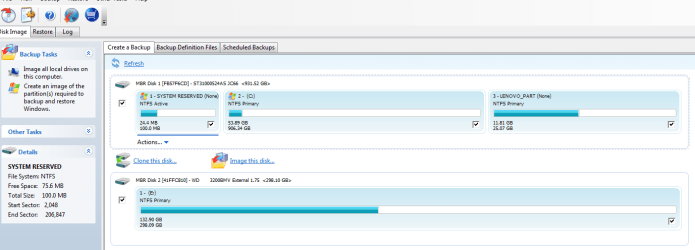
I am not sure which partitions I would be best to check/include - see attached photo.

Any help would be appreciated.

Thanks

Andy
 

Attachments

  • Capture.PNG
    Capture.PNG
    37.2 KB · Views: 30

My Computer

Computer Manufacturer/Model Number
LENOVO 330
OS
MS Windows 7 Home Premium 64-bit SP1
CPU
Intel Core i3 2120
Motherboard
LENOVO
Memory
DDR3 Size 8192 MBytes
Graphics Card(s)
Intel(R) HD Graphics
Monitor(s) Displays
Samsung SMS22A100
Screen Resolution
Current Resolution 1920x1080 pixels
Hard Drives
Seagate ST31000524AS ATA Device
Internet Speed
Download 4.8mb, Upload 1.1mb
I'd say check the first disk and it will backup the 3 partitions (System Reserved, C, Lenovo_Part).
 

My Computer

Computer type
PC/Desktop
OS
Microsoft Windows 10 Professional / Windows 7 Professional
CPU
Intel i5-3570
Motherboard
Lenovo Mahobay
Memory
16GB DDR3
Graphics Card(s)
AMD Radeon HD 7850 2GB
Sound Card
(1) Realtek HD Audio (2) AMD HD Audio
Monitor(s) Displays
LG LS192WS
Screen Resolution
1440 x 900 @ 32bit color
Hard Drives
(1) SUV300S37A/120G (2) ST3500413AS SATA Disk Device AHCI mode enabled.
PSU
Corsair HX620
Case
Thermaltake V4 Black Edition
Cooling
Cooler Master Hyper 212 + Artic Silver 5 on CPU/GPU
Keyboard
Dell SK-8115
Mouse
Razer Copperhead with MAPED mat (awesome!)
Internet Speed
100 Mbps up/down
Browser
Chrome
On a regular basis I would image bothe System Reserved (tiny but essential for booting) and your OS partition C: . If you choose "Create an image of the partitions required to backup and restore Windows" then these 2 partitions should be selected.

I would separately make one or two images of LENOVO_PART since I think this is your recovery partition. If it gets corrupted or you need to replace you HDD you can reimage it.
One of the advantages of Macrium over the more basic inbuilt Windows imaging is that you can separately image recovery partitions.

You wouldn't select E: - Is this your backup disk?
 

My Computer

Computer type
PC/Desktop
Computer Manufacturer/Model Number
Own build
OS
Windows 7x64 Home Premium SP1
CPU
Intel i7 2600k
Motherboard
ASUS P8Z68 Deluxe
Memory
G.Skill Ripjaws (DDR3-1600) 2x4GB
Graphics Card(s)
Nvidia GeForce GTS 450; Intel HD Graphics 3000(GT2+)
Monitor(s) Displays
Dell Ultrasharp IPS panel U2311H, Samsung SyncMaster P2350
Screen Resolution
1920x1080
Hard Drives
Samsung 850 Pro SSD 256GB, Samsung SSD 840 120GB, Seagates 1TB Barracuda ST31000528AS x2
PSU
Seasonic M12II 520W
Case
Lian Li Lancool PC-K60
Cooling
Case: 1x120mm, 3x140mm CPU: Hyper 212+
Keyboard
Logitech MK520 (wireless)
Mouse
Logitech MK520
Internet Speed
6-7 Mbps
Antivirus
Norton Security Premium, Malwarebytes on 2 (MSE on 3rd PC)
Browser
FireFox
Other Info
Audio: Logitech Z523 2.1
Yes, the E drive is my external backup drive
 

My Computer

Computer Manufacturer/Model Number
LENOVO 330
OS
MS Windows 7 Home Premium 64-bit SP1
CPU
Intel Core i3 2120
Motherboard
LENOVO
Memory
DDR3 Size 8192 MBytes
Graphics Card(s)
Intel(R) HD Graphics
Monitor(s) Displays
Samsung SMS22A100
Screen Resolution
Current Resolution 1920x1080 pixels
Hard Drives
Seagate ST31000524AS ATA Device
Internet Speed
Download 4.8mb, Upload 1.1mb

My Computer

Computer type
Laptop
Computer Manufacturer/Model Number
Hewlett-Packard/G62-107SA Notebook
OS
Microsoft Windows 7 Home Premium 64-bit Service Pack 1
CPU
Intel(R) Core(TM) i3 CPU M 330 @ 2.13GHz
Motherboard
Hewlett-Packard 1425
Memory
8 GB DDR3
Graphics Card(s)
Intel(R) HD Graphics
Sound Card
Realtek High Definition Audio
Monitor(s) Displays
Builtin
Screen Resolution
1366 x 768 x 32 bits (4294967296 colors) @ 60 Hz
Hard Drives
250 GB SATA Hard Disk Drive 7200 rpm
2TB Seagate GoFlex USB 2 Drive
1TB Iomega Prestige USB 2 Drive
1.5TB Iomega Prestige USB 2 Drive (Samsung)
2TB WD MyBook Live NAS.
Mouse
Logitech Anywhere MX
Internet Speed
152 Mbs download 10 Mbs upload
Antivirus
Norton 360
Browser
Chrome
Back
Top