

- Local time
- 11:07 PM
- Messages
- 139
Hi, i have a western digital raptor 3.5" 36gb with win7 x64 on it, i just bought an Intel X25-M 80GB 2.5" for an upgrade and first i used acronis trueimage to clone my raptor over to my Intel.
After i cloned it i unplugged the raptor and booted on the SSD which worked slow, and up until that point where it would change from the welcome login to display the desktop which it never got to that stage... even in failsafe i couldn't get into the desktop...
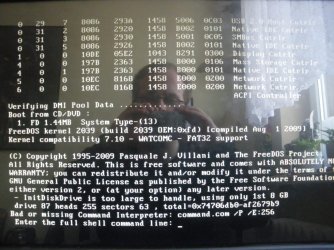
Then i tried downloading the firmware update from their website a 2.7mb ISO "110902HD88208850" and i used poweriso to burn it onto a DVD which i booted in dos and it gave this error message i have included a picture "IMGP2011".
So i thought, i'll try this again later, for now i want windows to work. So thinking the cloning didn't work i proceeded to try installing a fresh copy of windows x64 on the drive by which i got this error shown in the second attached image "IMGP2012".
My motherboard is a "Gigabyte ga-x48-ds5_e" whith an updated bios from april 2009
So why didn't it work cloning? and why can't i even install a new windows onto it? I think the native firmware on the intel drive is 02HA if FW stands for firmware...
After i cloned it i unplugged the raptor and booted on the SSD which worked slow, and up until that point where it would change from the welcome login to display the desktop which it never got to that stage... even in failsafe i couldn't get into the desktop...
Then i tried downloading the firmware update from their website a 2.7mb ISO "110902HD88208850" and i used poweriso to burn it onto a DVD which i booted in dos and it gave this error message i have included a picture "IMGP2011".
So i thought, i'll try this again later, for now i want windows to work. So thinking the cloning didn't work i proceeded to try installing a fresh copy of windows x64 on the drive by which i got this error shown in the second attached image "IMGP2012".
My motherboard is a "Gigabyte ga-x48-ds5_e" whith an updated bios from april 2009
So why didn't it work cloning? and why can't i even install a new windows onto it? I think the native firmware on the intel drive is 02HA if FW stands for firmware...
Attachments

My Computer
- Computer Manufacturer/Model Number
- White Box
- OS
- Windows 7 RTM x64
- CPU
- Core 2 Quad 2.6GHz
- Motherboard
- Gigabyte Ga-x48-ds5
- Memory
- 4GB Ram
- Graphics Card(s)
- Asus nvidia 260
- Sound Card
- Built in, Using Optical Out with Logitech Z-5500 5.1
- Monitor(s) Displays
- Acer T230H & Samsung LCD TV FULL HD "LE46B530"
- Screen Resolution
- 1920x1080 + 1920x1080
- Hard Drives
- 8 of them, about 6.5TB
- PSU
- 750 watt
- Case
- Antec P180
- Cooling
- Default Intel stock
- Keyboard
- Logitech Dinovo edge
- Mouse
- wireless laser mouse
- Internet Speed
- 15mbit Cable
- Other Info
- Primary monitor is multitouch (yay)

