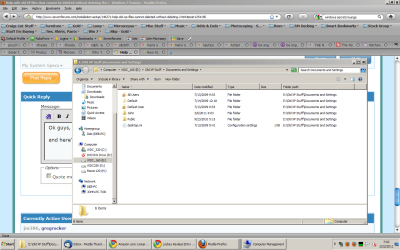
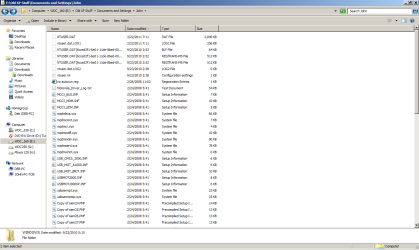
Help with old XP files that cannot be deleted without deleting the i

jm386

New member
Local time
5:49 AM
Messages
23
identical Win7 files.

When I did my custom upgrade to Win7 from XP, I kept my old 'my documents' files on a separate disk from where Win 7 would live.

Since win7 is great and all my files on the win7 disk are also ok, I decided to delete the old files from the prior XP installation , but they are somehow linked. When I delete 'downloads' (for example) on the seperate 'E" drive, my "downloads" on drive 'c' are also deleted.

Weirder still, is that although I specify downloads to go to drive 'c', and have been doing this for the last 4 months since the upgrade, the downloads folder on drive 'e' is identical to the drive 'c' folder (ie: completely up to date).

Any help is much appreciated.

John
 

My Computer My Computer

At a glance

Microsoft Windows 7 Home Premium 32-bit 7601 ...AMD Phenom(tm) II X4 955 Processor4.00 GBATI Radeon HD 4250
Computer type
PC/Desktop
OS
Microsoft Windows 7 Home Premium 32-bit 7601 Multiprocessor Free Service Pack 1
CPU
AMD Phenom(tm) II X4 955 Processor
Motherboard
ASUSTeK Computer INC. M4A88TD-V EVO/USB3
Memory
4.00 GB
Graphics Card(s)
ATI Radeon HD 4250
Sound Card
(1) AMD High Definition Audio Device (2) High Definition A
Screen Resolution
1920 x 1080 x 32 bits (4294967296 colors) @ 60 Hz
Hard Drives
(1) INTEL SSDSC2BW240A4 ATA Device (2) WDC WD10EZEX-00BN5A0 ATA Device (3) WDC WD10EZEX-08M2NA0 ATA Device (4) WDC WD2003FZEX-00Z4SA0 ATA Device (5) WDC WD3200AAKS-00V1A0 ATA Device (6) Generic- Compact Flash USB Device (7) Generic- MS/MS
identical Win7 files.

When I did my custom upgrade to Win7 from XP, I kept my old 'my documents' files on a separate disk from where Win 7 would live.

Since win7 is great and all my files on the win7 disk are also ok, I decided to delete the old files from the prior XP installation , but they are somehow linked. When I delete 'downloads' (for example) on the seperate 'E" drive, my "downloads" on drive 'c' are also deleted.

Weirder still, is that although I specify downloads to go to drive 'c', and have been doing this for the last 4 months since the upgrade, the downloads folder on drive 'e' is identical to the drive 'c' folder (ie: completely up to date).

Any help is much appreciated.

John

John you are experiencing a new "feature" (or problem) called libraries. You can think of lis as the index for all the user files stored anywhere. A central repository of the location of the files. they are linked as you discovered.

Is that a problem for you? there are tutorials on how to move libs, or not use them
 

My Computer My Computer

At a glance

Win 8 Release candidate 8400[email protected]4 gigsNvidia 9600M
Computer Manufacturer/Model Number
HP Pavillion dv-7 1005 Tx
OS
Win 8 Release candidate 8400
CPU
[email protected]
Memory
4 gigs
Graphics Card(s)
Nvidia 9600M
Sound Card
HD built-in
Monitor(s) Displays
17" Wxga
Screen Resolution
1440x900
Cooling
none
Internet Speed
45Mb down 5Mb up
Hi, and thanks for the help, but I don;t think it's a library issue. I have checked the properties of the download library and it only links to the C:\drive - there is no reference to the E:\ Drive where the old XP files are located.

My limited understanding of 'libraries' is that they are similar to a shortcut, in that they 'point' or 'link' to where the desired files actually are. As near as I can tell, in my situation, there actually are two identical files sets, on the two separate hard disks.

John
 

My Computer My Computer

At a glance

Microsoft Windows 7 Home Premium 32-bit 7601 ...AMD Phenom(tm) II X4 955 Processor4.00 GBATI Radeon HD 4250
Computer type
PC/Desktop
OS
Microsoft Windows 7 Home Premium 32-bit 7601 Multiprocessor Free Service Pack 1
CPU
AMD Phenom(tm) II X4 955 Processor
Motherboard
ASUSTeK Computer INC. M4A88TD-V EVO/USB3
Memory
4.00 GB
Graphics Card(s)
ATI Radeon HD 4250
Sound Card
(1) AMD High Definition Audio Device (2) High Definition A
Screen Resolution
1920 x 1080 x 32 bits (4294967296 colors) @ 60 Hz
Hard Drives
(1) INTEL SSDSC2BW240A4 ATA Device (2) WDC WD10EZEX-00BN5A0 ATA Device (3) WDC WD10EZEX-08M2NA0 ATA Device (4) WDC WD2003FZEX-00Z4SA0 ATA Device (5) WDC WD3200AAKS-00V1A0 ATA Device (6) Generic- Compact Flash USB Device (7) Generic- MS/MS
Post a snapshot of your entire Disk Management here please. See here for info: How to Use the Snipping Tool in Vista - Vista Forums (says Vista but also applies to Windows 7).

To get to Disk Management, press Winkey+r, type diskmgmt.msc and press Enter or click GO.

What happens if you disconnect the E: drive? Does the computer still boot? Is everything still there?
 

My Computer My Computer

At a glance

Windows 10 Pro X64Intel Quad Core i7-4770 @ 3.4Ghz16.0GB PC3-12800 DDR3 SDRAM 1600 MHzIntel Integrated HD Graphics
Computer type
PC/Desktop
Computer Manufacturer/Model Number
Lenovo IdeaCenter 450
OS
Windows 10 Pro X64
CPU
Intel Quad Core i7-4770 @ 3.4Ghz
Memory
16.0GB PC3-12800 DDR3 SDRAM 1600 MHz
Graphics Card(s)
Intel Integrated HD Graphics
Sound Card
Realtek HD Audio
Monitor(s) Displays
HP 22" LCD
Screen Resolution
1680 x 1050
Hard Drives
250GB Samsung EVO SATA-3 SSD
2TB Seagate ST2000DM001 SATA-2
1.5TB Seagate ST3150041AS SATA
Keyboard
Dell USB
Mouse
Lenovo USB
Internet Speed
Cable via Road Runner 3MB Upload, 30MB Download
Antivirus
Windows Defender, MBAM Pro, MBAE
Browser
Seamonkey
Other Info
UEFI/GPT
PLDS DVD-RW DH16AERSH
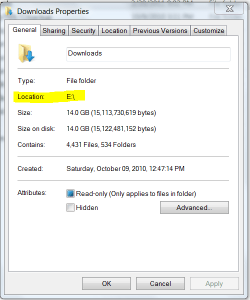
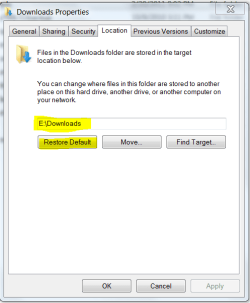
Look on the Properties box of your active Win7 User folders (Documents, Pictures, etc) for each one's Location. If necessary on the Location tab you can Restore Default.
Capture.PNG Capture2.PNG
In the above screenshots, it shows the location where I have moved my User folders. If I Restore Default, it will change back to C:\Users\Administrator\Downloads.

You delete an OS by backing up everything you want from it, then deleting it's partition in Disk Management.

There is a possibility that you have boot-critical files for WIn7 on the XP partition, which is one reason why we need to see the full Disk Management screenshot with listings - use Snipping Tool in Start Menu.
 
Having problems replying to you guys ...

Now I can't post because my 'token' has expired - help. I was using the quick reply thingie, now trying this.
 

My Computer My Computer

At a glance

Microsoft Windows 7 Home Premium 32-bit 7601 ...AMD Phenom(tm) II X4 955 Processor4.00 GBATI Radeon HD 4250
Computer type
PC/Desktop
OS
Microsoft Windows 7 Home Premium 32-bit 7601 Multiprocessor Free Service Pack 1
CPU
AMD Phenom(tm) II X4 955 Processor
Motherboard
ASUSTeK Computer INC. M4A88TD-V EVO/USB3
Memory
4.00 GB
Graphics Card(s)
ATI Radeon HD 4250
Sound Card
(1) AMD High Definition Audio Device (2) High Definition A
Screen Resolution
1920 x 1080 x 32 bits (4294967296 colors) @ 60 Hz
Hard Drives
(1) INTEL SSDSC2BW240A4 ATA Device (2) WDC WD10EZEX-00BN5A0 ATA Device (3) WDC WD10EZEX-08M2NA0 ATA Device (4) WDC WD2003FZEX-00Z4SA0 ATA Device (5) WDC WD3200AAKS-00V1A0 ATA Device (6) Generic- Compact Flash USB Device (7) Generic- MS/MS
Hope this woks....
 

Attachments

  • Capture of disk management.PNG
    Capture of disk management.PNG
    29.9 KB · Views: 10

My Computer My Computer

At a glance

Microsoft Windows 7 Home Premium 32-bit 7601 ...AMD Phenom(tm) II X4 955 Processor4.00 GBATI Radeon HD 4250
Computer type
PC/Desktop
OS
Microsoft Windows 7 Home Premium 32-bit 7601 Multiprocessor Free Service Pack 1
CPU
AMD Phenom(tm) II X4 955 Processor
Motherboard
ASUSTeK Computer INC. M4A88TD-V EVO/USB3
Memory
4.00 GB
Graphics Card(s)
ATI Radeon HD 4250
Sound Card
(1) AMD High Definition Audio Device (2) High Definition A
Screen Resolution
1920 x 1080 x 32 bits (4294967296 colors) @ 60 Hz
Hard Drives
(1) INTEL SSDSC2BW240A4 ATA Device (2) WDC WD10EZEX-00BN5A0 ATA Device (3) WDC WD10EZEX-08M2NA0 ATA Device (4) WDC WD2003FZEX-00Z4SA0 ATA Device (5) WDC WD3200AAKS-00V1A0 ATA Device (6) Generic- Compact Flash USB Device (7) Generic- MS/MS
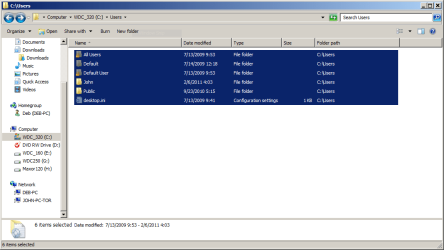
OK, now for the next three screen shots....Capture - users.PNG

Capture - users on E drive.PNG

Capture Users on E - details.PNG
 

My Computer My Computer

At a glance

Microsoft Windows 7 Home Premium 32-bit 7601 ...AMD Phenom(tm) II X4 955 Processor4.00 GBATI Radeon HD 4250
Computer type
PC/Desktop
OS
Microsoft Windows 7 Home Premium 32-bit 7601 Multiprocessor Free Service Pack 1
CPU
AMD Phenom(tm) II X4 955 Processor
Motherboard
ASUSTeK Computer INC. M4A88TD-V EVO/USB3
Memory
4.00 GB
Graphics Card(s)
ATI Radeon HD 4250
Sound Card
(1) AMD High Definition Audio Device (2) High Definition A
Screen Resolution
1920 x 1080 x 32 bits (4294967296 colors) @ 60 Hz
Hard Drives
(1) INTEL SSDSC2BW240A4 ATA Device (2) WDC WD10EZEX-00BN5A0 ATA Device (3) WDC WD10EZEX-08M2NA0 ATA Device (4) WDC WD2003FZEX-00Z4SA0 ATA Device (5) WDC WD3200AAKS-00V1A0 ATA Device (6) Generic- Compact Flash USB Device (7) Generic- MS/MS
You can just remove E since XP partition doesn't contain any boot files. Your Win7 User files also all seem to be contained within C.

Whatever was wrong seems to be an anolmaly. See what happens when XP is removed.

BTW do you know you are running Win7 with ugly Windows 98 file cabinet graphics? To correct this, go Start>rightclick Computer>Advanced Settings>Performance>Settings>Visual effects and tick the last box to "Use Visual Style..." to enjoy Win7 aero graphics. If you still don't have the cool transparent window frames, rightclick Desktop>Personalize to choose an Aero theme, even set up a Desktop Background slideshow.
 
Thanks for the help. I'm right in the middle of finishing my taxes, so doing anything risky with the computer doesn't seem prudent. If I understood you correctly, you're saying physically remove or disconnect the e drive and see what happens. Couldn't I also move the non XP files from E to another drive, and then have windows format the E drive.

This would save me opening my case which has my UPS and resultant rats nest of wires in the way. I believe this would accomplish the same thing - correct?

And yes, I was unaware of the non-aero desktop. I upgraded with LapLink's PC Mover which moved my settings which are basically unchanged since Win 2000 days. Enough new features were present in Win 7 (by default, I guess) to make me think I had aero going fully.

I'm pleased with the new look - thanks.
 

My Computer My Computer

At a glance

Microsoft Windows 7 Home Premium 32-bit 7601 ...AMD Phenom(tm) II X4 955 Processor4.00 GBATI Radeon HD 4250
Computer type
PC/Desktop
OS
Microsoft Windows 7 Home Premium 32-bit 7601 Multiprocessor Free Service Pack 1
CPU
AMD Phenom(tm) II X4 955 Processor
Motherboard
ASUSTeK Computer INC. M4A88TD-V EVO/USB3
Memory
4.00 GB
Graphics Card(s)
ATI Radeon HD 4250
Sound Card
(1) AMD High Definition Audio Device (2) High Definition A
Screen Resolution
1920 x 1080 x 32 bits (4294967296 colors) @ 60 Hz
Hard Drives
(1) INTEL SSDSC2BW240A4 ATA Device (2) WDC WD10EZEX-00BN5A0 ATA Device (3) WDC WD10EZEX-08M2NA0 ATA Device (4) WDC WD2003FZEX-00Z4SA0 ATA Device (5) WDC WD3200AAKS-00V1A0 ATA Device (6) Generic- Compact Flash USB Device (7) Generic- MS/MS
If you haven't changed your settings since Win2000 then you are way overdue for a clean reinstall. You may not even know the lightweight instantaneous OS which Win7 truly is.

The reason it is suggested you unplug E is so you can plug it back in if something major is missing, even though Disk Mgmt shows it should not interfere and you say you can back everything up. So, yes, you can format or (better yet) wipe E if you want: http://www.sevenforums.com/tutorials/52129-disk-clean-clean-all-diskpart-command.html

Do yourself a favor and plan some time ahead to wipe your HD and clean reinstall Win7 for best performance from the best OS yet. Here are tips for getting a purrfect reinstall - use the ones which apply: http://www.sevenforums.com/installation-setup/125874-re-install-windows-7-a.html#post1086729
 
What I meant by settings really concerned the desktop appearance. Prior to Win7, I was just content to have a stable machine, and never messed around with the wallpaper, etc. As to clean re-installs, I've had several. Perhaps out of superstition, when I got the clean installed OS running, I just went back to my regular no-thrills desktop.

Win 7 is a good OS, and I feel safe to customize it. Thanks again.

I see your point on removing the e disk, but I think I can accomplish the same measure of safety with taking a Image of the E disk with both Acronis True Image and Terabyte's Image for Windows.

Thanks again.
 

My Computer My Computer

At a glance

Microsoft Windows 7 Home Premium 32-bit 7601 ...AMD Phenom(tm) II X4 955 Processor4.00 GBATI Radeon HD 4250
Computer type
PC/Desktop
OS
Microsoft Windows 7 Home Premium 32-bit 7601 Multiprocessor Free Service Pack 1
CPU
AMD Phenom(tm) II X4 955 Processor
Motherboard
ASUSTeK Computer INC. M4A88TD-V EVO/USB3
Memory
4.00 GB
Graphics Card(s)
ATI Radeon HD 4250
Sound Card
(1) AMD High Definition Audio Device (2) High Definition A
Screen Resolution
1920 x 1080 x 32 bits (4294967296 colors) @ 60 Hz
Hard Drives
(1) INTEL SSDSC2BW240A4 ATA Device (2) WDC WD10EZEX-00BN5A0 ATA Device (3) WDC WD10EZEX-08M2NA0 ATA Device (4) WDC WD2003FZEX-00Z4SA0 ATA Device (5) WDC WD3200AAKS-00V1A0 ATA Device (6) Generic- Compact Flash USB Device (7) Generic- MS/MS
Back
Top