Help with OS X theme

theonlyswang

New member
Local time
1:07 AM
Messages
3
Location
Fort Belvoir, VA
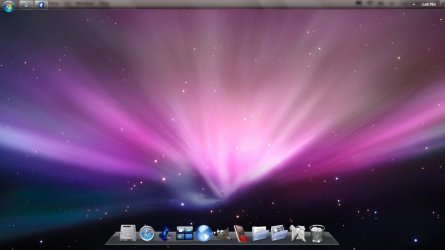
I was bored today, so I decided to try to customize my Windows 7 Build 7600 to resemble Mac OS X. I have attached my work so far, but I would like to also change my start bar to match the menu on OS X. Any advice?
 

Attachments

  • W7_OSX.png
    W7_OSX.png
    327.1 KB · Views: 1,055

My Computer

Computer Manufacturer/Model Number
Sony Vaio VGN-NW130J
OS
Microsoft Windows 7 Home Edition: Build 7600
CPU
2X Intel Core 2 Duo T6500 @ 2.1GHz
Motherboard
Sony Vaio
Memory
4.00 GB
Graphics Card(s)
ATI Mobility Radeon HD 4570
Sound Card
ATI HDMI Audio
Monitor(s) Displays
15.3" 1366X768
Hard Drives
Hitatchi 320 GB 5400 RPM SATA Drive
try objectbar premium and u will get a mac finder bar in it....although i never liked that mac bar,if its on mac then ya but not in windows...it dun let u use windows...loll
 

My Computer

Computer Manufacturer/Model Number
Dell Studio 1737
OS
windows 7 ultimate x64
CPU
2.18ghz DC
Memory
4GB
Graphics Card(s)
1674MB
Monitor(s) Displays
1440*900
Hard Drives
320+500
try objectbar premium and u will get a mac finder bar in it....although i never liked that mac bar,if its on mac then ya but not in windows...it dun let u use windows...loll

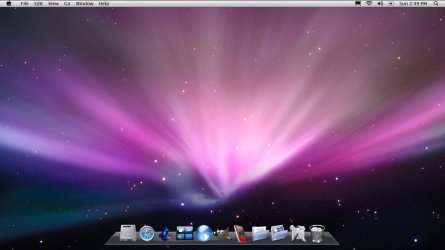
Awesome. I now have the both the OS X and 7 start bars working. the W7 bar is on auto-hide, and the OS X is not. It works out beautifully. any ideas how to change the window borders and buttons?
 

Attachments

  • W7BAR.jpg
    W7BAR.jpg
    51.3 KB · Views: 539
  • OSXBAR.jpg
    OSXBAR.jpg
    53.3 KB · Views: 320

My Computer

Computer Manufacturer/Model Number
Sony Vaio VGN-NW130J
OS
Microsoft Windows 7 Home Edition: Build 7600
CPU
2X Intel Core 2 Duo T6500 @ 2.1GHz
Motherboard
Sony Vaio
Memory
4.00 GB
Graphics Card(s)
ATI Mobility Radeon HD 4570
Sound Card
ATI HDMI Audio
Monitor(s) Displays
15.3" 1366X768
Hard Drives
Hitatchi 320 GB 5400 RPM SATA Drive
there are 2 types of objectbar, one is free which also has finder bar but there is premium version of objectbar too u can find it on RS, if u find it,well n good or i will send u...then there is a theme for object bar,which makes it more perfect,with shiny blue back as of real mac,n lots more good stuff.but it does not get installed in free object bar.

if u r this much mac fanatic,try to install OS X 86 any iso, ideneb,iatkos etc u will get real mac on ur pc,its a little work,u have to do for finding kexts but u will get real one.but i got bored of mac now,windows is windows,m more comfortable with widnows.anyhow...

 

My Computer

Computer Manufacturer/Model Number
Dell Studio 1737
OS
windows 7 ultimate x64
CPU
2.18ghz DC
Memory
4GB
Graphics Card(s)
1674MB
Monitor(s) Displays
1440*900
Hard Drives
320+500
try objectbar premium and u will get a mac finder bar in it....although i never liked that mac bar,if its on mac then ya but not in windows...it dun let u use windows...loll

Awesome. I now have the both the OS X and 7 start bars working. the W7 bar is on auto-hide, and the OS X is not. It works out beautifully. any ideas how to change the window borders and buttons?

If i'm not mistaken, i think either someone on SF, or somewhere on DeviantArt, someone made an OSX theme. Do a search and see how it goes.
 

My Computer

Computer Manufacturer/Model Number
Custom Build
OS
W7 RTM Ultimate x64
CPU
Intel Q8400 @ 2.66GHZ
Motherboard
Gigabyte GA-EG45M-UD2H
Memory
4GB DDR2-800
Graphics Card(s)
Gainward GTS 450 GLH 1GB Edition
Sound Card
Integrated 8 Channel
Monitor(s) Displays
AOC 23.6 Inch Widescreen LCD
Screen Resolution
1920x1080
Hard Drives
Seagate 500GB Internal
Western Digital 1TB Internal

Hitachi 1TB External
PSU
Apevia Java Power 500W
Case
Cooler Master HAF 922 Black
Cooling
Stock Intel CPU Fan
Keyboard
HP SK-2960 Multimedia Keyboard
Mouse
Logitech M350 Wireless Gaming Mouse
Internet Speed
1.5MB
There are two themes made by Alkhan You may have on deviantART. Those are of almost Leopard like shell style. I tried it, really nice.
 

My Computer

Computer type
PC/Desktop
Computer Manufacturer/Model Number
Self Assembled
OS
Microsoft Windows 10 Pro Insider Preview 64-bit
CPU
Intel(R) Core(TM) i3-4130 CPU @ 3.40GHz
Motherboard
Gigabyte Technology Co., Ltd. B85M-D3H
Memory
Corsair Vengence 4GB x2 (8.00GB Dual-Channel DDR3 @ 798MHz)
Graphics Card(s)
2047MB GeForce GTS 450 (ZOTAC International)
Sound Card
Onboard (Realtek High Definition Audio)
Monitor(s) Displays
LG Flatron E2040T
Screen Resolution
1600x900
Hard Drives
Western Digital 1 TB
Seagate 500 GB
PSU
Corsair VS550
Case
Cooler Master K380
Cooling
Cooler Master Seidon 120V Plus
Keyboard
Logitech MK260r
Mouse
Logitech MK260r
Internet Speed
PMPL Broadband
Antivirus
Windows Defender + MBAM
Browser
Firefox
Other Info
Dell Studio 15" Laptop
Back
Top