Help with Outlook In/Out mail Problem

The Howling Wolves

WE BOTH ARE VETERANS
Gold Member
VIP
Local time
9:41 PM
Messages
8,991
Location
California
I had Vista Home Premium 32bit and Win Office 2007 Outlook ran great. I have just installed Win 7 Home Premium 64 bit and having problem with MS Office 2007 Outlook sending mail. I can send mail from both of my internet sites but not from Outlook.
I have set it up correctly but everytime I send from Outlook a box appears asking me to Enter Network Password again and again. Thereby not sending from Inbox
Server is pop.att.yahoo.com

Income is pop.att.yahoo.com
Outgoing is smtp.att.yahoo.com
It finishes saying Congratulation and ready to go. However, it doesn't work.
Any and all help appreciated. TIA
 

My Computer

Computer Manufacturer/Model Number
HP M9077c
OS
Windows 7 Home Premium 64bit
CPU
Intel(R)Core(TM)2 quad [email protected] 2.39GHz
Motherboard
ASUSeK
Memory
6GB DDR2 6400
Graphics Card(s)
GeForce 8500/512MB
Sound Card
Realtek High Def Audio
Monitor(s) Displays
HP w2408 LCD 24" widescreen
Screen Resolution
1920x1200
Cooling
6 pack of Bud
Keyboard
MS wireless Inteli
Mouse
MS wireless Inteli
Are you absolutely sure you didnt mistype the servernames and/or password?
 

My Computer

Computer Manufacturer/Model Number
Homebrew PC - "Alpha_Dawg"
OS
Windows 7 Ultimate 64 bit Steve Ballmer Signature Edition
CPU
Intel Core 2 Quad - Q9550 - 2.83GHz stock - OC'd to 3.6GHz
Motherboard
Gigabyte EP45-UD3P
Memory
4GB DDR2 800MHz (PC6400) OCZ Reaper
Graphics Card(s)
Nvidia GE Force 8800 GTS
Sound Card
Asus Xonar DX
Monitor(s) Displays
Samsung SyncMaster 2333HD
Screen Resolution
1920 x 1080
Hard Drives
WD Caviar Black 750GB - 7200RPM - 32MB cache
WD Caviar Green 1.5TB - 5400RPM - 64MB cache
WD Caviar Green 2.0TB - 5400RPM - 64MB cache
PSU
PC Power & Cooling Silencer 750
Case
Gigabyte 3D Aurora
Cooling
Case is Air - 5ea. 120mm fans (mix of Arctic and Xigmatec)
Keyboard
MS Natural Wireless KB
Mouse
MS Wireless Mouse
Internet Speed
50 mbps down/5 mbps up
Other Info
AVerMedia - AVerTVHD G2 Dual Tuner Card
Are you absolutely sure you didnt mistype the servernames and/or password?
Double checked and removed and did a new log in(several times) and still no luck!
I think the problem is when I sign in to ISP it is
[email protected]
tried that and no success.
 

My Computer

Computer Manufacturer/Model Number
HP M9077c
OS
Windows 7 Home Premium 64bit
CPU
Intel(R)Core(TM)2 quad [email protected] 2.39GHz
Motherboard
ASUSeK
Memory
6GB DDR2 6400
Graphics Card(s)
GeForce 8500/512MB
Sound Card
Realtek High Def Audio
Monitor(s) Displays
HP w2408 LCD 24" widescreen
Screen Resolution
1920x1200
Cooling
6 pack of Bud
Keyboard
MS wireless Inteli
Mouse
MS wireless Inteli
Check att/yahoos support pages on pop mail settings... you probably missed a checkmark or something small.
 

My Computer

Computer Manufacturer/Model Number
Homebrew PC - "Alpha_Dawg"
OS
Windows 7 Ultimate 64 bit Steve Ballmer Signature Edition
CPU
Intel Core 2 Quad - Q9550 - 2.83GHz stock - OC'd to 3.6GHz
Motherboard
Gigabyte EP45-UD3P
Memory
4GB DDR2 800MHz (PC6400) OCZ Reaper
Graphics Card(s)
Nvidia GE Force 8800 GTS
Sound Card
Asus Xonar DX
Monitor(s) Displays
Samsung SyncMaster 2333HD
Screen Resolution
1920 x 1080
Hard Drives
WD Caviar Black 750GB - 7200RPM - 32MB cache
WD Caviar Green 1.5TB - 5400RPM - 64MB cache
WD Caviar Green 2.0TB - 5400RPM - 64MB cache
PSU
PC Power & Cooling Silencer 750
Case
Gigabyte 3D Aurora
Cooling
Case is Air - 5ea. 120mm fans (mix of Arctic and Xigmatec)
Keyboard
MS Natural Wireless KB
Mouse
MS Wireless Mouse
Internet Speed
50 mbps down/5 mbps up
Other Info
AVerMedia - AVerTVHD G2 Dual Tuner Card
I had Vista Home Premium 32bit and Win Office 2007 Outlook ran great. I have just installed Win 7 Home Premium 64 bit and having problem with MS Office 2007 Outlook sending mail. I can send mail from both of my internet sites but not from Outlook.
I have set it up correctly but everytime I send from Outlook a box appears asking me to Enter Network Password again and again. Thereby not sending from Inbox
Server is pop.att.yahoo.com

Income is pop.att.yahoo.com
Outgoing is smtp.att.yahoo.com
It finishes saying Congratulation and ready to go. However, it doesn't work.
Any and all help appreciated. TIA

Hello Borngof !!

I believe Yahoo is using custom port numbers maybe you might not have entered them.

  1. Click the "Advanced" tab.
  2. Under "Incoming Server (POP3)," check the box next to "This server requires an encrypted connection (SSL)." The port number in the "Incoming Server (POP3)" field should automatically change from 110 to 995. If it doesn't, make sure to change the port number to 995.
  3. Under "Outgoing Server (SMTP)," check the box next to "This server requires an encrypted connection (SSL)." Enter port number "465" in the "Outgoing Server (SMTP)" field.
Hope this helps,
Captain
 

My Computer

Computer Manufacturer/Model Number
Samsung NP550P5C-S02IN
OS
Windows 7 Ultimate - 64-bit | Windows 8 Pro - 64-bit
CPU
Intel® Core™ i7 Processor 3,610QM (2.30Hz, 6MB L3 Cach
Memory
8 GB
Graphics Card(s)
NVIDIA® GeForce® GT 650M 2GB Graphics, Optimus™ techno
Sound Card
SoundAlive™ JBL 3 Speakers (With sub-Woofer)
Monitor(s) Displays
39.62cm (15.6) SuperBright 300nit HD+ LED Display
Screen Resolution
1,600 x 900, Anti-Reflective
Hard Drives
1TB S-ATA II Hard Drive (5,400RPM)
I had Vista Home Premium 32bit and Win Office 2007 Outlook ran great. I have just installed Win 7 Home Premium 64 bit and having problem with MS Office 2007 Outlook sending mail. I can send mail from both of my internet sites but not from Outlook.
I have set it up correctly but everytime I send from Outlook a box appears asking me to Enter Network Password again and again. Thereby not sending from Inbox
Server is pop.att.yahoo.com

Income is pop.att.yahoo.com
Outgoing is smtp.att.yahoo.com
It finishes saying Congratulation and ready to go. However, it doesn't work.
Any and all help appreciated. TIA

Hello Borngof !!

Capt.Jack

I believe Yahoo is using custom port numbers maybe you might not have entered them.

  1. Click the "Advanced" tab.
  2. Under "Incoming Server (POP3)," check the box next to "This server requires an encrypted connection (SSL)." The port number in the "Incoming Server (POP3)" field should automatically change from 110 to 995. If it doesn't, make sure to change the port number to 995.
  3. Under "Outgoing Server (SMTP)," check the box next to "This server requires an encrypted connection (SSL)." Enter port number "465" in the "Outgoing Server (SMTP)" field.
Hope this helps,
Captain
Capt. Jack:
1. Tried 1-3 and still won't kick in. Have run test to myself in my msn.com and sbcglobal.net addresses and fails to send or recieve.
2. I called a tech at U-verse and he walked me thru various steps and zilch(nothing)
3. Went to att/esupport and they had direction labels giving me exactly what you had sent me.
4. Even(out of desperation) I uninstalled MS Office 2007 and re-installed it. Which was stupid as it has no bearing on the internet connection.
I still can go on line and send and recieve e-mails but not in Outlook 2007.
As you can see, I don't quit until the cows come home but I hear them mooooing.
I do want to thank you for your input and if you can think of anything else, you know where to find me. TIA
 

My Computer

Computer Manufacturer/Model Number
HP M9077c
OS
Windows 7 Home Premium 64bit
CPU
Intel(R)Core(TM)2 quad [email protected] 2.39GHz
Motherboard
ASUSeK
Memory
6GB DDR2 6400
Graphics Card(s)
GeForce 8500/512MB
Sound Card
Realtek High Def Audio
Monitor(s) Displays
HP w2408 LCD 24" widescreen
Screen Resolution
1920x1200
Cooling
6 pack of Bud
Keyboard
MS wireless Inteli
Mouse
MS wireless Inteli

My Computer

Computer Manufacturer/Model Number
Homebrew PC - "Alpha_Dawg"
OS
Windows 7 Ultimate 64 bit Steve Ballmer Signature Edition
CPU
Intel Core 2 Quad - Q9550 - 2.83GHz stock - OC'd to 3.6GHz
Motherboard
Gigabyte EP45-UD3P
Memory
4GB DDR2 800MHz (PC6400) OCZ Reaper
Graphics Card(s)
Nvidia GE Force 8800 GTS
Sound Card
Asus Xonar DX
Monitor(s) Displays
Samsung SyncMaster 2333HD
Screen Resolution
1920 x 1080
Hard Drives
WD Caviar Black 750GB - 7200RPM - 32MB cache
WD Caviar Green 1.5TB - 5400RPM - 64MB cache
WD Caviar Green 2.0TB - 5400RPM - 64MB cache
PSU
PC Power & Cooling Silencer 750
Case
Gigabyte 3D Aurora
Cooling
Case is Air - 5ea. 120mm fans (mix of Arctic and Xigmatec)
Keyboard
MS Natural Wireless KB
Mouse
MS Wireless Mouse
Internet Speed
50 mbps down/5 mbps up
Other Info
AVerMedia - AVerTVHD G2 Dual Tuner Card
I had Vista Home Premium 32bit and Win Office 2007 Outlook ran great. I have just installed Win 7 Home Premium 64 bit and having problem with MS Office 2007 Outlook sending mail. I can send mail from both of my internet sites but not from Outlook.
I have set it up correctly but everytime I send from Outlook a box appears asking me to Enter Network Password again and again. Thereby not sending from Inbox
Server is pop.att.yahoo.com

Income is pop.att.yahoo.com
Outgoing is smtp.att.yahoo.com
It finishes saying Congratulation and ready to go. However, it doesn't work.
Any and all help appreciated. TIA
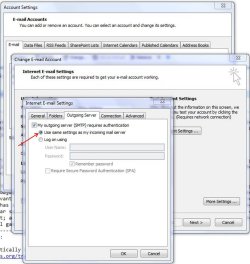
Have you ensured that in Account Setup, where you enter details for your outgoing mail server, you have selected "Use same settings as my incoming mail server"?
 

Attachments

  • Capture.JPG
    Capture.JPG
    95.7 KB · Views: 19

My Computer

Computer Manufacturer/Model Number
Custom
OS
Windows 7 Enterprise x64
CPU
Intel i7 920
Motherboard
Asus P6T Deluxe v2
Memory
6 GB
Graphics Card(s)
nVidia GTX260 + nVidia 3D
Sound Card
Onboard
Monitor(s) Displays
Samsung SyncMaster 2233RZ
Screen Resolution
1680 x 1050
Hard Drives
1 x 64GB SSD primary
2 x 1 TB (mirrored)
PSU
700W
Other Info
Edimax 802.11n Wireless PCI Card
Netgear DG834G router
I had Vista Home Premium 32bit and Win Office 2007 Outlook ran great. I have just installed Win 7 Home Premium 64 bit and having problem with MS Office 2007 Outlook sending mail. I can send mail from both of my internet sites but not from Outlook.
I have set it up correctly but everytime I send from Outlook a box appears asking me to Enter Network Password again and again. Thereby not sending from Inbox
Server is pop.att.yahoo.com

Income is pop.att.yahoo.com
Outgoing is smtp.att.yahoo.com
It finishes saying Congratulation and ready to go. However, it doesn't work.
Any and all help appreciated. TIA
Have you ensured that in Account Setup, where you enter details for your outgoing mail server, you have selected "Use same settings as my incoming mail server"?

Thanks everyone for your effort but I have tried ALL the above methods over and over. However, I am not giving up yet! TIA
 

My Computer

Computer Manufacturer/Model Number
HP M9077c
OS
Windows 7 Home Premium 64bit
CPU
Intel(R)Core(TM)2 quad [email protected] 2.39GHz
Motherboard
ASUSeK
Memory
6GB DDR2 6400
Graphics Card(s)
GeForce 8500/512MB
Sound Card
Realtek High Def Audio
Monitor(s) Displays
HP w2408 LCD 24" widescreen
Screen Resolution
1920x1200
Cooling
6 pack of Bud
Keyboard
MS wireless Inteli
Mouse
MS wireless Inteli
Try this download Windows Live Mail and configure under that and see whether the E-mail account works in that or not. And one more thing there might be some option in the E-mail when you need to enable the POP account.

- Captain
 

My Computer

Computer Manufacturer/Model Number
Samsung NP550P5C-S02IN
OS
Windows 7 Ultimate - 64-bit | Windows 8 Pro - 64-bit
CPU
Intel® Core™ i7 Processor 3,610QM (2.30Hz, 6MB L3 Cach
Memory
8 GB
Graphics Card(s)
NVIDIA® GeForce® GT 650M 2GB Graphics, Optimus™ techno
Sound Card
SoundAlive™ JBL 3 Speakers (With sub-Woofer)
Monitor(s) Displays
39.62cm (15.6) SuperBright 300nit HD+ LED Display
Screen Resolution
1,600 x 900, Anti-Reflective
Hard Drives
1TB S-ATA II Hard Drive (5,400RPM)
Last edited:

My Computer

Computer Manufacturer/Model Number
HP M9077c
OS
Windows 7 Home Premium 64bit
CPU
Intel(R)Core(TM)2 quad [email protected] 2.39GHz
Motherboard
ASUSeK
Memory
6GB DDR2 6400
Graphics Card(s)
GeForce 8500/512MB
Sound Card
Realtek High Def Audio
Monitor(s) Displays
HP w2408 LCD 24" widescreen
Screen Resolution
1920x1200
Cooling
6 pack of Bud
Keyboard
MS wireless Inteli
Mouse
MS wireless Inteli
Try this download Windows Live Mail and configure under that and see whether the E-mail account works in that or not. And one more thing there might be some option in the E-mail when you need to enable the POP account.

- Captain
I tried Window Live Mail and the first time it didn't work. The second time it worked:D
I waited long enough for it to load.....
Thanks Capt. Jack and let's close this puppy down and get back to playing some golf.
Have a great day.
 
Last edited:

My Computer

Computer Manufacturer/Model Number
HP M9077c
OS
Windows 7 Home Premium 64bit
CPU
Intel(R)Core(TM)2 quad [email protected] 2.39GHz
Motherboard
ASUSeK
Memory
6GB DDR2 6400
Graphics Card(s)
GeForce 8500/512MB
Sound Card
Realtek High Def Audio
Monitor(s) Displays
HP w2408 LCD 24" widescreen
Screen Resolution
1920x1200
Cooling
6 pack of Bud
Keyboard
MS wireless Inteli
Mouse
MS wireless Inteli
Glad that you got it working !! Thank You for posting back !!

- Captain
 

My Computer

Computer Manufacturer/Model Number
Samsung NP550P5C-S02IN
OS
Windows 7 Ultimate - 64-bit | Windows 8 Pro - 64-bit
CPU
Intel® Core™ i7 Processor 3,610QM (2.30Hz, 6MB L3 Cach
Memory
8 GB
Graphics Card(s)
NVIDIA® GeForce® GT 650M 2GB Graphics, Optimus™ techno
Sound Card
SoundAlive™ JBL 3 Speakers (With sub-Woofer)
Monitor(s) Displays
39.62cm (15.6) SuperBright 300nit HD+ LED Display
Screen Resolution
1,600 x 900, Anti-Reflective
Hard Drives
1TB S-ATA II Hard Drive (5,400RPM)
Back
Top