My mom is just use to its interface and here where stay office 2010 is not on the shelfs het, so I will stick toe2007. I just want the same everything on my desktop PC on my laptop because I am going to travel so I must get my emails and still have my old ones en folders and everything as it is so please is there a way?
Certainly, but you must export and import as you make changes.
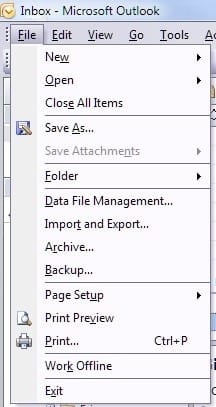
Select "File" then select "Import and Export..."
View attachment 100354
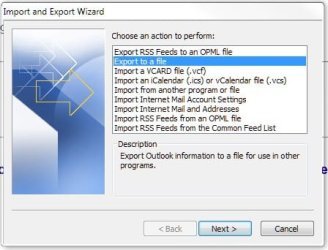
Select "Export to a file" then "Next"
View attachment 100355
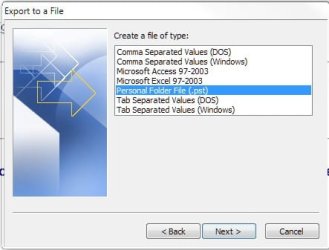
Select "Personal Folder File (.pst)" then "Next"
View attachment 100356
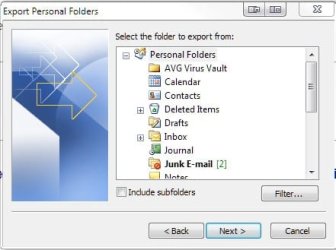
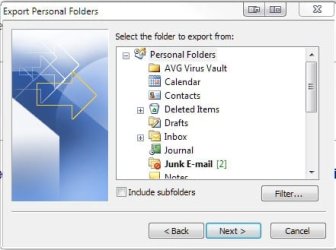
Select your Personal Folders in order that you get all of the information that is in your Outlook 2007 database then select "Next" and choose a place to save the file. If you are like me it can be up to a 1.5 GB file (I save everything

)
View attachment 100357
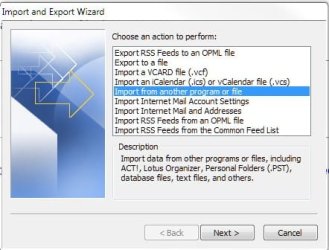
On your other computer be sure you have access to the file and select the "Import and Export..." choice once again but this time you will Import the file by selecting "Import from another file or program" and then select "Next"
View attachment 100358
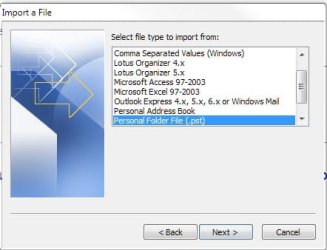
You will want to select the "Personal Folder File (*.pst) option
View attachment 100359
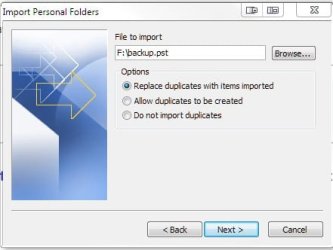
Then browse to your .pst file you saved earlier and be sure the radio button is ticked indicating "Replace duplicates with items imported"
View attachment 100360
Do it again once you get back from traveling to update your other computer.
I hope that helps. There may be an easier method but I use this method when I synch my Outlook 2007 accounts on my computers. (It's free and it works)