Help with partitioning.

RileyRandom

New member
Local time
11:29 PM
Messages
80
When i first got windows 7 i only gave 20 gbs to the partition, now windows 7 is my main OS and i would like to know how to make that partition bigger and my Vista partition smaller.

I already tried PartitionMagic, but it said my drive was 'Bad'.

Also when i tried uninstalling PartitionMagic i got the BSod. (Had to manually uninstall it.)
 

My Computer

OS
Ubuntu 9.10 and Seven Ultimate OEM 32 bit
CPU
AMD Athlon 64 x2 Mobile
Memory
2gb (2x1024) DDR2
Graphics Card(s)
HD Radeon 1270 integrated.
Sound Card
integrated.
Monitor(s) Displays
15" laptop display and 15" external monitor
Screen Resolution
1280x768
Hard Drives
120gb WD 2.5 internal
1tb WD external.
Cooling
Fan
I prefer GParted.

You can delete all partition *if that;;s what you want to do(, the I create a 70GB partition for Windows7.

When back in Windows go to Start > Run, and type diskmgmt.msc and you can format the unallocated space or break it down into more partitions.

GParted download:
GParted -- Download
 

My Computer

Computer Manufacturer/Model Number
Cheap $399.00 E-Machine
OS
Windows 7 Pro & Vista Home Premium
CPU
Athlon 64 3800+ (Orleans) 2.40GHz
Motherboard
Winfast
Memory
2GB DDR2 RAM DIMM
Graphics Card(s)
NVIDIA GeForce 8500 GT 512 MB memory HDMI out
Sound Card
creative X-Fi Exteme 7..1 channel
Monitor(s) Displays
Acer V223W 22" widescreen DVI
Screen Resolution
1680x1050
Hard Drives
WDC WD5 500GB
WDC WD25 250GB
PSU
OCZ 550 watt
Case
Gateway
Cooling
2 fans
Keyboard
Dell
Mouse
Sony Vaio
Internet Speed
18MB/s down - .72MB /s up
I don't want to delete the partitions or format or anything like that.

I just want to take about 30 gbs from one partition and move it to the other partition
 

My Computer

OS
Ubuntu 9.10 and Seven Ultimate OEM 32 bit
CPU
AMD Athlon 64 x2 Mobile
Memory
2gb (2x1024) DDR2
Graphics Card(s)
HD Radeon 1270 integrated.
Sound Card
integrated.
Monitor(s) Displays
15" laptop display and 15" external monitor
Screen Resolution
1280x768
Hard Drives
120gb WD 2.5 internal
1tb WD external.
Cooling
Fan
When i first got windows 7 i only gave 20 gbs to the partition, now windows 7 is my main OS and i would like to know how to make that partition bigger and my Vista partition smaller.

I already tried PartitionMagic, but it said my drive was 'Bad'.

Also when i tried uninstalling PartitionMagic i got the BSod. (Had to manually uninstall it.)

Hi and welcome

Partition magic. An oldy but a goodie doesnt work in win 7. Parigon disk suite 2009 does

Good luck and let us know if you need any help with that


Ken J++
 

My Computer

Computer Manufacturer/Model Number
HP Pavillion dv-7 1005 Tx
OS
Win 8 Release candidate 8400
CPU
[email protected]
Memory
4 gigs
Graphics Card(s)
Nvidia 9600M
Sound Card
HD built-in
Monitor(s) Displays
17" Wxga
Screen Resolution
1440x900
Cooling
none
Internet Speed
45Mb down 5Mb up
When i first got windows 7 i only gave 20 gbs to the partition, now windows 7 is my main OS and i would like to know how to make that partition bigger and my Vista partition smaller.

I already tried PartitionMagic, but it said my drive was 'Bad'.

Also when i tried uninstalling PartitionMagic i got the BSod. (Had to manually uninstall it.)

Hi and welcome

Partition magic. An oldy but a goodie doesnt work in win 7. Parigon disk suite 2009 does

Good luck and let us know if you need any help with that


Ken J++


I just downloaded Parigon disk suite 2009, now how do i change the size of a partition?

Edit: Now i'm getting some error saying "I/O error on hard disk drive 2 has occured".
 

My Computer

OS
Ubuntu 9.10 and Seven Ultimate OEM 32 bit
CPU
AMD Athlon 64 x2 Mobile
Memory
2gb (2x1024) DDR2
Graphics Card(s)
HD Radeon 1270 integrated.
Sound Card
integrated.
Monitor(s) Displays
15" laptop display and 15" external monitor
Screen Resolution
1280x768
Hard Drives
120gb WD 2.5 internal
1tb WD external.
Cooling
Fan
I don't know for sure if GParted can do that.
 

My Computer

Computer Manufacturer/Model Number
Cheap $399.00 E-Machine
OS
Windows 7 Pro & Vista Home Premium
CPU
Athlon 64 3800+ (Orleans) 2.40GHz
Motherboard
Winfast
Memory
2GB DDR2 RAM DIMM
Graphics Card(s)
NVIDIA GeForce 8500 GT 512 MB memory HDMI out
Sound Card
creative X-Fi Exteme 7..1 channel
Monitor(s) Displays
Acer V223W 22" widescreen DVI
Screen Resolution
1680x1050
Hard Drives
WDC WD5 500GB
WDC WD25 250GB
PSU
OCZ 550 watt
Case
Gateway
Cooling
2 fans
Keyboard
Dell
Mouse
Sony Vaio
Internet Speed
18MB/s down - .72MB /s up
Any other ways to resize the partition?
 

My Computer

OS
Ubuntu 9.10 and Seven Ultimate OEM 32 bit
CPU
AMD Athlon 64 x2 Mobile
Memory
2gb (2x1024) DDR2
Graphics Card(s)
HD Radeon 1270 integrated.
Sound Card
integrated.
Monitor(s) Displays
15" laptop display and 15" external monitor
Screen Resolution
1280x768
Hard Drives
120gb WD 2.5 internal
1tb WD external.
Cooling
Fan
I trued my GParted ISO, but I'm having video card problems and it wouldn't completely load.

There's a be program out there call Parted Magic.

I haven't used it, but you can read about it here:
Documentation
 

My Computer

Computer Manufacturer/Model Number
Cheap $399.00 E-Machine
OS
Windows 7 Pro & Vista Home Premium
CPU
Athlon 64 3800+ (Orleans) 2.40GHz
Motherboard
Winfast
Memory
2GB DDR2 RAM DIMM
Graphics Card(s)
NVIDIA GeForce 8500 GT 512 MB memory HDMI out
Sound Card
creative X-Fi Exteme 7..1 channel
Monitor(s) Displays
Acer V223W 22" widescreen DVI
Screen Resolution
1680x1050
Hard Drives
WDC WD5 500GB
WDC WD25 250GB
PSU
OCZ 550 watt
Case
Gateway
Cooling
2 fans
Keyboard
Dell
Mouse
Sony Vaio
Internet Speed
18MB/s down - .72MB /s up

My Computers

System One System Two

  • Computer type
    PC/Desktop
    Computer Manufacturer/Model Number
    ChillBlast - Custom to my design
    OS
    Windows 11 Pro x64 [Latest Release and Release Preview]
    CPU
    Ryzen 9 5950X, 3.8 - 5.2 MHz
    Motherboard
    Asus Prime X570-Pro
    Memory
    64GB [2 x 32GB] DDR4 3200MHz
    Graphics Card(s)
    4GB NVIDIA GEFORCE GTX 1650 Ti
    Sound Card
    On-board SPDIF to 5.1 System + HDMI [5.1 system]
    Monitor(s) Displays
    32" UHD 32 Bit HDR Monitor + 43" UHD 4K 32Bit HDR TV
    Screen Resolution
    2 x 3840 x 2160 @60Hz
    Hard Drives
    1TB M2 SSD OS, 500GB Fast Access SSD, 2 x 8TB Data + Various Externals from 1TB to 4TB, 10TB NAS
    PSU
    NZXT C750 80 PLUS Gold 750W Modular PSU
    Case
    Workstation Case [Matt Black]
    Cooling
    NZXT Kraken X63 280mm CPU Cooler +2x Quiet Case fans
    Keyboard
    Logitech Wireless MX Keys & K400 + others
    Mouse
    Logitech Wireless MX Master 3S
    Internet Speed
    920 MB Down 50 MB Up
    Antivirus
    BitDefender Total Security Pro
    Browser
    Chrome (always run latest Non-Beta)
    Other Info
    Also run ...
    Laptop - Quad 8GB - Windows 10 Pro x64
    Nexus 7 Android tablet x2
    Samsung 10.2" tablet
    Blackview TAB 8 4G Android Tablet c/w Keyboard
    Wacom Intuos Pro Medium Pen Pad
    Wacom Intuos Pro Small Pen Pad
    Wacom Expresskeys Remote
    Loopdeck+ Graphics Controller
    Shuttle Pro v2 Control
  • Computer type
    Laptop
    System Manufacturer/Model Number
    Dell XPS 17 10750H
    OS
    Windows 11 Pro x64 Latest RP
    CPU
    Intel I7 10750H 5.0GHz
    Motherboard
    Dell XPS
    Memory
    32GB [2x16GB] DDR4 2933 MHz
    Graphics Card(s)
    nVidia GTX1650Ti 4 GB GDDR6
    Sound Card
    Stock [Realtek] 4 Speaker
    Monitor(s) Displays
    17" IPS UHD+ Infinity Edge Touchscreen
    Screen Resolution
    3840 x 2400
    Hard Drives
    2TB M2 NVMe, 4TB External + various 500GB & 1TB External NVMe (also have access to spinner HDD from
    PSU
    Stock
    Case
    Stock XPS Aluminium & Carbon Fibre
    Cooling
    Stock - Active Fan Control
    Keyboard
    Backlit + Various Logitech
    Mouse
    Stock Track Pad + Logitech MX Trackball
    Internet Speed
    72 MB Down 18MB Up
    Browser
    Chrome
    Other Info
    Also run ...
    Laptop - Quad 8GB - Windows 10 Pro x64
    Nexus 7 Android tablet x2
    10.2" tablet
    Sony Z3 Android Smartphone
    Wacom Intuos Pro Medium Pen Pad
    Wacom Intuos Pro Small Pen Pad
    Wacom Expresskeys Remote
    Loopdeck+ Graphics Controller
    Shuttle Pro v2 Control Pad
    10TB NAS
Hi Riley,

My partition manager of choice at the moment is Partition Wizard - in particular the bootable disk version, (take the Operating system out of the equation ;) ).

The software is available here for free ...

BEST FREE Partition Manager for Windows supports all 32-bit & 64 bit Windows No-server OS.

Also there is a step by step of resizing Windows 7 partition here ....

How to Resize Partition under Windows 7


Now my partitions that i made smaller wont show up.
 

My Computer

OS
Ubuntu 9.10 and Seven Ultimate OEM 32 bit
CPU
AMD Athlon 64 x2 Mobile
Memory
2gb (2x1024) DDR2
Graphics Card(s)
HD Radeon 1270 integrated.
Sound Card
integrated.
Monitor(s) Displays
15" laptop display and 15" external monitor
Screen Resolution
1280x768
Hard Drives
120gb WD 2.5 internal
1tb WD external.
Cooling
Fan
Won't show up in windows or in the partition manager?
 

My Computers

System One System Two

  • Computer type
    PC/Desktop
    Computer Manufacturer/Model Number
    ChillBlast - Custom to my design
    OS
    Windows 11 Pro x64 [Latest Release and Release Preview]
    CPU
    Ryzen 9 5950X, 3.8 - 5.2 MHz
    Motherboard
    Asus Prime X570-Pro
    Memory
    64GB [2 x 32GB] DDR4 3200MHz
    Graphics Card(s)
    4GB NVIDIA GEFORCE GTX 1650 Ti
    Sound Card
    On-board SPDIF to 5.1 System + HDMI [5.1 system]
    Monitor(s) Displays
    32" UHD 32 Bit HDR Monitor + 43" UHD 4K 32Bit HDR TV
    Screen Resolution
    2 x 3840 x 2160 @60Hz
    Hard Drives
    1TB M2 SSD OS, 500GB Fast Access SSD, 2 x 8TB Data + Various Externals from 1TB to 4TB, 10TB NAS
    PSU
    NZXT C750 80 PLUS Gold 750W Modular PSU
    Case
    Workstation Case [Matt Black]
    Cooling
    NZXT Kraken X63 280mm CPU Cooler +2x Quiet Case fans
    Keyboard
    Logitech Wireless MX Keys & K400 + others
    Mouse
    Logitech Wireless MX Master 3S
    Internet Speed
    920 MB Down 50 MB Up
    Antivirus
    BitDefender Total Security Pro
    Browser
    Chrome (always run latest Non-Beta)
    Other Info
    Also run ...
    Laptop - Quad 8GB - Windows 10 Pro x64
    Nexus 7 Android tablet x2
    Samsung 10.2" tablet
    Blackview TAB 8 4G Android Tablet c/w Keyboard
    Wacom Intuos Pro Medium Pen Pad
    Wacom Intuos Pro Small Pen Pad
    Wacom Expresskeys Remote
    Loopdeck+ Graphics Controller
    Shuttle Pro v2 Control
  • Computer type
    Laptop
    System Manufacturer/Model Number
    Dell XPS 17 10750H
    OS
    Windows 11 Pro x64 Latest RP
    CPU
    Intel I7 10750H 5.0GHz
    Motherboard
    Dell XPS
    Memory
    32GB [2x16GB] DDR4 2933 MHz
    Graphics Card(s)
    nVidia GTX1650Ti 4 GB GDDR6
    Sound Card
    Stock [Realtek] 4 Speaker
    Monitor(s) Displays
    17" IPS UHD+ Infinity Edge Touchscreen
    Screen Resolution
    3840 x 2400
    Hard Drives
    2TB M2 NVMe, 4TB External + various 500GB & 1TB External NVMe (also have access to spinner HDD from
    PSU
    Stock
    Case
    Stock XPS Aluminium & Carbon Fibre
    Cooling
    Stock - Active Fan Control
    Keyboard
    Backlit + Various Logitech
    Mouse
    Stock Track Pad + Logitech MX Trackball
    Internet Speed
    72 MB Down 18MB Up
    Browser
    Chrome
    Other Info
    Also run ...
    Laptop - Quad 8GB - Windows 10 Pro x64
    Nexus 7 Android tablet x2
    10.2" tablet
    Sony Z3 Android Smartphone
    Wacom Intuos Pro Medium Pen Pad
    Wacom Intuos Pro Small Pen Pad
    Wacom Expresskeys Remote
    Loopdeck+ Graphics Controller
    Shuttle Pro v2 Control Pad
    10TB NAS
Won't show up in windows or in the partition manager?

It wouldn't show up up in windows, but i did a quick system restore to earlier today and it fixed it.
 

My Computer

OS
Ubuntu 9.10 and Seven Ultimate OEM 32 bit
CPU
AMD Athlon 64 x2 Mobile
Memory
2gb (2x1024) DDR2
Graphics Card(s)
HD Radeon 1270 integrated.
Sound Card
integrated.
Monitor(s) Displays
15" laptop display and 15" external monitor
Screen Resolution
1280x768
Hard Drives
120gb WD 2.5 internal
1tb WD external.
Cooling
Fan
Okay, i reduced my Vista partition by 30 gbs now i have 30 gbs of unallocated space and i can't figure out how to add it to the windows 7 partition using partition wizard.
 

My Computer

OS
Ubuntu 9.10 and Seven Ultimate OEM 32 bit
CPU
AMD Athlon 64 x2 Mobile
Memory
2gb (2x1024) DDR2
Graphics Card(s)
HD Radeon 1270 integrated.
Sound Card
integrated.
Monitor(s) Displays
15" laptop display and 15" external monitor
Screen Resolution
1280x768
Hard Drives
120gb WD 2.5 internal
1tb WD external.
Cooling
Fan
OK you should be able to move the rightmost partition to the left and then extend that partition to use the free space.

To be sure if you want to post a screenshot of the current layout of the partitions, I can just confirm the steps
 

My Computers

System One System Two

  • Computer type
    PC/Desktop
    Computer Manufacturer/Model Number
    ChillBlast - Custom to my design
    OS
    Windows 11 Pro x64 [Latest Release and Release Preview]
    CPU
    Ryzen 9 5950X, 3.8 - 5.2 MHz
    Motherboard
    Asus Prime X570-Pro
    Memory
    64GB [2 x 32GB] DDR4 3200MHz
    Graphics Card(s)
    4GB NVIDIA GEFORCE GTX 1650 Ti
    Sound Card
    On-board SPDIF to 5.1 System + HDMI [5.1 system]
    Monitor(s) Displays
    32" UHD 32 Bit HDR Monitor + 43" UHD 4K 32Bit HDR TV
    Screen Resolution
    2 x 3840 x 2160 @60Hz
    Hard Drives
    1TB M2 SSD OS, 500GB Fast Access SSD, 2 x 8TB Data + Various Externals from 1TB to 4TB, 10TB NAS
    PSU
    NZXT C750 80 PLUS Gold 750W Modular PSU
    Case
    Workstation Case [Matt Black]
    Cooling
    NZXT Kraken X63 280mm CPU Cooler +2x Quiet Case fans
    Keyboard
    Logitech Wireless MX Keys & K400 + others
    Mouse
    Logitech Wireless MX Master 3S
    Internet Speed
    920 MB Down 50 MB Up
    Antivirus
    BitDefender Total Security Pro
    Browser
    Chrome (always run latest Non-Beta)
    Other Info
    Also run ...
    Laptop - Quad 8GB - Windows 10 Pro x64
    Nexus 7 Android tablet x2
    Samsung 10.2" tablet
    Blackview TAB 8 4G Android Tablet c/w Keyboard
    Wacom Intuos Pro Medium Pen Pad
    Wacom Intuos Pro Small Pen Pad
    Wacom Expresskeys Remote
    Loopdeck+ Graphics Controller
    Shuttle Pro v2 Control
  • Computer type
    Laptop
    System Manufacturer/Model Number
    Dell XPS 17 10750H
    OS
    Windows 11 Pro x64 Latest RP
    CPU
    Intel I7 10750H 5.0GHz
    Motherboard
    Dell XPS
    Memory
    32GB [2x16GB] DDR4 2933 MHz
    Graphics Card(s)
    nVidia GTX1650Ti 4 GB GDDR6
    Sound Card
    Stock [Realtek] 4 Speaker
    Monitor(s) Displays
    17" IPS UHD+ Infinity Edge Touchscreen
    Screen Resolution
    3840 x 2400
    Hard Drives
    2TB M2 NVMe, 4TB External + various 500GB & 1TB External NVMe (also have access to spinner HDD from
    PSU
    Stock
    Case
    Stock XPS Aluminium & Carbon Fibre
    Cooling
    Stock - Active Fan Control
    Keyboard
    Backlit + Various Logitech
    Mouse
    Stock Track Pad + Logitech MX Trackball
    Internet Speed
    72 MB Down 18MB Up
    Browser
    Chrome
    Other Info
    Also run ...
    Laptop - Quad 8GB - Windows 10 Pro x64
    Nexus 7 Android tablet x2
    10.2" tablet
    Sony Z3 Android Smartphone
    Wacom Intuos Pro Medium Pen Pad
    Wacom Intuos Pro Small Pen Pad
    Wacom Expresskeys Remote
    Loopdeck+ Graphics Controller
    Shuttle Pro v2 Control Pad
    10TB NAS

Attachments

  • Hard Drive Partition Screen Shot..png
    Hard Drive Partition Screen Shot..png
    53.7 KB · Views: 11

My Computer

OS
Ubuntu 9.10 and Seven Ultimate OEM 32 bit
CPU
AMD Athlon 64 x2 Mobile
Memory
2gb (2x1024) DDR2
Graphics Card(s)
HD Radeon 1270 integrated.
Sound Card
integrated.
Monitor(s) Displays
15" laptop display and 15" external monitor
Screen Resolution
1280x768
Hard Drives
120gb WD 2.5 internal
1tb WD external.
Cooling
Fan
Ok

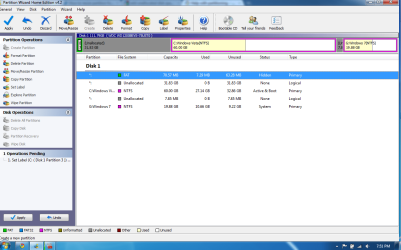
You should be able to now right click on the vista partition and select Move/ resize

You should now be able to either drag the partition to the left or set the start cluster to the lowest available number to move the partition into the empty space.

After you commit this you can do the same with the Windows 7 partition

This will give you (Left to right) the vista partition then the Windows 7 partition and an area of unallocated space.

After this is done you can then select the Windows 7 partition and extend this into the unallocated space.

It is possible to do all these above changes and then commit the lot at once but I would advise that you do each phase and check that all is well before proceeding to the next
 

My Computers

System One System Two

  • Computer type
    PC/Desktop
    Computer Manufacturer/Model Number
    ChillBlast - Custom to my design
    OS
    Windows 11 Pro x64 [Latest Release and Release Preview]
    CPU
    Ryzen 9 5950X, 3.8 - 5.2 MHz
    Motherboard
    Asus Prime X570-Pro
    Memory
    64GB [2 x 32GB] DDR4 3200MHz
    Graphics Card(s)
    4GB NVIDIA GEFORCE GTX 1650 Ti
    Sound Card
    On-board SPDIF to 5.1 System + HDMI [5.1 system]
    Monitor(s) Displays
    32" UHD 32 Bit HDR Monitor + 43" UHD 4K 32Bit HDR TV
    Screen Resolution
    2 x 3840 x 2160 @60Hz
    Hard Drives
    1TB M2 SSD OS, 500GB Fast Access SSD, 2 x 8TB Data + Various Externals from 1TB to 4TB, 10TB NAS
    PSU
    NZXT C750 80 PLUS Gold 750W Modular PSU
    Case
    Workstation Case [Matt Black]
    Cooling
    NZXT Kraken X63 280mm CPU Cooler +2x Quiet Case fans
    Keyboard
    Logitech Wireless MX Keys & K400 + others
    Mouse
    Logitech Wireless MX Master 3S
    Internet Speed
    920 MB Down 50 MB Up
    Antivirus
    BitDefender Total Security Pro
    Browser
    Chrome (always run latest Non-Beta)
    Other Info
    Also run ...
    Laptop - Quad 8GB - Windows 10 Pro x64
    Nexus 7 Android tablet x2
    Samsung 10.2" tablet
    Blackview TAB 8 4G Android Tablet c/w Keyboard
    Wacom Intuos Pro Medium Pen Pad
    Wacom Intuos Pro Small Pen Pad
    Wacom Expresskeys Remote
    Loopdeck+ Graphics Controller
    Shuttle Pro v2 Control
  • Computer type
    Laptop
    System Manufacturer/Model Number
    Dell XPS 17 10750H
    OS
    Windows 11 Pro x64 Latest RP
    CPU
    Intel I7 10750H 5.0GHz
    Motherboard
    Dell XPS
    Memory
    32GB [2x16GB] DDR4 2933 MHz
    Graphics Card(s)
    nVidia GTX1650Ti 4 GB GDDR6
    Sound Card
    Stock [Realtek] 4 Speaker
    Monitor(s) Displays
    17" IPS UHD+ Infinity Edge Touchscreen
    Screen Resolution
    3840 x 2400
    Hard Drives
    2TB M2 NVMe, 4TB External + various 500GB & 1TB External NVMe (also have access to spinner HDD from
    PSU
    Stock
    Case
    Stock XPS Aluminium & Carbon Fibre
    Cooling
    Stock - Active Fan Control
    Keyboard
    Backlit + Various Logitech
    Mouse
    Stock Track Pad + Logitech MX Trackball
    Internet Speed
    72 MB Down 18MB Up
    Browser
    Chrome
    Other Info
    Also run ...
    Laptop - Quad 8GB - Windows 10 Pro x64
    Nexus 7 Android tablet x2
    10.2" tablet
    Sony Z3 Android Smartphone
    Wacom Intuos Pro Medium Pen Pad
    Wacom Intuos Pro Small Pen Pad
    Wacom Expresskeys Remote
    Loopdeck+ Graphics Controller
    Shuttle Pro v2 Control Pad
    10TB NAS
You will probably get a message from PW about being unbootable after moving the system /boot partition.

That is normal - you can sort that out afterwards.
 

My Computers

System One System Two

  • Computer type
    PC/Desktop
    OS
    7 X64
    CPU
    i5 8400
    Motherboard
    gigabyte b365m ds3h
    Memory
    2x8gb 3200mhz
    Hard Drives
    various
    PSU
    pure power 11 400w cm
    Case
    Coolermaster
    Cooling
    cryorig m9i
  • Computer type
    PC/Desktop
    OS
    7x64
    CPU
    g5400
    Motherboard
    ga b365m ds3h
    Memory
    8gb ddr4 2400
    PSU
    xfx pro 450w
I am not able to click and drag them. :/

EDIT: Opps, i was trying to click and drag on where all the partitions are on top, but i see what you mean now, and i did it. Thank you very much. (:
 

My Computer

OS
Ubuntu 9.10 and Seven Ultimate OEM 32 bit
CPU
AMD Athlon 64 x2 Mobile
Memory
2gb (2x1024) DDR2
Graphics Card(s)
HD Radeon 1270 integrated.
Sound Card
integrated.
Monitor(s) Displays
15" laptop display and 15" external monitor
Screen Resolution
1280x768
Hard Drives
120gb WD 2.5 internal
1tb WD external.
Cooling
Fan
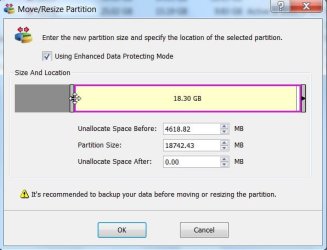
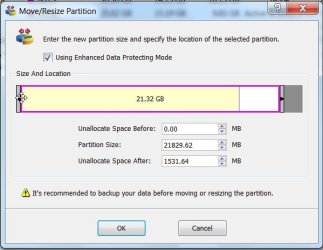
LEft Click on the LEFT edge of the partion. Hold the click and drag to the LEFT.

PW-2-2009-11-20_014535.jpg

PW-3-2009-11-20_014605.jpg

Edit - I see you figured it out.

Click OK , then Click Apply.
 

My Computers

System One System Two

  • Computer type
    PC/Desktop
    OS
    7 X64
    CPU
    i5 8400
    Motherboard
    gigabyte b365m ds3h
    Memory
    2x8gb 3200mhz
    Hard Drives
    various
    PSU
    pure power 11 400w cm
    Case
    Coolermaster
    Cooling
    cryorig m9i
  • Computer type
    PC/Desktop
    OS
    7x64
    CPU
    g5400
    Motherboard
    ga b365m ds3h
    Memory
    8gb ddr4 2400
    PSU
    xfx pro 450w
Back
Top