Help with partitions

djpaulc

New member
Local time
2:39 PM
Messages
8
Hi

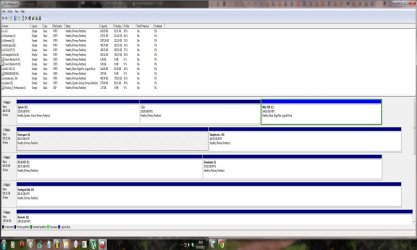
I am having a nightmare trying to delete an old partition (Win 7 (64) ). I have 3 HDD's in my system and this is the config:

Disk 0 - 3 partitions:
System D: 175GB - System Healthy (System, Active, Primary Partition); -
G: - 145.95GB - Healthy (Primary Partition); -
Win732 C: 144.80GB - - Healthy, Boot, Page File, Logical Drive)

Disk 1 - 2 Partitions:
Extra space E: 465.75GB - Healthy (Primary Partition);
Samples etc.. H: 465.76GB - Healthy (Primary Partition)

Disk 2 - 2 Partitions:
FLS & VST - F: 290.75GB - Healthy (Primary Partition);
Extra Extra Space - I: 175.01GB - Healthy (Primary Partition).

I also have 2 external drives (1TB and 1.5TB) which run over USB 2.

What I'm trying to achieve is to delete and reformat partition D, which was a Windows 7 (64 bit) install. Then make the C drive a system drive. I would then like to install Windows 8 (Beta) to the D Drive and dual boo

I did run diskpart earlier made the D drive inactive and rebooted and had all sorts of problems. So I need to make the C drive the main system drive I think.
 
Last edited:

My Computer

Computer Manufacturer/Model Number
Home built
OS
Windows 7 x64 Ultimate
CPU
Intel QX6600
Motherboard
Asus P5K
Memory
Corsair DDR2 800Mhz x 2 (Dual channel)
Graphics Card(s)
Geforce 7300LE
Sound Card
EMU 0404 PCI
Monitor(s) Displays
2 x 19" Widescreen (1x Acer, 1 x Edge)
Hard Drives
1 x Seagate ST3500320AS - 500GB SATA Drive - (System)
1 x Western Digital WDC WD10EARS-00Y5B1 1TB SATA Drive
1 x Hitachi HDP725050GLA360 500GB SATA Drive
1 x Seagate Free agent 500GB External Drive (USB 2)
PSU
Win Power 650W
Case
Mini Tower
Cooling
Standard Intel Heatsink & Fan for QX6600
Your Disk 0 configuration is little bit complicated.

You have Windows 7 x64 on D: drive and Windows 7 x86 on C: drive which is a logical drive. You want to delete Win 7 x64 and install Win 8.

You will have further complications and nightmares with what you are trying to achieve.

If I were you, I would disconnect the drives 1 and 2 completely first. Clean out the Disk 0 after taking a backup of important data on the external USB HDDs.

Then Remove all the partitions and do fresh install of Windows 7 (x86 or x64) on Disk 0 on C: (new partition) and then install Windows 8 on D: (again a new partition) drive.

Later on, once both the operating systems are functioning correctly, connect back Disk 1 and 2 back.

This way you will have less headaches and make no mistakes.
 

My Computer

Computer Manufacturer/Model Number
Toshiba Satellite P775-S7232
OS
MS Windows 7 Ultimate 64-bit SP1
CPU
i5-2410M 2.3GHz (2.9GHz Turbo-Boost) Sandy Bridge 32nm
Motherboard
Toshiba PHRAA ver. PSBY1U-00F003
Memory
4GB+4GB Samsung DDR3 PC3-10700 (1333 MHz)
Graphics Card(s)
Video Intel(R) HD Graphics Family, 1696MB available memory
Sound Card
Realtek High Definition Audio version=6.0.1.6323
Monitor(s) Displays
17.3 " Trubrite TFT LCD, LED Backlit
Screen Resolution
1600x900 32 bit, Native support for 720P content
Hard Drives
TOSHIBA MK6476GSXN
580.614 [GB] partitioned C: 80GB and D: 500GB with hidden recovery partitons.

Spare bay for 2nd HDD but no SATA connector :-(
PSU
Toshiba AC/DC Adapter
Case
Notebook
Cooling
Built-in Fan
Keyboard
Premium Raised Tile keyboard
Mouse
Logitech M215 wireless mouse
Internet Speed
Not fast enough
Other Info
Built-in Harman Kardon speakers with Dolby Advanced Audio, Waves MaxxAudio® 3. HDMI, 1xUSB3+3xUSB2 ports, WebCam, Battery life 4hrs 11mins, 4GB Readyboost SDHC card, WD My Book Essential Ext HDDs 2 TB, 2x1TB, My Passport SE 1TB and WDTV 1st Gen for Multimedia playing on a Sony Wega 32" LCD.
Recent addition to my toys are Asus Transformer Pad TF300T with 32GB onboard sd card + 32GB microsd card.
Please post back a screenshot of your maximized Disk management drive map with listings showing all columns so we can confirm the following steps based on what you presented so far.

Because C is Logical it cannot be marked Active to receive the System boot files from D so that it will boot on it's own.

You'll need to boot free Partition Wizard bootable CD, rightclick C to Modify>Convert to Primary, OK.

Then again rightclick C to Modify>Set to Active, OK.

Now click on the HD to highlight it, from Disk tab select Rebuild MBR, OK, Apply all steps.

This may preclude the need to run Startup Repair - Run 3 Separate Times to write the System boot files to C. If not boot the Win7 DVD Repair console or Repair CD to run Startup Repair up to 3 separate times with reboots. System Repair Disc - Create

You can now boot Win8 installer to install to D: select Custom Install, use Drive options to format D first, Win8 installer should configure a Dual Boot with Win7.

Another method is to boot the Win8 installer, format and install to D, then afterwards install EasyBCD to add Win7 to a Dual Boot Menu. Earlier versions of Easy are still free: EasyBCD 2.0.2 - NeoSmart Technologies

If you want a cleaner Dual Boot then install Win7 to another HD with all other HD's unplugged. After install plug back in other HD's, set preferred OS first HD to boot in BIOS setup, use one-time BIOS Boot Menu key to trigger other OS HD if needed. This keeps the OS HD's independent to come and go as you please whereas a Windows Dual Boot Menu requires surgery to remove one of the OS"s.

If you chose that last option you'll still need to recover the System boot files into C while deleting D to make Win7 32 bit boot on its own.
 
Last edited:
HI, here's the screenshot and many thanks for your help.... :-)
 

Attachments

  • dskmgmt ss 1 RESIZE.jpg
    dskmgmt ss 1 RESIZE.jpg
    105.1 KB · Views: 42

My Computer

Computer Manufacturer/Model Number
Home built
OS
Windows 7 x64 Ultimate
CPU
Intel QX6600
Motherboard
Asus P5K
Memory
Corsair DDR2 800Mhz x 2 (Dual channel)
Graphics Card(s)
Geforce 7300LE
Sound Card
EMU 0404 PCI
Monitor(s) Displays
2 x 19" Widescreen (1x Acer, 1 x Edge)
Hard Drives
1 x Seagate ST3500320AS - 500GB SATA Drive - (System)
1 x Western Digital WDC WD10EARS-00Y5B1 1TB SATA Drive
1 x Hitachi HDP725050GLA360 500GB SATA Drive
1 x Seagate Free agent 500GB External Drive (USB 2)
PSU
Win Power 650W
Case
Mini Tower
Cooling
Standard Intel Heatsink & Fan for QX6600
The steps above will achieve what you want, with some additional options offered.
 
Thanks very much for your help!! :-)
 

My Computer

Computer Manufacturer/Model Number
Home built
OS
Windows 7 x64 Ultimate
CPU
Intel QX6600
Motherboard
Asus P5K
Memory
Corsair DDR2 800Mhz x 2 (Dual channel)
Graphics Card(s)
Geforce 7300LE
Sound Card
EMU 0404 PCI
Monitor(s) Displays
2 x 19" Widescreen (1x Acer, 1 x Edge)
Hard Drives
1 x Seagate ST3500320AS - 500GB SATA Drive - (System)
1 x Western Digital WDC WD10EARS-00Y5B1 1TB SATA Drive
1 x Hitachi HDP725050GLA360 500GB SATA Drive
1 x Seagate Free agent 500GB External Drive (USB 2)
PSU
Win Power 650W
Case
Mini Tower
Cooling
Standard Intel Heatsink & Fan for QX6600
Back
Top