help with "Password Never Expires" setting

southieguy

Banned
Local time
3:31 PM
Messages
30
I just ran the Microsoft Baseline Security Analyzer, which said I have 3 accounts with passwords that never expire (a hidden Administrator account, mine (which also has Admin rights), and Guest (which is "off").

I run W7 Home Premium.

I found 2 tutorials here about "Password Expiration".
I'm probably half-asleep, but for someone with Home Premium the tutorials seem to point back and forth to each other in a circle, and never tell me (with Home Premium) how to enable Password Expiration.

Can someone clear the cobwebs from my brain, and tell me how to do that?

Thank you,
Dick
 

My Computer

Computer Manufacturer/Model Number
Dell 4600i
OS
windows 7 home premium - 32 bit
CPU
Intel Pentium 4 Prescott 90nm technologu
Motherboard
Dell Computer Corp. 0F4491 (Microprocessor)
Memory
2.0GB Dual-Channel DDR @ 166MHz (2.5-3-3-7)
Graphics Card(s)
DELL 1707FP @ 1024x768 - 64MB Standard VGA Graphics Adapter
Sound Card
SoundMAX Integrated Digital Audio
Hard Drives
78GB Maxtor Maxtor 6Y080L0 ATA Device (IDE)
488GB Western Digital WDC WD5000AAKS-00D2B0 ATA Device (IDE)
Hello southieguy.


That is not available in Home Premium.


From this tutorial

This option is only available for the Windows 7 Professional, Ultimate, and Enterprise editions.


My Computer

Computer Manufacturer/Model Number
* BFK Customs *
OS
W 7 64-bit Ultimate
CPU
Intel Q9550 Yorkfield
Motherboard
ASUS P5Q Pro
Memory
8GB Dominator 8500C5D
Graphics Card(s)
ATI : XFX 5870
Sound Card
Realtek HD Audio 7-1
Monitor(s) Displays
1x 47" LCD HDMI & 3x 26" LCD HDMI
Screen Resolution
1920x1080P & 1920x1200
Hard Drives
1x 80GB Intel X25-M G2 SSD : 1x 500GB & 1x 640GB WD Caviar Black(s)
PSU
Corsair 620HX
Case
Cooler Master RC-690
Cooling
Tuniq Tower 120, 2x 140mm and 3x 120mm case fans
Keyboard
Microsoft 500
Mouse
Razer Diamondback 3G
Internet Speed
14 Mb/s
Other Info
1x Koutech 3Gb/s SATA HDD Hot Swap Rack
In the any edition, right click on my computer & select manage. That will open the computer management console
select users under local users and groups
right click on each account listed and select properties, and there you will find the password options... uncheck "password never expires" and click apply.
You can then set the time for the password to expire by opening an elevated command prompt and typing net accounts /maxpwage: (0-999)


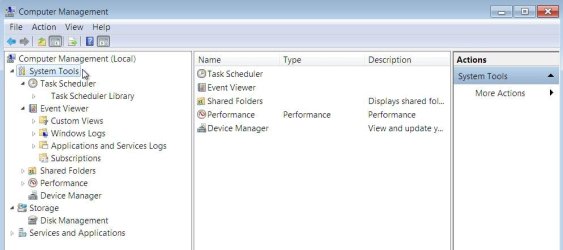
It's not there, this from 32-bit Home Premium.


click to enlarge
not2.JPG
 

My Computer

Computer Manufacturer/Model Number
* BFK Customs *
OS
W 7 64-bit Ultimate
CPU
Intel Q9550 Yorkfield
Motherboard
ASUS P5Q Pro
Memory
8GB Dominator 8500C5D
Graphics Card(s)
ATI : XFX 5870
Sound Card
Realtek HD Audio 7-1
Monitor(s) Displays
1x 47" LCD HDMI & 3x 26" LCD HDMI
Screen Resolution
1920x1080P & 1920x1200
Hard Drives
1x 80GB Intel X25-M G2 SSD : 1x 500GB & 1x 640GB WD Caviar Black(s)
PSU
Corsair 620HX
Case
Cooler Master RC-690
Cooling
Tuniq Tower 120, 2x 140mm and 3x 120mm case fans
Keyboard
Microsoft 500
Mouse
Razer Diamondback 3G
Internet Speed
14 Mb/s
Other Info
1x Koutech 3Gb/s SATA HDD Hot Swap Rack
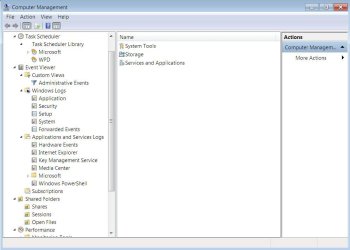
did you expand system tools?.. look under this tutorial

under that same tutorial you linked earlier is
OPTION TWO
Through a Elevated Command Prompt

NOTE: This option is available for all Windows 7 editions.


Did you read down to Option Two, step 4?

This will only change the maximum password age, it will not enable pasword expiration for users unless their user account has already had password expiration enabled in OPTION ONE above.


Sys.JPG
 

My Computer

Computer Manufacturer/Model Number
* BFK Customs *
OS
W 7 64-bit Ultimate
CPU
Intel Q9550 Yorkfield
Motherboard
ASUS P5Q Pro
Memory
8GB Dominator 8500C5D
Graphics Card(s)
ATI : XFX 5870
Sound Card
Realtek HD Audio 7-1
Monitor(s) Displays
1x 47" LCD HDMI & 3x 26" LCD HDMI
Screen Resolution
1920x1080P & 1920x1200
Hard Drives
1x 80GB Intel X25-M G2 SSD : 1x 500GB & 1x 640GB WD Caviar Black(s)
PSU
Corsair 620HX
Case
Cooler Master RC-690
Cooling
Tuniq Tower 120, 2x 140mm and 3x 120mm case fans
Keyboard
Microsoft 500
Mouse
Razer Diamondback 3G
Internet Speed
14 Mb/s
Other Info
1x Koutech 3Gb/s SATA HDD Hot Swap Rack
aha.. the op is correct.. the tutorial point back and forth to each other without solving the problem


Let's wait for an answer from Brink, I'll ask his opinion, I'll VM him to have a look at this thread.

;)
 

My Computer

Computer Manufacturer/Model Number
* BFK Customs *
OS
W 7 64-bit Ultimate
CPU
Intel Q9550 Yorkfield
Motherboard
ASUS P5Q Pro
Memory
8GB Dominator 8500C5D
Graphics Card(s)
ATI : XFX 5870
Sound Card
Realtek HD Audio 7-1
Monitor(s) Displays
1x 47" LCD HDMI & 3x 26" LCD HDMI
Screen Resolution
1920x1080P & 1920x1200
Hard Drives
1x 80GB Intel X25-M G2 SSD : 1x 500GB & 1x 640GB WD Caviar Black(s)
PSU
Corsair 620HX
Case
Cooler Master RC-690
Cooling
Tuniq Tower 120, 2x 140mm and 3x 120mm case fans
Keyboard
Microsoft 500
Mouse
Razer Diamondback 3G
Internet Speed
14 Mb/s
Other Info
1x Koutech 3Gb/s SATA HDD Hot Swap Rack
Why do you want your password to expire?
 

My Computer

Computer type
PC/Desktop
Computer Manufacturer/Model Number
Alienware Aurora ALX R4
OS
Windows 10 Pro (x64)
CPU
Intel Core i7-3930K (3.2GHz - 4.5GHz)
Motherboard
Alienware Aurora-R4 x79
Memory
4x Samsung 4GB PC3-12800 DDR3 (16GB 1600MHz)
Graphics Card(s)
Nvidia Geforce GTX 690
Sound Card
SteelSeries Siberia Elite
Monitor(s) Displays
Dell UltraSharp U3011
Screen Resolution
2560x1600
Hard Drives
Samsung 850 Pro 256 GB, Seagate 1TB Desktop Hybrid HDD, 2x Western Digital 4TB Green HDD
PSU
875W Some Dell PSU <.<
Case
Alienware Aurora ALX
Cooling
Custom Liquid Cooling (EK CPU & GPU blocks) dual EK 480RAD
Keyboard
Logitech G710+ Mechanical
Mouse
Logitech G700s
Internet Speed
Verizon Fios (50 mbps average)
Other Info
Server: Intel NUC D54250WYK: i5-4250U, 16GB, 256 GB mSATA, Windows Server 2012 R2
good idea.. pretty sure there's a way to do this by creating registry dwords, but I don't remember the correct ones
 
I'm with Logic Earth on this. You don't need (or want in most cases) the passwords to expire. The only place I've actually seen this is at my high school where students were issued laptop computers. Teachers also got laptops and they hard admin accounts and could access all websites. Students couldn't even get on Wikipedia (because learning is bad??). The expiration schedule was meant to reduce the chances of students figuring out teachers passwords and using them to view illegal websites or make unauthorized changes to school computers. Unless you are in such a situation, which it doesn't seem like you are, it doesn't seem necessary.

Also, so for the lengthy explanation. I like to use examples :p
 

My Computer

Computer type
Laptop
Computer Manufacturer/Model Number
Toshiba P775-S7100
OS
Windows 7 Professional SP1 64-bit
CPU
Intel Core i5-2450M @2.5 GHz
Memory
6 GB DDR3 1333MHz
Graphics Card(s)
Intel HD 3000
Monitor(s) Displays
Built-in 17.3" LED; 22" Insignia NS-L22Q-10A
Screen Resolution
1600x900; 1360x768
Hard Drives
750 GB Hitachi
1TB Seagate FreeAgent External
Internet Speed
Verizon DSL Speed(Down/Up): 3360 Kbps / 800 Kbps
Antivirus
MSE and MBAM Pro
Browser
IE10
I'm with Logic Earth on this. You don't need (or want in most cases) the passwords to expire.

Not really for us to decide. OP wants to set the password to expire, and here is a way in Home Premium:

Click Start > Type Command Prompt in the search box > RIGHT click the program > Click Run as Administrator (enter credentials if you need to) > Type this command "net accounts /maxpwage:20" > Replace the 20 with however many days you want

If you get access error 5, you didn't run Command Prompt as administrator.


My Computer

Computer Manufacturer/Model Number
Custom Built
OS
Windows 7 Ultimate
CPU
AMD Athlon II X2 245 2.90Ghz
Motherboard
Some Gigabyte one, dont remember model
Memory
3.00 GB
Graphics Card(s)
8800GTS 512MB
Sound Card
Sound Blaster X-Fi Titanium Fatal1ty
Monitor(s) Displays
Dual 22" widescreen
Hard Drives
250GB internal, 500GB internal
PSU
CORSAIR CMPSU-850TX 850W Power Supply
Case
Thermalkake Tsunami Dream
Cooling
Thermaltake Golden Orb II
Keyboard
Saitek Eclipse 2
Mouse
Logitech MX518
I'm with Logic Earth on this. You don't need (or want in most cases) the passwords to expire.

Not really for us to decide. OP wants to set the password to expire, and here is a way in Home Premium:

Click Start > Type Command Prompt in the search box > RIGHT click the program > Click Run as Administrator (enter credentials if you need to) > Type this command "net accounts /maxpwage:20" > Replace the 20 with however many days you want

If you get access error 5, you didn't run Command Prompt as administrator.

Already been there..I deleted a prior post with the same instructions because it doesn't work unless you enable password expiration first, which is apparently difficult if not impossible to do in the home editions.
 

My Computer

Computer type
PC/Desktop
Computer Manufacturer/Model Number
Self built custom
OS
64-bit Windows 11 Pro for Workstations
CPU
Intel i7-8700K OC'd to 5 GHz
Motherboard
ASUS ROG Maximus XI Formula Z390
Memory
64 GB (4x16GB) G.SKILL TridentZ RGB DDR4 3600 MHz
Graphics Card(s)
ASUS ROG-STRIX-GTX1080TI-O11G-GAMING
Sound Card
Integrated
Monitor(s) Displays
2 x Samsung Odyssey G7 27"
Screen Resolution
2560x1440
Hard Drives
1TB Samsung 990 PRO M.2,
4TB Samsung 990 PRO PRO M.2,
TerraMaster F8 SSD Plus NAS
PSU
Seasonic Prime Titanium 850W
Case
Thermaltake Core P3
Cooling
Corsair Hydro H115i
Keyboard
Logitech wireless K800
Mouse
Logitech MX Master 4
Internet Speed
2 Gb/s Download and 100 Mb/s Upload
Antivirus
Malwarebyte Anti-Malware Premium
Browser
Google Chrome
Other Info
Logitech Z625 speaker system,
Logitech BRIO 4K Pro webcam,
HP Color LaserJet Pro MFP M477fdn,
APC SMART-UPS RT 1000 XL - SURT1000XLI,
Galaxy S23 Plus phone
Thanks Shawn!
 

My Computer

Computer Manufacturer/Model Number
* BFK Customs *
OS
W 7 64-bit Ultimate
CPU
Intel Q9550 Yorkfield
Motherboard
ASUS P5Q Pro
Memory
8GB Dominator 8500C5D
Graphics Card(s)
ATI : XFX 5870
Sound Card
Realtek HD Audio 7-1
Monitor(s) Displays
1x 47" LCD HDMI & 3x 26" LCD HDMI
Screen Resolution
1920x1080P & 1920x1200
Hard Drives
1x 80GB Intel X25-M G2 SSD : 1x 500GB & 1x 640GB WD Caviar Black(s)
PSU
Corsair 620HX
Case
Cooler Master RC-690
Cooling
Tuniq Tower 120, 2x 140mm and 3x 120mm case fans
Keyboard
Microsoft 500
Mouse
Razer Diamondback 3G
Internet Speed
14 Mb/s
Other Info
1x Koutech 3Gb/s SATA HDD Hot Swap Rack
Shawn:
Thank you.
Dick
 

My Computer

Computer Manufacturer/Model Number
Dell 4600i
OS
windows 7 home premium - 32 bit
CPU
Intel Pentium 4 Prescott 90nm technologu
Motherboard
Dell Computer Corp. 0F4491 (Microprocessor)
Memory
2.0GB Dual-Channel DDR @ 166MHz (2.5-3-3-7)
Graphics Card(s)
DELL 1707FP @ 1024x768 - 64MB Standard VGA Graphics Adapter
Sound Card
SoundMAX Integrated Digital Audio
Hard Drives
78GB Maxtor Maxtor 6Y080L0 ATA Device (IDE)
488GB Western Digital WDC WD5000AAKS-00D2B0 ATA Device (IDE)
You're most welcome guys. :)
 

My Computer

Computer type
PC/Desktop
Computer Manufacturer/Model Number
Self built custom
OS
64-bit Windows 11 Pro for Workstations
CPU
Intel i7-8700K OC'd to 5 GHz
Motherboard
ASUS ROG Maximus XI Formula Z390
Memory
64 GB (4x16GB) G.SKILL TridentZ RGB DDR4 3600 MHz
Graphics Card(s)
ASUS ROG-STRIX-GTX1080TI-O11G-GAMING
Sound Card
Integrated
Monitor(s) Displays
2 x Samsung Odyssey G7 27"
Screen Resolution
2560x1440
Hard Drives
1TB Samsung 990 PRO M.2,
4TB Samsung 990 PRO PRO M.2,
TerraMaster F8 SSD Plus NAS
PSU
Seasonic Prime Titanium 850W
Case
Thermaltake Core P3
Cooling
Corsair Hydro H115i
Keyboard
Logitech wireless K800
Mouse
Logitech MX Master 4
Internet Speed
2 Gb/s Download and 100 Mb/s Upload
Antivirus
Malwarebyte Anti-Malware Premium
Browser
Google Chrome
Other Info
Logitech Z625 speaker system,
Logitech BRIO 4K Pro webcam,
HP Color LaserJet Pro MFP M477fdn,
APC SMART-UPS RT 1000 XL - SURT1000XLI,
Galaxy S23 Plus phone
Brink you are ridiculous :thumbsup:
 

My Computer

Computer Manufacturer/Model Number
Custom Built
OS
Windows 7 Ultimate
CPU
AMD Athlon II X2 245 2.90Ghz
Motherboard
Some Gigabyte one, dont remember model
Memory
3.00 GB
Graphics Card(s)
8800GTS 512MB
Sound Card
Sound Blaster X-Fi Titanium Fatal1ty
Monitor(s) Displays
Dual 22" widescreen
Hard Drives
250GB internal, 500GB internal
PSU
CORSAIR CMPSU-850TX 850W Power Supply
Case
Thermalkake Tsunami Dream
Cooling
Thermaltake Golden Orb II
Keyboard
Saitek Eclipse 2
Mouse
Logitech MX518
Back
Top