Help with RAID

MrF430

New member
Local time
9:05 AM
Messages
10
Hi guys,

I hope I can explain this correctly...

I have two 1tb spinpoint f3 hdd's and 1 ocz ssd. I setup raid on the two hdd, then I disconnected all drives except for the ssd and I installed W7 pro64. During the installation I installed the appropriate drivers for the ssd/raid.

So I boot up into win7 and download all the win updates etc. Then I shutoff and install the raid hdds. Boot up into windows and the raid drives dont show up. I checked disk management and the two 1tb drives show up as 1 drive but I need to format them. Do I choose NEW STRIPED VOLUME? Im confused about this, since I already setup raid via bios, wont this be like setting up software raid? Should I just choose setup new simple volume instead? Please help! I couldnt find the answer to this anywhere!

thank you in advance!!!
 

My Computer

OS
7 x64
Hi guys,

I hope I can explain this correctly...

I have two 1tb spinpoint f3 hdd's and 1 ocz ssd. I setup raid on the two hdd, then I disconnected all drives except for the ssd and I installed W7 pro64. During the installation I installed the appropriate drivers for the ssd/raid.

So I boot up into win7 and download all the win updates etc. Then I shutoff and install the raid hdds. Boot up into windows and the raid drives dont show up. I checked disk management and the two 1tb drives show up as 1 drive but I need to format them. Do I choose NEW STRIPED VOLUME? Im confused about this, since I already setup raid via bios, wont this be like setting up software raid? Should I just choose setup new simple volume instead? Please help! I couldnt find the answer to this anywhere!

thank you in advance!!!

I don't know where you get this striped bit from, maybe I missed something when I set my discs up.
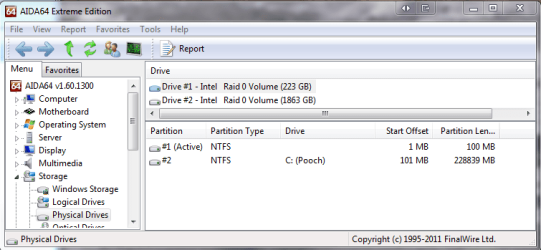
I set up 2 x RAID 0 in the Bios and in windows they showed up correctly as two single drives which I then partitioned as simple volumes

I hope this helps
 

Attachments

  • Capture.PNG
    Capture.PNG
    35.8 KB · Views: 25
  • Capture1.PNG
    Capture1.PNG
    25 KB · Views: 8

My Computer

Computer Manufacturer/Model Number
Something I threw together
OS
Windows 7 Ultimate x64
CPU
Intel Core i7-2600K
Motherboard
Asus P8P67
Memory
16 GB G Skill F3-10666 CL9D-4GBRL
Graphics Card(s)
ATI Radeon HD 6870
Sound Card
ATI Radeon HDMI / Realtek ALC892
Monitor(s) Displays
2 x 22" standard monitors / LG32LC56v TV to watch films
Screen Resolution
1920 x1080
Hard Drives
2 x OCZ Vertex2 111.79GB
3 x Samsung103SJ
1 x Samsung103UJ
1 x WD3200BEVT
1 x Hitachi5K320-160
PSU
Thermaltake Toughpower Cable Management 750W
Case
Antec 300
Cooling
Noctua NH-U12P SE2 and 5 120mm Case fans
Keyboard
Microsoft Comfort Curve Keyboard 2000
Mouse
Hama M3110 / Logitech M305
Internet Speed
16000
Other Info
I have also used Fedora, Suse, Ubuntu Linux
And all other Windows from 95 to date except ME
Choose new simple volume.
 

My Computer

Computer type
PC/Desktop
Computer Manufacturer/Model Number
Custom Built
OS
Windows 10 Pro x64, Windows 8.1 Pro x64, Windows 7 Ultimate x64 SP1,
CPU
INTEL i9-7920X LGA 2066
Motherboard
Gigabyte X299-WU8 F3
Memory
64 GB (4 X 16 GB) G-Skill V Series DDR4 3200 Quad Channel
Graphics Card(s)
EVGA GTX 1060 SC 3 GB
Sound Card
Realtek Onboard ALC1220
Monitor(s) Displays
2 x Samsung S27E310
Screen Resolution
1920x1080
Hard Drives
Samsung 2 x 970 EVO Plus 500 GB NVMe
1 x 6TB WD 6003FZBX SATA
1 x 6TB WD 60EFRX SATA
12 x 3TB WD 30EFRX SATA
PSU
Seasonic X-1050
Case
Thermaltake Armor+
Cooling
Corsair H80i V2 Liquid AOI Cooler
Keyboard
Logitech G510s
Mouse
Logitech MX Master 2S
Internet Speed
200 Mb/s
Antivirus
ESET NOD32 13.1
Browser
EDGE (Dev, Canary, Beta), Chrome
Other Info
ASUS RT-AC68U router
Malwarebytes 4.0.4
Thanks for the info guys!

Pooch, I think something must have not been recognized properly by windows or there was a problem with the array setup in bios. From what I have read since last night, it seems that if it is setup properly/or recognized correctly by windows, the 2 disks in the array should show up as 1 combined drive, eliminating the need to do a software raid(striped volume etc).

I am extremely new to this and so, I could definitely be wrong here. I think someone with the experience should clarify this as I too am concerned with why yours did it a different way than mine.

pbcopter, what do you think about that?
 

My Computer

OS
7 x64
Hi,

When you boot the computer, check the POST screen as a check that the RAID configured correctly. In the POST, it should list the drives and whether they belong to a particular array or not.

If you are configuring a hardware array (from within BIOS), which is what you are trying to do, you should not need to choose simple volume. Check the BIOS POST screen to see that the RAID is configured correctly.

Regards,
Golden
 

My Computer

Computer type
PC/Desktop
Computer Manufacturer/Model Number
Golden Mk. I.4
OS
Windows 10 Pro x64 ; Xubuntu x64
CPU
Intel i7 860 @ 2.80 GHz O/C'ed to 4.0GHz
Motherboard
Gigabyte P55A-UD3R Rev.1. Award BIOS F13
Memory
16GB Corsair Vengance DDR3 @ 661 MHz Dual Channel (9-9-9-24)
Graphics Card(s)
EVGA NVidia GTX 560 1024MB
Sound Card
Realtek Integrated
Monitor(s) Displays
Dual Samsung SyncMaster 2494HS
Screen Resolution
1920*1080 and 1920*1080
Hard Drives
1*Samsung 840 EVO 120GB SSD;
1*OCZ Vertex 2 60GB SSD;
2*Samsung F3 SpinPoint 1TB in RAID0;
1*Samsung F1 SpinPoint 1TB;
2*Western Digital 1TB External USB 3.0
1*Western Digital 500GB External USB 3.0
1*Seagate 500GB External USB 2.0
PSU
Thermaltake ToughPower QFan 750W
Case
Thermaltake Element S VK60001W2Z
Cooling
Corsair H60 Water Cooling, 2*230mm and 2*80mm case fans
Keyboard
Logitech G110
Mouse
Logitech MX518
Hi,

When you boot the computer, check the POST screen as a check that the RAID configured correctly. In the POST, it should list the drives and whether they belong to a particular array or not.

If you are configuring a hardware array (from within BIOS), which is what you are trying to do, you should not need to choose simple volume. Check the BIOS POST screen to see that the RAID is configured correctly.

Regards,
Golden


I checked the bios post screen and it lists all of my drives as well as the array. Everything looks good there! Doesnt it make sense that I would need to format the array prior to use (keeping in mind that my os is on my ssd and the raid drives were not formatted during os installation)?
 

My Computer

OS
7 x64
the raid drives were not formatted during os installation)?

Ah, that could be the issue. Since the drives weren't formatted when the RAID was setup, you do need to set it to New Simple Volume as per pbcopters suggestion.

Regards,
Golden
 

My Computer

Computer type
PC/Desktop
Computer Manufacturer/Model Number
Golden Mk. I.4
OS
Windows 10 Pro x64 ; Xubuntu x64
CPU
Intel i7 860 @ 2.80 GHz O/C'ed to 4.0GHz
Motherboard
Gigabyte P55A-UD3R Rev.1. Award BIOS F13
Memory
16GB Corsair Vengance DDR3 @ 661 MHz Dual Channel (9-9-9-24)
Graphics Card(s)
EVGA NVidia GTX 560 1024MB
Sound Card
Realtek Integrated
Monitor(s) Displays
Dual Samsung SyncMaster 2494HS
Screen Resolution
1920*1080 and 1920*1080
Hard Drives
1*Samsung 840 EVO 120GB SSD;
1*OCZ Vertex 2 60GB SSD;
2*Samsung F3 SpinPoint 1TB in RAID0;
1*Samsung F1 SpinPoint 1TB;
2*Western Digital 1TB External USB 3.0
1*Western Digital 500GB External USB 3.0
1*Seagate 500GB External USB 2.0
PSU
Thermaltake ToughPower QFan 750W
Case
Thermaltake Element S VK60001W2Z
Cooling
Corsair H60 Water Cooling, 2*230mm and 2*80mm case fans
Keyboard
Logitech G110
Mouse
Logitech MX518
the raid drives were not formatted during os installation)?

Ah, that could be the issue. Since the drives weren't formatted when the RAID was setup, you do need to set it to New Simple Volume as per pbcopters suggestion.

Regards,
Golden


Yea I figured that was why, nice to know that it really is.;)
 

My Computer

OS
7 x64

My Computer

Computer Manufacturer/Model Number
Something I threw together
OS
Windows 7 Ultimate x64
CPU
Intel Core i7-2600K
Motherboard
Asus P8P67
Memory
16 GB G Skill F3-10666 CL9D-4GBRL
Graphics Card(s)
ATI Radeon HD 6870
Sound Card
ATI Radeon HDMI / Realtek ALC892
Monitor(s) Displays
2 x 22" standard monitors / LG32LC56v TV to watch films
Screen Resolution
1920 x1080
Hard Drives
2 x OCZ Vertex2 111.79GB
3 x Samsung103SJ
1 x Samsung103UJ
1 x WD3200BEVT
1 x Hitachi5K320-160
PSU
Thermaltake Toughpower Cable Management 750W
Case
Antec 300
Cooling
Noctua NH-U12P SE2 and 5 120mm Case fans
Keyboard
Microsoft Comfort Curve Keyboard 2000
Mouse
Hama M3110 / Logitech M305
Internet Speed
16000
Other Info
I have also used Fedora, Suse, Ubuntu Linux
And all other Windows from 95 to date except ME
Back
Top