Help with Resolution

vana

New member
Local time
12:09 AM
Messages
4
I just installed Windows 7 into my new Laptop and it just won´t let me change the resolution to make things smaller. I can change it to make things bigger, but not smaller. I´ve been trying to find a way on the internet and on the other blogs, whatever I try doesn´t seem to work. Please help.
 

My Computer

Computer Manufacturer/Model Number
Dell Inspiron 1010
OS
Windows 7
Motherboard
Intel Atom Processor Z520, 1.33GHz, 512K L2 Cache
Memory
1GB DDR2 SDRAM
Graphics Card(s)
Intel Graphics Media Accelerator 500
Monitor(s) Displays
10.1 Inch Widescreen Display (1024 x 600)
Hard Drives
160GB, 2.5inch, 5400RPM SATA Hard Drive
You'll do best at the laptop's max recommended resolution.
 

My Computer

Computer Manufacturer/Model Number
Built by OpSysWiz
OS
Win 7 Ultimate x64
CPU
i5-750
Motherboard
ASUS P7P55D-E
Memory
2 x 2GB Corsair DDR3 1600
Graphics Card(s)
eVGA 260 Core 216
Sound Card
X-FI Fatal1ty
Monitor(s) Displays
Samsung 21" S-PVA
Screen Resolution
1600x1200
Hard Drives
OCZ Vertex Turbo 60GB SSD, WD VelociRaptor
PSU
Antec Signature 850W
Case
Lian-Li PC-80B
Cooling
CoolerMaster Hyper 212 Plus, OCZ Freeze
Keyboard
Saitek Gamer
Mouse
MS Wheel Mouse Optical
Internet Speed
3Mb/sec
If the screen is running at extremely low res you may not have gfx driver installed.
Check hardware manager and look at gfx card and check its got driver installed if not download latest driver for your card and this should help

Check your manufacturers website for more details
 

My Computer

Computer type
PC/Desktop
Computer Manufacturer/Model Number
Pauly Special
OS
Win7 Ultimate X64
CPU
Intel i5 3570K
Motherboard
Gigabyte Z77X-DS3H
Memory
8GB DDR3 1600
Graphics Card(s)
Onboard
Sound Card
Onboard
Screen Resolution
1280x1024
Hard Drives
Samsung 840 Evo SSD (OS)
1TB Spinner (Data)
PSU
800W Arctic
Case
Cooler Master
Cooling
3x120mm Fans
Keyboard
MS Wireless
Mouse
MS Wireless
Internet Speed
20M
I just installed Windows 7 into my new Laptop and it just won´t let me change the resolution to make things smaller. I can change it to make things bigger, but not smaller. I´ve been trying to find a way on the internet and on the other blogs, whatever I try doesn´t seem to work. Please help.

At netbook resolution I'm not surprised. Right-clik the desktop, select display, is it set to the right resolution?
 

My Computer

Computer Manufacturer/Model Number
Sony Vaio Z46GDU
OS
Windows 7 Ultimate x86-64
CPU
[email protected] 1066MHz FSB
Motherboard
Sony branded
Memory
6GB DDR3 1066MHz
Graphics Card(s)
9300M GS 256MB Dedicated (Speed) + Intel4500MHD (Stamina)
Sound Card
Realtek HD Audio
Monitor(s) Displays
13.1' WXGA
Screen Resolution
1600x900
Hard Drives
320GB 7200RPM w/ 16MB cache
Internet Speed
1MB/s
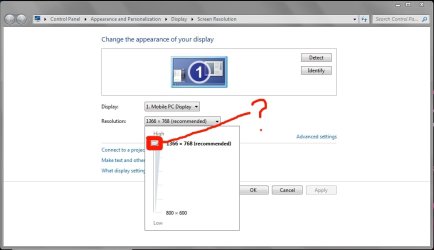
Are you sure the slider in the picture shown below is at the highest setting?
Untitled.jpg
 

My Computer

Computer type
PC/Desktop
Computer Manufacturer/Model Number
The Dominator?
OS
Windows Seven Ultimate
CPU
AMD Piledriver FX 8320 @ 3.5GHz
Motherboard
ASUS M5A97 EVO R2.0
Memory
Crucial Ballistix 8GB 1600 MHz DDR3
Graphics Card(s)
ASUS GeForce GTX 970 Strix Edition @ 1.114 GHz
Sound Card
Integrated
Monitor(s) Displays
LG 23EA63V 23" IPS 1080p Monitor
Screen Resolution
1920x1080
Hard Drives
Samsung SSD 840 EVO 120 GB
1x WD GreenPower 500GB 7200RPM
1 External HDD 1TB
PSU
Corsair CX500
Case
Zalman Z9 Plus
Cooling
CPU - Corsair Hydro H80i, Case - 3x Aerocool Shark Edition
Keyboard
Xenta Backlit Keyboard (Not very good!)
Mouse
Logitech G400
Internet Speed
Download: 7 mb/s Upload: 0.76 mb/s
Antivirus
Microsoft Security Essentials
Browser
Google Chrome
Other Info
Overclockers UK Desk Pad 89 x 45 cm
1200x730x600mm Desk
Using Virtual Audio Cable to split stereo sound into Audio Technica ATH-M50 headphones and Logitech X-530 speakers.
Yes, the slider is at the highest, however, the highest is 800x600.

And on the bottom is reads a message that if the resolution is not set to 1024x768 (or 720...cant remember) that some images might not fit in the screen or something like that (my win7 is in spanish) but then it wont give me that resolution.


And as for the gfx, I am not sure how to check if I have one installed or not...I am a little n00bie when it comes to that. :confused:
 

My Computer

Computer Manufacturer/Model Number
Dell Inspiron 1010
OS
Windows 7
Motherboard
Intel Atom Processor Z520, 1.33GHz, 512K L2 Cache
Memory
1GB DDR2 SDRAM
Graphics Card(s)
Intel Graphics Media Accelerator 500
Monitor(s) Displays
10.1 Inch Widescreen Display (1024 x 600)
Hard Drives
160GB, 2.5inch, 5400RPM SATA Hard Drive
And as for the gfx, I am not sure how to check if I have one installed or not...I am a little n00bie when it comes to that. :confused:

Right click my computer>click properties>click device manager>expand display adapters, you should now see your graphics card listed and check driver is installed/updated
 

My Computer

Computer type
PC/Desktop
Computer Manufacturer/Model Number
Pauly Special
OS
Win7 Ultimate X64
CPU
Intel i5 3570K
Motherboard
Gigabyte Z77X-DS3H
Memory
8GB DDR3 1600
Graphics Card(s)
Onboard
Sound Card
Onboard
Screen Resolution
1280x1024
Hard Drives
Samsung 840 Evo SSD (OS)
1TB Spinner (Data)
PSU
800W Arctic
Case
Cooler Master
Cooling
3x120mm Fans
Keyboard
MS Wireless
Mouse
MS Wireless
Internet Speed
20M
on your netbook when something can't be displayed within the resolution it will just scroll, there was a way in xp to increase the resolution of the desktop past what the monitor supported but then you had to scroll just to view everything.
 

My Computer

Computer Manufacturer/Model Number
Custom
OS
Windows 7 Ultimate Signature Edition
CPU
Intel Core i7 Extreme 3.33GHz
Motherboard
EVGA X-58 SLI Classified
Memory
12GB DDR3
Graphics Card(s)
2x EVGA 285 2GB in SLI
Sound Card
Creative Labs X-Fi ExtremeGamer
Monitor(s) Displays
30" Viewsonic
Hard Drives
2x1TB Western Digital 7200RPM in RAID 0/1TB WD My Book External HDD
PSU
Thermaltake 1000w supporting quad SLI
Case
Thermaltake Armor Full Tower
Cooling
Thermaltake V1 CPU+DIY Liquid cooling
on your netbook when something can't be displayed within the resolution it will just scroll, there was a way in xp to increase the resolution of the desktop past what the monitor supported but then you had to scroll just to view everything.


Yeah, but what I mind is the scrolling. I dont want to scroll...:cry:
And its not just that, but everything seems HUGE to me.
And also the pictures look veeeeery streched.
 

My Computer

Computer Manufacturer/Model Number
Dell Inspiron 1010
OS
Windows 7
Motherboard
Intel Atom Processor Z520, 1.33GHz, 512K L2 Cache
Memory
1GB DDR2 SDRAM
Graphics Card(s)
Intel Graphics Media Accelerator 500
Monitor(s) Displays
10.1 Inch Widescreen Display (1024 x 600)
Hard Drives
160GB, 2.5inch, 5400RPM SATA Hard Drive
Yes, the slider is at the highest, however, the highest is 800x600. And on the bottom is reads a message that if the resolution is not set to 1024x768 (or 720...cant remember) that some images might not fit in the screen or something like that (my win7 is in spanish) but then it wont give me that resolution.

And as for the gfx, I am not sure how to check if I have one installed or not...I am a little n00bie when it comes to that. :confused:
vana;

According to this the max resolution for the Inspiron Mini 10 (1010) is "Glossy 10.1 display with a 1024x576 resolution".

Mini Netbooks: Colorful, Small, Light Weight | Dell

Question: did this ship with Ubuntu installed?

The three related drivers you will need to have on your Mini 10 for Windows 7 to work correctly are the "Bios", "Chipset", and "Video". All three are here at Dell:

Drivers & Downloads

The newest Bios version is A11. You can see the Bios version in use if you reboot and look at the boot screen. If you have this Bios version already, you can skip this.

Download the "Chipset" and "Video" drivers and install them as Dell instructs.

Cheers!
Robert
 
Last edited:

My Computer

OS
...
Yes, the slider is at the highest, however, the highest is 800x600. And on the bottom is reads a message that if the resolution is not set to 1024x768 (or 720...cant remember) that some images might not fit in the screen or something like that (my win7 is in spanish) but then it wont give me that resolution.

And as for the gfx, I am not sure how to check if I have one installed or not...I am a little n00bie when it comes to that. :confused:
vana;

According to this the max resolution for the Inspiron Mini 10 (1010) is "Glossy 10.1 display with a 1024x576 resolution".

Mini Netbooks: Colorful, Small, Light Weight | Dell

Question: did this ship with Ubuntu installed?

The three related drivers you will need to have on your Mini 10 for Windows 7 to work correctly are the "Bios", "Chipset", and "Video". All three are here at Dell:

Drivers & Downloads

The newest Bios version is A11. You can see the Bios version in use if you reboot and look at the boot screen. If you have this Bios version already, you can skip this.

Download the "Chipset" and "Video" drivers and install them as Dell instructs.

Cheers!
Robert


OMG!!! I love you!!! It worked! Finally. Thank you so so so much for your help, it was very clear and easy to follow. :D
Thank you so very much!:party:
And the answer to you question, no, my Dell did not come with Ubuntu. I was actually thinking about buying it with that OS, but I prefer Windows.


And all, thank you for taking your time and replying to my post! Cheers to yall!
 

My Computer

Computer Manufacturer/Model Number
Dell Inspiron 1010
OS
Windows 7
Motherboard
Intel Atom Processor Z520, 1.33GHz, 512K L2 Cache
Memory
1GB DDR2 SDRAM
Graphics Card(s)
Intel Graphics Media Accelerator 500
Monitor(s) Displays
10.1 Inch Widescreen Display (1024 x 600)
Hard Drives
160GB, 2.5inch, 5400RPM SATA Hard Drive
OMG!!! I love you!!! It worked! Finally. Thank you so so so much for your help, it was very clear and easy to follow. :D
Thank you so very much!:party:
And the answer to you question, no, my Dell did not come with Ubuntu. I was actually thinking about buying it with that OS, but I prefer Windows.


And all, thank you for taking your time and replying to my post! Cheers to yall!
That is great news! We all are glad you got it sorted. Its a team effort!

Cheers!
Robert
 

My Computer

OS
...
OMG!!! I love you!!! It worked! Finally. Thank you so so so much for your help, it was very clear and easy to follow. :D
Thank you so very much!:party:
And the answer to you question, no, my Dell did not come with Ubuntu. I was actually thinking about buying it with that OS, but I prefer Windows.


And all, thank you for taking your time and replying to my post! Cheers to yall!
That is great news! We all are glad you got it sorted. Its a team effort!

Cheers!
Robert
The rep was needed :D :party:
 

My Computer

Computer type
PC/Desktop
Computer Manufacturer/Model Number
The Dominator?
OS
Windows Seven Ultimate
CPU
AMD Piledriver FX 8320 @ 3.5GHz
Motherboard
ASUS M5A97 EVO R2.0
Memory
Crucial Ballistix 8GB 1600 MHz DDR3
Graphics Card(s)
ASUS GeForce GTX 970 Strix Edition @ 1.114 GHz
Sound Card
Integrated
Monitor(s) Displays
LG 23EA63V 23" IPS 1080p Monitor
Screen Resolution
1920x1080
Hard Drives
Samsung SSD 840 EVO 120 GB
1x WD GreenPower 500GB 7200RPM
1 External HDD 1TB
PSU
Corsair CX500
Case
Zalman Z9 Plus
Cooling
CPU - Corsair Hydro H80i, Case - 3x Aerocool Shark Edition
Keyboard
Xenta Backlit Keyboard (Not very good!)
Mouse
Logitech G400
Internet Speed
Download: 7 mb/s Upload: 0.76 mb/s
Antivirus
Microsoft Security Essentials
Browser
Google Chrome
Other Info
Overclockers UK Desk Pad 89 x 45 cm
1200x730x600mm Desk
Using Virtual Audio Cable to split stereo sound into Audio Technica ATH-M50 headphones and Logitech X-530 speakers.
Back
Top