Help with Sky Drive

lsufrontier

New member
Power User
Local time
10:58 PM
Messages
215
I want to use the windows live sky drive as a backup for my documents and pictures on my pc. The one problem is that I can't figure out how to move more than one file at a time into a sky drive folder. Does anyone have a better way to do this? Thanks
 

My Computer

Computer Manufacturer/Model Number
HP
OS
Windows 7
I use this on multiple programs.

Hold "Ctrl" while clicking on each item. Then finally, drag and it will drag all of them.

I select one first (Without holding "Ctrl" yet), then I hold "Ctrl" and select every other. This works on most things for computering.
 

My Computer

Computer Manufacturer/Model Number
Gateway KAV60
OS
Windows 7 Home Premium 32-bit
Memory
2 GB
Screen Resolution
1024x600
Hard Drives
250 GB HDD
Internet Speed
Time Warner Cable/Road Runner
Other Info
Intel Atom processor N270
Multi-in-1 card reader
802.11b/g
NO optical drive
NO WWAN
NO Bluetooth
Thanks I think I have it but i dont know what to do next. I put the files in and then kept hitting up to higher level directory until it got where I wanted it but what do I do now to save all the files. When I exit off then go back on none of the files are there. Thanks
 

My Computer

Computer Manufacturer/Model Number
HP
OS
Windows 7
I want to use the windows live sky drive as a backup for my documents and pictures on my pc. The one problem is that I can't figure out how to move more than one file at a time into a sky drive folder. Does anyone have a better way to do this? Thanks

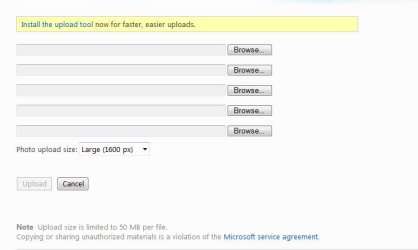
You need to use IE and install the Upload Tool ;)

Open the page using IE and install the Upload Tool if its shown in the yellow bar:
Upload Tool.JPG

Refresh the page and simply drag drop as many files as you like ;)
Upload.JPG
 
Ohh ok thanks Im gonna try that
 

My Computer

Computer Manufacturer/Model Number
HP
OS
Windows 7
I went on there but the yellow bar never showed up to use the tool
 

My Computer

Computer Manufacturer/Model Number
HP
OS
Windows 7
Open Internet Explorer, then click on "Tools"->"Manage Add-ons". Has the "Windows Live Upload Tool" perhaps not been disabled?

skydrive_addon.jpg
 

My Computer

Computer type
PC/Desktop
Computer Manufacturer/Model Number
Virtual Machine
OS
Windows 7 Professional 32-bit SP1
CPU
AMD A4/A6
Motherboard
Intel Corporation 440BX Desktop Reference Platform
Memory
3.00GB EDO
Graphics Card(s)
VMware SVGA 3D
Sound Card
High Definition Audio Device
Monitor(s) Displays
Generic Non-PnP Monitor on VMware SVGA 3D
Screen Resolution
1440x900
Hard Drives
1 x 60GB VMware Virtual SATA Hard Drive ATA Device
Antivirus
Kaspersky Total Security
I want to use the windows live sky drive as a backup for my documents and pictures on my pc. The one problem is that I can't figure out how to move more than one file at a time into a sky drive folder. Does anyone have a better way to do this? Thanks


No instructions at the site ???
 

My Computer

Computer Manufacturer/Model Number
Myself
OS
Windows 7 Ultimate 64Bit
CPU
C2D E8200
Motherboard
XFX 750i
Memory
8GB PNY PC2-6400
Graphics Card(s)
BFG 9600GT x 2
Sound Card
Stock XFX Optical
Monitor(s) Displays
Gateway 22" HD Display
Hard Drives
C: 1 TB G: 500 GB H: 500 GB
PSU
Ultra LSP 550 Pro Lifetime Series
Case
Xion2
Cooling
ThermalTake
I use Skydrive Explorer. You can add files using windows explorer interface. Drag 'n Drop. Much easier.
 

My Computer

Computer Manufacturer/Model Number
Toshiba Satellite A135S4487
OS
Windows 7 Ultimate (32-bit)
CPU
Intel Mobile Core 2 Duo T5500 @ 1.66 GHz
Motherboard
Intel i945GM Chipset
Memory
2.0GB Dual Channel DDR2 @ 266 MHz 4-4-4-12
Graphics Card(s)
Mobile Intel 945 Express Chipset Family
Sound Card
Realtek High Definition Audio
Monitor(s) Displays
Generic PnP Monitor, Samsung 46" LCD
Screen Resolution
1280 x 800, 1920 x 1080
Hard Drives
100GB Hitachi ATA Device (IDE)
120GB Western Digital USB
250GB External USB
Keyboard
Microsoft Wireless Comfort Keyboard 5000
Mouse
Microsoft Wireless Mouse 5000
Internet Speed
DSL
I use Skydrive Explorer. You can add files using windows explorer interface. Drag 'n Drop. Much easier.

In my efforts to locate a complete download for SkyDrive Explorer (the link you gave is for a download manager that downloads and installs the program), I found that SkyDrive Explorer is now known as SDExplorer, available here. I'm checking it out now to see if it works.
 

My Computer

Computer type
PC/Desktop
Computer Manufacturer/Model Number
Virtual Machine
OS
Windows 7 Professional 32-bit SP1
CPU
AMD A4/A6
Motherboard
Intel Corporation 440BX Desktop Reference Platform
Memory
3.00GB EDO
Graphics Card(s)
VMware SVGA 3D
Sound Card
High Definition Audio Device
Monitor(s) Displays
Generic Non-PnP Monitor on VMware SVGA 3D
Screen Resolution
1440x900
Hard Drives
1 x 60GB VMware Virtual SATA Hard Drive ATA Device
Antivirus
Kaspersky Total Security
I use Skydrive Explorer. You can add files using windows explorer interface. Drag 'n Drop. Much easier.

In my efforts to locate a complete download for SkyDrive Explorer (the link you gave is for a download manager that downloads and installs the program), I found that SkyDrive Explorer is now known as SDExplorer, available here. I'm checking it out now to see if it works.

Thanks for the info. I wasn't aware they had changed. It's been a while since I installed it.
 

My Computer

Computer Manufacturer/Model Number
Toshiba Satellite A135S4487
OS
Windows 7 Ultimate (32-bit)
CPU
Intel Mobile Core 2 Duo T5500 @ 1.66 GHz
Motherboard
Intel i945GM Chipset
Memory
2.0GB Dual Channel DDR2 @ 266 MHz 4-4-4-12
Graphics Card(s)
Mobile Intel 945 Express Chipset Family
Sound Card
Realtek High Definition Audio
Monitor(s) Displays
Generic PnP Monitor, Samsung 46" LCD
Screen Resolution
1280 x 800, 1920 x 1080
Hard Drives
100GB Hitachi ATA Device (IDE)
120GB Western Digital USB
250GB External USB
Keyboard
Microsoft Wireless Comfort Keyboard 5000
Mouse
Microsoft Wireless Mouse 5000
Internet Speed
DSL
I use Skydrive Explorer. You can add files using windows explorer interface. Drag 'n Drop. Much easier.

In my efforts to locate a complete download for SkyDrive Explorer (the link you gave is for a download manager that downloads and installs the program), I found that SkyDrive Explorer is now known as SDExplorer, available here. I'm checking it out now to see if it works.

Thanks for the info. I wasn't aware they had changed. It's been a while since I installed it.

+1 Rep, Guntmeister. SDExplorer is a great find. I've submitted it to Brink for addition to the Free Software section of SevenForums, and I've credited you with the find.

Now, if only we can get Microsoft to add SkyDrive support to SyncToy...
 

My Computer

Computer type
PC/Desktop
Computer Manufacturer/Model Number
Virtual Machine
OS
Windows 7 Professional 32-bit SP1
CPU
AMD A4/A6
Motherboard
Intel Corporation 440BX Desktop Reference Platform
Memory
3.00GB EDO
Graphics Card(s)
VMware SVGA 3D
Sound Card
High Definition Audio Device
Monitor(s) Displays
Generic Non-PnP Monitor on VMware SVGA 3D
Screen Resolution
1440x900
Hard Drives
1 x 60GB VMware Virtual SATA Hard Drive ATA Device
Antivirus
Kaspersky Total Security
In my efforts to locate a complete download for SkyDrive Explorer (the link you gave is for a download manager that downloads and installs the program), I found that SkyDrive Explorer is now known as SDExplorer, available here. I'm checking it out now to see if it works.

Thanks for the info. I wasn't aware they had changed. It's been a while since I installed it.

+1 Rep, Guntmeister. SDExplorer is a great find. I've submitted it to Brink for addition to the Free Software section of SevenForums, and I've credited you with the find.

Now, if only we can get Microsoft to add SkyDrive support to SyncToy...

Thanks. Just installed the new version. Still seems to work great.
 

My Computer

Computer Manufacturer/Model Number
Toshiba Satellite A135S4487
OS
Windows 7 Ultimate (32-bit)
CPU
Intel Mobile Core 2 Duo T5500 @ 1.66 GHz
Motherboard
Intel i945GM Chipset
Memory
2.0GB Dual Channel DDR2 @ 266 MHz 4-4-4-12
Graphics Card(s)
Mobile Intel 945 Express Chipset Family
Sound Card
Realtek High Definition Audio
Monitor(s) Displays
Generic PnP Monitor, Samsung 46" LCD
Screen Resolution
1280 x 800, 1920 x 1080
Hard Drives
100GB Hitachi ATA Device (IDE)
120GB Western Digital USB
250GB External USB
Keyboard
Microsoft Wireless Comfort Keyboard 5000
Mouse
Microsoft Wireless Mouse 5000
Internet Speed
DSL
Ok thanks I downloaded the SDExplorer and I was trying to copy my pictures to the skydrive as a backup but when I selected them all and went to copy them it said it would take 12 hours. I guess there is not any way to speed this up? Does anyone else use this as a backup also? Thanks
 

My Computer

Computer Manufacturer/Model Number
HP
OS
Windows 7
Hello lsufrontier.


How big are the files and what type of IP connection do you have?
 

My Computer

Computer Manufacturer/Model Number
* BFK Customs *
OS
W 7 64-bit Ultimate
CPU
Intel Q9550 Yorkfield
Motherboard
ASUS P5Q Pro
Memory
8GB Dominator 8500C5D
Graphics Card(s)
ATI : XFX 5870
Sound Card
Realtek HD Audio 7-1
Monitor(s) Displays
1x 47" LCD HDMI & 3x 26" LCD HDMI
Screen Resolution
1920x1080P & 1920x1200
Hard Drives
1x 80GB Intel X25-M G2 SSD : 1x 500GB & 1x 640GB WD Caviar Black(s)
PSU
Corsair 620HX
Case
Cooler Master RC-690
Cooling
Tuniq Tower 120, 2x 140mm and 3x 120mm case fans
Keyboard
Microsoft 500
Mouse
Razer Diamondback 3G
Internet Speed
14 Mb/s
Other Info
1x Koutech 3Gb/s SATA HDD Hot Swap Rack
Open Internet Explorer, then click on "Tools"->"Manage Add-ons". Has the "Windows Live Upload Tool" perhaps not been disabled?


Peter I noticed in your screenshot that you are showing an out of date Flash player.
 

My Computer

Computer type
PC/Desktop
Computer Manufacturer/Model Number
Acer Aspire XC-704 x64 bit/ Asus K55A Notebook PC/HP Envy x360 Convertible 15-bq0xx
OS
Windows 10 64bit/Windows 10 64bit/Windows 10 64bit
CPU
Intel Pentium J3710 @ 60GHz/Intel B820,1.7GHz/AMD A9 Radeon
Motherboard
Acer Aspire XC-704 (SOCKET 0)/Asus/HP 8312 (Socket FP4)
Memory
8.00GB DDR3 @ 1599MHz/8GB 2 x 4GB DDR3/8.00GB Dual-Channel
Graphics Card(s)
Intel HD Graphics/Intel/512MB ATI AMD Radeon R5 Graphics (HP
Sound Card
Realtek High Definition Audio/Onboard/AMD High Definition Au
Monitor(s) Displays
Acer LCD K222HQL /Asus 15.6/Generic PnP Monitor (1920x1080@6
Screen Resolution
1920x1080@59Hz/1366 x 768/1920x1080@60Hz
Hard Drives
1863GBWesternn Digital WDC/Asus/119GB SanDisk SD8SN8U-128G-1006 (SSD)
931GB Hitachi HGST HTS721010A9E630 (SATA)
Keyboard
Microsoft Natural Ergonomic Keyboard 4000 (UK)/Inbuilt/Inbui
Mouse
Microsoft Optical Wheel Mouse/Same plus Touchpad/Same + Pad
Internet Speed
Infinity 2 up to 76 Mbps
Antivirus
MSE/MSE/MSE and all 3 have MalwareBytes Premium
Browser
Edge, Firefox/Edge, Firefox/Edge, Firefox, Chrome
Other Info
Seagate Expansion 500GB External Desktop Drive
Seagate Expansion Portable Drives 500GB and 1TB
Epson XP-332 Wireless Printer
If you put everything into a .zip folder, uploads are no problem. But the .zip folder must not be larger than 50MB - that is the maximum that Skydrive allows per upload. You have, however, a total capacity of 25GBs. Just have to chop it into pieces.
 

My Computer

Computer Manufacturer/Model Number
HP, Dell, Gateway, Toshiba - 4 laptops and 2 desktops
OS
Vista, Windows7, Mint Mate, Zorin, Windows 8
CPU
from 1.6GHz Duo to i7
Monitor(s) Displays
2x HP w2207
Hard Drives
5x HDD, 7x SSD, 12x Externals
Keyboard
with trackball - no mices
Mouse
Trackball mice
Internet Speed
DSL 6000
Ohhh ok how do I make a zip drive? Say my pc crashes and I want to recover everything that I saved on skydrive. Is that possible to take the files from skydrive and put them back on my pc? I just want to make sure before I even do all of this. Thanks
 

My Computer

Computer Manufacturer/Model Number
HP
OS
Windows 7
Hello again lsufrontier.


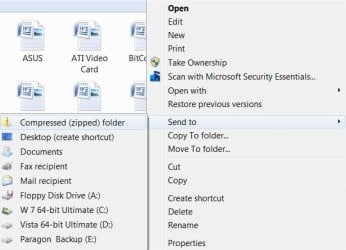
You right click the files you want to add to the zip folder and select "Compressed (zipped) folder".

zip.JPG
 

My Computer

Computer Manufacturer/Model Number
* BFK Customs *
OS
W 7 64-bit Ultimate
CPU
Intel Q9550 Yorkfield
Motherboard
ASUS P5Q Pro
Memory
8GB Dominator 8500C5D
Graphics Card(s)
ATI : XFX 5870
Sound Card
Realtek HD Audio 7-1
Monitor(s) Displays
1x 47" LCD HDMI & 3x 26" LCD HDMI
Screen Resolution
1920x1080P & 1920x1200
Hard Drives
1x 80GB Intel X25-M G2 SSD : 1x 500GB & 1x 640GB WD Caviar Black(s)
PSU
Corsair 620HX
Case
Cooler Master RC-690
Cooling
Tuniq Tower 120, 2x 140mm and 3x 120mm case fans
Keyboard
Microsoft 500
Mouse
Razer Diamondback 3G
Internet Speed
14 Mb/s
Other Info
1x Koutech 3Gb/s SATA HDD Hot Swap Rack
Ok thanks and I can open and use a zipped file just like a normal one?
 

My Computer

Computer Manufacturer/Model Number
HP
OS
Windows 7
Back
Top