Help with stack docklets

craney5

New member
Power User
Local time
12:51 AM
Messages
212
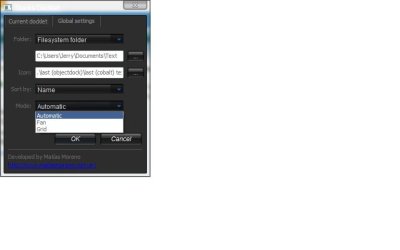
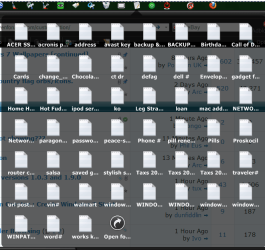
Hi all, I have just installed stack docklet for rocket dock but just would like to know if there is a way to get the stacks to come up in a grid instead of a list any ideas?

Many thanks

Craney
 

My Computer

OS
Windows 7 64bit
CPU
Phenom IIx4 955 Black Edition
Memory
4GB Kingston 1066mhz DDR2
Graphics Card(s)
Gigabyte 260GTX
Monitor(s) Displays
Samsung syncmaster 2033
Hard Drives
500GB Samsung ATA
500GB Segate ATA
PSU
Antec True blue 750W Modular
Case
Antec 1200
Cooling
Prolimatech Megahalems Performance CPU Cooler/2x Apache Fan
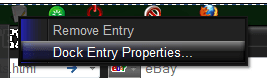
With Object Dock right click on the stack icon on the dock click on properties
& check for some options
Hope that helps
Jerry
 

Attachments

  • Capture8.PNG
    Capture8.PNG
    4.2 KB · Views: 3,377
  • Untitled9.jpg
    Untitled9.jpg
    15.4 KB · Views: 184
  • Capture7.PNG
    Capture7.PNG
    35.4 KB · Views: 107

My Computer

Computer type
Laptop
Computer Manufacturer/Model Number
Sager NP9170
OS
Win 7 Pro x64 / Win 10 Pro
CPU
Intel(R) Core(TM) i7-3630QM CPU @ 2.40GHz
Motherboard
CLEVO P170EM
Memory
12 GB
Graphics Card(s)
(1) Intel(R) HD Graphics 4000 (2) NVIDIA GeForce GTX 675M
Sound Card
(1) Realtek High Definition Audio (2) Intel(R) Display Aud
Monitor(s) Displays
17.3
Screen Resolution
1920x1080
Hard Drives
(1) Samsung 860 EVO 500GB(OS) (1) Samsung 860 EVO 500GB(Data)
Keyboard
Backlite
Antivirus
MSE, Malwarebytes Pro
Browser
Firefox
Other Info
DESKTOP: Custom-built.
OS: Win 10 Pro x64.
CASE: Rosewill R5.
CPU: Intel I5 4670K CPU @ 3.40GHz.
CPU COOLER: Cool Master Hyper 212 EVO.
MOTHERBOARD: Asus Z87-A.
MEMORY: Kingston HyperX 2x4 GB.
GPU: Nvidia Geforce 650 TI.
PSU: Corsair TX750.
DRIVES: (1) Samsung 840 120 GB SSD (2) Western Digital blue 500 GB 7200 RPM.
Rocketdocket and Stacks Docklet 2

I've used rocketdocket for a long time, both on a 32 and 64 bit windows laptops; works great. Installed Stacks Docklet 2 on both laptops a few days ago, and the 32 bit laptop works absolutely perfectly. On the 64 bit laptop, I find that a few applications off the stacks docklet 2 will not run, although most will...I'm scratching my head trying to figure out why certain ones will run and others don't (they all run fine on my 32 bit laptop using Stacks Docklet 2). These are NOT 64 bit applications btw, so that's not the issue.

Any idea why certain applications will not run and others will under Stacks Docklet 2 and again, only experiencing that problem on the 64 bit laptop.

Thanks!!!!!

PS... the applications that don't run off the Stacks Docklets 2, DO run just fine off the regular rocketdocket bar...
 
Last edited:

My Computer

OS
Windows 7 64x
I've used rocketdocket for a long time, both on a 32 and 64 bit windows laptops; works great. Installed Stacks Docklet 2 on both laptops a few days ago, and the 32 bit laptop works absolutely perfectly. On the 64 bit laptop, I find that a few applications off the stacks docklet 2 will not run, although most will...I'm scratching my head trying to figure out why certain ones will run and others don't (they all run fine on my 32 bit laptop using Stacks Docklet 2). These are NOT 64 bit applications btw, so that's not the issue.

Any idea why certain applications will not run and others will under Stacks Docklet 2 and again, only experiencing that problem on the 64 bit laptop.

Thanks!!!!!

PS... the applications that don't run off the Stacks Docklets 2, DO run just fine off the regular rocketdocket bar...

I use objectdock with Stack Docklet & some times it works & some times it does not Then I tried 7Stacks Alastria Software, makers of great software including 7stacks, Speedy Shopper, and Popup Calendar you can make a shortcut on your desktop then drag it to your dock or taskbar & works great.
Jerry
 

My Computer

Computer type
Laptop
Computer Manufacturer/Model Number
Sager NP9170
OS
Win 7 Pro x64 / Win 10 Pro
CPU
Intel(R) Core(TM) i7-3630QM CPU @ 2.40GHz
Motherboard
CLEVO P170EM
Memory
12 GB
Graphics Card(s)
(1) Intel(R) HD Graphics 4000 (2) NVIDIA GeForce GTX 675M
Sound Card
(1) Realtek High Definition Audio (2) Intel(R) Display Aud
Monitor(s) Displays
17.3
Screen Resolution
1920x1080
Hard Drives
(1) Samsung 860 EVO 500GB(OS) (1) Samsung 860 EVO 500GB(Data)
Keyboard
Backlite
Antivirus
MSE, Malwarebytes Pro
Browser
Firefox
Other Info
DESKTOP: Custom-built.
OS: Win 10 Pro x64.
CASE: Rosewill R5.
CPU: Intel I5 4670K CPU @ 3.40GHz.
CPU COOLER: Cool Master Hyper 212 EVO.
MOTHERBOARD: Asus Z87-A.
MEMORY: Kingston HyperX 2x4 GB.
GPU: Nvidia Geforce 650 TI.
PSU: Corsair TX750.
DRIVES: (1) Samsung 840 120 GB SSD (2) Western Digital blue 500 GB 7200 RPM.

My Computer

Computer Manufacturer/Model Number
Moi
OS
Win7 Ultimate x64 7601
CPU
AMD Phenom II x4 955 Black Ed @ 3.60
Motherboard
ASUSTeK M3N72-D
Memory
8 Gig Kingston
Graphics Card(s)
nVidia 295GTX, nVidia 9800GT
Screen Resolution
1680x1050 + 1280x1024 x2 + 1280x768
Hard Drives
500GB Spinpoint F3 x2 in Hardware RAID0
PSU
Thermaltake 850w
Cooling
Arctic Cooling
Keyboard
OCZ
Mouse
Ozone Smog
Stack Docklets/RocketDock PROBLEM

Hello everyone,

Ive read the post here in a desperate search to find a similar problem to mine..if not the same exact problem to no avail. Its very simple but for some reason theres hardly any information on this.

MY SITUATION:

im running win 7 ultimate x64, and ive installed rocketdock(works FINE)..i also installed stacks docklet (latest version) which installed fine and functions well. HERE IS WHERE THE PROB STARTS...when i choose my folders i want to have "stacked" in rocketdock, stackdocklet stacks them correctly only to have no icons for the applications within the folder it is stacking. For example...ill go into icon settings, choose folder, and ill find my utorrent folder with the utorrent.exe in it. When i hover over this and click stacks docklet...the stacks show up but the utorrent icon is just a blank white sheet of paper.

I have learned that win 7 does not support png icons...which is what rocketdock/stacks docklet is all about (seems like)... so im wondering if this is the root of the problem? Does stacks docklet even support ico files? I just want my application icons to show when the stacks pop up...intsead of blank white sheets of paper.

Has anyone installed stacks docklet on win7 x64for rocketdock and not had this problem with their icons?

PLEASE HELP :confused:
 

My Computer

OS
Windows 7 Ultimate x64
Welcome to the Seven Fourms
I can tell you by looking at mine shows icons
But I do know how to fix it someone should step in.
Jerry
 

My Computer

Computer type
Laptop
Computer Manufacturer/Model Number
Sager NP9170
OS
Win 7 Pro x64 / Win 10 Pro
CPU
Intel(R) Core(TM) i7-3630QM CPU @ 2.40GHz
Motherboard
CLEVO P170EM
Memory
12 GB
Graphics Card(s)
(1) Intel(R) HD Graphics 4000 (2) NVIDIA GeForce GTX 675M
Sound Card
(1) Realtek High Definition Audio (2) Intel(R) Display Aud
Monitor(s) Displays
17.3
Screen Resolution
1920x1080
Hard Drives
(1) Samsung 860 EVO 500GB(OS) (1) Samsung 860 EVO 500GB(Data)
Keyboard
Backlite
Antivirus
MSE, Malwarebytes Pro
Browser
Firefox
Other Info
DESKTOP: Custom-built.
OS: Win 10 Pro x64.
CASE: Rosewill R5.
CPU: Intel I5 4670K CPU @ 3.40GHz.
CPU COOLER: Cool Master Hyper 212 EVO.
MOTHERBOARD: Asus Z87-A.
MEMORY: Kingston HyperX 2x4 GB.
GPU: Nvidia Geforce 650 TI.
PSU: Corsair TX750.
DRIVES: (1) Samsung 840 120 GB SSD (2) Western Digital blue 500 GB 7200 RPM.
thanks alot BONGO for confirming that win 7 x64 lack of support for .png icons is not the problem. That helps a ton...ive been trying to solve this for the last few days.

If anyone has any answers..it would be great.

Thanks again
 

My Computer

OS
Windows 7 Ultimate x64
You may have better luck if you start a new post
this is a little old
Jerry
 

My Computer

Computer type
Laptop
Computer Manufacturer/Model Number
Sager NP9170
OS
Win 7 Pro x64 / Win 10 Pro
CPU
Intel(R) Core(TM) i7-3630QM CPU @ 2.40GHz
Motherboard
CLEVO P170EM
Memory
12 GB
Graphics Card(s)
(1) Intel(R) HD Graphics 4000 (2) NVIDIA GeForce GTX 675M
Sound Card
(1) Realtek High Definition Audio (2) Intel(R) Display Aud
Monitor(s) Displays
17.3
Screen Resolution
1920x1080
Hard Drives
(1) Samsung 860 EVO 500GB(OS) (1) Samsung 860 EVO 500GB(Data)
Keyboard
Backlite
Antivirus
MSE, Malwarebytes Pro
Browser
Firefox
Other Info
DESKTOP: Custom-built.
OS: Win 10 Pro x64.
CASE: Rosewill R5.
CPU: Intel I5 4670K CPU @ 3.40GHz.
CPU COOLER: Cool Master Hyper 212 EVO.
MOTHERBOARD: Asus Z87-A.
MEMORY: Kingston HyperX 2x4 GB.
GPU: Nvidia Geforce 650 TI.
PSU: Corsair TX750.
DRIVES: (1) Samsung 840 120 GB SSD (2) Western Digital blue 500 GB 7200 RPM.
Back
Top