
help with theme PLEASE

FCVPI99

New member
Local time
4:33 AM
Messages
153
Location
Chicago area
so i downloaded
Midnight Glass Nature Pack and Theme

by_MrGRiM01 and the icons

i installed everything and it works great and look great also

but i dont know how to apply the black media player mod or the shell32 replacenent inages

black media player is just 1 file called wmploc.DLL what do i do with this how to i install it

the shell32 images are a little harder i have 4 BMp files with a readme that says

"Use thes images to replace the default Control Panel Images in the shell32.dll using Restorator.

If your using x64 then you will need to replace them in System32 and SysWOW64, Coppy the shell32.dll
to the desktop firt and Take Ownership and rename the originals to shell32.dll.bak and the after you
have replaced the images paste them back in and Restart."

i have read i should use a program called restorator but i really dont know how to use it

can anybody help please
 
Last edited:

My Computer

Computer Manufacturer/Model Number
Custom built by myself
OS
Windows 7 Ultimate 64 bit
CPU
Intel Core 2 quad Q9550 2.83 12 MB Cache 95 Watt OC to 3.4
Motherboard
Gigabyte GA-EP45-UD3P Rev 1.6 Socket 775 Running 1600 FSB
Memory
4 GB Patriot Viper II 1066 2X2GB Memory PV224G8500ELKB
Graphics Card(s)
NVIDIA GeForce 9500 GT GV-N95TOC-1GI overclocked to 650 MHz
Sound Card
Realtec HD on board
Monitor(s) Displays
LG W2053TQ
Screen Resolution
1600X900
Hard Drives
Hatchi 160 GB SATA II System drive
Hatchi 400 GB SATA II Data
Hatchi 500 GB SATA II Data
Hitachi 2 TB SATA II Backup
PSU
Ultra LSP750 750-Watt
Case
Leadertek FX626 or Foxconn FX-626BKH
Cooling
Cool Master V-8 (its Big),1 80 MM Fan and 2 92 MM Fan
Keyboard
Dell Quietkey (POS)
Mouse
GE PS2 Optical
Internet Speed
8 down 1 up
Other Info
LS-120 Drive(IDE) - Lite-on iHOS104 Blu-ray(SATA) - HP DVD Burner with lightscribe(IDE) - media card reader
The WMP is easy, the shell replacement is more difficult. 1st, if you haven't, install the take ownership fix. Mark (Mr.Grim) has a tute here:

http://www.sevenforums.com/tutorials/1911-take-ownership-shortcut.html

If you have x64 version of windows 7, you have to change wmploc.DLL in both System32 and SysWOW64 directories. You should have the correct version for your system (x64 for 64 Bit, or x86 for 32 Bit). If you have the 32 bit version, you only need to change file in System 32 directory.

Make backups of the original files. Right click on wmploc.DLL in each folder, take ownership. rename them to wmploc.DLL.old , or something similar. Copy new wmploc.DLL file into the folder. Do this for both folders. Restart your PC and you should have the new WMP.

The shell 32 hacks are harder. You need to use Restorator or the free reshacker to replace individual images in dll files. If you aren't familiar with this, it might be quite a task for you. If you still want to try, let me know, I'dd see if I can find some reshacker tutes for you.

A Guy
 

My Computer

Computer type
PC/Desktop
OS
Windows 10 Home x64
CPU
INTEL Core i5-750 Quad-Core 3.37GHz
Motherboard
ASUS P7P55D
Memory
HyperX Fury Black Series 8GB (2 x 4GB) 1866Mhz
Graphics Card(s)
EVGA GeForce GTX 750 Superclocked 1GB 128-Bit GDDR5
Monitor(s) Displays
LG 32MA68HY 32" IPS
Screen Resolution
1920 x 1080
Hard Drives
Samsung 840 Evo 120GB, SEAGATE 500GB Barracuda® 7200.12, SATA 3 Gb/s, 7200 RPM, 16MB cache
PSU
ANTEC TruePower New TP-550, 80 PLUS, 550W
Case
ANTEC Three Hundred Illusion
Cooling
COOLER MASTER Hyper 212 Plus, 4 x 120mm 1 x 140mm Noctua's
Internet Speed
85 + Mbps
Antivirus
Avast
Browser
Vivaldi
thank you A GUY i now have black Media player not what i really wanted i thought it was gana be just black put there is some pic of some girl in the back ground i guess il have to deal with it for now
 

My Computer

Computer Manufacturer/Model Number
Custom built by myself
OS
Windows 7 Ultimate 64 bit
CPU
Intel Core 2 quad Q9550 2.83 12 MB Cache 95 Watt OC to 3.4
Motherboard
Gigabyte GA-EP45-UD3P Rev 1.6 Socket 775 Running 1600 FSB
Memory
4 GB Patriot Viper II 1066 2X2GB Memory PV224G8500ELKB
Graphics Card(s)
NVIDIA GeForce 9500 GT GV-N95TOC-1GI overclocked to 650 MHz
Sound Card
Realtec HD on board
Monitor(s) Displays
LG W2053TQ
Screen Resolution
1600X900
Hard Drives
Hatchi 160 GB SATA II System drive
Hatchi 400 GB SATA II Data
Hatchi 500 GB SATA II Data
Hitachi 2 TB SATA II Backup
PSU
Ultra LSP750 750-Watt
Case
Leadertek FX626 or Foxconn FX-626BKH
Cooling
Cool Master V-8 (its Big),1 80 MM Fan and 2 92 MM Fan
Keyboard
Dell Quietkey (POS)
Mouse
GE PS2 Optical
Internet Speed
8 down 1 up
Other Info
LS-120 Drive(IDE) - Lite-on iHOS104 Blu-ray(SATA) - HP DVD Burner with lightscribe(IDE) - media card reader
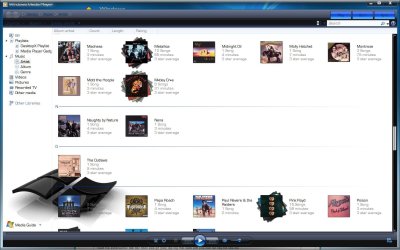
Lol, yeah, nothing against her, but I didn't grab it for that reason. Look at what I have, and if you prefer it, I'll see if I can find where I got it.

WMP.jpg

A Guy
 

My Computer

Computer type
PC/Desktop
OS
Windows 10 Home x64
CPU
INTEL Core i5-750 Quad-Core 3.37GHz
Motherboard
ASUS P7P55D
Memory
HyperX Fury Black Series 8GB (2 x 4GB) 1866Mhz
Graphics Card(s)
EVGA GeForce GTX 750 Superclocked 1GB 128-Bit GDDR5
Monitor(s) Displays
LG 32MA68HY 32" IPS
Screen Resolution
1920 x 1080
Hard Drives
Samsung 840 Evo 120GB, SEAGATE 500GB Barracuda® 7200.12, SATA 3 Gb/s, 7200 RPM, 16MB cache
PSU
ANTEC TruePower New TP-550, 80 PLUS, 550W
Case
ANTEC Three Hundred Illusion
Cooling
COOLER MASTER Hyper 212 Plus, 4 x 120mm 1 x 140mm Noctua's
Internet Speed
85 + Mbps
Antivirus
Avast
Browser
Vivaldi
its very nice looking but id prefer a black base if it was inverted that would be sweet most of the time im useing my computer when my kid is sleeping trying to minimize the light LOL

PS i finaly found a post that told me how to get the shell32 images in and it worked

im having a hell of a time getting an answer from my grim
i noticed that somepne said his last program on his start menu was cut off and he posed a midnight glass theme file that was 1.64 MB but when i put it in the themes folder it doesnt show up it just so happens its my VMware program
plus i asked if he could make a black glass virtural CD/DVD/BD drive icon


you know what if you can fine it send it to me i wonder if i can invert it myself?!?
 

My Computer

Computer Manufacturer/Model Number
Custom built by myself
OS
Windows 7 Ultimate 64 bit
CPU
Intel Core 2 quad Q9550 2.83 12 MB Cache 95 Watt OC to 3.4
Motherboard
Gigabyte GA-EP45-UD3P Rev 1.6 Socket 775 Running 1600 FSB
Memory
4 GB Patriot Viper II 1066 2X2GB Memory PV224G8500ELKB
Graphics Card(s)
NVIDIA GeForce 9500 GT GV-N95TOC-1GI overclocked to 650 MHz
Sound Card
Realtec HD on board
Monitor(s) Displays
LG W2053TQ
Screen Resolution
1600X900
Hard Drives
Hatchi 160 GB SATA II System drive
Hatchi 400 GB SATA II Data
Hatchi 500 GB SATA II Data
Hitachi 2 TB SATA II Backup
PSU
Ultra LSP750 750-Watt
Case
Leadertek FX626 or Foxconn FX-626BKH
Cooling
Cool Master V-8 (its Big),1 80 MM Fan and 2 92 MM Fan
Keyboard
Dell Quietkey (POS)
Mouse
GE PS2 Optical
Internet Speed
8 down 1 up
Other Info
LS-120 Drive(IDE) - Lite-on iHOS104 Blu-ray(SATA) - HP DVD Burner with lightscribe(IDE) - media card reader
dark themes

I dont know where to start for you or what exactly your after
1. for wmploc.dll it is located in system 32 -make sure to stop all services associated with wmplayer first and then simply replace with the one you have
(better stop using windows media player,,, get media monkey and then install dread m's vision skin >>>DreadM's Skins - MMWiki)
sorry but wmplayer is super lame and hard to use

2. a program called bsicon>>>BS Icon Maker - Profession Icon Software will allow you to change icons as necessary its hard to use though (there is also an .ico plugin for adobe Photo shop if u use that then u can use adobe to open and save .ico) then theres filetypeman >>>FileTypesMan - Alternative to 'File Types' manager of Windows
which will allow you to change icons for various file types extremely useful and a huge oversight in win7 of ms not to include file manager but this one is way better anyway....of course u must find and dl yer icons first ...I suggest making and icons folder in windows folder to house yer downloaded/created icons.

3. for thunderbird and firefox install the pitch dark >>>https://addons.mozilla.org/en-US/thunderbird/addon/2106/

4. stop playing with themes and get tune-up utilities 2010>>>TuneUp Utilities 2010 - Download
I suggest getting this through a torrent once installed you want visual styles
and download from website and get this one its awesome Verdesh SteelFlash you can see it here to make sure its what you want >>>>>TuneUp America - Personalize Windows appearance - Visual styles
no one knows how to install this them without tune-up utilities it is not suported and not public if anyone does know I would love to hear how to install without the software

as you can see yer machine will be virtually entirely black you dont want to black the explorer background it just will not werk theres too much going on but you can grey it a bit via the advanced options of the glass thing then you get the classic
xp type styler

hope this helps
 

My Computer

Computer Manufacturer/Model Number
Custom built super system & Fujitsu Lifebook (Lap)
OS
Win7 Ultimate (32) & Win7 Pro (64)
CPU
i7-860 (2.8 Ghz Overclocked) & intel centrino duo
Motherboard
Asus P7P55D & standard fujitsu
Memory
4 GB (Patriot) & 2 GB
Graphics Card(s)
nivida GeForce GTS 250 & standard
Sound Card
Creative Sound Blaster X-Fi Xtreme Audio & default fujitsu
Monitor(s) Displays
View Sonic , Samsung
Hard Drives
1 TB Caviar Black
1 TB Caviar Green
1/2 TB WD (my book thing)
60 gig Hitachi Travel star in the fuji lifebook
(I administer multiple systems but these are mine and usually they are not the ones with problems ---because theyre mine)
PSU
THERMALTAKE Toughpower 750 & Standard
Case
Cooler Master Sniper
Cooling
Standard
i like media player works fine for me i just want it all black AKA without the girl in the background
 

My Computer

Computer Manufacturer/Model Number
Custom built by myself
OS
Windows 7 Ultimate 64 bit
CPU
Intel Core 2 quad Q9550 2.83 12 MB Cache 95 Watt OC to 3.4
Motherboard
Gigabyte GA-EP45-UD3P Rev 1.6 Socket 775 Running 1600 FSB
Memory
4 GB Patriot Viper II 1066 2X2GB Memory PV224G8500ELKB
Graphics Card(s)
NVIDIA GeForce 9500 GT GV-N95TOC-1GI overclocked to 650 MHz
Sound Card
Realtec HD on board
Monitor(s) Displays
LG W2053TQ
Screen Resolution
1600X900
Hard Drives
Hatchi 160 GB SATA II System drive
Hatchi 400 GB SATA II Data
Hatchi 500 GB SATA II Data
Hitachi 2 TB SATA II Backup
PSU
Ultra LSP750 750-Watt
Case
Leadertek FX626 or Foxconn FX-626BKH
Cooling
Cool Master V-8 (its Big),1 80 MM Fan and 2 92 MM Fan
Keyboard
Dell Quietkey (POS)
Mouse
GE PS2 Optical
Internet Speed
8 down 1 up
Other Info
LS-120 Drive(IDE) - Lite-on iHOS104 Blu-ray(SATA) - HP DVD Burner with lightscribe(IDE) - media card reader
Back
Top