Help with

jaybeans821

New member
Local time
3:08 AM
Messages
5
Windows won't open or run updates and other windows programs!

Let me try and explain this the best way I know how as I am not computer savvy.
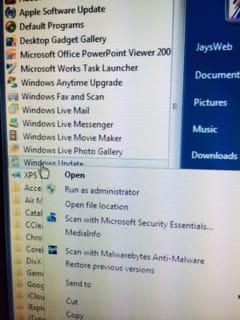
So when I click on my Windows update in the top right-hand corner nothing happens it won't open. And I try and open windows update in the start menu under all the programs and it will not open it will not let me run under administrator also. right-click or left click nothing happens but that is not the only windows program that won't run on my PC. Windows media player won't open up cannot access it at all. also when I try to access Control Panel programs almost nothing opens in there either, only the titles to each individual of the categories opens up things but the little subcategories won't open anything up! there's a lot other things that aren't working right on this computer as far as opening up programs, I tried to restore the computer at an earlier date to try and see if it would start working correctly but to no avail, that is all I really knew how to do. I really want to get this fixed, any help out there would be very much appreciated please point me in the right direction to have this fixed, I really want my computer running the way it used to,thank you all in advance I really appreciate any help I get.

Oh yeah my computer specs are:
Toshiba satellite C655D Windows 7 Home Premium
service pack 1
64 bit
2 GB RAM
320 GB HDD
with the AED and Radeon
thank you again!
 
Last edited:

My Computer

Computer type
Laptop
Computer Manufacturer/Model Number
toshiba
OS
Windows 7 Home Premium 64bit
Mouse
wireless optical ge
Internet Speed
28.40 MBPS on Average
Browser
google chrome
Other Info
my laptop is on its way out, its starting to mess up, hence why i joined this forum to get help to keep it working the best i can till i can get another one....
Hello Jaybeans, and welcome to Seven Forums.

Please provide more details for what this is about. :)
 

My Computer

Computer type
PC/Desktop
Computer Manufacturer/Model Number
Self built custom
OS
64-bit Windows 11 Pro for Workstations
CPU
Intel i7-8700K OC'd to 5 GHz
Motherboard
ASUS ROG Maximus XI Formula Z390
Memory
64 GB (4x16GB) G.SKILL TridentZ RGB DDR4 3600 MHz
Graphics Card(s)
ASUS ROG-STRIX-GTX1080TI-O11G-GAMING
Sound Card
Integrated
Monitor(s) Displays
2 x Samsung Odyssey G7 27"
Screen Resolution
2560x1440
Hard Drives
1TB Samsung 990 PRO M.2,
4TB Samsung 990 PRO PRO M.2,
TerraMaster F8 SSD Plus NAS
PSU
Seasonic Prime Titanium 850W
Case
Thermaltake Core P3
Cooling
Corsair Hydro H115i
Keyboard
Logitech wireless K800
Mouse
Logitech MX Master 4
Internet Speed
2 Gb/s Download and 100 Mb/s Upload
Antivirus
Malwarebyte Anti-Malware Premium
Browser
Google Chrome
Other Info
Logitech Z625 speaker system,
Logitech BRIO 4K Pro webcam,
HP Color LaserJet Pro MFP M477fdn,
APC SMART-UPS RT 1000 XL - SURT1000XLI,
Galaxy S23 Plus phone
Hello Jaybeans, and welcome to Seven Forums.

Please provide more details for what this is about. :)

hi and thanks for the warm welcome.

i think i tried to explain what im going through the best way i know how, right below........

Let me try and explain this the best way I know how as I am not computer savvy.
So when I click on my Windows update in the top right-hand corner nothing happens it won't open. And I try and open windows update in the start menu under all the programs and it will not open it will not let me run under administrator also. right-click or left click nothing happens but that is not the only windows program that won't run on my PC. Windows media player won't open up cannot access it at all. also when I try to access Control Panel programs almost nothing opens in there either, only the titles to each individual of the categories opens up things but the little subcategories won't open anything up! there's a lot other things that aren't working right on this computer as far as opening up programs, I tried to restore the computer at an earlier date to try and see if it would start working correctly but to no avail, that is all I really knew how to do. I really want to get this fixed, any help out there would be very much appreciated please point me in the right direction to have this fixed, I really want my computer running the way it used to,thank you all in advance I really appreciate any help I get.

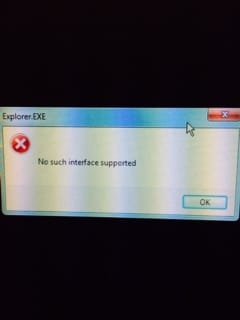
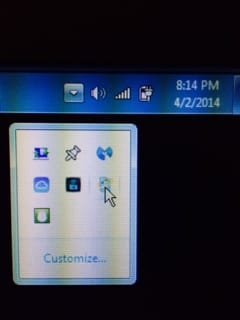
...But i can only add that when i attempt to click on anything that is a windows stock program such as windows media player and anything that is in the control panel and anything to personalize my settings its just that nothing will open. now if you can see the photos i added, this is what happens when i try to click on stuff, nothing opens no matter what i do...

I feel as though i need some sort of software downloaded back into the PC and to remove some stuff also for this computer to run as it did, i hope this can help you help me....thanks again!!

(see in the last 2 pictures i was just trying to show that even alternate ways of trying to get the windows updates downloaded and/or installed just wont work)
 

Attachments

  • photo 1.JPG
    photo 1.JPG
    8.7 KB · Views: 21
  • photo 2.JPG
    photo 2.JPG
    10.9 KB · Views: 20
  • photo 3.JPG
    photo 3.JPG
    17.4 KB · Views: 20
  • photo 4.JPG
    photo 4.JPG
    18.2 KB · Views: 20
Last edited:

My Computer

Computer type
Laptop
Computer Manufacturer/Model Number
toshiba
OS
Windows 7 Home Premium 64bit
Mouse
wireless optical ge
Internet Speed
28.40 MBPS on Average
Browser
google chrome
Other Info
my laptop is on its way out, its starting to mess up, hence why i joined this forum to get help to keep it working the best i can till i can get another one....
For those issues, a repair install should be able to fix it without losing anything.
 

My Computer

Computer type
PC/Desktop
Computer Manufacturer/Model Number
Self built custom
OS
64-bit Windows 11 Pro for Workstations
CPU
Intel i7-8700K OC'd to 5 GHz
Motherboard
ASUS ROG Maximus XI Formula Z390
Memory
64 GB (4x16GB) G.SKILL TridentZ RGB DDR4 3600 MHz
Graphics Card(s)
ASUS ROG-STRIX-GTX1080TI-O11G-GAMING
Sound Card
Integrated
Monitor(s) Displays
2 x Samsung Odyssey G7 27"
Screen Resolution
2560x1440
Hard Drives
1TB Samsung 990 PRO M.2,
4TB Samsung 990 PRO PRO M.2,
TerraMaster F8 SSD Plus NAS
PSU
Seasonic Prime Titanium 850W
Case
Thermaltake Core P3
Cooling
Corsair Hydro H115i
Keyboard
Logitech wireless K800
Mouse
Logitech MX Master 4
Internet Speed
2 Gb/s Download and 100 Mb/s Upload
Antivirus
Malwarebyte Anti-Malware Premium
Browser
Google Chrome
Other Info
Logitech Z625 speaker system,
Logitech BRIO 4K Pro webcam,
HP Color LaserJet Pro MFP M477fdn,
APC SMART-UPS RT 1000 XL - SURT1000XLI,
Galaxy S23 Plus phone
For those issues, a repair install should be able to fix it without losing anything.

Ok, thankyou, I shall try that, but to make sure i understand exactly what it is I am to do as I am not very knowledgable with computers(although I am getting better)... So what I'm to do is basically reinstall the OS?
And if I am correct, how can I do that? Is there a disc I need or is it built in to the computer somehow??

Thanks again.
 

My Computer

Computer type
Laptop
Computer Manufacturer/Model Number
toshiba
OS
Windows 7 Home Premium 64bit
Mouse
wireless optical ge
Internet Speed
28.40 MBPS on Average
Browser
google chrome
Other Info
my laptop is on its way out, its starting to mess up, hence why i joined this forum to get help to keep it working the best i can till i can get another one....
The link that Brink posted answers your questions -- you should click it and read through it before asking more questions.
 

My Computer

Computer type
PC/Desktop
Computer Manufacturer/Model Number
Custom
OS
Win7 Pro 32-bit, Win8 Pro 32-bit
CPU
AMD Phenom II X6 1090T
Motherboard
Gigabyte
Memory
4GB ddr3 1300
Graphics Card(s)
AMD HD 4290 onboard
Sound Card
Builtin Realtek HD Audio
Monitor(s) Displays
Samsung 24" widescreen, LG 23" widescreen
Screen Resolution
1920x1200/1920x1080
Hard Drives
Kingston 256GB SSD
Keyboard
Logitech Illuminated Keyboard
Mouse
Logitech M705 wireless mouse
Antivirus
Norton Av 2013
Browser
IE v10
For those issues, a repair install should be able to fix it without losing anything.

Ok, thankyou, I shall try that, but to make sure i understand exactly what it is I am to do as I am not very knowledgable with computers(although I am getting better)... So what I'm to do is basically reinstall the OS?
And if I am correct, how can I do that? Is there a disc I need or is it built in to the computer somehow??

Thanks again.

Perhaps you are not familiar with how the link in Brink's post works...just click the words "repair install" and you will be redirected to the information you need.

HTH
 

My Computer

Computer type
PC/Desktop
Computer Manufacturer/Model Number
Custom Built
OS
Windows 7 Professional x64
CPU
Intel i5 quad processor
Motherboard
DP67BG
Memory
16 GB
Graphics Card(s)
Radeon HD 5770
Sound Card
Realtek High Definition Audio
Monitor(s) Displays
Samsung SyncMaster
Screen Resolution
1920X1080
Hard Drives
WD 2TB (SATA Internal)
WD 1TB (USB External)
PSU
Corsair GS800
Case
Tower (Generic)
Cooling
3 Internal Fans
Keyboard
MS Wireless
Mouse
MS Optical Wired
Internet Speed
54 mbps
Antivirus
Emsisoft
Browser
IE-Version 9, Palemoon-Version 24.2.0
The link that Brink posted answers your questions -- you should click it and read through it before asking more questions.

ohh!! ok thank you. will do! i was not aware that was a link...:doh:
 

My Computer

Computer type
Laptop
Computer Manufacturer/Model Number
toshiba
OS
Windows 7 Home Premium 64bit
Mouse
wireless optical ge
Internet Speed
28.40 MBPS on Average
Browser
google chrome
Other Info
my laptop is on its way out, its starting to mess up, hence why i joined this forum to get help to keep it working the best i can till i can get another one....
For those issues, a repair install should be able to fix it without losing anything.

Ok, thankyou, I shall try that, but to make sure i understand exactly what it is I am to do as I am not very knowledgable with computers(although I am getting better)... So what I'm to do is basically reinstall the OS?
And if I am correct, how can I do that? Is there a disc I need or is it built in to the computer somehow??

Thanks again.

Perhaps you are not familiar with how the link in Brink's post works...just click the words "repair install" and you will be redirected to the information you need.

HTH

I didnt know that was a link, thank you for letting me know, i will post my results of how everything goes....:D
 

My Computer

Computer type
Laptop
Computer Manufacturer/Model Number
toshiba
OS
Windows 7 Home Premium 64bit
Mouse
wireless optical ge
Internet Speed
28.40 MBPS on Average
Browser
google chrome
Other Info
my laptop is on its way out, its starting to mess up, hence why i joined this forum to get help to keep it working the best i can till i can get another one....
Back
Top