Help

richard391

New member
Local time
5:07 PM
Messages
2
I mistakenly installed Windows 7 two times. ( when win7 was installing & a restart was to be done I hit a key when computer was booting up. It then went back to the intallation menu & installed Win7 a second time) How do I get one of the systems off my computer? One installed in a partition the other I think on C:

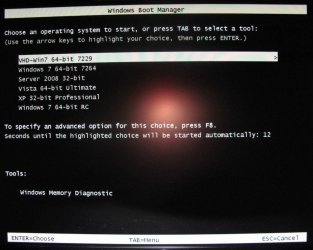
On bootup screen 2 choices of windows 7 are shown
 

Attachments
  • Capture.PNG
    Capture.PNG
    66.5 KB · Views: 8
Last edited:

My Computer

Computer Manufacturer/Model Number
Sony VGC-RA820G
OS
windows 7
Memory
2 G
Monitor(s) Displays
LG
Hard Drives
2

My Computer

Computer type
PC/Desktop
Computer Manufacturer/Model Number
Dell XPS 420
OS
Windows 10, Home Clean Install
CPU
Intel Core2 processsor Q8200(2.33Ghz 1333FSB) Quad Core Tech
Motherboard
Dell
Memory
6 gb
Graphics Card(s)
ATI Radeon 256MB HD3650
Sound Card
Intergrated 7.1 Channel Audio
Monitor(s) Displays
Dell SP2009W 20"
Hard Drives
640 GB Serial ATA Hard drive
Cooling
Fan
Keyboard
Dell USB Keyboard
Mouse
Dell Premium Optical USB
Internet Speed
DSL 2.85
You would have had to choose another partition for it to install a separate second Win7 OS.

What makes you think you have two Win7's installed? Do you have a Dual Boot menu showing at startup?

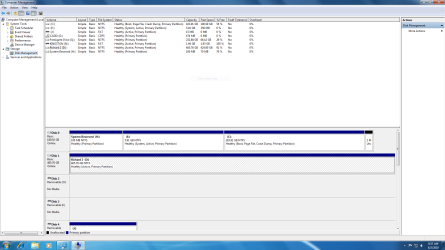
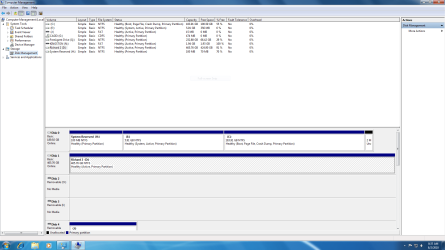
If you post back a screenshot of your full Disk Management drive map, we can have a look. Use Snipping Tool in Start Menu.
 
Hello richard391, welcome to Seven Forums!


Unless you get a screen similar to the one in the snip below when you first start-up the PC you only have one Windows installed, if you do post the snip of disk management as Greg has suggested so we can see what you have going on.


How to Post a Screenshot in Seven Forums


click to enlarge
Boot Menu.JPG
 

My Computer

Computer Manufacturer/Model Number
* BFK Customs *
OS
W 7 64-bit Ultimate
CPU
Intel Q9550 Yorkfield
Motherboard
ASUS P5Q Pro
Memory
8GB Dominator 8500C5D
Graphics Card(s)
ATI : XFX 5870
Sound Card
Realtek HD Audio 7-1
Monitor(s) Displays
1x 47" LCD HDMI & 3x 26" LCD HDMI
Screen Resolution
1920x1080P & 1920x1200
Hard Drives
1x 80GB Intel X25-M G2 SSD : 1x 500GB & 1x 640GB WD Caviar Black(s)
PSU
Corsair 620HX
Case
Cooler Master RC-690
Cooling
Tuniq Tower 120, 2x 140mm and 3x 120mm case fans
Keyboard
Microsoft 500
Mouse
Razer Diamondback 3G
Internet Speed
14 Mb/s
Other Info
1x Koutech 3Gb/s SATA HDD Hot Swap Rack
copy of disk management
 

Attachments

  • Capture.PNG
    Capture.PNG
    66.5 KB · Views: 11

My Computer

Computer Manufacturer/Model Number
Sony VGC-RA820G
OS
windows 7
Memory
2 G
Monitor(s) Displays
LG
Hard Drives
2
I don't think E:Windows 7 would even function on 5.91gb partition and can't imagine how he installed it there.

It appears to hold the System Active MBR though, which needs to be transferred to the SysReserved or Win7 partition first.

Since we don't know the condition of the SysReserved partition, it would probably be best to use Partition Wizard CD to mark Win7 partition Active, delete E, boot the Win7 DVD Repair console or Repair CD, click through to Recovery Tools list to run Startup Repair up to 3 separate times to write the MBR to Win7 partition.

Once Win7 starts, you can boot back into PW CD to delete the 100mb System Reserved partition, then rightclick Win7 partition to Resize it into the deleted 100mb and E space. This may require another set of Startup Repairs as it tampers with the boot sector.

It might actually be better to wipe the HD and reinstall because the mystery of how two Win7's were installed with one on a 5.91gb partition could also shroud much more complication. But if he doesn't want to reinstall then recovering the MBR into the working Win7 partition is the safest move.
 
Thanks Greg, sorry to say I never looked at the size and that's why I was suggesting to use E:; I've deleted my previous post.
 

My Computer

Computer Manufacturer/Model Number
* BFK Customs *
OS
W 7 64-bit Ultimate
CPU
Intel Q9550 Yorkfield
Motherboard
ASUS P5Q Pro
Memory
8GB Dominator 8500C5D
Graphics Card(s)
ATI : XFX 5870
Sound Card
Realtek HD Audio 7-1
Monitor(s) Displays
1x 47" LCD HDMI & 3x 26" LCD HDMI
Screen Resolution
1920x1080P & 1920x1200
Hard Drives
1x 80GB Intel X25-M G2 SSD : 1x 500GB & 1x 640GB WD Caviar Black(s)
PSU
Corsair 620HX
Case
Cooler Master RC-690
Cooling
Tuniq Tower 120, 2x 140mm and 3x 120mm case fans
Keyboard
Microsoft 500
Mouse
Razer Diamondback 3G
Internet Speed
14 Mb/s
Other Info
1x Koutech 3Gb/s SATA HDD Hot Swap Rack
Thanks Greg, sorry to say I never looked at the size and that's why I was suggesting to use E:; I've deleted my previous post.

Not sure why: your advice was correct as I recall. :geek: The size just adds to the mystery.

Maybe OP will tell us exactly what was done.
 
Back
Top