HELP!

Sure.... if it works.

Norton/Symantec may be bundled with your Internet service
\Bell Internet Security Services\Fws.exe
 

My Computer

Computer type
PC/Desktop
Computer Manufacturer/Model Number
Bruce ... somewhere in his 40's
OS
Windows 7 Ultimate 32bit SP1
CPU
Intel(R) Core(TM)2 Quad CPU @ 2.40GHz, 2400 MHz
Motherboard
INTEL/D975XBX2
Memory
4 GB
Graphics Card(s)
ATI Radeon HD 2600 Pro
Monitor(s) Displays
Samsung SyncMaster 914v
Screen Resolution
1280 x 1024
Hard Drives
2/500GB each ... ST3500630AS ATA Device.
One is not connected
PSU
Rocketfish 700 W
Case
G.Skill Gigabyte Chassis
Keyboard
Standard PS/2 Keyboard
Mouse
Microsoft PS/2 Mouse
Internet Speed
DSL
Antivirus
Avira Internet Security
Browser
IE 11
Other Info
ATI HDMI Audio
ComboFix 10-08-08.03 - Owner 09/08/2010 12:44:53.1.2 - x86
Microsoft Windows 7 Home Premium 6.1.7600.0.1252.2.1033.18.3062.1262 [GMT -4:00]
Running from: E:\ComboFix.exe
AV: Norton Security Online *On-access scanning enabled* (Updated) {E10A9785-9598-4754-B552-92431C1C35F8}
FW: Norton Security Online *enabled* {7C21A4C9-F61F-4AC4-B722-A6E19C16F220}
SP: Norton Security Online *enabled* (Updated) {CBB7EE13-8244-4DAB-8B55-D5C7AA91E59A}
.
((((((((((((((((((((((((((((((((((((((( Other Deletions )))))))))))))))))))))))))))))))))))))))))))))))))
.
c:\program files\INSTALL.LOG
c:\windows\system32\system
.
((((((((((((((((((((((((( Files Created from 2010-07-09 to 2010-08-09 )))))))))))))))))))))))))))))))
.
2010-08-09 17:02 . 2010-08-09 17:02 -------- d-----w- c:\users\Guest\AppData\Local\temp
2010-08-09 17:02 . 2010-08-09 17:02 -------- d-----w- c:\users\Default\AppData\Local\temp
2010-08-05 02:49 . 2010-08-05 02:49 8192 ----a-w- c:\windows\system32\opuqbe.dll
2010-08-05 02:49 . 2010-08-05 04:21 -------- d-----w- c:\users\Owner\AppData\Roaming\65DEC236D132C3CBF0FB939CADDDD2B4
2010-08-05 00:39 . 2010-08-05 00:39 156912 ----a-w- c:\users\Guest\AppData\Roaming\Bell\Internet Service Advisor\downloads\SPDFileCopier.24464.exe.dir\SPDFileCopier.exe
2010-08-04 20:39 . 2010-08-04 20:39 156912 ----a-w- c:\users\Guest\AppData\Roaming\Bell\Internet Service Advisor\downloads\SPDFileCopier.26962.exe.dir\SPDFileCopier.exe
2010-08-04 04:16 . 2010-08-04 04:16 156912 ----a-w- c:\users\Guest\AppData\Roaming\Bell\Internet Service Advisor\downloads\SPDFileCopier.29358.exe.dir\SPDFileCopier.exe
2010-08-03 23:16 . 2010-08-03 23:16 156912 ----a-w- c:\users\Guest\AppData\Roaming\Bell\Internet Service Advisor\downloads\SPDFileCopier.11478.exe.dir\SPDFileCopier.exe
2010-08-03 18:32 . 2010-08-03 18:32 156912 ----a-w- c:\users\Guest\AppData\Roaming\Bell\Internet Service Advisor\downloads\SPDFileCopier.15724.exe.dir\SPDFileCopier.exe
2010-08-03 05:33 . 2010-08-03 05:33 156912 ----a-w- c:\users\Guest\AppData\Roaming\Bell\Internet Service Advisor\downloads\SPDFileCopier.19169.exe.dir\SPDFileCopier.exe
2010-08-03 01:33 . 2010-08-03 01:33 156912 ----a-w- c:\users\Guest\AppData\Roaming\Bell\Internet Service Advisor\downloads\SPDFileCopier.26500.exe.dir\SPDFileCopier.exe
2010-07-31 05:34 . 2010-07-31 05:34 156912 ----a-w- c:\users\Guest\AppData\Roaming\Bell\Internet Service Advisor\downloads\SPDFileCopier.6334.exe.dir\SPDFileCopier.exe
2010-07-29 19:12 . 2010-07-29 19:12 156912 ----a-w- c:\users\Guest\AppData\Roaming\Bell\Internet Service Advisor\downloads\SPDFileCopier.18467.exe.dir\SPDFileCopier.exe
2010-07-24 02:19 . 2010-07-24 02:19 -------- d-----w- c:\program files\iPod
2010-07-24 02:19 . 2010-07-24 02:20 -------- d-----w- c:\program files\iTunes
2010-07-24 02:13 . 2010-07-24 02:13 -------- d-----w- c:\program files\Bonjour
2010-07-24 02:10 . 2010-07-24 02:10 73000 ----a-w- c:\programdata\Apple Computer\Installer Cache\iTunes 9.2.1.5\SetupAdmin.exe
.
(((((((((((((((((((((((((((((((((((((((( Find3M Report ))))))))))))))))))))))))))))))))))))))))))))))))))))
.
2010-08-09 16:31 . 2009-11-25 23:57 -------- d-----w- c:\program files\Common Files\Akamai
2010-08-09 16:26 . 2009-11-24 02:52 -------- d-----w- c:\users\Owner\AppData\Roaming\Skype
2010-08-09 15:31 . 2009-11-24 02:55 -------- d-----w- c:\users\Owner\AppData\Roaming\skypePM
2010-08-05 04:43 . 2010-01-30 18:12 -------- d-----w- c:\users\Guest\AppData\Roaming\IMVU
2010-07-24 03:09 . 2008-11-10 04:37 -------- d-----w- c:\users\Owner\AppData\Roaming\Apple Computer
2010-07-24 02:19 . 2008-11-10 04:33 -------- d-----w- c:\program files\Common Files\Apple
2010-07-23 19:15 . 2010-02-18 22:57 -------- d-----w- c:\program files\Common Files\DVDVideoSoft
2010-06-28 22:37 . 2010-01-30 21:29 -------- d-----w- c:\users\Guest\AppData\Roaming\Apple Computer
2010-06-27 23:46 . 2010-01-30 21:41 123048 ----a-w- c:\users\Guest\AppData\Local\GDIPFONTCACHEV1.DAT
2010-06-24 21:22 . 2009-10-30 01:48 123048 ----a-w- c:\users\Owner\AppData\Local\GDIPFONTCACHEV1.DAT
2010-06-24 20:46 . 2010-06-24 20:46 -------- d-----w- c:\programdata\regid.1986-12.com.adobe
2010-06-24 20:44 . 2010-06-24 20:44 -------- d-----w- c:\programdata\ALM
2010-06-24 20:43 . 2008-02-12 00:09 -------- d-----w- c:\program files\Common Files\Adobe
2010-06-22 16:51 . 2010-06-22 16:51 -------- d-----w- c:\users\Owner\AppData\Roaming\DVDVideoSoftIEHelpers
2010-06-15 18:50 . 2010-02-11 03:36 -------- d-----w- c:\programdata\Radialpoint
2010-05-28 21:11 . 2010-05-28 21:11 79144 ----a-w- c:\programdata\Apple Computer\Installer Cache\Safari 5.31.22.7\SetupAdmin.exe
2010-05-21 18:14 . 2009-10-02 19:41 221568 ------w- c:\windows\system32\MpSigStub.exe
2010-05-18 20:35 . 2010-05-18 20:35 91424 ----a-w- c:\windows\system32\dnssd.dll
2010-05-18 20:35 . 2010-05-18 20:35 107808 ----a-w- c:\windows\system32\dns-sd.exe
2009-06-10 21:26 . 2009-07-14 02:04 9633792 --sha-r- c:\windows\Fonts\StaticCache.dat
2009-08-21 13:41 . 2009-05-17 02:32 1025326880 --sha-w- c:\windows\System32\drivers\fidbox(3629).dat
2009-07-14 01:14 . 2009-07-13 23:42 396800 --sha-w- c:\windows\winsxs\x86_microsoft-windows-mail-app_31bf3856ad364e35_6.1.7600.16385_none_f12e83abb108c86c\WinMail.exe
.
((((((((((((((((((((((((((((((((((((( Reg Loading Points ))))))))))))))))))))))))))))))))))))))))))))))))))
.
.
*Note* empty entries & legit default entries are not shown
REGEDIT4
[HKEY_LOCAL_MACHINE\software\microsoft\windows\currentversion\explorer\shelliconoverlayidentifiers\VaultIcon1]
@="{B976888E-DC7B-456C-A62F-44EA07ED231F}"
[HKEY_CLASSES_ROOT\CLSID\{B976888E-DC7B-456C-A62F-44EA07ED231F}]
2010-01-17 23:08 503808 ----a-w- c:\program files\Personal Vault Backup Manager\VaultClientMenu.dll
[HKEY_CURRENT_USER\SOFTWARE\Microsoft\Windows\CurrentVersion\Run]
"ehTray.exe"="c:\windows\ehome\ehTray.exe" [2009-07-14 144384]
"MsnMsgr"="c:\program files\Windows Live\Messenger\MsnMsgr.Exe" [2009-07-26 3883856]
"TOSCDSPD"="c:\program files\TOSHIBA\TOSCDSPD\TOSCDSPD.exe" [2008-01-30 430080]
"Update Manager"="c:\program files\Rogers\Update Manager\UpdateManager.exe" [2006-01-06 131072]
"Skype"="c:\program files\Skype\Phone\Skype.exe" [2010-04-06 26102056]
"AdobeUpdater"="c:\program files\Common Files\Adobe\Updater5\AdobeUpdater.exe" [2009-04-03 2356088]
[HKEY_LOCAL_MACHINE\SOFTWARE\Microsoft\Windows\CurrentVersion\Run]
"SynTPEnh"="c:\program files\Synaptics\SynTP\SynTPEnh.exe" [2008-08-14 1348904]
"RtHDVCpl"="c:\program files\Realtek\Audio\HDA\RtHDVCpl.exe" [2009-07-29 7625248]
"Skytel"="c:\program files\Realtek\Audio\HDA\Skytel.exe" [2009-07-29 1833504]
"Adobe Reader Speed Launcher"="c:\program files\Adobe\Reader 8.0\Reader\Reader_sl.exe" [2008-10-15 39792]
"AdobeCS4ServiceManager"="c:\program files\Common Files\Adobe\CS4ServiceManager\CS4ServiceManager.exe" [2008-08-14 611712]
"AppleSyncNotifier"="c:\program files\Common Files\Apple\Mobile Device Support\AppleSyncNotifier.exe" [2010-04-13 47392]
"BrMfcWnd"="c:\program files\Brother\Brmfcmon\BrMfcWnd.exe" [2007-03-05 663552]
"Camera Assistant Software"="c:\program files\Camera Assistant Software for Toshiba\traybar.exe" [2008-08-14 417792]
"ControlCenter3"="c:\program files\Brother\ControlCenter3\brctrcen.exe" [2007-01-26 65536]
"IndexSearch"="c:\program files\ScanSoft\PaperPort\IndexSearch.exe" [2007-01-30 46632]
"PaperPort PTD"="c:\program files\ScanSoft\PaperPort\pptd40nt.exe" [2007-01-30 30248]
"PPort11reminder"="c:\program files\ScanSoft\PaperPort\Ereg\Ereg.exe" [2007-02-01 255528]
"SSBkgdUpdate"="c:\program files\Common Files\Scansoft Shared\SSBkgdUpdate\SSBkgdupdate.exe" [2006-10-25 210472]
"SunJavaUpdateSched"="c:\program files\Java\jre6\bin\jusched.exe" [2009-06-25 148888]
"LtMoh"="c:\program files\ltmoh\Ltmoh.exe" [2008-09-25 195080]
"IgfxTray"="c:\windows\system32\igfxtray.exe" [2009-08-21 141848]
"HotKeysCmds"="c:\windows\system32\hkcmd.exe" [2009-08-21 173592]
"Persistence"="c:\windows\system32\igfxpers.exe" [2009-08-21 150552]
"TPwrMain"="c:\program files\TOSHIBA\Power Saver\TPwrMain.EXE" [2009-08-21 476512]
"SmoothView"="c:\program files\Toshiba\SmoothView\SmoothView.exe" [2009-07-28 460088]
"00TCrdMain"="c:\program files\TOSHIBA\FlashCards\TCrdMain.exe" [2009-08-05 738616]
"BISA.exe"="c:\program files\Bell\Internet Service Advisor\BISA.exe" [2010-01-13 4281584]
"BellCanada_McciTrayApp"="c:\program files\BellCanada\McciTrayApp.exe" [2010-01-19 1565696]
"TkBellExe"="c:\program files\Common Files\Real\Update_OB\realsched.exe" [2010-04-23 202256]
"Malwarebytes Anti-Malware (reboot)"="c:\program files\Malwarebytes' Anti-Malware\mbam.exe" [2010-03-30 1086856]
"QuickTime Task"="c:\program files\QuickTime\QTTask.exe" [2010-03-18 421888]
"AdobeAAMUpdater-1.0"="c:\program files\Common Files\Adobe\OOBE\PDApp\UWA\UpdaterStartupUtility.exe" [2010-03-06 500208]
"AdobeCS5ServiceManager"="c:\program files\Common Files\Adobe\CS5ServiceManager\CS5ServiceManager.exe" [2010-02-22 406992]
"iTunesHelper"="c:\program files\iTunes\iTunesHelper.exe" [2010-07-21 141608]
[HKEY_LOCAL_MACHINE\software\microsoft\windows\currentversion\policies\system]
"ConsentPromptBehaviorAdmin"= 5 (0x5)
"ConsentPromptBehaviorUser"= 3 (0x3)
"EnableUIADesktopToggle"= 0 (0x0)
[HKEY_LOCAL_MACHINE\system\currentcontrolset\control\session manager]
BootExecute REG_MULTI_SZ PDBoot.exe\0autocheck autochk *
[HKEY_LOCAL_MACHINE\SYSTEM\CurrentControlSet\Control\SafeBoot\Minimal\Radialpoint Security Services]
@="Service"
R1 jswpslwf;JumpStart Wireless Filter Driver;c:\windows\system32\DRIVERS\jswpslwf.sys [2007-08-31 20352]
R2 gupdate1ca06e8bd91aaa0;Google Update Service (gupdate1ca06e8bd91aaa0);c:\program files\Google\Update\GoogleUpdate.exe [2009-07-17 133104]
R3 jswpsapi;Jumpstart Wifi Protected Setup;c:\program files\Jumpstart\jswpsapi.exe [2007-10-30 937984]
R3 RtsUIR;Realtek IR Driver;c:\windows\system32\DRIVERS\Rts516xIR.sys [x]
R3 TMachInfo;TMachInfo;c:\program files\TOSHIBA\TOSHIBA Service Station\TMachInfo.exe [2009-08-17 51512]
R3 WatAdminSvc;Windows Activation Technologies Service;c:\windows\system32\Wat\WatAdminSvc.exe [2010-02-28 1343400]
S0 RadialpointIDSEH;RadialpointIDSEH;c:\windows\system32\drivers\AVGIDSEH.sys [2009-11-02 25608]
S1 vwififlt;Virtual WiFi Filter Driver;c:\windows\system32\DRIVERS\vwififlt.sys [2009-07-13 48128]
S2 Akamai;Akamai NetSession Interface;c:\windows\System32\svchost.exe [2009-07-14 20992]
S2 cfWiMAXService;ConfigFree WiMAX Service;c:\program files\TOSHIBA\ConfigFree\CFIWmxSvcs.exe [2009-08-10 185712]
S2 ConfigFree Service;ConfigFree Service;c:\program files\TOSHIBA\ConfigFree\CFSvcs.exe [2009-03-10 46448]
S2 Radialpoint Security Services;Bell Internet Security Services;c:\program files\Bell\Bell Internet Security Services\RpsSecurityAwareR.exe [2010-04-09 166944]
S2 RadialpointIDSAgent;RadialpointIDSAgent;c:\program files\Bell\Bell Internet Security Services\AVG\Identity Protection\agent\Bin\AVGIDSAgent.exe RadialpointIDSAgent [x]
S2 ServicepointService;ServicepointService;c:\program files\Bell\Internet Service Advisor\ServicepointService.exe [2010-01-13 689392]
S2 VaultClientSRV;Personal Vault Backup Manager Service;c:\program files\Personal Vault Backup Manager\VaultClientSRV.exe [2010-01-17 1051728]
S2 VaultClientUpgrade;Personal Vault Backup Manager Upgrade Service;c:\program files\Personal Vault Backup Manager\VaultClientUpgrade.exe [2010-01-17 56400]
S3 FwLnk;FwLnk Driver;c:\windows\system32\DRIVERS\FwLnk.sys [2006-11-20 7168]
S3 RadialpointIDSDriver;RadialpointIDSDriver;c:\program files\Bell\Bell Internet Security Services\AVG\Identity Protection\agent\drivers\AVGIDSDriver.sys [2009-11-02 122376]
S3 RadialpointIDSFilter;RadialpointIDSFilter;c:\program files\Bell\Bell Internet Security Services\AVG\Identity Protection\agent\drivers\AVGIDSFilter.sys [2009-11-02 30216]
S3 RadialpointIDSShim;RadialpointIDSShim;c:\program files\Bell\Bell Internet Security Services\AVG\Identity Protection\agent\drivers\AVGIDSShim.sys [2009-11-02 21208]
S3 RSUSBSTOR;RtsUStor.Sys Realtek USB Card Reader;c:\windows\system32\Drivers\RtsUStor.sys [2009-08-05 171520]
S3 vwifimp;Microsoft Virtual WiFi Miniport Service;c:\windows\system32\DRIVERS\vwifimp.sys [2009-07-13 14336]

--- Other Services/Drivers In Memory ---
*NewlyCreated* - 8030872F
*Deregistered* - 8030872f
[HKEY_LOCAL_MACHINE\software\microsoft\windows nt\currentversion\svchost]
Akamai REG_MULTI_SZ Akamai
bdx REG_MULTI_SZ scan sysagent
.
Contents of the 'Scheduled Tasks' folder
2010-08-09 c:\windows\Tasks\GoogleUpdateTaskMachineCore.job
- c:\program files\Google\Update\GoogleUpdate.exe [2009-07-17 14:10]
2010-08-09 c:\windows\Tasks\GoogleUpdateTaskMachineUA.job
- c:\program files\Google\Update\GoogleUpdate.exe [2009-07-17 14:10]
.
.
------- Supplementary Scan -------
.
mStart Page = hxxp://www.shoptoshiba.ca/welcome
uInternet Settings,ProxyOverride = *.local
LSP: c:\windows\system32\opuqbe.dll
FF - ProfilePath - c:\users\Owner\AppData\Roaming\Mozilla\Firefox\Profiles\sb91m7ao.default\
FF - prefs.js: browser.search.defaulturl - hxxp://search.live.com/results.aspx?FORM=IEFM1&q=
FF - prefs.js: browser.search.selectedEngine - Google
FF - prefs.js: browser.startup.homepage - hxxp://go.microsoft.com/fwlink/?LinkId=69157
FF - prefs.js: keyword.URL - hxxp://search.live.com/results.aspx?FORM=IEFM1&q=
FF - component: c:\programdata\Real\RealPlayer\BrowserRecordPlugin\Firefox\Ext\components\nprpffbrowserrecordext.dll
FF - component: c:\users\Owner\AppData\Roaming\Mozilla\Firefox\Profiles\sb91m7ao.default\extensions\{463F6CA5-EE3C-4be1-B7E6-7FEE11953374}\platform\WINNT\components\FoxyTunes.dll
FF - plugin: c:\program files\Bell\Internet Service Advisor\nprpspa.dll
FF - plugin: c:\program files\Common Files\Motive\npMotive.dll
FF - plugin: c:\program files\Google\Update\1.2.183.23\npGoogleOneClick8.dll
FF - plugin: c:\program files\Microsoft\Office Live\npOLW.dll
FF - plugin: c:\program files\Mozilla Firefox\plugins\np-mswmp.dll
FF - plugin: c:\program files\Windows Live\Photo Gallery\NPWLPG.dll
FF - plugin: c:\programdata\Real\RealPlayer\BrowserRecordPlugin\MozillaPlugins\nprphtml5videoshim.dll
FF - HiddenExtension: Microsoft .NET Framework Assistant: {20a82645-c095-46ed-80e3-08825760534b} - c:\windows\Microsoft.NET\Framework\v3.5\Windows Presentation Foundation\DotNetAssistantExtension\
---- FIREFOX POLICIES ----
c:\program files\Mozilla Firefox\greprefs\security-prefs.js - pref("security.ssl.allow_unrestricted_renego_everywhere__temporarily_available_pref", true);
c:\program files\Mozilla Firefox\greprefs\security-prefs.js - pref("security.ssl.renego_unrestricted_hosts", "");
c:\program files\Mozilla Firefox\greprefs\security-prefs.js - pref("security.ssl.treat_unsafe_negotiation_as_broken", false);
c:\program files\Mozilla Firefox\greprefs\security-prefs.js - pref("security.ssl.require_safe_negotiation", false);
.
- - - - ORPHANS REMOVED - - - -
AddRemove-TOSHIBA Software Modem - c:\windows\agrsmdel

.
--------------------- LOCKED REGISTRY KEYS ---------------------
[HKEY_LOCAL_MACHINE\system\ControlSet001\Control\Class\{4D36E96D-E325-11CE-BFC1-08002BE10318}\0000\AllUserSettings]
@Denied: (A) (Users)
@Denied: (A) (Everyone)
@Allowed: (B 1 2 3 4 5) (S-1-5-20)
"BlindDial"=dword:00000001
"MSCurrentCountry"=dword:00000020
[HKEY_LOCAL_MACHINE\system\ControlSet001\Control\PCW\Security]
@Denied: (Full) (Everyone)
.
Completion time: 2010-08-09 13:10:01
ComboFix-quarantined-files.txt 2010-08-09 17:10
Pre-Run: 71,377,874,944 bytes free
Post-Run: 71,443,492,864 bytes free
- - End Of File - - C23254101B6F688FEE279856F93E7D7E
 

My Computer

OS
Windows 7
You have a couple of files that I'd like you to upload to Virus total VirusTotal - Free Online Virus and Malware Scan

Scan each one individually and save to results to copy and past back here.

c:\windows\system32\opuqbe.dll
c:\users\Owner\AppData\Roaming\65DEC236D132C3CBF0FB939CADDDD2B4


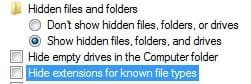
You may have to unhide 'hidden files and folders' to find/see them
From the control panel, click on 'Folder Options" > View tab > check 'show hidden files', uncheck 'hide extentions'.
 

Attachments

  • hidden files and folders.jpg
    hidden files and folders.jpg
    7.3 KB · Views: 392

My Computer

Computer type
PC/Desktop
Computer Manufacturer/Model Number
Bruce ... somewhere in his 40's
OS
Windows 7 Ultimate 32bit SP1
CPU
Intel(R) Core(TM)2 Quad CPU @ 2.40GHz, 2400 MHz
Motherboard
INTEL/D975XBX2
Memory
4 GB
Graphics Card(s)
ATI Radeon HD 2600 Pro
Monitor(s) Displays
Samsung SyncMaster 914v
Screen Resolution
1280 x 1024
Hard Drives
2/500GB each ... ST3500630AS ATA Device.
One is not connected
PSU
Rocketfish 700 W
Case
G.Skill Gigabyte Chassis
Keyboard
Standard PS/2 Keyboard
Mouse
Microsoft PS/2 Mouse
Internet Speed
DSL
Antivirus
Avira Internet Security
Browser
IE 11
Other Info
ATI HDMI Audio
Opuqbe.dll it says:
File has already been analysed:


MD5:b3efb184d5762dabce4c0ac7b6e188bfFirst received:2010.07.23 13:18:23 UTCDate:2010.08.06 14:14:31 UTC [>3D]Results:4/42Permalink:analisis/7d40af468b30ae2426063d3590ba215e8d10d3a12095fb5af9ba3dd884c5787a-1281104071
MD5:b3efb184d5762dabce4c0ac7b6e188bfFirst received:2010.07.23 13:18:23 UTCDate:2010.08.06 14:14:31 UTC [>3D]Results:4/42Permalink:analisis/7d40af468b30ae2426063d3590ba215e8d10d3a12095fb5af9ba3dd884c5787a-1281104071MD5:b3efb184d5762dabce4c0ac7b6e188bfFirst received:2010.07.23 13:18:23 UTCDate:2010.08.06 14:14:31 UTC [>3D]Results:4/42Permalink:analisis/7d40af468b30ae2426063d3590ba215e8d10d3a12095fb5af9ba3dd884c5787a-1281104071MD5:b3efb184d5762dabce4c0ac7b6e188bfFirst received:2010.07.23 13:18:23 UTCDate:2010.08.06 14:14:31 UTC [>3D]Results:4/42Permalink:analisis/7d40af468b30ae2426063d3590ba215e8d10d3a12095fb5af9ba3dd884c5787a-1281104071MD5:b3efb184d5762dabce4c0ac7b6e188bfFirst received:2010.07.23 13:18:23 UTCDate:2010.08.06 14:14:31 UTC [>3D]Results:4/42Permalink:analisis/7d40af468b30ae2426063d3590ba215e8d10d3a12095fb5af9ba3dd884c5787a-1281104071MD5:b3efb184d5762dabce4c0ac7b6e188bfFirst received:2010.07.23 13:18:23 UTCDate:2010.08.06 14:14:31 UTC [>3D]Results:4/42Permalink:analisis/7d40af468b30ae2426063d3590ba215e8d10d3a12095fb5af9ba3dd884c5787a-1281104071MD5:b3efb184d5762dabce4c0ac7b6e188bfFirst received:2010.07.23 13:18:23 UTCDate:2010.08.06 14:14:31 UTC [>3D]Results:4/42Permalink:analisis/7d40af468b30ae2426063d3590ba215e8d10d3a12095fb5af9ba3dd884c5787a-1281104071MD5: b3efb184d5762dabce4c0ac7b6e188bf
first recieved: 2010.07.23 13:18:23 UTC
Date: 2010.08.06 14:14:31 UTC [>3D]
Results: 4/42
permalink: analisis/7d40af468b30ae2426063d3590ba215e8d10d3a12095fb5af9ba3dd884c5787a-1281104071

then I reanalysed it and got:

Antivirus Version Last Update Result

AhnLab-V32010.08.10.002010.08.09-
AntiVir8.2.4.342010.08.09-
Antiy-AVL2.0.3.72010.08.09-
Authentium5.2.0.52010.08.09-
Avast4.8.1351.02010.08.09-
Avast55.0.332.02010.08.09-
AVG9.0.0.8512010.08.09-
BitDefender7.22010.08.09-
CAT-QuickHeal11.002010.08.09-
ClamAV0.96.0.3-git2010.08.09-
Comodo56982010.08.09-
DrWeb5.0.2.033002010.08.09Trojan.Click1.25301
Emsisoft5.0.0.362010.08.09-
eSafe7.0.17.02010.08.09-
eTrust-Vet36.1.77782010.08.09-
F-Prot4.6.1.1072010.08.09-
F-Secure9.0.15370.02010.08.09-
Fortinet4.1.143.02010.08.09-
GData212010.08.09-
IkarusT3.1.1.87.02010.08.09-
Jiangmin13.0.9002010.08.07-
McAfee5.400.0.11582010.08.09Artemis!B3EFB184D576
McAfee-GW-Edition2010.12010.08.09Artemis!B3EFB184D576
Microsoft1.60042010.08.09-NOD3253532010.08.09-Norman6.05.112010.08.09-nProtect2010-08-09.022010.08.09-Panda10.0.2.72010.08.09-PCTools7.0.3.52010.08.09-Prevx3.02010.08.09High Risk Cloaked Malware
Rising22.60.00.042010.08.09-
Sophos4.56.02010.08.09Troj/Agent-OFJ
Sunbelt67052010.08.09Trojan.Win32.Browser-Winsock.Hijacker
SUPERAntiSpyware4.40.0.10062010.08.09-Symantec20101.1.1.72010.08.09-TheHacker6.5.2.1.3392010.08.09-TrendMicro9.120.0.10042010.08.09-TrendMicro-HouseCall9.120.0.10042010.08.09-VBA323.12.12.82010.08.04-ViRobot2010.8.9.39782010.08.09-VirusBuster5.0.27.02010.08.09-

Additional information

File size: 8192 bytesMD5...: b3efb184d5762dabce4c0ac7b6e188bf
SHA1..: e6dc04c8c5a4965e093b9a96c219b998bb86e9b1
SHA256: 7d40af468b30ae2426063d3590ba215e8d10d3a12095fb5af9ba3dd884c5787a
ssdeep: 192:/wjHWy8YkntA5huI/2NLEFYjf+8AFup3e:4L7/kGXuI/aL5pu<BR>PEiD..: -PEInfo: PE Structure information<BR><BR>( base data )<BR>entrypointaddress.: 0x1410<BR>timedatestamp.....: 0x4c46f543 (Wed Jul 21 13:25:23 2010)<BR>machinetype.......: 0x14c (I386)<BR><BR>( 4 sections )<BR>name viradd virsiz rawdsiz ntrpy md5<BR>.text 0x1000 0x12b2 0x1400 6.07 cb94cf75c209beb01a273ed5c7516c86<BR>.rdata 0x3000 0x2fd 0x400 3.88 0b75dd81c6aa12ea35fb354c4887ef81<BR>.data 0x4000 0x78 0x200 0.31 f0f4f53dfd61aa2546d9fbcee5627038<BR>.reloc 0x5000 0x130 0x200 2.93 a77c08f6b71b7d67beede025f13d8027<BR><BR>( 2 imports ) <BR>> WS2_32.dll: WSCEnumProtocols, getnameinfo, -, -, WSCGetProviderPath<BR>> KERNEL32.dll: LoadLibraryW, ExpandEnvironmentStringsA, LoadLibraryA, LeaveCriticalSection, EnterCriticalSection, FindAtomA, DeleteCriticalSection, FreeLibrary, InitializeCriticalSection, WideCharToMultiByte, HeapAlloc, ExpandEnvironmentStringsW, HeapFree, GetProcAddress, GetLastError, HeapCreate<BR><BR>( 2 exports ) <BR>GetLspGuid, WSPStartup<BR>RDS...: NSRL Reference Data Set<BR>-pdfid.: -sigcheck:<BR>publisher....: n/a<BR>copyright....: n/a<BR>product......: n/a<BR>description..: n/a<BR>original name: n/a<BR>internal name: n/a<BR>file version.: n/a<BR>comments.....: n/a<BR>signers......: -<BR>signing date.: -<BR>verified.....: Unsigned<BR>trid..: Win32 Executable Generic (42.3%)<BR>Win32 Dynamic Link Library (generic) (37.6%)<BR>Generic Win/DOS Executable (9.9%)<BR>DOS Executable Generic (9.9%)<BR>Autodesk FLIC Image File (extensions: flc, fli, cel) (0.0%)Symantec Reputation Network: Suspicious.Insight http://www.symantec.com/security_response/writeup.jsp?docid=2010-021223-0550-99<a href='http://info.prevx.com/aboutprogramtext.asp?PX5=735DB25700952011205C0036C52BF8009271D5EB' target='_blank'>http://info.prevx.com/aboutprogramtext.asp?PX5=735DB25700952011205C0036C52BF8009271D5EB</a>

 

My Computer

OS
Windows 7
The Other file is an empty folder, so I cant scan it.
 

My Computer

OS
Windows 7
Are you able to get online? Let's do this ...

Open a command prompt, right click and run as Administrator. Type
netsh winsock reset

Reboot and it should be fixed.

Next, download DrWeb Curit! and run a complete scan.
http://www.freedrweb.com/cureit/
 

My Computer

Computer type
PC/Desktop
Computer Manufacturer/Model Number
Bruce ... somewhere in his 40's
OS
Windows 7 Ultimate 32bit SP1
CPU
Intel(R) Core(TM)2 Quad CPU @ 2.40GHz, 2400 MHz
Motherboard
INTEL/D975XBX2
Memory
4 GB
Graphics Card(s)
ATI Radeon HD 2600 Pro
Monitor(s) Displays
Samsung SyncMaster 914v
Screen Resolution
1280 x 1024
Hard Drives
2/500GB each ... ST3500630AS ATA Device.
One is not connected
PSU
Rocketfish 700 W
Case
G.Skill Gigabyte Chassis
Keyboard
Standard PS/2 Keyboard
Mouse
Microsoft PS/2 Mouse
Internet Speed
DSL
Antivirus
Avira Internet Security
Browser
IE 11
Other Info
ATI HDMI Audio
Thank you soooooo much!! This means sooo much to me.
I've been trying find out what was wrong for 2 days!!
Your help is very appreciated, everyone!
I was able to access the net and download DrWeb Cureit!
and my laptop is being scanned (complete scan).

Thanks a lot!!
 

My Computer

OS
Windows 7
Please, if you can save the log, post it! Also let me know How your compter is running.
 

My Computer

Computer type
PC/Desktop
Computer Manufacturer/Model Number
Bruce ... somewhere in his 40's
OS
Windows 7 Ultimate 32bit SP1
CPU
Intel(R) Core(TM)2 Quad CPU @ 2.40GHz, 2400 MHz
Motherboard
INTEL/D975XBX2
Memory
4 GB
Graphics Card(s)
ATI Radeon HD 2600 Pro
Monitor(s) Displays
Samsung SyncMaster 914v
Screen Resolution
1280 x 1024
Hard Drives
2/500GB each ... ST3500630AS ATA Device.
One is not connected
PSU
Rocketfish 700 W
Case
G.Skill Gigabyte Chassis
Keyboard
Standard PS/2 Keyboard
Mouse
Microsoft PS/2 Mouse
Internet Speed
DSL
Antivirus
Avira Internet Security
Browser
IE 11
Other Info
ATI HDMI Audio
Hi, RoxyyC.

In addition to the Dr. Web Cureit log, there is vulnerable software on your computer that needs to be dealt with.
 

My Computer

OS
Windows 7 & Windows Vista Ultimate
My laptop just shut down and restarted to blue screen during the scan. So I will be re-scanning it again. It should be done in a day. And Vulnerable software do you mean the updates to Adobe & Java?
 

My Computer

OS
Windows 7
Yes, both of those are quite outdated.

Go into safe mode and delete
c:\windows\system32\opuqbe.dll <---this file
c:\users\Owner\AppData\Roaming\65DEC236D132C3CBF0FB939CADDDD2B4 <--this application

Now reboot normally and try to run Drweb again
 

My Computer

Computer type
PC/Desktop
Computer Manufacturer/Model Number
Bruce ... somewhere in his 40's
OS
Windows 7 Ultimate 32bit SP1
CPU
Intel(R) Core(TM)2 Quad CPU @ 2.40GHz, 2400 MHz
Motherboard
INTEL/D975XBX2
Memory
4 GB
Graphics Card(s)
ATI Radeon HD 2600 Pro
Monitor(s) Displays
Samsung SyncMaster 914v
Screen Resolution
1280 x 1024
Hard Drives
2/500GB each ... ST3500630AS ATA Device.
One is not connected
PSU
Rocketfish 700 W
Case
G.Skill Gigabyte Chassis
Keyboard
Standard PS/2 Keyboard
Mouse
Microsoft PS/2 Mouse
Internet Speed
DSL
Antivirus
Avira Internet Security
Browser
IE 11
Other Info
ATI HDMI Audio
Soo, the files have been deleted. For the second time however, my laptop shutdown during the complete scan. I did an express scan (before the second complete scan attempt) and it deleted the *opuqbe.dll* file. And I deleted the other on safe mode manually. Right now, I'm just trying to updating the out-dated things. Laptops running well other wise.
 

My Computer

OS
Windows 7
This method has worked for me in the past:


Start your computer in safe mode with networking
Download MalwareBytes Anti-Malware.

Download rkill.com ( rkill.exe ) and run it

Install the mbam-setup.exe file. You'll have to monitor the install folder as it's running and as soon as you see mbam.exe file, select it and click ctrl+x, paste it to the desktop, wait a few minutes, then paste it back into the install folder..
Go to the Scan tab, select “Perform Quick Scan” and press “Scan.”
MalwareBytes Anti Malware will now scan all your PC for malware, including the Security Tool.
You will see a “The Scan completed successfully. Click ‘Show Results’ to display all objects found” prompt once the scan is finished. Press OK.
Now press “Show Results.”
You will see a list of malware applications, including the Rogue.SecurityTool. Be sure to select them all and press “Remove Selected.”
After MalwareBytes Anti Malware finishes the cleaning, you can close the program and be sure your PC is clean.
As a caution, you should also use rkill.com ( rkill.exe ) to terminate malicious processes.
 
While you're updating Adobe products, in addition to Adobe Reader, there was a critical update to Adobe Flash and Adobe Air today. (Additional information is available in the Security Bulletin. Remember to update for both IE and Firefox.)

With Java, go to Add/Remove Programs and uninstall the following:

Java(TM) 6 Update 13
Java(TM) 6 Update 3

Next, please download JavaRa and unzip it to your desktop.


  • Double-click on JavaRa.exe to start the program. (Windows Vista users Right-click JavaRa.exe > Select Run as Administrator)
  • Click on Remove Older Versions to remove older versions of Java.
  • A logfile will pop up. Please save it to a convenient location.


Then download and install Java SE Runtime Environment (JRE) 6 Update 21.

Download Link: Java SE Runtime Environment 6u21

Note: UNCHECK any pre-checked toolbar and/or software options presented with the update. They are not part of the software update and are completely optional.

Since it seem you're having a problem with the Dr.Cureit full scan, how about an MBAM scan?

  • Launch Malwarebytes' Anti-Malware then click the Update tab and "Check for Updates
  • Once the update has been installed and the program has loaded, select Quick scan
    [*]When the scan is complete, click OK, then Show Results to view the results.
    [*]Be sure that everything is checked, EXCEPT items in System Restore as shown in this sample:
    MBAM_SR.png

    [*] Click Remove Selected.
    [*]When disinfection is completed, a log will open in Notepad and you may be prompted to Restart. (See the Note below)
    [*]The log is automatically saved by MBAM and can be viewed by clicking the Logs tab in MBAM.
    [*]Please post contents of that file in your next reply.


** Note **

If MBAM encounters a file that is difficult to remove, you will be presented with 1 of 2 prompts. Click OK to either and let MBAM proceed with the disinfection process. If asked to restart the computer, please do so immediately.
 

My Computer

OS
Windows 7 & Windows Vista Ultimate
While you're updating Adobe products, in addition to Adobe Reader, there was a critical update to Adobe Flash and Adobe Air today. (Additional information is available in the Security Bulletin. Remember to update for both IE and Firefox.)

With Java, go to Add/Remove Programs and uninstall the following:

Java(TM) 6 Update 13
Java(TM) 6 Update 3

Next, please download JavaRa and unzip it to your desktop.


  • Double-click on JavaRa.exe to start the program. (Windows Vista users Right-click JavaRa.exe > Select Run as Administrator)
  • Click on Remove Older Versions to remove older versions of Java.
  • A logfile will pop up. Please save it to a convenient location.


Then download and install Java SE Runtime Environment (JRE) 6 Update 21.

Download Link: Java SE Runtime Environment 6u21

Note: UNCHECK any pre-checked toolbar and/or software options presented with the update. They are not part of the software update and are completely optional.

Since it seem you're having a problem with the Dr.Cureit full scan, how about an MBAM scan?

  • Launch Malwarebytes' Anti-Malware then click the Update tab and "Check for Updates
  • Once the update has been installed and the program has loaded, select Quick scan
    [*]When the scan is complete, click OK, then Show Results to view the results.
    [*]Be sure that everything is checked, EXCEPT items in System Restore as shown in this sample:
    MBAM_SR.png

    [*] Click Remove Selected.
    [*]When disinfection is completed, a log will open in Notepad and you may be prompted to Restart. (See the Note below)
    [*]The log is automatically saved by MBAM and can be viewed by clicking the Logs tab in MBAM.
    [*]Please post contents of that file in your next reply.


** Note **

If MBAM encounters a file that is difficult to remove, you will be presented with 1 of 2 prompts. Click OK to either and let MBAM proceed with the disinfection process. If asked to restart the computer, please do so immediately.


Done, done and done!
MBAM found nothing.
 

My Computer

OS
Windows 7
Good to hear it. I have a quite a few friends who've gotten hit by that Security Tool, and it's really annoying, but at least it doesn't do a lot of damage by itself.
 
Good news, RoxyyC!

If everything is back to normal, the following will implement some cleanup procedures as well as reset System Restore points:

Click Start > Run and copy/paste the following bolded text into the Run box and click OK:

ComboFix /Uninstall

Having a firewall, anti-virus and anti-malware software are not enough. You also need to stay current with security updates. If you don't have your computer set to automatically install the Microsoft Security Updates, please check for updates now. For additional information, see my blog post Understanding Microsoft Updates

To check if your system is missing security updates or has any additional insecure applications installed, visit OSI - Consumer - Products . The Secunia Software Inspector runs through your browser with no installation or download required and does the following:
  • Detects insecure versions of applications installed
  • Verifies that all Microsoft patches are applied
  • Assists you in updating your system and applications


Install and update SpywareBlaster to prevent the installation of spyware and other potentially unwanted software: SpywareBlaster® | Prevent spyware and malware. Free download.

My favorite security software is WinPatrol which includes the features described at WinPatrol Features

Please let me know if you have any questions.
 

My Computer

OS
Windows 7 & Windows Vista Ultimate
Good to hear it. I have a quite a few friends who've gotten hit by that Security Tool, and it's really annoying, but at least it doesn't do a lot of damage by itself.

yes, exactly! I got rid of it on my brothers laptop easy. But my laptop was acting up. Thanks from the help here though, I was able to fix other things as well.
 

My Computer

OS
Windows 7
Back
Top