help

varunkamra

New member
Local time
7:43 PM
Messages
5
i am using windows7 home basic. initially my c drive was 50 gb n now just 17 gb left. i have tried everything but its not increasing. i have a new laptop n nothing installed in it by me. everything is pre loaded. earlier it was 41gb free out of 50 gb n now just 17 gb free n decreasing. i have deleted all the restore points from clear restore points option in disk cleanup n also allocated just 1,5 gb for restore points from the system protection option in control panel but no success.... plz help
 

My Computer

OS
Windows 7 Home basic 32bit.
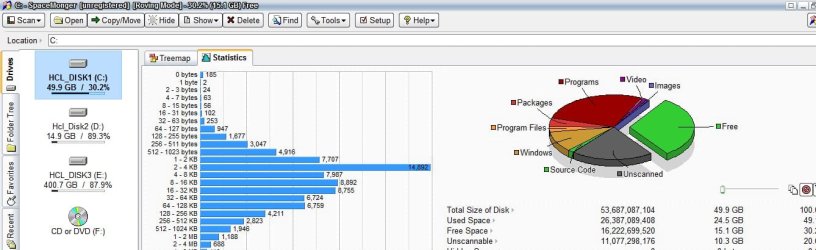
Best to figure out where the disk space is going first - my suggestion is to download Spacemonger (click on the free software tab and download Spacemonger v1.4.0 near the bottom of the page), and scan your C drive to get a raw layout of space utilized on disk, and to where.
 

My Computer

Computer type
PC/Desktop
Computer Manufacturer/Model Number
Custom
OS
Windows 10 Pro x64
CPU
Intel Core i7 4790K @ 4.5GHz
Motherboard
Asus Maximus Hero VII
Memory
32GB DDR3
Graphics Card(s)
Nvidia GeForce GTX970
Sound Card
Realtek HD Audio
Screen Resolution
1920x1200
Hard Drives
1x Samsung 250GB SSD
4x WD RE 2TB (RAIDZ)
PSU
Corsair AX760i
Case
Fractal Design Define R4
Cooling
Noctua NH-D15
it is showing 8gb as cant scan.... is it virus in that space???
 

My Computer

OS
Windows 7 Home basic 32bit.
Could you post a screenshot of your disk scan?
 

My Computer

Computer type
PC/Desktop
Computer Manufacturer/Model Number
Custom
OS
Windows 10 Pro x64
CPU
Intel Core i7 4790K @ 4.5GHz
Motherboard
Asus Maximus Hero VII
Memory
32GB DDR3
Graphics Card(s)
Nvidia GeForce GTX970
Sound Card
Realtek HD Audio
Screen Resolution
1920x1200
Hard Drives
1x Samsung 250GB SSD
4x WD RE 2TB (RAIDZ)
PSU
Corsair AX760i
Case
Fractal Design Define R4
Cooling
Noctua NH-D15
ya i posted the screenshot
 

Attachments

  • Untitled.jpg
    Untitled.jpg
    78.2 KB · Views: 17

My Computer

OS
Windows 7 Home basic 32bit.
Are you sure this is a fresh install? You seem to have an awful lot of programs installed.

In any case, the most likely culprits are the pagefile and hibernation file. You can adjust the former manually and disable the latter completely if you never hibernate your system. (These two files probably account for the "unscannable" area in your screenshot as well.)

Also, if you installed Service Pack 1 or otherwise downloaded/installed a lot of Windows Updates, these can be safely deleted from C:\Windows\SoftwareDistribution\Download. For SP1 there's a special command tool to remove backup files created during the installation of SP1.
 

My Computer

Computer type
PC/Desktop
Computer Manufacturer/Model Number
Custom-built
OS
Windows 7 Professional SP1 32-bit
CPU
Intel Core 2 Duo E6600 2.4GHz
Motherboard
Asus PL5D2
Memory
4GB DDR2-667 (4x1GB in dual-channel config)
Graphics Card(s)
nVidia GeForce 9800 GT
Sound Card
Creative X-Fi XtremeMusic
Monitor(s) Displays
Acer P236H
Screen Resolution
1920x1200 (DVI)
Hard Drives
OCZ SSD Vertex Plus 60GB SATA (Firmware 3.55), 64MB cache
Hitachi HD321KJ SATA, 320GB, 7200rpm, 16MB cache
PSU
Antec TruePower 2.0
Case
Cooler Master Centurion
Cooling
Too many fans
Keyboard
Standard
Mouse
Microsoft wireless optical mouse
Internet Speed
AT&T U-verse (18mbit/sec)
Antivirus
Microsoft Security Essentials
Browser
Firefox
Other Info
Other devices:
Compaq CQ-60 laptop
Google Nexus 7 (2012) tablet
Nvidia SHIELD tablet (US/LTE)
Hardkernel ODROID-XU single-board computer (Samsung Exynos 5420)

My Computer

Computer Manufacturer/Model Number
Dell Inspiron E 1505
OS
Windows 7 Professional 32 Bit
CPU
Genuine Intel(R) CPU T2080 @ 1.73GHz 1.73 GHz
Motherboard
DELL
Memory
2GB
Graphics Card(s)
ATI Mobility Radeon X1400
Sound Card
High Definition Audio Device
Screen Resolution
1280 by 800
Hard Drives
136 GB
Recovery 10 GB
Looks like Corazon and Pragnesh already beat me to it.... :)
 

My Computer

Computer type
PC/Desktop
Computer Manufacturer/Model Number
Custom
OS
Windows 10 Pro x64
CPU
Intel Core i7 4790K @ 4.5GHz
Motherboard
Asus Maximus Hero VII
Memory
32GB DDR3
Graphics Card(s)
Nvidia GeForce GTX970
Sound Card
Realtek HD Audio
Screen Resolution
1920x1200
Hard Drives
1x Samsung 250GB SSD
4x WD RE 2TB (RAIDZ)
PSU
Corsair AX760i
Case
Fractal Design Define R4
Cooling
Noctua NH-D15
i followed the procedure in disk clean up to delete service pack 1 files but its already showing 0 bytes without me doing anything:shock :....
 

My Computer

OS
Windows 7 Home basic 32bit.
Back
Top