Help!

garethgkr

New member
Local time
8:17 PM
Messages
93
Today I bought a copy of Windows 7 Ultimate for my HTPC which is using Vista Home Premium.

The HTPC hard disk was like this.
Total 1TB and has 2 partitions.
C: Vista has 25GB <= has vista and some programs
G: Main has 920 GB <= has movies, games and tv shows.

I couldn't do and upgrade or clean install on Drive C: because it need 5GB more of free space for some reason..

So I did this:

I managed to shrink G: drive using disk management and got 30GB out of it for Windows 7
I then formated the remaining 30GB and named it Drive F. Installed Win 7 on it and everything was fine till I got back home 10 hours later.
To find it saying Boot Manager missing. Press Alt+Ctrl+Delete to restart. I did it and it brought me back to square one.

Help?

Cheers,
gareth
 

My Computer

Computer Manufacturer/Model Number
Self built
OS
Windows 7 Professional
CPU
Asus AMD 9550 Quad Core
Motherboard
Asus M3A78-EM
Memory
4GB DDR3
Graphics Card(s)
Saphire ATI HD 4850 1GB
Monitor(s) Displays
Pioneer Plasma - PDP508A
Screen Resolution
1920 x 1080
Hard Drives
1TB Samsung
2TB Seagate
PSU
Big Ant 600W
Case
Antec
Keyboard
Dinovo Edge
Mouse
Dinovo Edge
Insert your installation dvd and do a repair install...you may need to do this three times to insure it does a full repair...
 

My Computer

Computer type
PC/Desktop
Computer Manufacturer/Model Number
LENOVO K450 @3.0GHZ
OS
64-bit Windows 8.1 Pro
CPU
Core(TM) i5 CPU 4330 Haswell @ 3.20GHz
Motherboard
LENOVO
Memory
12.00 GB
Graphics Card(s)
Intel(R) HD Graphics
Sound Card
Intel HD integtrated
Monitor(s) Displays
HP 25' ISP Monitor
Screen Resolution
1900/1020
Hard Drives
(1) ST1000DM003-1CH162 (2) Generic STORAGE DEVICE USB Device (3) Generic STORAGE DEVICE USB Device
Internet Speed
100mb down/10mb up
Is there a way i can make the F: Drive that has Win 7 on it the main HDD? so that it boots from there?? and How do I delete the C: Drive? so that all of Vista's components are gone.
 

My Computer

Computer Manufacturer/Model Number
Self built
OS
Windows 7 Professional
CPU
Asus AMD 9550 Quad Core
Motherboard
Asus M3A78-EM
Memory
4GB DDR3
Graphics Card(s)
Saphire ATI HD 4850 1GB
Monitor(s) Displays
Pioneer Plasma - PDP508A
Screen Resolution
1920 x 1080
Hard Drives
1TB Samsung
2TB Seagate
PSU
Big Ant 600W
Case
Antec
Keyboard
Dinovo Edge
Mouse
Dinovo Edge
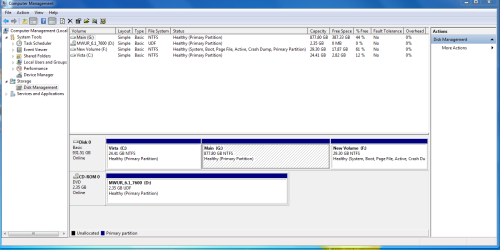
We need to see a picture of your Disk Management map but since you cannot get into Windows 7, you need to boot from the Win7 installer, select Repair my Computer and run Startup repair 3 times to get into your Win7.

Then use the Snipping Tool on Start>Programs to take a picture of your entire Disk Mangement map and attach it here using the paper clip in reply box.

If you have your Win7 installed way out on the far right of your HD and want to get rid of Vista in the first partition, then you need to use a 3rd party partition manager like free Partition Wizard to delete Vista, resize your middle storage drive to make more room for Windows 7 in the old Vista space, then mark active and copy Windows 7 over into the desired first partition and delete it's old partition.

You then run startup repair again 3 times to rewrite the MBR to new Win7 partition.
 
Ok. I just did the 1st repair.. and it restarted and still said the same. Doing the 2nd one now.
 

My Computer

Computer Manufacturer/Model Number
Self built
OS
Windows 7 Professional
CPU
Asus AMD 9550 Quad Core
Motherboard
Asus M3A78-EM
Memory
4GB DDR3
Graphics Card(s)
Saphire ATI HD 4850 1GB
Monitor(s) Displays
Pioneer Plasma - PDP508A
Screen Resolution
1920 x 1080
Hard Drives
1TB Samsung
2TB Seagate
PSU
Big Ant 600W
Case
Antec
Keyboard
Dinovo Edge
Mouse
Dinovo Edge
Sweet Im in on the second try. Ill post a pic of the Disk manager now.
 

My Computer

Computer Manufacturer/Model Number
Self built
OS
Windows 7 Professional
CPU
Asus AMD 9550 Quad Core
Motherboard
Asus M3A78-EM
Memory
4GB DDR3
Graphics Card(s)
Saphire ATI HD 4850 1GB
Monitor(s) Displays
Pioneer Plasma - PDP508A
Screen Resolution
1920 x 1080
Hard Drives
1TB Samsung
2TB Seagate
PSU
Big Ant 600W
Case
Antec
Keyboard
Dinovo Edge
Mouse
Dinovo Edge
Here it is.
 

Attachments

  • Capture.PNG
    Capture.PNG
    37.6 KB · Views: 35

My Computer

Computer Manufacturer/Model Number
Self built
OS
Windows 7 Professional
CPU
Asus AMD 9550 Quad Core
Motherboard
Asus M3A78-EM
Memory
4GB DDR3
Graphics Card(s)
Saphire ATI HD 4850 1GB
Monitor(s) Displays
Pioneer Plasma - PDP508A
Screen Resolution
1920 x 1080
Hard Drives
1TB Samsung
2TB Seagate
PSU
Big Ant 600W
Case
Antec
Keyboard
Dinovo Edge
Mouse
Dinovo Edge
Based on what you have written to now, I suggest:

Back up your files. If you can't stand to lose your Win7 partition, use Backup Center to store an image of it which can be used to reimage HD in 15 minutes. Move/Copy operations can fail.

Download and burn to disk free Partition Wizard* bootable.

Boot into PW and right click delete Vista.

Right click G:Main and Resize/Move. Drag the left border to make the desired size of a first partition.

Right click on Windows 7, verify again it is Active, then Copy into unallocated space you have made where Vista was.

Delete the original Win7 partition. Apply all operations.

When complete, if necessary boot into Win7 installer and run Startup Repair 3 times.

Later, recover the old Win7 partition into G: and make a new primary partition to store your Recovery Image so reinstalls will never again be necessary.

*Paragon Partition Pro is a paid program which can copy the MBR along with Win7. Otherwise Startup Repair wil likely be necessary to rewrite the MBR, normally on the third reboot.
 
Another thing is since I put Win 7 on this HTPC there is like 1 inch of black space left between the image and the side of the screen. The resolution is already at 1920 x 1080. But it is not filling out the entire screen like Vista did before.
 

My Computer

Computer Manufacturer/Model Number
Self built
OS
Windows 7 Professional
CPU
Asus AMD 9550 Quad Core
Motherboard
Asus M3A78-EM
Memory
4GB DDR3
Graphics Card(s)
Saphire ATI HD 4850 1GB
Monitor(s) Displays
Pioneer Plasma - PDP508A
Screen Resolution
1920 x 1080
Hard Drives
1TB Samsung
2TB Seagate
PSU
Big Ant 600W
Case
Antec
Keyboard
Dinovo Edge
Mouse
Dinovo Edge
yes. and some how after installing Win 7 my internet speed has slowed down by 3x..
 

My Computer

Computer Manufacturer/Model Number
Self built
OS
Windows 7 Professional
CPU
Asus AMD 9550 Quad Core
Motherboard
Asus M3A78-EM
Memory
4GB DDR3
Graphics Card(s)
Saphire ATI HD 4850 1GB
Monitor(s) Displays
Pioneer Plasma - PDP508A
Screen Resolution
1920 x 1080
Hard Drives
1TB Samsung
2TB Seagate
PSU
Big Ant 600W
Case
Antec
Keyboard
Dinovo Edge
Mouse
Dinovo Edge
Try uninstalling your wireless or ethernet adapter and restarting the computer.

They should reinstall.

But have the drivers backed up just in case.
 
Ok.

I tried installing the latest updates for the Graphics card. and still the image doesnt fill out the entire screen.
 

My Computer

Computer Manufacturer/Model Number
Self built
OS
Windows 7 Professional
CPU
Asus AMD 9550 Quad Core
Motherboard
Asus M3A78-EM
Memory
4GB DDR3
Graphics Card(s)
Saphire ATI HD 4850 1GB
Monitor(s) Displays
Pioneer Plasma - PDP508A
Screen Resolution
1920 x 1080
Hard Drives
1TB Samsung
2TB Seagate
PSU
Big Ant 600W
Case
Antec
Keyboard
Dinovo Edge
Mouse
Dinovo Edge
Now the word system that was on the new Partition has moved back to the old partition when I view it through Disk management.
How do I change it back?
 

My Computer

Computer Manufacturer/Model Number
Self built
OS
Windows 7 Professional
CPU
Asus AMD 9550 Quad Core
Motherboard
Asus M3A78-EM
Memory
4GB DDR3
Graphics Card(s)
Saphire ATI HD 4850 1GB
Monitor(s) Displays
Pioneer Plasma - PDP508A
Screen Resolution
1920 x 1080
Hard Drives
1TB Samsung
2TB Seagate
PSU
Big Ant 600W
Case
Antec
Keyboard
Dinovo Edge
Mouse
Dinovo Edge
Did you install Word on the new partition? It has to be reinstalled.

It's not the Microsoft Word. It is the word "system". If you look at the picture i posted last page. The word "system" is in the new volume. Now that word is in the old volume.
 

My Computer

Computer Manufacturer/Model Number
Self built
OS
Windows 7 Professional
CPU
Asus AMD 9550 Quad Core
Motherboard
Asus M3A78-EM
Memory
4GB DDR3
Graphics Card(s)
Saphire ATI HD 4850 1GB
Monitor(s) Displays
Pioneer Plasma - PDP508A
Screen Resolution
1920 x 1080
Hard Drives
1TB Samsung
2TB Seagate
PSU
Big Ant 600W
Case
Antec
Keyboard
Dinovo Edge
Mouse
Dinovo Edge
Do you want to move your Windows 7 over into the space occupied by Vista? If so I posted the steps to do that earlier.

Vista is your system drive because it contains the MBR until you delete it and recover the MBR to Win7 by running Startup Repair 3 times from the booted Win7 DVD Repair console.

You are going to have to use a 3rd party partition manager like Partition Wizard to delete Vista anyway, so you can also resize your middle data partition to make enough space to Copy Win7 into the deleted Vista space, then apply all steps.

Boot into Win7 installer and run Startup Repair 3 times as it will attempt to repair before rewriting the MBR to your 7 partition.
 
When I put in the motherboard disc. it says "Motherboard CD does not support this operating system(WNT_6.1P_32_MCE)
 

My Computer

Computer Manufacturer/Model Number
Self built
OS
Windows 7 Professional
CPU
Asus AMD 9550 Quad Core
Motherboard
Asus M3A78-EM
Memory
4GB DDR3
Graphics Card(s)
Saphire ATI HD 4850 1GB
Monitor(s) Displays
Pioneer Plasma - PDP508A
Screen Resolution
1920 x 1080
Hard Drives
1TB Samsung
2TB Seagate
PSU
Big Ant 600W
Case
Antec
Keyboard
Dinovo Edge
Mouse
Dinovo Edge
What are you trying to do now?

If you need to get drivers off a mobo disk, then browse for them from Device Manager.

But WIndows 7 DVD is almost fully driver-complete (with Windows Updates follow-up) so you will not likely find a better driver.

Is there one in particular you want to try?
 
Im gonna delete the Vista partition. But all the Drivers for the Audio and Ethernet, AMD etc are on the Vista partition.
 

My Computer

Computer Manufacturer/Model Number
Self built
OS
Windows 7 Professional
CPU
Asus AMD 9550 Quad Core
Motherboard
Asus M3A78-EM
Memory
4GB DDR3
Graphics Card(s)
Saphire ATI HD 4850 1GB
Monitor(s) Displays
Pioneer Plasma - PDP508A
Screen Resolution
1920 x 1080
Hard Drives
1TB Samsung
2TB Seagate
PSU
Big Ant 600W
Case
Antec
Keyboard
Dinovo Edge
Mouse
Dinovo Edge
Back
Top