Heroes of Might and Magic III + Win7?

skdyer

New member
Local time
4:26 AM
Messages
8
Just wanted to know if anyone has had success running Heroes of Might and Magic III on Windows 7? I ordered it this weekend but haven't received it so I just have my fingers crossed for now. I'll report back when I determine if I can get it working.
 

My Computer My Computer

At a glance

Windows 7 ProfessionalIntel Centrino T2300 Dual Core 1.66 GHz2.5GBNvidia Quadro NVS 110M 128 MB
Computer Manufacturer/Model Number
Dell Latitude D620
OS
Windows 7 Professional
CPU
Intel Centrino T2300 Dual Core 1.66 GHz
Memory
2.5GB
Graphics Card(s)
Nvidia Quadro NVS 110M 128 MB
Monitor(s) Displays
1440 x 900
i got it to work

Well, your post was several months ago, so maybe you don't care any more, but I managed to install and run it after some trials. First, to install it, I had to right-click on the setup.exe (or whatever the program name was; i don't have it in front of me) on the CD and right-click and choose propertied. In the Compatibility tab, I picked "Windows XP (Service Pack 2)".

After it installs, go to C:\Program Files\3DO\Heroes 3 Complete.

Do the same thing (Windows XP SP2 Compatiblity) for ALL executables in that folder. There are a bunch of them. If you don't do it for all of them, the program will crash occasionally.
 

My Computer My Computer

At a glance

Windows 7
OS
Windows 7
Thanks for posting this, rlwindows. skdyer, let us know if this solution worked for you!

Cheers,

Walker
Windows Outreach Team
 

My Computer My Computer

At a glance

Windows 7 Home Premium (64-bit) *** Windows X...AMD Athlon Neo X2 1.6GHz *** Intel Core i7 Qu...4.00 GB *** 4.00 GBATI Radeon HD 3200, 384MB *** ATI Radeon HD 4...
Computer Manufacturer/Model Number
HP Pavilion dm3 (netbook) *** 27" iMac (Dual-Boot)
OS
Windows 7 Home Premium (64-bit) *** Windows XP SP3 (32-bit), OSX 10.6
CPU
AMD Athlon Neo X2 1.6GHz *** Intel Core i7 Quad Core 2.8GHz
Memory
4.00 GB *** 4.00 GB
Graphics Card(s)
ATI Radeon HD 3200, 384MB *** ATI Radeon HD 4850, 1GB
Sound Card
ATI High Definition Audio *** ATI High Definition Audio
Monitor(s) Displays
LG Flatron W2053TX
Screen Resolution
1600 x 900 (monitor), 1266 x 768 (laptop) *** 2560 x 1440
Hard Drives
300 GB SATA (internal), 500 GB HP SimpleSave (external) *** 1 TB SATA (internal), 160 GB LaCie (external)
Mouse
Logitech Cordless Optical Mouse for Notebooks
Internet Speed
Broadband
Heroes 3 change compapility Xp SP2

Didn't work for me!

-I have not yet seen 'changing compability' have any effect on any app?

'Run as administrator' sometimes seems to work on some things... but not this one apparently..

Oh well. If anyone else has had success with change compability or running H3 please post!

cheers,
 

My Computer My Computer

At a glance

win 7 64athlon 64x2 4600+4 gig ddr2NVIDIA GeForce 7300 GT
OS
win 7 64
CPU
athlon 64x2 4600+
Motherboard
MSI K9VGM-V MS-7253
Memory
4 gig ddr2
Graphics Card(s)
NVIDIA GeForce 7300 GT
Sound Card
onboard Realteak ALC883
Hard Drives
wd 320 7200
It's hard to know what I changed in order to make this work because I've changed too many variables at once. But I'll tell you my setup and hopefully it points you in the right direction.

First of all, I purchased the game from gog.com. This is a GREAT site that takes old games, repackages them with a new installer, and then tests/tweaks with modern systems to make sure the game works. (Plus they are DRM free so know annoying disc checks.) So, if you are running the game from the old CD it might be worth the $5 or $10, whatever gog.com charges, to just repurchase the game and run their setup.

As far as the compatibility settings, I am running as administrator in windows 98/ME compatibility mode. Even with these settings occasionally when I run the game it does not work correctly. But 95% of the time it does. I've noticed it often depends on what other applications I have open. For example, if firefox is running that will always cause it to crap out. So another suggestion would be to make sure you have all other applications closed.

If all of that doesn't work I am wondering if it is worth toying with running it in XP mode. Now that Windows 7 XP mode doesn't require hardware virtualization it seems like that is an option that is open to more people. I am pretty sure you should be able to get HoMM III running without taking this drastic action though.
 

My Computer My Computer

At a glance

Windows 7 ProfessionalIntel Centrino T2300 Dual Core 1.66 GHz2.5GBNvidia Quadro NVS 110M 128 MB
Computer Manufacturer/Model Number
Dell Latitude D620
OS
Windows 7 Professional
CPU
Intel Centrino T2300 Dual Core 1.66 GHz
Memory
2.5GB
Graphics Card(s)
Nvidia Quadro NVS 110M 128 MB
Monitor(s) Displays
1440 x 900
i cant get my Heroes of Might and Magic 3 to install on my computer, i just recently bought the game and it keeps giving me errors, i have tired everything on here and it still does not work... HELP!!
 

My Computer My Computer

At a glance

Windows 7
OS
Windows 7
i cant get my Heroes of Might and Magic 3 to install on my computer, i just recently bought the game and it keeps giving me errors, i have tired everything on here and it still does not work... HELP!!

Can you please be more specific? What are you installing from? CD or from downloaded installation package? What errors are you encountering?
 

My Computer My Computer

At a glance

Windows 7 ProfessionalIntel Centrino T2300 Dual Core 1.66 GHz2.5GBNvidia Quadro NVS 110M 128 MB
Computer Manufacturer/Model Number
Dell Latitude D620
OS
Windows 7 Professional
CPU
Intel Centrino T2300 Dual Core 1.66 GHz
Memory
2.5GB
Graphics Card(s)
Nvidia Quadro NVS 110M 128 MB
Monitor(s) Displays
1440 x 900
Cmuije, please post your System Spec first. We can't really help you until we know all the details of your setup.

Cheers,

Walker
Windows Outreach Team
 

My Computer My Computer

At a glance

Windows 7 Home Premium (64-bit) *** Windows X...AMD Athlon Neo X2 1.6GHz *** Intel Core i7 Qu...4.00 GB *** 4.00 GBATI Radeon HD 3200, 384MB *** ATI Radeon HD 4...
Computer Manufacturer/Model Number
HP Pavilion dm3 (netbook) *** 27" iMac (Dual-Boot)
OS
Windows 7 Home Premium (64-bit) *** Windows XP SP3 (32-bit), OSX 10.6
CPU
AMD Athlon Neo X2 1.6GHz *** Intel Core i7 Quad Core 2.8GHz
Memory
4.00 GB *** 4.00 GB
Graphics Card(s)
ATI Radeon HD 3200, 384MB *** ATI Radeon HD 4850, 1GB
Sound Card
ATI High Definition Audio *** ATI High Definition Audio
Monitor(s) Displays
LG Flatron W2053TX
Screen Resolution
1600 x 900 (monitor), 1266 x 768 (laptop) *** 2560 x 1440
Hard Drives
300 GB SATA (internal), 500 GB HP SimpleSave (external) *** 1 TB SATA (internal), 160 GB LaCie (external)
Mouse
Logitech Cordless Optical Mouse for Notebooks
Internet Speed
Broadband
So I too have a problem with the game. I tried what was explained here, nothing helped.

So my prob is that when I press Autorun it pops up that window with Instal, Play and so on clickers, and Non of them buttons work. The window disappears after I press any of them. Any ideas?
 

My Computer My Computer

At a glance

WINDOWS 7
OS
WINDOWS 7
Kinda off subject but i play Heroes 2 gold on Vista x64 all the time. Every once in awhile i lose sound and on occasion it does freeze, but most times i can play for couple hours with no issues at all.

Again kinda off subject but i can confirm Heroes 1 and 3 work on Vista x64 as well.

I should mention that all mine are the original 3DO versions and not remakes.
 

My Computer My Computer

At a glance

Vista Business x64AMD Phenom II x3 720be @3.15ghz2x2GB A-Data DDR2 pc6400Nvidia EVGA 8800gts (640MB,320bit)
Computer Manufacturer/Model Number
Self Build
OS
Vista Business x64
CPU
AMD Phenom II x3 720be @3.15ghz
Motherboard
Asus M4A77D
Memory
2x2GB A-Data DDR2 pc6400
Graphics Card(s)
Nvidia EVGA 8800gts (640MB,320bit)
Sound Card
Creative Sound Blaster
Monitor(s) Displays
Samsung 226bw
Screen Resolution
1680x1050
Hard Drives
Seagate 320gig, WD 80gig
PSU
Rosewill 500watt
Case
Dynex
Cooling
Thermaltake V1
Keyboard
G15
Mouse
Razor DeathAdder
Internet Speed
10.0Mb/896Kb
I bought Heroes III Complete from GoG.com as well and have been playing it (with limited success) on Windows 7 Home Premium x64. I have set all the .exe files in the game's directory to "Run as Administrator" and Compatibility with WinXP SP2. I can usually get anywhere from two to four hours of gameplay in before it crashes and I have to reload from the autosave.

After emailing GoG.com's support team, they replied that they don't support Windows 7 yet. So warning to anyone buying from GoG.com, your games might not work on Windows 7. So far I'm 1 for 2.
 

My Computer My Computer

At a glance

Windows 7 Home Premium x64Intel Core i76144 MBGeForce GTX 285
Computer Manufacturer/Model Number
Dell XPS 730i
OS
Windows 7 Home Premium x64
CPU
Intel Core i7
Motherboard
Default XPS MB
Memory
6144 MB
Graphics Card(s)
GeForce GTX 285
Sound Card
Onboard
Monitor(s) Displays
Dell SX2210T

My Computer My Computer

At a glance

Windows 10 ProIntel Core i7-4770K (3.5Ghz)32 gig Corsair Dominator Platinum (4x8Gig)Sapphire Tri-X R9 Fury
Computer type
PC/Desktop
Computer Manufacturer/Model Number
Custom built by me.
OS
Windows 10 Pro
CPU
Intel Core i7-4770K (3.5Ghz)
Motherboard
Gigabyte G1 Sniper 5 (F10 Bios)
Memory
32 gig Corsair Dominator Platinum (4x8Gig)
Graphics Card(s)
Sapphire Tri-X R9 Fury
Sound Card
Soundblaster ZXR
Monitor(s) Displays
NEC PA242W 24" LCD Monitor
Screen Resolution
1920 x 1200
Hard Drives
Primary - Samsung 850 Pro (512gig), Samsung 840 Pro (256gig), 2TB WD Caviar Black.
PSU
EVGA Supernova 1000 G2
Case
Cooler Master HAF X
Cooling
Corsair H100i with Corsair Air Series SP120 Quiet Fans
Keyboard
Logitech Wireless Wave
Mouse
Logitech Performance MX
Internet Speed
High Speed Cable
Antivirus
Norton Security
Browser
IE11
Other Info
Memory Timings - 1866MHz @ 9-9-9-27-1T @ 1.5 volts
Wow, I was really surprised to hear you say that GoG does not support Windows 7 but sure enough in the description for that game on their website it says it only supports Vista and XP. Very strange. I too encounter the same problem. Sometimes the game randomly crashes. I've just sort of accepted it as a small inconvenience of getting to play such a great game. Though I can't present conclusive evidence about this, in general I feel like the game runs with more stability when I close all other applications prior to launching HoMMIII. You could give that a whirl.
 

My Computer My Computer

At a glance

Windows 7 ProfessionalIntel Centrino T2300 Dual Core 1.66 GHz2.5GBNvidia Quadro NVS 110M 128 MB
Computer Manufacturer/Model Number
Dell Latitude D620
OS
Windows 7 Professional
CPU
Intel Centrino T2300 Dual Core 1.66 GHz
Memory
2.5GB
Graphics Card(s)
Nvidia Quadro NVS 110M 128 MB
Monitor(s) Displays
1440 x 900
Tcp/ip games in Heroes III?

Hey all

My wife just got a new laptop with W7.
I just copied the whole game folder with everything from our normal PC to her Laptop (so no real installing - just copying the files)
And it works like a charm...almost

We normally play multiplayer tcp/ip, with me on the normal PC and her on the Laptop.
But she keeps getting "thrown off" all the time.

I tried everything!
Uninstalled antivirus. Switched off firewall. Changed channel on our wireless connection to the router. Even plugged in network cabel to the router instead of using wireless

Nothing works - she keeps getting disconnected from the games we play...
Anyone can help with this?

Thanks in advance!
(Ps we play the "Heroes Complete" game)
 

My Computer My Computer

At a glance

XP / W7
OS
XP / W7
I'm going to "guess" it's a server thing. Might have something to do with the fact that the game was never "actually" installed and the server might see this as cheating and disconnects the game.

My two cents as I've never done multiplayer.

Good luck.
 

My Computer My Computer

At a glance

Windows 10 ProIntel Core i7-4770K (3.5Ghz)32 gig Corsair Dominator Platinum (4x8Gig)Sapphire Tri-X R9 Fury
Computer type
PC/Desktop
Computer Manufacturer/Model Number
Custom built by me.
OS
Windows 10 Pro
CPU
Intel Core i7-4770K (3.5Ghz)
Motherboard
Gigabyte G1 Sniper 5 (F10 Bios)
Memory
32 gig Corsair Dominator Platinum (4x8Gig)
Graphics Card(s)
Sapphire Tri-X R9 Fury
Sound Card
Soundblaster ZXR
Monitor(s) Displays
NEC PA242W 24" LCD Monitor
Screen Resolution
1920 x 1200
Hard Drives
Primary - Samsung 850 Pro (512gig), Samsung 840 Pro (256gig), 2TB WD Caviar Black.
PSU
EVGA Supernova 1000 G2
Case
Cooler Master HAF X
Cooling
Corsair H100i with Corsair Air Series SP120 Quiet Fans
Keyboard
Logitech Wireless Wave
Mouse
Logitech Performance MX
Internet Speed
High Speed Cable
Antivirus
Norton Security
Browser
IE11
Other Info
Memory Timings - 1866MHz @ 9-9-9-27-1T @ 1.5 volts
Thanks for the reply.

I just tried installing it (only Shadow of Death) on both computers - like really installing it

It went fine, but the disconnects still happens :-(

Maybe it just cant work with W7?
 

My Computer My Computer

At a glance

XP / W7
OS
XP / W7
Have you looked into some fourms for the game to see what others have to say? It might be worth a try?
 
Last edited:

My Computer My Computer

At a glance

Windows 10 ProIntel Core i7-4770K (3.5Ghz)32 gig Corsair Dominator Platinum (4x8Gig)Sapphire Tri-X R9 Fury
Computer type
PC/Desktop
Computer Manufacturer/Model Number
Custom built by me.
OS
Windows 10 Pro
CPU
Intel Core i7-4770K (3.5Ghz)
Motherboard
Gigabyte G1 Sniper 5 (F10 Bios)
Memory
32 gig Corsair Dominator Platinum (4x8Gig)
Graphics Card(s)
Sapphire Tri-X R9 Fury
Sound Card
Soundblaster ZXR
Monitor(s) Displays
NEC PA242W 24" LCD Monitor
Screen Resolution
1920 x 1200
Hard Drives
Primary - Samsung 850 Pro (512gig), Samsung 840 Pro (256gig), 2TB WD Caviar Black.
PSU
EVGA Supernova 1000 G2
Case
Cooler Master HAF X
Cooling
Corsair H100i with Corsair Air Series SP120 Quiet Fans
Keyboard
Logitech Wireless Wave
Mouse
Logitech Performance MX
Internet Speed
High Speed Cable
Antivirus
Norton Security
Browser
IE11
Other Info
Memory Timings - 1866MHz @ 9-9-9-27-1T @ 1.5 volts
Hello,

I'll just repost what I posted on GoG.com forums as an answer to the following post:

I have windows 7. I have this game on disc and when I try running it, a black screen just comes up, i have to run it in my xp mode to get it to play. I downloaded it off of GOG thinking it would work and the same things happened. any clue why?


Unfortunately I have the same problem. Bought this game yesterday from GOG, installed without problems on my Win7 (Home Premium 64) and I can't get it to work. I tried different tricks like running 'as administrator' and in 'compatibility mode' to no avail - after launching the game I get a black screen and nothing happens from now on... At this point I'm forced to reboot my PC manually (alt tab doesn't work, win+L doesn't work, ctrl+shift+esc doesn't work).

Naturally I'm using Home Premium version so I can't use XP mode...
It's really very annoying, I wanted to play HoMM3 again so much...

Do you have any tips on what else I can try to make it work?

Thanks in advance.
 

My Computer My Computer

At a glance

Win7 64-bit
OS
Win7 64-bit
Can't install

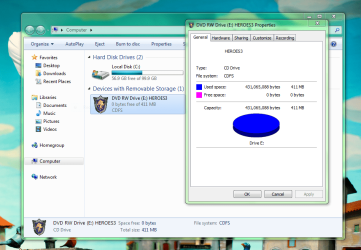
I have Heroes 3 complete on disc, and I just got a new laptop with Windows 7, so I'm not very familiar. I've tried running Heroes several times now by skipping past the incompatibility messages (operating system, RAM, and DirectX) and it won't fully install. It gets to 94% every time and freezes up so I have to take out the disk to get the installer to close. I tried the properties/compatibility method only to find that I have no compatibility tab. I'm confused by this. Could anyone tell me what I'm doing wrong?
 

Attachments

  • Heroes issue.PNG
    Heroes issue.PNG
    82.6 KB · Views: 555

My Computer My Computer

At a glance

Windows 7
Computer Manufacturer/Model Number
Samsung
OS
Windows 7
I have Heroes 3 complete on disc, and I just got a new laptop with Windows 7, so I'm not very familiar. I've tried running Heroes several times now by skipping past the incompatibility messages (operating system, RAM, and DirectX) and it won't fully install. It gets to 94% every time and freezes up so I have to take out the disk to get the installer to close. I tried the properties/compatibility method only to find that I have no compatibility tab. I'm confused by this. Could anyone tell me what I'm doing wrong?

Hi lunchboxoven,

Make sure you're looking at Properties for the installer .exe, not the game disc. You need to right-click the game disc, click Explore, then navigate to the installer, right-click and select Properties, and there should be a Compatibility tab there.

Cheers,

Walker
Windows Outreach Team
 

My Computer My Computer

At a glance

Windows 7 Home Premium (64-bit) *** Windows X...AMD Athlon Neo X2 1.6GHz *** Intel Core i7 Qu...4.00 GB *** 4.00 GBATI Radeon HD 3200, 384MB *** ATI Radeon HD 4...
Computer Manufacturer/Model Number
HP Pavilion dm3 (netbook) *** 27" iMac (Dual-Boot)
OS
Windows 7 Home Premium (64-bit) *** Windows XP SP3 (32-bit), OSX 10.6
CPU
AMD Athlon Neo X2 1.6GHz *** Intel Core i7 Quad Core 2.8GHz
Memory
4.00 GB *** 4.00 GB
Graphics Card(s)
ATI Radeon HD 3200, 384MB *** ATI Radeon HD 4850, 1GB
Sound Card
ATI High Definition Audio *** ATI High Definition Audio
Monitor(s) Displays
LG Flatron W2053TX
Screen Resolution
1600 x 900 (monitor), 1266 x 768 (laptop) *** 2560 x 1440
Hard Drives
300 GB SATA (internal), 500 GB HP SimpleSave (external) *** 1 TB SATA (internal), 160 GB LaCie (external)
Mouse
Logitech Cordless Optical Mouse for Notebooks
Internet Speed
Broadband
Back
Top