hey need help with sata HD :(

champ

Banned
Local time
7:35 AM
Messages
45
hi guyzz i installed windows 7 on my new sata HD n it works fine but when i try to isnatll xp it gives error when i try to install it, i tryed everything plz help me :( i have motherboard of gigbyte i relly want xp with 7 plzzz help me out here
 

My Computer

OS
XP
CPU
AMD x64 (3.0ghz)
Motherboard
Gigbyte
Memory
4gb
Hi Champ, I suspect your problem is with ACHI drivers, XP doesn't come with them by default.

You have 3 options here:
1. Go into your BIOS and find your hard drive settings, change ACHI or SATA to IDE mode.
2. If you have a floppy disk drive you can load your SATA drivers into XP http://www.sevenforums.com/tutorials/66010-sata-drivers-load-windows-xp-setup-dual-boot.html
3. Slip stream the drivers into the XP disk http://www.sevenforums.com/tutorials/72185-sata-drivers-slipstream-into-windows-xp-cd.html
 

My Computer

Computer type
PC/Desktop
Computer Manufacturer/Model Number
Medion Erazer (note to self: insert model number) - with custom additions
OS
Windows 10 Pro x64
CPU
Intel Core i5 7400 @ 3.00GHz
Motherboard
OEM supllied with PC
Memory
8GB 2133Mhz DDR4 (OEM supplied)
Graphics Card(s)
Gygabyte Windforce GTX 1050Ti (Factory Overclocked)
Sound Card
Realtek
Monitor(s) Displays
Acer Al1980 + HKC
Screen Resolution
1360*768(HKC) / 1280*1024(Acer)
Hard Drives
1TB Toshiba
1TB WD Caviar Green
120GB Samsung Evo 840
PSU
OEM supplied (no power rating on case)
Case
OEM Supplied
Cooling
Stock
Keyboard
Logitech Wireless
Mouse
Logitect Wireless
Internet Speed
40Mb/s Down 10Mb/s Up
Antivirus
Defender
Browser
Firefox
yup as i thought, ACHI, change Onchip SATA type to IDE and that should fix it
 

My Computer

Computer type
PC/Desktop
Computer Manufacturer/Model Number
Medion Erazer (note to self: insert model number) - with custom additions
OS
Windows 10 Pro x64
CPU
Intel Core i5 7400 @ 3.00GHz
Motherboard
OEM supllied with PC
Memory
8GB 2133Mhz DDR4 (OEM supplied)
Graphics Card(s)
Gygabyte Windforce GTX 1050Ti (Factory Overclocked)
Sound Card
Realtek
Monitor(s) Displays
Acer Al1980 + HKC
Screen Resolution
1360*768(HKC) / 1280*1024(Acer)
Hard Drives
1TB Toshiba
1TB WD Caviar Green
120GB Samsung Evo 840
PSU
OEM supplied (no power rating on case)
Case
OEM Supplied
Cooling
Stock
Keyboard
Logitech Wireless
Mouse
Logitect Wireless
Internet Speed
40Mb/s Down 10Mb/s Up
Antivirus
Defender
Browser
Firefox
so which one do i change n am i in the right section in my bios if im can u tell me which option i go in n change it
 

My Computer

OS
XP
CPU
AMD x64 (3.0ghz)
Motherboard
Gigbyte
Memory
4gb
In your screenshot of your BIOS you have Onchip SATA type ACHI selected, that is the option you need to change, every BIOS is different, but it SHOULD have an option that says IDE mode or just IDE
 

My Computer

Computer type
PC/Desktop
Computer Manufacturer/Model Number
Medion Erazer (note to self: insert model number) - with custom additions
OS
Windows 10 Pro x64
CPU
Intel Core i5 7400 @ 3.00GHz
Motherboard
OEM supllied with PC
Memory
8GB 2133Mhz DDR4 (OEM supplied)
Graphics Card(s)
Gygabyte Windforce GTX 1050Ti (Factory Overclocked)
Sound Card
Realtek
Monitor(s) Displays
Acer Al1980 + HKC
Screen Resolution
1360*768(HKC) / 1280*1024(Acer)
Hard Drives
1TB Toshiba
1TB WD Caviar Green
120GB Samsung Evo 840
PSU
OEM supplied (no power rating on case)
Case
OEM Supplied
Cooling
Stock
Keyboard
Logitech Wireless
Mouse
Logitect Wireless
Internet Speed
40Mb/s Down 10Mb/s Up
Antivirus
Defender
Browser
Firefox
i changhed it to nativ ide mode n the setup loads after i install can i change it back to ahci?
 

My Computer

OS
XP
CPU
AMD x64 (3.0ghz)
Motherboard
Gigbyte
Memory
4gb
i changhed it to nativ ide mode n the setup loads after i install can i change it back to ahci?


That SHOULD be ok, but you will need to install the drivers for your SATA controller before doing so, or XP won't load can you please fill out your system specs in User CP so I can find the right drivers for you? If you don't know your specs then Speccy is a great little utility Speccy - System Information - Free Download
 

My Computer

Computer type
PC/Desktop
Computer Manufacturer/Model Number
Medion Erazer (note to self: insert model number) - with custom additions
OS
Windows 10 Pro x64
CPU
Intel Core i5 7400 @ 3.00GHz
Motherboard
OEM supllied with PC
Memory
8GB 2133Mhz DDR4 (OEM supplied)
Graphics Card(s)
Gygabyte Windforce GTX 1050Ti (Factory Overclocked)
Sound Card
Realtek
Monitor(s) Displays
Acer Al1980 + HKC
Screen Resolution
1360*768(HKC) / 1280*1024(Acer)
Hard Drives
1TB Toshiba
1TB WD Caviar Green
120GB Samsung Evo 840
PSU
OEM supplied (no power rating on case)
Case
OEM Supplied
Cooling
Stock
Keyboard
Logitech Wireless
Mouse
Logitect Wireless
Internet Speed
40Mb/s Down 10Mb/s Up
Antivirus
Defender
Browser
Firefox
wohoo its formatting :yahoo: i gave tht partition 20gb can i extend it later on?
 

My Computer

OS
XP
CPU
AMD x64 (3.0ghz)
Motherboard
Gigbyte
Memory
4gb
wohoo its formatting :yahoo: i gave tht partition 20gb can i extend it later on?

yes that shouldn't be an issue, if you post a screenshot of your Disk Management screen we can advise you on the best way to do that. (From Windows 7 click start, right click computer, click manage then click Disk management)
 

My Computer

Computer type
PC/Desktop
Computer Manufacturer/Model Number
Medion Erazer (note to self: insert model number) - with custom additions
OS
Windows 10 Pro x64
CPU
Intel Core i5 7400 @ 3.00GHz
Motherboard
OEM supllied with PC
Memory
8GB 2133Mhz DDR4 (OEM supplied)
Graphics Card(s)
Gygabyte Windforce GTX 1050Ti (Factory Overclocked)
Sound Card
Realtek
Monitor(s) Displays
Acer Al1980 + HKC
Screen Resolution
1360*768(HKC) / 1280*1024(Acer)
Hard Drives
1TB Toshiba
1TB WD Caviar Green
120GB Samsung Evo 840
PSU
OEM supplied (no power rating on case)
Case
OEM Supplied
Cooling
Stock
Keyboard
Logitech Wireless
Mouse
Logitect Wireless
Internet Speed
40Mb/s Down 10Mb/s Up
Antivirus
Defender
Browser
Firefox
Motherboard: Gigabyte MA785GM-US2H (rv-1.0)

Cpu: AMD athlon x250 am3
 

My Computer

OS
XP
CPU
AMD x64 (3.0ghz)
Motherboard
Gigbyte
Memory
4gb
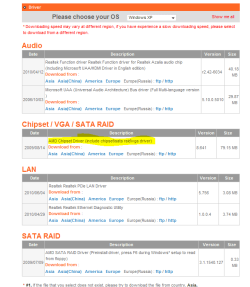
right :) here are your chipset drivers for XP (Im assuming its XP 32 bit right?): GA-MA785GM-US2H (rev. 1.0) - GIGABYTE - Support&Download - Motherboard - Driver

download the one i have highlighted, and install it on the XP machine, that should sort ACHI. If not, you may need to keep it in either SATA or IDE mode

remember to get an updated graphics driver too! the one included in Chipset drivers is normally a very old version
 

Attachments

  • Chipset.PNG
    Chipset.PNG
    23.3 KB · Views: 6

My Computer

Computer type
PC/Desktop
Computer Manufacturer/Model Number
Medion Erazer (note to self: insert model number) - with custom additions
OS
Windows 10 Pro x64
CPU
Intel Core i5 7400 @ 3.00GHz
Motherboard
OEM supllied with PC
Memory
8GB 2133Mhz DDR4 (OEM supplied)
Graphics Card(s)
Gygabyte Windforce GTX 1050Ti (Factory Overclocked)
Sound Card
Realtek
Monitor(s) Displays
Acer Al1980 + HKC
Screen Resolution
1360*768(HKC) / 1280*1024(Acer)
Hard Drives
1TB Toshiba
1TB WD Caviar Green
120GB Samsung Evo 840
PSU
OEM supplied (no power rating on case)
Case
OEM Supplied
Cooling
Stock
Keyboard
Logitech Wireless
Mouse
Logitect Wireless
Internet Speed
40Mb/s Down 10Mb/s Up
Antivirus
Defender
Browser
Firefox
ok so i have to download it fisrst n thn install n thn change it back to sata thn it should work right? n also :P it going directly to xp i dont get the option saying windows boot manger n i have option to pick windows 7 and ubuntu can i alos get tht for xp
 

My Computer

OS
XP
CPU
AMD x64 (3.0ghz)
Motherboard
Gigbyte
Memory
4gb
ok so i have to download it fisrst n thn install n thn change it back to sata thn it should work right?

yes that is right :) in regards to the dual boot issue, im sorry i should have warned you about that :o I forgot.

Follow from step 7 of method 2 here: http://www.sevenforums.com/tutorials/8057-dual-boot-installation-windows-7-xp.html that will get Win 7 back.

Ubuntu could be a bit more difficult... how was GRUB installed? was it your primary bootloader? (IE did you get the grub menu when you booted or the Windows 7 dual boot menu?)
 

My Computer

Computer type
PC/Desktop
Computer Manufacturer/Model Number
Medion Erazer (note to self: insert model number) - with custom additions
OS
Windows 10 Pro x64
CPU
Intel Core i5 7400 @ 3.00GHz
Motherboard
OEM supllied with PC
Memory
8GB 2133Mhz DDR4 (OEM supplied)
Graphics Card(s)
Gygabyte Windforce GTX 1050Ti (Factory Overclocked)
Sound Card
Realtek
Monitor(s) Displays
Acer Al1980 + HKC
Screen Resolution
1360*768(HKC) / 1280*1024(Acer)
Hard Drives
1TB Toshiba
1TB WD Caviar Green
120GB Samsung Evo 840
PSU
OEM supplied (no power rating on case)
Case
OEM Supplied
Cooling
Stock
Keyboard
Logitech Wireless
Mouse
Logitect Wireless
Internet Speed
40Mb/s Down 10Mb/s Up
Antivirus
Defender
Browser
Firefox
i got the windows 7 boot manger n when i click ubuntu thn i got grub
 

My Computer

OS
XP
CPU
AMD x64 (3.0ghz)
Motherboard
Gigbyte
Memory
4gb
i have to do this part here? If you get Error loading Operating System after XP restarts:
  • Using your Windows 7 installation disc, boot to the command prompt at startup.
  • Type in these comands below, and press enter after each one.
    • bootrec /FixMbr
    • bootrec /FixBoot
    • bootrec /RebuildBcd
  • Exit the command prompt and restart the computer.
  • At this point, Windows 7 should boot up the same way before trying to install XP.
  • Continue to step 8 below and run EasyBCD from Windows 7 instead.
 

My Computer

OS
XP
CPU
AMD x64 (3.0ghz)
Motherboard
Gigbyte
Memory
4gb
thank god for that.... ok thats easily fixed, First get your Windows 7 back by going to method 2: step 7 of the tutorial I just posted, then boot into Windows 7.

To get Ubuntu back do the following
Install Easy BCD on Windows 7 (which you will pick up by following the above steps)
Open Easy BCD and click Add New Entry
Click the Linux/BSD Tab
Make the type Grub2
Rename the entry to Ubuntu
Click Add Entry

that should get things back to how they were

i have to do this part here? If you get Error loading Operating System after XP restarts:
  • Using your Windows 7 installation disc, boot to the command prompt at startup.
  • Type in these comands below, and press enter after each one.
    • bootrec /FixMbr
    • bootrec /FixBoot
    • bootrec /RebuildBcd
  • Exit the command prompt and restart the computer.
  • At this point, Windows 7 should boot up the same way before trying to install XP.
  • Continue to step 8 below and run EasyBCD from Windows 7 instead.

Did you get that error message? if not then do this bit:


7. In XP, download and install .Net Framework 2.0 (32-bit) verison or .Net Framework 2.0 (64-bit) version and EasyBCD for your 32-bit (x86) or 64-bit (x86) XP.
NOTE: In XP, Net Framework is required to be installed to run the free program EasyBCD.

8. Run EasyBCD.
NOTE: This is required to repair the Windows 7 boot file and add XP to the Windows Boot Manager list.

9. In EasyBCD, click on Add/Remove Entries (left side). (See screenshot below)

10. In the bottom right section under Add and Entry, type Microsoft Windows XP (name displayed in Windows Boot Manager) for the Name.
NOTE: You can type whatever name you would like to have displayed in the Windows Boot Manager for XP though.
A) If you have a 100mb System Reserved partition with Windows 7, then right click it in Disk Management and give it a drive letter ( S is a good choice). Then select the letter you assigned (ex: S ) in the EasyBCD Drive drop down menu.

OR

B) If you don't have a 100mb System Reserved partition with Windows 7, then select the drive letter (ex: C: ) that Windows 7 is installed on from the Drive drop down menu in EasyBCD.
11. To the right of Type, select Windows NT/2k/XP/2k3 from the drop down menu.
12. Click on the Add Entry button. (See screenshot above)

13. You will now notice that this has added Microsoft Windows XP to the upper right section. Click on the Save button. (See screenshot below)

14. In EasyBCD, click on Manage Bootloader (left side). (See screenshot below)

15. In the upper right section under Bootloader Installer Options, select (dot) Reinstall the Vista Bootloader, then click on the Write MBR button. (See screenshot above)

16. Close EasyBCD.

17. Restart the computer to have the option to boot from XP or Windows 7. (See screenshot below)
 

My Computer

Computer type
PC/Desktop
Computer Manufacturer/Model Number
Medion Erazer (note to self: insert model number) - with custom additions
OS
Windows 10 Pro x64
CPU
Intel Core i5 7400 @ 3.00GHz
Motherboard
OEM supllied with PC
Memory
8GB 2133Mhz DDR4 (OEM supplied)
Graphics Card(s)
Gygabyte Windforce GTX 1050Ti (Factory Overclocked)
Sound Card
Realtek
Monitor(s) Displays
Acer Al1980 + HKC
Screen Resolution
1360*768(HKC) / 1280*1024(Acer)
Hard Drives
1TB Toshiba
1TB WD Caviar Green
120GB Samsung Evo 840
PSU
OEM supplied (no power rating on case)
Case
OEM Supplied
Cooling
Stock
Keyboard
Logitech Wireless
Mouse
Logitect Wireless
Internet Speed
40Mb/s Down 10Mb/s Up
Antivirus
Defender
Browser
Firefox
thanks really helped if iget problem i will let u know thanks u r awesome :D
 

My Computer

OS
XP
CPU
AMD x64 (3.0ghz)
Motherboard
Gigbyte
Memory
4gb
not a problem my friend :) thats what i'm hear for, I have subscribed to your thread, so any issues make a post and I will know almost instantly

Can we mark this thread as solved now? Is everything sorted?
 

My Computer

Computer type
PC/Desktop
Computer Manufacturer/Model Number
Medion Erazer (note to self: insert model number) - with custom additions
OS
Windows 10 Pro x64
CPU
Intel Core i5 7400 @ 3.00GHz
Motherboard
OEM supllied with PC
Memory
8GB 2133Mhz DDR4 (OEM supplied)
Graphics Card(s)
Gygabyte Windforce GTX 1050Ti (Factory Overclocked)
Sound Card
Realtek
Monitor(s) Displays
Acer Al1980 + HKC
Screen Resolution
1360*768(HKC) / 1280*1024(Acer)
Hard Drives
1TB Toshiba
1TB WD Caviar Green
120GB Samsung Evo 840
PSU
OEM supplied (no power rating on case)
Case
OEM Supplied
Cooling
Stock
Keyboard
Logitech Wireless
Mouse
Logitect Wireless
Internet Speed
40Mb/s Down 10Mb/s Up
Antivirus
Defender
Browser
Firefox
yhh go head
 

My Computer

OS
XP
CPU
AMD x64 (3.0ghz)
Motherboard
Gigbyte
Memory
4gb
Back
Top