Solved Hi all, need your expertise on user account control dialog box issue.

jack0131

New member
Local time
7:05 PM
Messages
9
Hi,

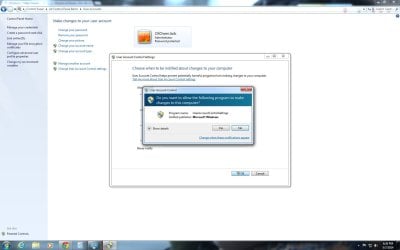
I can't seem to get pass user account control dialog boxes. Whenever this box pop up, it will freeze and the only way is to stop task from the task manager. It happens every time if the box pops up, regardless of whether I am installing a program or adjusting user control account setting. What can I do to fix this issue without having to re install windows?
Thanks for your time.

Jack
Window 7 Ultimate
 

Attachments
  • UAC_box.jpg
    UAC_box.jpg
    92.6 KB · Views: 4
Last edited:

My Computer My Computer

At a glance

Window 7 Ultimate 64 bitIntel Core i7 3.2G16GNVIDIA GeForce GTX 460
Computer type
PC/Desktop
Computer Manufacturer/Model Number
Custom Built
OS
Window 7 Ultimate 64 bit
CPU
Intel Core i7 3.2G
Motherboard
Asus Sabertooth X58
Memory
16G
Graphics Card(s)
NVIDIA GeForce GTX 460
Yes I am, Win7 Ultimate 64 bit.

Thanks.

Jack
 

My Computer My Computer

At a glance

Window 7 Ultimate 64 bitIntel Core i7 3.2G16GNVIDIA GeForce GTX 460
Computer type
PC/Desktop
Computer Manufacturer/Model Number
Custom Built
OS
Window 7 Ultimate 64 bit
CPU
Intel Core i7 3.2G
Motherboard
Asus Sabertooth X58
Memory
16G
Graphics Card(s)
NVIDIA GeForce GTX 460
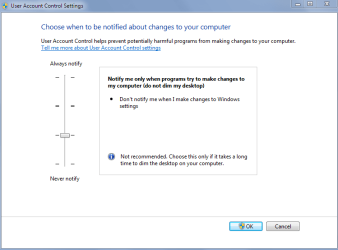
Try the troubleshooting mode setting:

UAC settings-
 

Attachments

  • uac setting.PNG
    uac setting.PNG
    12.7 KB · Views: 0

My Computer My Computer

At a glance

Windows 10 ProAMD Ryzen 5 2400G Processor with Radeon RX Ve...G.SKILL Ripjaws V Series 16GB (2 x 8GB) 288-P...2047MB NVIDIA GeForce GTX 1060 6GB (EVGA)
Computer type
PC/Desktop
Computer Manufacturer/Model Number
Custom Built
OS
Windows 10 Pro
CPU
AMD Ryzen 5 2400G Processor with Radeon RX Vega 11 Graphics
Motherboard
ASRock X470 Master SLI/AC AM4 AMD Promontory X470 SATA 6Gb/s
Memory
G.SKILL Ripjaws V Series 16GB (2 x 8GB) 288-Pin DDR4 SDRAM D
Graphics Card(s)
2047MB NVIDIA GeForce GTX 1060 6GB (EVGA)
Sound Card
Motherboard Built in
Monitor(s) Displays
Acer R240HY bidx 23.8-Inch IPS HDMI DVI VGA (1920 x 1080) Wi
Screen Resolution
1920 x 1080
Hard Drives
1TB Sandisk SSD PLUS (Main drive)
500 GB Seagate 7200 RPM (Games)
500 GB Western Digital 7200 RPM (Virtual Machines)
PSU
CORSAIR TX Series TX650M 650W 80+ Gold Modular Power Supply
Case
CORSAIR CARBIDE SPEC-02 Mid-Tower Gaming Case, Red LED Fan
Cooling
220mm, two 120mm, and four 60mm fans
Keyboard
Wired Dell keyboard
Mouse
Wireless Logitech mouse
Internet Speed
250mb down, 30mb up
Antivirus
Panda Cloud Antivirus
Browser
Chrome-ish x64
Other Info
Your awesome for reading this.

My Computer My Computer

At a glance

Windows 10 ProAMD Ryzen 5 2400G Processor with Radeon RX Ve...G.SKILL Ripjaws V Series 16GB (2 x 8GB) 288-P...2047MB NVIDIA GeForce GTX 1060 6GB (EVGA)
Computer type
PC/Desktop
Computer Manufacturer/Model Number
Custom Built
OS
Windows 10 Pro
CPU
AMD Ryzen 5 2400G Processor with Radeon RX Vega 11 Graphics
Motherboard
ASRock X470 Master SLI/AC AM4 AMD Promontory X470 SATA 6Gb/s
Memory
G.SKILL Ripjaws V Series 16GB (2 x 8GB) 288-Pin DDR4 SDRAM D
Graphics Card(s)
2047MB NVIDIA GeForce GTX 1060 6GB (EVGA)
Sound Card
Motherboard Built in
Monitor(s) Displays
Acer R240HY bidx 23.8-Inch IPS HDMI DVI VGA (1920 x 1080) Wi
Screen Resolution
1920 x 1080
Hard Drives
1TB Sandisk SSD PLUS (Main drive)
500 GB Seagate 7200 RPM (Games)
500 GB Western Digital 7200 RPM (Virtual Machines)
PSU
CORSAIR TX Series TX650M 650W 80+ Gold Modular Power Supply
Case
CORSAIR CARBIDE SPEC-02 Mid-Tower Gaming Case, Red LED Fan
Cooling
220mm, two 120mm, and four 60mm fans
Keyboard
Wired Dell keyboard
Mouse
Wireless Logitech mouse
Internet Speed
250mb down, 30mb up
Antivirus
Panda Cloud Antivirus
Browser
Chrome-ish x64
Other Info
Your awesome for reading this.
Try the troubleshooting mode setting:

UAC settings-
Hi, I can't get pass the UAC dialog box. It just freeze. So even if I adjust the slider down, this box will pop up next, and that's as far as I can go. Video card driver is up to date.
Thanks.

Jack
 

My Computer My Computer

At a glance

Window 7 Ultimate 64 bitIntel Core i7 3.2G16GNVIDIA GeForce GTX 460
Computer type
PC/Desktop
Computer Manufacturer/Model Number
Custom Built
OS
Window 7 Ultimate 64 bit
CPU
Intel Core i7 3.2G
Motherboard
Asus Sabertooth X58
Memory
16G
Graphics Card(s)
NVIDIA GeForce GTX 460

My Computer My Computer

At a glance

Windows 10 ProAMD Ryzen 5 2400G Processor with Radeon RX Ve...G.SKILL Ripjaws V Series 16GB (2 x 8GB) 288-P...2047MB NVIDIA GeForce GTX 1060 6GB (EVGA)
Computer type
PC/Desktop
Computer Manufacturer/Model Number
Custom Built
OS
Windows 10 Pro
CPU
AMD Ryzen 5 2400G Processor with Radeon RX Vega 11 Graphics
Motherboard
ASRock X470 Master SLI/AC AM4 AMD Promontory X470 SATA 6Gb/s
Memory
G.SKILL Ripjaws V Series 16GB (2 x 8GB) 288-Pin DDR4 SDRAM D
Graphics Card(s)
2047MB NVIDIA GeForce GTX 1060 6GB (EVGA)
Sound Card
Motherboard Built in
Monitor(s) Displays
Acer R240HY bidx 23.8-Inch IPS HDMI DVI VGA (1920 x 1080) Wi
Screen Resolution
1920 x 1080
Hard Drives
1TB Sandisk SSD PLUS (Main drive)
500 GB Seagate 7200 RPM (Games)
500 GB Western Digital 7200 RPM (Virtual Machines)
PSU
CORSAIR TX Series TX650M 650W 80+ Gold Modular Power Supply
Case
CORSAIR CARBIDE SPEC-02 Mid-Tower Gaming Case, Red LED Fan
Cooling
220mm, two 120mm, and four 60mm fans
Keyboard
Wired Dell keyboard
Mouse
Wireless Logitech mouse
Internet Speed
250mb down, 30mb up
Antivirus
Panda Cloud Antivirus
Browser
Chrome-ish x64
Other Info
Your awesome for reading this.

Attachments

  • cmd_Admin.jpg
    cmd_Admin.jpg
    173.5 KB · Views: 2

My Computer My Computer

At a glance

Window 7 Ultimate 64 bitIntel Core i7 3.2G16GNVIDIA GeForce GTX 460
Computer type
PC/Desktop
Computer Manufacturer/Model Number
Custom Built
OS
Window 7 Ultimate 64 bit
CPU
Intel Core i7 3.2G
Motherboard
Asus Sabertooth X58
Memory
16G
Graphics Card(s)
NVIDIA GeForce GTX 460
Hello Jack, and welcome to Seven Forums.

You might see if you may be able to do a system restore at boot using a restore point dated before this started to hopefully fix it.
 

My Computer My Computer

At a glance

64-bit Windows 11 Pro for WorkstationsIntel i7-8700K OC'd to 5 GHz64 GB (4x16GB) G.SKILL TridentZ RGB DDR4 3600...ASUS ROG-STRIX-GTX1080TI-O11G-GAMING
Computer type
PC/Desktop
Computer Manufacturer/Model Number
Self built custom
OS
64-bit Windows 11 Pro for Workstations
CPU
Intel i7-8700K OC'd to 5 GHz
Motherboard
ASUS ROG Maximus XI Formula Z390
Memory
64 GB (4x16GB) G.SKILL TridentZ RGB DDR4 3600 MHz
Graphics Card(s)
ASUS ROG-STRIX-GTX1080TI-O11G-GAMING
Sound Card
Integrated
Monitor(s) Displays
2 x Samsung Odyssey G7 27"
Screen Resolution
2560x1440
Hard Drives
1TB Samsung 990 PRO M.2,
4TB Samsung 990 PRO PRO M.2,
TerraMaster F8 SSD Plus NAS
PSU
Seasonic Prime Titanium 850W
Case
Thermaltake Core P3
Cooling
Corsair Hydro H115i
Keyboard
Logitech wireless K800
Mouse
Logitech MX Master 4
Internet Speed
2 Gb/s Download and 100 Mb/s Upload
Antivirus
Malwarebyte Anti-Malware Premium
Browser
Google Chrome
Other Info
Logitech Z625 speaker system,
Logitech BRIO 4K Pro webcam,
HP Color LaserJet Pro MFP M477fdn,
APC SMART-UPS RT 1000 XL - SURT1000XLI,
Galaxy S23 Plus phone
Hello Jack, and welcome to Seven Forums.

You might see if you may be able to do a system restore at boot using a restore point dated before this started to hopefully fix it.

Hi I have tried that, and even went back to the earliest restore point available, but the problem still exists.:confused: I guess I didn't know the issue exists until when I tried to install a program or when UAC prompt is needed to pop up.
Thanks for your reply.

Jack
 

My Computer My Computer

At a glance

Window 7 Ultimate 64 bitIntel Core i7 3.2G16GNVIDIA GeForce GTX 460
Computer type
PC/Desktop
Computer Manufacturer/Model Number
Custom Built
OS
Window 7 Ultimate 64 bit
CPU
Intel Core i7 3.2G
Motherboard
Asus Sabertooth X58
Memory
16G
Graphics Card(s)
NVIDIA GeForce GTX 460
Last edited:

My Computer My Computer

At a glance

Windows 10 ProAMD Ryzen 5 2400G Processor with Radeon RX Ve...G.SKILL Ripjaws V Series 16GB (2 x 8GB) 288-P...2047MB NVIDIA GeForce GTX 1060 6GB (EVGA)
Computer type
PC/Desktop
Computer Manufacturer/Model Number
Custom Built
OS
Windows 10 Pro
CPU
AMD Ryzen 5 2400G Processor with Radeon RX Vega 11 Graphics
Motherboard
ASRock X470 Master SLI/AC AM4 AMD Promontory X470 SATA 6Gb/s
Memory
G.SKILL Ripjaws V Series 16GB (2 x 8GB) 288-Pin DDR4 SDRAM D
Graphics Card(s)
2047MB NVIDIA GeForce GTX 1060 6GB (EVGA)
Sound Card
Motherboard Built in
Monitor(s) Displays
Acer R240HY bidx 23.8-Inch IPS HDMI DVI VGA (1920 x 1080) Wi
Screen Resolution
1920 x 1080
Hard Drives
1TB Sandisk SSD PLUS (Main drive)
500 GB Seagate 7200 RPM (Games)
500 GB Western Digital 7200 RPM (Virtual Machines)
PSU
CORSAIR TX Series TX650M 650W 80+ Gold Modular Power Supply
Case
CORSAIR CARBIDE SPEC-02 Mid-Tower Gaming Case, Red LED Fan
Cooling
220mm, two 120mm, and four 60mm fans
Keyboard
Wired Dell keyboard
Mouse
Wireless Logitech mouse
Internet Speed
250mb down, 30mb up
Antivirus
Panda Cloud Antivirus
Browser
Chrome-ish x64
Other Info
Your awesome for reading this.
Edit: I should have started with instructions to make a manual restore point:
http://www.sevenforums.com/tutorials/697-system-restore-point-create.html

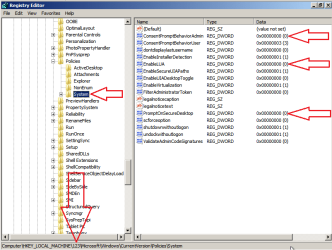
Since you need to run the SFC scan, you can turn off the User Account Control (without dealing with the consent message box) by using some of the steps from this tutorial. If you need a W7 installation DVD, please see the note above "STAGE 1" in this tutorial.

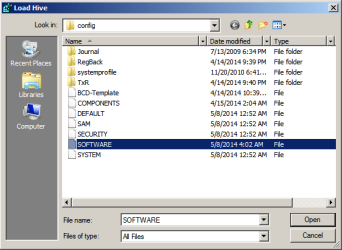
In step 4 of that first tutorial, you will want to load SOFTWARE (not SYSTEM).

UAC-OFF-1.png

If you name the imported hive 123
...like step 5 of the tutorial suggests
...then you will be navigating to here for step 6:

UAC-OFF-2.png

The goal of step 7 is to set the three values shown above to 0.

Once you complete step 11, Windows should start normally and you should be able to run the SFC scan without dealing with the consent message.

Once you figure out the issue, please set the UAC back to the default (or higher) setting. Leaving it off makes programs run in the high integrity mode and that is dangerous.
 
Last edited:

My Computer My Computer

At a glance

W7 Pro SP1 64biti78GBIntel HD Graphics
Computer type
Laptop
Computer Manufacturer/Model Number
Employer provided Dell Latitude
OS
W7 Pro SP1 64bit
CPU
i7
Memory
8GB
Graphics Card(s)
Intel HD Graphics
Hard Drives
crappy SSD
Antivirus
Employer mandated Symantec Endpoint Protection
Browser
Pale Moon 64bit, IE11 64bit & Chrome 64bit
Thanks for all the feedback.

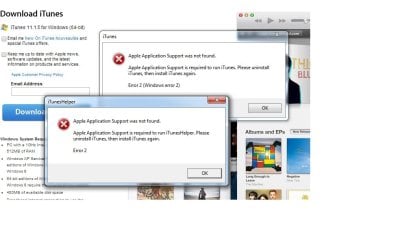
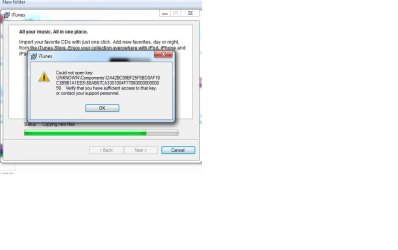
Hi All, went into the registry and did the necessary change to turn off the UAC prompt. Ran the SFC scan for like 10 times, 5 in Boot ups, no error was found. I turned back on UAC setting back to normal, and everything seems to be fine now. The only issue I had encounter so far was when I tried to install Itunes, I get these 2 error messages, are these related to Registry or is purely an Itunes issue?
Really appreciate everyone's help.

Jack
 

Attachments

  • itunes.jpg
    itunes.jpg
    33.2 KB · Views: 4
  • itnues_errors.jpg
    itnues_errors.jpg
    55.2 KB · Views: 1

My Computer My Computer

At a glance

Window 7 Ultimate 64 bitIntel Core i7 3.2G16GNVIDIA GeForce GTX 460
Computer type
PC/Desktop
Computer Manufacturer/Model Number
Custom Built
OS
Window 7 Ultimate 64 bit
CPU
Intel Core i7 3.2G
Motherboard
Asus Sabertooth X58
Memory
16G
Graphics Card(s)
NVIDIA GeForce GTX 460

My Computer My Computer

At a glance

W7 Pro SP1 64biti78GBIntel HD Graphics
Computer type
Laptop
Computer Manufacturer/Model Number
Employer provided Dell Latitude
OS
W7 Pro SP1 64bit
CPU
i7
Memory
8GB
Graphics Card(s)
Intel HD Graphics
Hard Drives
crappy SSD
Antivirus
Employer mandated Symantec Endpoint Protection
Browser
Pale Moon 64bit, IE11 64bit & Chrome 64bit
I'm glad that you got the UAC turned off and back on.

You might want to start a new thread to deal with the iTunes issue.

You might also want to read this info on screenshots.

And it would help us to help you if you had more info in the My System Specs area.
http://www.sevenforums.com/tutorials/180324-system-info-see-your-system-specs.html

Hi, yes I should have done that! I will start a new thread for the Itunes issue.
Thanks for the advise.
Cheers, have a great weekend.

Jack
 

My Computer My Computer

At a glance

Window 7 Ultimate 64 bitIntel Core i7 3.2G16GNVIDIA GeForce GTX 460
Computer type
PC/Desktop
Computer Manufacturer/Model Number
Custom Built
OS
Window 7 Ultimate 64 bit
CPU
Intel Core i7 3.2G
Motherboard
Asus Sabertooth X58
Memory
16G
Graphics Card(s)
NVIDIA GeForce GTX 460
Back
Top