

willisxdc
New member
After a clean install of Windows 7 and installing both current NVidia (GeForce 7800GS AGP) drivers and monitor driver (ACER W223X) I was able to get Windows & to run in my monitor's native resolution (1680x1050) but no matter what resolution I run in I get some weird effects. When in the 'Login Screen' I get short black lines scattered about the screen and the controls are all corrupted. Once logged in and on the desktop the graphics are all good with no issues at all. That is until I try to do something that requires Windows to toss me the "User Account Control" dialog.
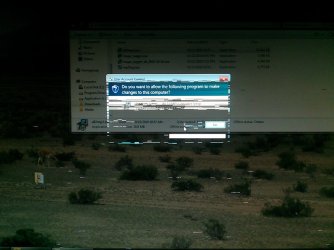
The dialog is corrupted (see attached) except for the "No" button which is obviously the default and therefore has focus. As I move the mouse over the "Yes" button it gains focus and it becomes clear and visible. The background, although dimmed, displays just fine. If I drag the dialog around the screen, the "No" button leaves copies of itself like mousetracks. When I click yes or no and the dialog closes, the display goes back to normal. This occured both during Windows installation and after it was completed. I just assumed that once the updated drivers were installed it would go away. NOT!
I am guessing Windows is changing the display resolution when dimming the screen or in the login screen. ?? I have exhausted myself trying Vista drivers, XP drivers, Windows default drivers... I have tried about 10 different versions and still no change. Suggestions. Is this an AGP/PCI issue with W7?
The dialog is corrupted (see attached) except for the "No" button which is obviously the default and therefore has focus. As I move the mouse over the "Yes" button it gains focus and it becomes clear and visible. The background, although dimmed, displays just fine. If I drag the dialog around the screen, the "No" button leaves copies of itself like mousetracks. When I click yes or no and the dialog closes, the display goes back to normal. This occured both during Windows installation and after it was completed. I just assumed that once the updated drivers were installed it would go away. NOT!
I am guessing Windows is changing the display resolution when dimming the screen or in the login screen. ?? I have exhausted myself trying Vista drivers, XP drivers, Windows default drivers... I have tried about 10 different versions and still no change. Suggestions. Is this an AGP/PCI issue with W7?
Attachments
My Computer
At a glance
Windows 7 64bitIntel Core2 Duo E4600 2.4GHz3 GB DDR2 667AGP GeForce 7800 GS
- Computer Manufacturer/Model Number
- Custom
- OS
- Windows 7 64bit
- CPU
- Intel Core2 Duo E4600 2.4GHz
- Motherboard
- ASRock Conroe Kentsfield FSB1066
- Memory
- 3 GB DDR2 667
- Graphics Card(s)
- AGP GeForce 7800 GS
- Sound Card
- Onboard HD
- Monitor(s) Displays
- Acer X223W
- Hard Drives
- LG Super Multi DVD R GH24LS50 SATA
Caviar WD1001FALS SATA 1TB
Caviar WD2000JB IDE 200GB
Caviar WD2000JB IDE 200GB
- PSU
- Basiq Power 550


